


 Home
HomeGoogle's Gemini, OpenAI Sora Unveil Major AI Tool Advancements
The field of Artificial Intelligence (AI) is witnessing an extraordinary wave of innovation. Recent breakthroughs are not only transforming what's currently possible but also laying the foundation for completely new applications. From revolutionary multimodal models to AI-powered video creation, the speed of advancement is astounding. This article delves into the most significant AI announcements, covering Google's Gemini 2.0, OpenAI's Sora and ChatGPT enhancements, and the pricing details for Devin AI.
Key Points
Google has introduced Gemini 2.0, a multimodal AI model that can interact with your desktop and camera inputs.
OpenAI has released Sora, a video generation tool with impressive yet currently limited features.
ChatGPT Canvas is now available to free users, providing improved collaboration and creative tools.
The Advanced Voice Mode now includes camera access and desktop recording for more sophisticated interactions.
Devin AI has set its monthly subscription price at $500.
OpenAI's '12 Days of OpenAI' Christmas Releases
Unveiling the '12 Days of OpenAI' Christmas Releases
OpenAI is continuing its festive '12 Days of OpenAI' Christmas event, introducing a sequence of exciting new features and upgrades to its AI tool suite. These releases are strategically scheduled,

to build momentum and anticipation within the AI community. Each day reveals a new element of OpenAI's continuously evolving platform. Let's examine the initial announcements and their implications for users.
Sora: AI-Powered Video Generation
On the first day of the '12 Days of OpenAI,' Sora was unveiled. Sora is an AI model that creates videos from text descriptions. The reception was mixed, with discussions focusing on its current limitations and cost. This highlights that AI video generation is still in active development. Nonetheless, the potential of this technology is unmistakable, offering a preview of the future of content creation.
Sora's pricing model has generated some discussion. Notably, the $20 plan provides a limited preview, permitting just 50 video generations per month with watermarks.

This plan does not allow for full HD file creation and restricts image-to-video generation involving human subjects. To access Sora's full capabilities, a $200 monthly subscription is necessary, representing a significant investment. If you're interested in trying it, visit sora.com.
As noted, while most individual users may not currently require AI video, Sora has the potential to become a valuable asset for businesses. It enables those with ideas to convert them into visually impressive videos.
ChatGPT Canvas: Enhanced Collaboration
OpenAI has made ChatGPT Canvas available to free users, expanding access to collaborative writing and content creation tools. This feature allows multiple users to work on the same document, brainstorm collectively, and develop projects together. OpenAI has also improved the interface. Canvas signifies a step towards making AI tools for creativity and productivity more accessible to everyone.
This has been highlighted as a particularly popular feature within ChatGPT. It's an excellent tool for collaborative writing and coding.
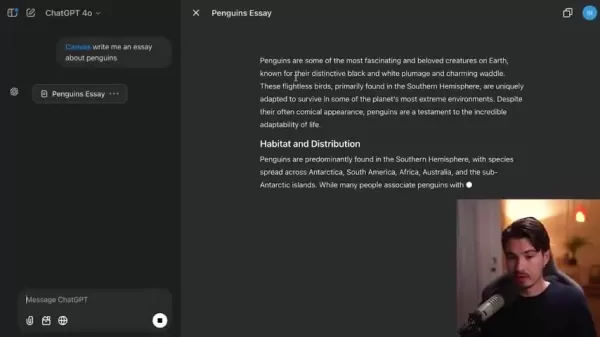
Canvas includes the functionality to execute Python code directly within the platform and troubleshoot console errors.
To use Canvas, simply enter your request in the message bar. The chatbot can then propose edits and comments that you can incorporate into your essay, providing a more efficient workflow.
Apple Intelligence Integration & Camera Access
OpenAI integrated ChatGPT with iPhone's Siri personal assistant. This integration has been perceived by some as 'underwhelming,' with the opinion that similar results could be achieved via email. However, the following day, camera and desktop recording access were added to the advanced voice mode.

The capability for the advanced voice mode on your phone to perceive the environment through the camera is certainly an exciting development.
How to Use ChatGPT Canvas Effectively
Creating a New Canvas
To begin using ChatGPT Canvas, follow these straightforward steps:
- Open ChatGPT: Launch the ChatGPT application on your device.
- Initiate a New Conversation: Start a new chat session.
- Access Canvas: Locate the new Canvas button, identified by a globe icon, within the chat interface.
- Describe Your Task: In the prompt section, clearly state what you need, and Canvas will assist you.
Collaboration with others
To improve your collaborative writing experience using ChatGPT Canvas:
- Conduct a brainstorming session with your team directly on the canvas.
- Have a clear vision of the desired outcome for the final project.
- Request refinements and suggestions from ChatGPT.
Coding and Debugging
To code and debug using ChatGPT Canvas, follow this process:
- Instruct ChatGPT to write the code for you within the canvas.
- Review potential errors flagged by ChatGPT and implement the suggested fixes.
- Error messages will appear within the interface for your review.
ChatGPT Pricing Overview
Understanding the ChatGPT Pricing Plans
ChatGPT provides a variety of pricing plans designed to meet different user requirements. The plans are built to offer flexibility and scalability, ensuring users pay only for the resources they actually use.
- Free Plan: Grants access to the GPT-4o mini model, Standard Voice Mode, and the use of custom GPTs. It's suitable for casual users with occasional chatbot needs.
- Plus Plan: This plan offers higher messaging limits, increased file upload capacity, advanced data analysis, and image generation. It also provides access to the o1 and o1-mini models, making it a good choice for users seeking greater productivity and creative options. Priced at $20 per month.
- Pro Plan: This plan delivers the highest level of access to OpenAI's most advanced offerings. Priced at $200 per month.
- Team Plan: Priced at $25 per user per month, this plan includes all Plus features and is specifically designed for team collaboration.
Pros and Cons of OpenAI's Sora
Pros
It creates videos from text prompts, opening up new possibilities for content creators.
It has the potential to produce high-quality, visually engaging videos.
It offers businesses a way to turn conceptual ideas into visual assets.
Cons
Features are restricted on the $20 per month package.
It cannot convert images containing humans into video.
The premium tier costs $200 per month.
Users might not require video generation frequently enough to warrant the cost.
FAQ
What is Devin AI?
Devin AI is an autonomous AI software engineer capable of managing entire projects from start to finish. It is priced at $500 per month, positioning it as another innovative and disruptive tool in the AI landscape.
How can I learn more about the Sora release?
For a comprehensive breakdown of Sora's features, limitations, and pricing structure, please watch the dedicated video released on the topic.
How do I access ChatGPT Canvas?
ChatGPT Canvas is accessible to all ChatGPT users, including those on the free plan. Simply begin a new chat and find the Canvas icon within the chat interface.
Related Questions
What are multimodal AI models?
Multimodal AI models are designed to process and interpret various forms of data, such as text, images, and sound. This enables more thorough and sophisticated interactions, facilitating applications like automatic image description, video content analysis, and more.
What is Project Astra?
Project Astra is Google's endeavor to create an AI assistant that utilizes a device's camera. It aims to provide an intuitive method for interacting with the physical world. This technology has the potential to simplify tasks like real-time text translation.
Related article
 Inside Details Exposed About Next-Gen Gemini: Strained Computing Power, Internal Teams Disagreed on Development Priorities and Resource Allocation
Reports indicate that the launch of Google’s highly anticipated next-generation Gemini model has been pushed back. Internal disagreements over development priorities and resource allocation, combined with limited computing capacity and complex approv
OpenAI Dismisses Growth Slowdown Concerns, Says Multiple Business Units Accelerating
In response to external scrutiny regarding decelerating sales growth and missed internal benchmarks, AI leader OpenAI issued a confident statement on Tuesday, April 28. The company clarified that its consumer products and enterprise services are adva
Alibaba Super Cup: Qwen3.8-Max Debuts with Boosted Coding and Office Tools
Alibaba has officially unveiled Qwen3.8-Max, a next-generation foundation large model boasting 2.4 trillion parameters. This significant AI advancement delivers substantial performance gains in core areas like coding and professional office tasks, sh
Related Special Topic Recommendations
Music composition
Inside Details Exposed About Next-Gen Gemini: Strained Computing Power, Internal Teams Disagreed on Development Priorities and Resource Allocation
Reports indicate that the launch of Google’s highly anticipated next-generation Gemini model has been pushed back. Internal disagreements over development priorities and resource allocation, combined with limited computing capacity and complex approv
OpenAI Dismisses Growth Slowdown Concerns, Says Multiple Business Units Accelerating
In response to external scrutiny regarding decelerating sales growth and missed internal benchmarks, AI leader OpenAI issued a confident statement on Tuesday, April 28. The company clarified that its consumer products and enterprise services are adva
Alibaba Super Cup: Qwen3.8-Max Debuts with Boosted Coding and Office Tools
Alibaba has officially unveiled Qwen3.8-Max, a next-generation foundation large model boasting 2.4 trillion parameters. This significant AI advancement delivers substantial performance gains in core areas like coding and professional office tasks, sh
Related Special Topic Recommendations
Music composition
 Best AI Melody Writing Tools for Song Drafts
2026 Latest Best Top-Rated AI Melody Writing Tools for Song Drafts! XIX.AI has curated a highly powerful game-changing collection that goes through rigorous real-world tests to deliver the best writing experience. You can find detailed free vs paid comparisons, accurate rankings, and must-try options designed to help you create stunning song drafts effortlessly and boost your creative productivity significantly. Explore now to discover your perfect tool!
 8 tools
 xix.ai
chatbot
Best AI Conversation Trainer Tools for Interview Practice
xix.ai
chatbot
Best AI Conversation Trainer Tools for Interview Practice
2026 Latest Best Top-rated AI Conversation Trainer Tools for Interview Practice are here on XIX.AI! This curated collection features powerful, game-changing tools that go through rigorous real-world tests to deliver accurate feedback. You’ll find a free vs paid comparison and detailed rankings to help you choose the must-try option that boosts your confidence and skills. Explore now to Discover your perfect tool for interview success!
12 tools
xix.ai
Design & Art
Best AI Style Transfer Tools for Creative Experiments
2026 Latest Best Top-rated AI Style Transfer Tools for Creative Experiments! XIX.AI has curated a powerful, game-changing collection of must-try tools that deliver exceptional results through real-world tests and rigorous rankings. These top solutions help creatives boost productivity significantly by accelerating content creation and unlocking endless creative possibilities. Explore now to discover your perfect tool and start creating today!
9 tools
xix.ai
Comic Creation
Best AI Dialogue Bubble Tools for Visual Storytelling
2026 Latest Best Top-Rated AI Dialogue Bubble Tools for Visual Storytelling are here on XIX.AI! This curated collection features powerful, game-changing tools that help creators boost productivity and overcome creative bottlenecks. Get a free vs paid comparison, see real-world tests, and check the latest rankings to find the must-try solutions perfect for crafting engaging visual narratives. Explore now to discover your ideal tool!
10 tools
xix.ai
Meeting Assistant
Top AI Meeting Summary Tools: Track Decisions and Follow-Ups Clearly
2026 Latest Top-Rated Best AI Meeting Summary Tools for Clear Decision Tracking and Effortless Follow-Ups. This curated list showcases powerful, game-changing solutions that boost productivity dramatically by automating meeting notes, identifying key action items, and streamlining team coordination across all projects. Get a free vs paid comparison along with real-world tests and weekly updated rankings to help you find the perfect tool. Explore now to unlock your AI edge!
9 tools
xix.ai
Data Analysis
Best AI Data Cleaning Tools: Fix Missing Values and Duplicates Fast
2026 Latest Best Top-rated AI Data Cleaning Tools for quick fixing of missing values and duplicates. This curated list showcases powerful, game-changing solutions that boost productivity significantly. Each option has undergone rigorous real-world tests to ensure reliability. Get a free vs paid comparison and discover the must-try tool that fits your needs best. Explore now at XIX.AI to Unlock your AI edge.
11 tools
xix.ai

 Comments (0)
0/500
Comments (0)
0/500
The field of Artificial Intelligence (AI) is witnessing an extraordinary wave of innovation. Recent breakthroughs are not only transforming what's currently possible but also laying the foundation for completely new applications. From revolutionary multimodal models to AI-powered video creation, the speed of advancement is astounding. This article delves into the most significant AI announcements, covering Google's Gemini 2.0, OpenAI's Sora and ChatGPT enhancements, and the pricing details for Devin AI.
Key Points
Google has introduced Gemini 2.0, a multimodal AI model that can interact with your desktop and camera inputs.
OpenAI has released Sora, a video generation tool with impressive yet currently limited features.
ChatGPT Canvas is now available to free users, providing improved collaboration and creative tools.
The Advanced Voice Mode now includes camera access and desktop recording for more sophisticated interactions.
Devin AI has set its monthly subscription price at $500.
OpenAI's '12 Days of OpenAI' Christmas Releases
Unveiling the '12 Days of OpenAI' Christmas Releases
OpenAI is continuing its festive '12 Days of OpenAI' Christmas event, introducing a sequence of exciting new features and upgrades to its AI tool suite. These releases are strategically scheduled,
to build momentum and anticipation within the AI community. Each day reveals a new element of OpenAI's continuously evolving platform. Let's examine the initial announcements and their implications for users.
Sora: AI-Powered Video Generation
On the first day of the '12 Days of OpenAI,' Sora was unveiled. Sora is an AI model that creates videos from text descriptions. The reception was mixed, with discussions focusing on its current limitations and cost. This highlights that AI video generation is still in active development. Nonetheless, the potential of this technology is unmistakable, offering a preview of the future of content creation.
Sora's pricing model has generated some discussion. Notably, the $20 plan provides a limited preview, permitting just 50 video generations per month with watermarks.
This plan does not allow for full HD file creation and restricts image-to-video generation involving human subjects. To access Sora's full capabilities, a $200 monthly subscription is necessary, representing a significant investment. If you're interested in trying it, visit sora.com.
As noted, while most individual users may not currently require AI video, Sora has the potential to become a valuable asset for businesses. It enables those with ideas to convert them into visually impressive videos.
ChatGPT Canvas: Enhanced Collaboration
OpenAI has made ChatGPT Canvas available to free users, expanding access to collaborative writing and content creation tools. This feature allows multiple users to work on the same document, brainstorm collectively, and develop projects together. OpenAI has also improved the interface. Canvas signifies a step towards making AI tools for creativity and productivity more accessible to everyone.
This has been highlighted as a particularly popular feature within ChatGPT. It's an excellent tool for collaborative writing and coding.
Canvas includes the functionality to execute Python code directly within the platform and troubleshoot console errors.
To use Canvas, simply enter your request in the message bar. The chatbot can then propose edits and comments that you can incorporate into your essay, providing a more efficient workflow.
Apple Intelligence Integration & Camera Access
OpenAI integrated ChatGPT with iPhone's Siri personal assistant. This integration has been perceived by some as 'underwhelming,' with the opinion that similar results could be achieved via email. However, the following day, camera and desktop recording access were added to the advanced voice mode.
The capability for the advanced voice mode on your phone to perceive the environment through the camera is certainly an exciting development.
How to Use ChatGPT Canvas Effectively
Creating a New Canvas
To begin using ChatGPT Canvas, follow these straightforward steps:
- Open ChatGPT: Launch the ChatGPT application on your device.
- Initiate a New Conversation: Start a new chat session.
- Access Canvas: Locate the new Canvas button, identified by a globe icon, within the chat interface.
- Describe Your Task: In the prompt section, clearly state what you need, and Canvas will assist you.
Collaboration with others
To improve your collaborative writing experience using ChatGPT Canvas:
- Conduct a brainstorming session with your team directly on the canvas.
- Have a clear vision of the desired outcome for the final project.
- Request refinements and suggestions from ChatGPT.
Coding and Debugging
To code and debug using ChatGPT Canvas, follow this process:
- Instruct ChatGPT to write the code for you within the canvas.
- Review potential errors flagged by ChatGPT and implement the suggested fixes.
- Error messages will appear within the interface for your review.
ChatGPT Pricing Overview
Understanding the ChatGPT Pricing Plans
ChatGPT provides a variety of pricing plans designed to meet different user requirements. The plans are built to offer flexibility and scalability, ensuring users pay only for the resources they actually use.
- Free Plan: Grants access to the GPT-4o mini model, Standard Voice Mode, and the use of custom GPTs. It's suitable for casual users with occasional chatbot needs.
- Plus Plan: This plan offers higher messaging limits, increased file upload capacity, advanced data analysis, and image generation. It also provides access to the o1 and o1-mini models, making it a good choice for users seeking greater productivity and creative options. Priced at $20 per month.
- Pro Plan: This plan delivers the highest level of access to OpenAI's most advanced offerings. Priced at $200 per month.
- Team Plan: Priced at $25 per user per month, this plan includes all Plus features and is specifically designed for team collaboration.
Pros and Cons of OpenAI's Sora
Pros
It creates videos from text prompts, opening up new possibilities for content creators.
It has the potential to produce high-quality, visually engaging videos.
It offers businesses a way to turn conceptual ideas into visual assets.
Cons
Features are restricted on the $20 per month package.
It cannot convert images containing humans into video.
The premium tier costs $200 per month.
Users might not require video generation frequently enough to warrant the cost.
FAQ
What is Devin AI?
Devin AI is an autonomous AI software engineer capable of managing entire projects from start to finish. It is priced at $500 per month, positioning it as another innovative and disruptive tool in the AI landscape.
How can I learn more about the Sora release?
For a comprehensive breakdown of Sora's features, limitations, and pricing structure, please watch the dedicated video released on the topic.
How do I access ChatGPT Canvas?
ChatGPT Canvas is accessible to all ChatGPT users, including those on the free plan. Simply begin a new chat and find the Canvas icon within the chat interface.
Related Questions
What are multimodal AI models?
Multimodal AI models are designed to process and interpret various forms of data, such as text, images, and sound. This enables more thorough and sophisticated interactions, facilitating applications like automatic image description, video content analysis, and more.
What is Project Astra?
Project Astra is Google's endeavor to create an AI assistant that utilizes a device's camera. It aims to provide an intuitive method for interacting with the physical world. This technology has the potential to simplify tasks like real-time text translation.








 Inside Details Exposed About Next-Gen Gemini: Strained Computing Power, Internal Teams Disagreed on Development Priorities and Resource Allocation
Reports indicate that the launch of Google’s highly anticipated next-generation Gemini model has been pushed back. Internal disagreements over development priorities and resource allocation, combined with limited computing capacity and complex approv
Inside Details Exposed About Next-Gen Gemini: Strained Computing Power, Internal Teams Disagreed on Development Priorities and Resource Allocation
Reports indicate that the launch of Google’s highly anticipated next-generation Gemini model has been pushed back. Internal disagreements over development priorities and resource allocation, combined with limited computing capacity and complex approv
 OpenAI Dismisses Growth Slowdown Concerns, Says Multiple Business Units Accelerating
In response to external scrutiny regarding decelerating sales growth and missed internal benchmarks, AI leader OpenAI issued a confident statement on Tuesday, April 28. The company clarified that its consumer products and enterprise services are adva
OpenAI Dismisses Growth Slowdown Concerns, Says Multiple Business Units Accelerating
In response to external scrutiny regarding decelerating sales growth and missed internal benchmarks, AI leader OpenAI issued a confident statement on Tuesday, April 28. The company clarified that its consumer products and enterprise services are adva
 Alibaba Super Cup: Qwen3.8-Max Debuts with Boosted Coding and Office Tools
Alibaba has officially unveiled Qwen3.8-Max, a next-generation foundation large model boasting 2.4 trillion parameters. This significant AI advancement delivers substantial performance gains in core areas like coding and professional office tasks, sh
Alibaba Super Cup: Qwen3.8-Max Debuts with Boosted Coding and Office Tools
Alibaba has officially unveiled Qwen3.8-Max, a next-generation foundation large model boasting 2.4 trillion parameters. This significant AI advancement delivers substantial performance gains in core areas like coding and professional office tasks, sh

2026 Latest Best Top-Rated AI Melody Writing Tools for Song Drafts! XIX.AI has curated a highly powerful game-changing collection that goes through rigorous real-world tests to deliver the best writing experience. You can find detailed free vs paid comparisons, accurate rankings, and must-try options designed to help you create stunning song drafts effortlessly and boost your creative productivity significantly. Explore now to discover your perfect tool!
8 tools
xix.ai

2026 Latest Best Top-rated AI Conversation Trainer Tools for Interview Practice are here on XIX.AI! This curated collection features powerful, game-changing tools that go through rigorous real-world tests to deliver accurate feedback. You’ll find a free vs paid comparison and detailed rankings to help you choose the must-try option that boosts your confidence and skills. Explore now to Discover your perfect tool for interview success!
12 tools
xix.ai

2026 Latest Best Top-rated AI Style Transfer Tools for Creative Experiments! XIX.AI has curated a powerful, game-changing collection of must-try tools that deliver exceptional results through real-world tests and rigorous rankings. These top solutions help creatives boost productivity significantly by accelerating content creation and unlocking endless creative possibilities. Explore now to discover your perfect tool and start creating today!
9 tools
xix.ai

2026 Latest Best Top-Rated AI Dialogue Bubble Tools for Visual Storytelling are here on XIX.AI! This curated collection features powerful, game-changing tools that help creators boost productivity and overcome creative bottlenecks. Get a free vs paid comparison, see real-world tests, and check the latest rankings to find the must-try solutions perfect for crafting engaging visual narratives. Explore now to discover your ideal tool!
10 tools
xix.ai

2026 Latest Top-Rated Best AI Meeting Summary Tools for Clear Decision Tracking and Effortless Follow-Ups. This curated list showcases powerful, game-changing solutions that boost productivity dramatically by automating meeting notes, identifying key action items, and streamlining team coordination across all projects. Get a free vs paid comparison along with real-world tests and weekly updated rankings to help you find the perfect tool. Explore now to unlock your AI edge!
9 tools
xix.ai

2026 Latest Best Top-rated AI Data Cleaning Tools for quick fixing of missing values and duplicates. This curated list showcases powerful, game-changing solutions that boost productivity significantly. Each option has undergone rigorous real-world tests to ensure reliability. Get a free vs paid comparison and discover the must-try tool that fits your needs best. Explore now at XIX.AI to Unlock your AI edge.
11 tools
xix.ai












