


 Home
HomeHow to create AI face swap videos in 2026? Step-by-step guide for content creators.
Artificial intelligence is revolutionizing content creation, turning once-futuristic concepts into everyday tools. Among the most dynamic developments is AI face swap technology, which lets users effortlessly substitute faces in videos and images. This opens up a wealth of creative options for marketers, content creators, and anyone wanting to inject fun into their digital work. Far from being a mere gimmick, this technology is a practical asset that boosts creativity, saves time, and delivers fresh ways to captivate viewers. This guide will walk you through AI face swapping, highlight its advantages, and present a user-friendly tool that puts this power at your fingertips.
Key Points
AI face swap tech streamlines video and image editing.
Many online services provide free credits for new users.
AI can refine images, erase backgrounds, and produce animations.
You'll find tools for video face swaps, photo face swaps, and swapping multiple faces at once.
Using face swap technology responsibly is essential.
Understanding AI Face Swap Technology
What is AI Face Swap?
AI face swap technology employs artificial intelligence to substitute one person's face with another in a video or picture.

Advanced algorithms analyze facial traits, expressions, and lighting to blend the new face in naturally. What makes AI stand out is its skill in managing tricky elements like head tilt, skin tone, and light sources, leading to remarkably authentic outcomes. AI-powered face swapping is handy for:
- Content Creation: Crafting original videos and images for social media, advertising, or personal projects.
- Entertainment: Making amusing or captivating content, like superimposing your face onto a film character.
- Privacy: Concealing identities in footage while keeping the scene intact.
- Accessibility: Helping users with minimal editing experience achieve polished results.
The Challenges of Traditional Image Tracing and Why AI is Needed
In the past, tracing real-world images and videos for animation or edits was a slow, demanding process.

It called for professional expertise, sharp attention to detail, and plenty of time. Rotoscoping, for example, means tracing each frame by hand—a monotonous and error-prone job. What's more, sourcing ideal reference images is tough, as matching poses, expressions, and lighting to your vision can be difficult.
AI tackles this by automating many of these detailed steps. Rather than manual effort, AI systems can now:
- Recognize and Analyze Faces: Spot faces accurately, even in busy scenes or tricky lighting.
- Seamlessly Swap Faces: Merge a new face while preserving the original expressions, head position, and skin texture.
- Enhance Image and Video Quality: Boost resolution and clarity, which helps when source material is poor.
By sidestepping the drawbacks of older techniques, AI not only cuts down on time but also sparks new creative ideas. It lets creators realize their visions without getting stuck on technical hurdles.
Ethical Considerations When Using AI Face Swap
Although AI face swap offers countless creative openings, it also raises ethical questions that users must acknowledge and honor. Misapplication could result in legal issues, especially concerning defamation, identity theft, or privacy breaches. Exercise caution when swapping faces in:
- Political content: Steer clear of producing deceptive or damaging material about public figures.
- Advertising: Make sure you don't imply false endorsements or use someone's image without permission.
- Personal relationships: Honor people's rights by not making or sharing hurtful content.
Additionally, being open about your use of AI face swap is vital.
Clearly labeling AI-altered videos or images can curb misinformation and prevent unwanted consequences. Focusing on responsible use is the best way to leverage AI face swap's benefits while reducing risks.
Introducing VideoFaceSwap.io: An All-in-One AI Solution
Overview of VideoFaceSwap.io
VideoFaceSwap.io is a web-based service that uses AI to let users easily swap faces in videos and pictures. Besides face swapping, it packs a suite of features, establishing itself as a comprehensive AI toolkit for creators. You can enhance images, remove backgrounds, and generate animations. VideoFaceSwap.io prioritizes ease of use, so these strong AI functions are within reach for non-technical users. With both free and paid tiers, it serves a broad spectrum, from hobbyists to professionals.
VideoFaceSwap.io equips users with what they need to produce distinctive, engaging visual content quickly. This is particularly useful for time-sensitive projects or creators testing out visual narratives.
Key Features and AI-Driven Tools
VideoFaceSwap.io goes beyond simple face swaps. It's a full set of AI-powered tools that assist creators in refining their work. Notable features include:
- AI Face Swap: Smoothly replace faces in videos and images with lifelike outcomes.
- AI Image Enhancer: Upgrade image quality by sharpening, enlarging, and recovering details.
- AI Object Remover: Delete unwanted items from images with AI accuracy.
- AI Background Changer: Alter video and image backdrops effortlessly for a pro finish.
- AI Animation Generator: Produce animations from text prompts to add movement to your content.
- AI Watermark Remover: Strip watermarks from videos for clean, professional results.
VideoFaceSwap.io consolidates these AI tools on one easy-to-use platform, streamlining how creators handle and upgrade their visual work.
Navigating the VideoFaceSwap.io Interface
The VideoFaceSwap.io interface is built for clarity, so novices and veterans alike can operate it efficiently. Main components are:
- Dashboard: Gives quick entry to all available AI tools.
- Tool Selection: Lets you pick the specific AI function you want.
- Upload Area: Where you add your videos or images for editing.
- Preview and Editing: Offers a chance to check and adjust your changes.
- Download Options: Enables you to save finished projects in different formats.
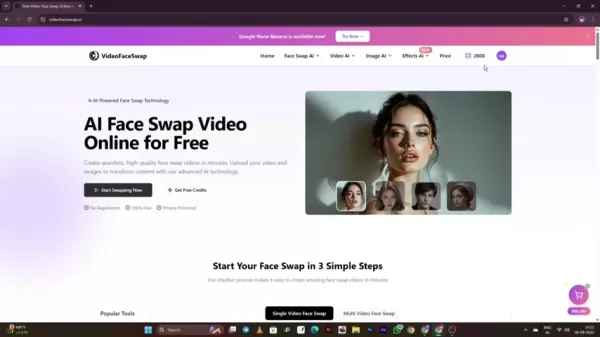
The platform also uses a credit system, accessible via the credit icon top-right. You can get free credits daily or buy more for heavier usage. This setup makes the platform usable for both occasional users and those with greater demands.
Step-by-Step Guide to Using VideoFaceSwap.io
Step 1: Accessing the Platform
To start with VideoFaceSwap.io, first go to the platform. Open your browser and type in the VideoFaceSwap.io web address. This brings you to the homepage, where you can browse the tools and choices. For quick future access, you might want to bookmark the page.
Step 2: Claiming Free Credits
VideoFaceSwap.io provides free credits to try out its features. To get them, tap the credits icon at the page's top-right corner.
Then, choose the 'Daily Check-In' option. Doing this daily nets you a set number of free credits. It's a good method to test the tools before spending money.
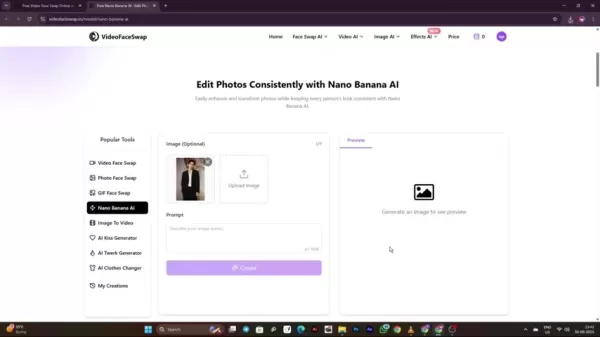
Step 3: Performing a Video Face Swap
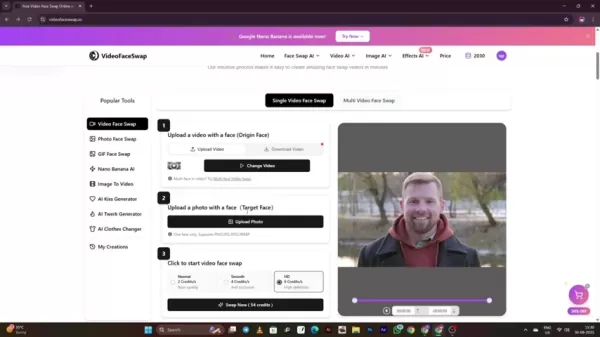
Here's how to execute a video face swap:
- Click 'Start Swapping Now': Hit the 'Start Swapping Now' button to begin.
- Upload Video: Select a video from your device to upload.
- Upload Target Face: Pick a picture of the face you wish to insert.
- Credit Selection: Choose a credit package according to the quality you want. Better quality generally costs more credits.
- Swap Now: After verifying your files and quality choice, click swap now and let VideoFaceSwap.io process.
Step 4: Performing a Photo Face Swap
Swapping faces in a photo follows similar steps to video:
- Click 'Photo Face Swap' under Popular Tools: Find and click the 'Photo Face Swap' option.
- Upload Original Photo: Upload the photo where you want to change the face.
- Upload Target Face: Upload a photo with the face you want to add.
- Swap Now: Click 'Swap Now' and let the platform work. Shortly, VideoFaceSwap.io will produce the new image with the swapped face.
Step 5: Converting Images to AI Anime
VideoFaceSwap.io can also transform images into anime style:
- Click Effects: Scroll to the Effects menu and select AI Animation Generator.
- Create a Prompt: Describe what to animate. Using a tool like ChatGPT can help here.
- Convert Photo: Upload the photo for conversion and click convert. The anime version will generate quickly.
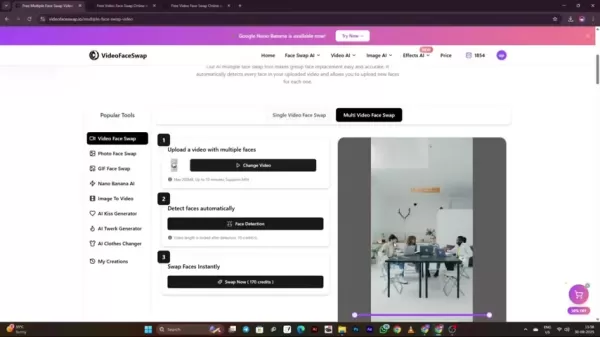
Step 6: Using Multi Face Swap
VideoFaceSwap.io's Multi-Face swap creates unique videos with several characters and different faces:
- Click Multi Face Swap: Scroll and click the Multi Face Swap button.
- Select Faces: Tap the plus icon over each character in the original image to assign a face image.
- Swipe Now: Once done, click swipe and let VideoFaceSwap.io handle the rest.
Pricing
Understanding the Credit System
VideoFaceSwap.io runs on a credit system. Simpler tasks use fewer credits, whereas higher-quality or more involved jobs need more. You can get extra credits through:
- Daily Check-In: Collect free credits just by logging in daily.
- Starter Plan: The entry plan is $9.99 for 2,000 credits.
- Standard Plan: A common choice at $29.99, giving 10,000 credits.
- Pro Plan: Suggested for creators at $49.99, with 18,000 credits.
- Premium Plan: The top tier for professionals is $199, offering 68,000 credits plus 12,000 bonus credits.
Pros and Cons
Pros
User-Friendly Interface: Straightforward design suits beginners and pros.
Comprehensive AI Tools: Includes more than face swapping for a complete package.
Affordable Options: Free and paid plans appeal to diverse users.
Time-Efficient: Automates complicated jobs, saving creators hours.
Cons
Ethical Concerns: Demands mindful use to prevent abuse and protect privacy.
Learning Curve: Newcomers might need time to master all features.
Credit System: Pay-as-you-go credits can add up for big projects.
Exploring Key Features of VideoFaceSwap.io
Face Swap Capabilities
VideoFaceSwap.io shines in swapping faces in videos and photos. Its AI-driven algorithms merge the new face smoothly with the original, keeping expressions, angles, and lighting believable. As shown earlier, this feature is easy to use and reliable.
Multi-Face Swapping Capabilities
This advanced function lets users swap several faces in one video or image, perfect for group shots, cast scenes, and any situation needing multiple replacements. AI Face Detection also provides features like:
- Automatic Face Detection
- Easy Image Upload
- Multiple Character Customization
Image Enhancement Tools
Beyond face swaps, VideoFaceSwap.io includes solid image enhancement tools that can significantly better image quality. These tools cover:
- Unblurring: Sharpens images by reducing blur and bringing out details.
- Upscaling: Raises the resolution of low-quality images for HD screens or printing.
- Image Restoration: Corrects common problems like overexposure, underexposure, and artifacts. These improvements are beneficial for:
- Restoring Old Photos
- Improving Low-Resolution Images
Unlocking the Various Use Cases
Content Creation
AI face swap technology offers multiple avenues to boost creativity in content creation.
- Social Media Content: Make captivating, funny content for TikTok, Instagram, and YouTube.
- Marketing Campaigns: Develop unique visuals for ads and social media promotions.
- Personal Projects: Add playful, creative spins to family videos, photo collections, and custom presents.
Entertainment
AI face swap technology presents many entertainment possibilities. One area to explore is:
- Humorous Videos: Craft funny clips by overlaying your face on stars, film roles, or pals.
- Engaging Visuals: Make special visuals for parties or private events.
- Unique Visual Effects: Merge face swapping with other effects for odd, amusing, and original pictures and videos.
Privacy and Anonymity
AI face swap can be used for anonymization, which matters with sensitive video content. It can:
- Protect Identities: Substitute faces in videos while keeping the scene's meaning.
- Comply with Regulations: Meet privacy rules by shielding personal data.
FAQ
Is VideoFaceSwap.io safe to use?
Yes, VideoFaceSwap.io is built with user security as a priority. Still, it's important to adhere to ethical standards and respect privacy on the platform. Always be transparent and secure consent when using someone's image.
Can I use VideoFaceSwap.io on my mobile device?
The VideoFaceSwap.io website works on desktops and mobile devices alike. That means you can comfortably access and use the platform on your phone or tablet for editing and creating while on the move.
Are there any limitations to the free credits?
Free credits often have restrictions, like lower output quality or limited feature access. These are intended for trialing the service. Paid plans remove these limits and offer better quality and more features. Check the subscription page for any current limitations.
Related Questions
How does AI face swapping work?
AI face swapping involves multiple stages:Face Detection: Algorithms find and locate faces in the video or image.Facial Landmark Identification: AI pinpoints key facial points like eyes, nose, and mouth.Feature Mapping: The system maps these points to the target face.Blending and Integration: AI merges the target face with the original, adjusting for skin tone, light, and angles.Rendering: The final image or video renders with the swapped face integrated seamlessly.
What are the typical use cases for AI in video creation?
AI has introduced many new possibilities for video production, assisting in areas such as:Automated Video Editing: Automatically trim and join clips while preserving a coherent narrative.AI-Generated Voiceovers: Produce audio from text scripts.Smart Animations: Design compelling animations for ads and online content.
Related article
 Stripe to Acquire OpenRouter as AI Model Routing Gains Momentum
Stripe has agreed to acquire OpenRouter, an AI model-routing platform that gives developers access to hundreds of models through a single interface. The deal adds model selection and routing to Stripe’s existing work around AI usage and token-based b
Former OpenAI Researcher Barrett Zoph Returns to Google to Support Gemini Development
Barret Zoph, who previously abruptly left and joined OpenAI due to a disagreement with Thinking Machines Lab CEO Miriam Mularati, has once again changed employers. Alphabet's Google announced that Zoph will return as Vice President of Research, bring
How Recursive Intelligence Raised $335M at $4B Valuation in 4 Months
The co-founders of startup Ricursive Intelligence seemed destined to be co-founders.Anna Goldie, CEO, and Azalia Mirhoseini, CTO, are so well-known in the AI community that they were among those AI engineers who “got those weird emails from Zuckerber
Related Special Topic Recommendations
Design & Art
Stripe to Acquire OpenRouter as AI Model Routing Gains Momentum
Stripe has agreed to acquire OpenRouter, an AI model-routing platform that gives developers access to hundreds of models through a single interface. The deal adds model selection and routing to Stripe’s existing work around AI usage and token-based b
Former OpenAI Researcher Barrett Zoph Returns to Google to Support Gemini Development
Barret Zoph, who previously abruptly left and joined OpenAI due to a disagreement with Thinking Machines Lab CEO Miriam Mularati, has once again changed employers. Alphabet's Google announced that Zoph will return as Vice President of Research, bring
How Recursive Intelligence Raised $335M at $4B Valuation in 4 Months
The co-founders of startup Ricursive Intelligence seemed destined to be co-founders.Anna Goldie, CEO, and Azalia Mirhoseini, CTO, are so well-known in the AI community that they were among those AI engineers who “got those weird emails from Zuckerber
Related Special Topic Recommendations
Design & Art
 Top AI Illustration Tools: Create Editorial Scenes and Cover Art Faster
2026 Latest Top-rated AI Illustration Tools: Our curated list features the best powerfully designed tools for creating stunning editorial scenes and eye-catching cover art quickly. Each option has gone through rigorous real-world tests, offering a free vs paid comparison to help you find the perfect match for your workflow. Try these must-try solutions today to unlock your AI edge and boost your creative productivity. Explore now at XIX.AI.
 10 tools
 xix.ai
Education and Learning
Top AI Tutors for Exam Prep: Practice Math, Science, and English
xix.ai
Education and Learning
Top AI Tutors for Exam Prep: Practice Math, Science, and English
2026 Latest Top-Rated Best AI Tutors for Exam Prep are here on XIX.AI! Our curated list features powerful game-changing tools that offer free vs paid comparison, real-world tests, and weekly updated rankings. They help boost your writing efficiency, simplify complex topic learning, and unlock your academic potential. Explore now to Discover your perfect exam prep tool and Start creating today to Unlock your AI edge!
10 tools
xix.ai
Finance
AI Budget Planning Tools for Personal Money Management
2026 Latest Best Top-Rated AI Budget Planning Tools for Personal Money Management are here on XIX.AI! This curated collection features powerful, game-changing solutions that help you conduct real-world tests, understand spending habits, and create personalized plans to boost productivity. Enjoy a free vs paid comparison along with detailed rankings. Must-try tools designed to simplify money management and unlock your AI edge. Explore now!
11 tools
xix.ai
Health & Wellness
AI Sleep Tracking Assistants: Improve Recovery with Better Bedtime Habits
2026 Latest Best Top-Rated AI Sleep Tracking Assistants curated for ultimate recovery. This fully updated weekly guide features powerful tools that deliver real-world tests, free vs paid comparison, and detailed rankings to help you find the must-try solution that boosts sleep quality and supports better bedtime habits. Explore now at XIX.AI to Unlock your AI edge.
10 tools
xix.ai
Data Analysis
AI SQL Copilots for Product and Revenue Analytics
2026 Latest Best Top-Rated AI SQL Copilots for Product and Revenue Analytics! XIX.AI has curated a powerful, game-changing collection of must-try tools that undergo real-world tests through weekly updated rankings. These tools help users boost productivity significantly by accelerating data analysis, streamlining complex queries, and generating accurate insights to drive smarter business decisions. Explore now to Discover your perfect tool for unlocking your AI edge!
14 tools
xix.ai
Education and Learning
Best AI Homework Helpers That Teach: Learn Concepts, Not Just Answers
2026 Latest Best Top-Rated AI Homework Helpers That Teach Core Concepts Not Just Answers Powerful Tools for Students Must-Try Curated List Weekly Updated Free vs Paid Comparison Real-World Tests Accurate Rankings to Help You Unlock Your Full Learning Potential Explore now to Discover your perfect tool for smarter studying.
10 tools
xix.ai

 Comments (0)
0/500
Comments (0)
0/500
Artificial intelligence is revolutionizing content creation, turning once-futuristic concepts into everyday tools. Among the most dynamic developments is AI face swap technology, which lets users effortlessly substitute faces in videos and images. This opens up a wealth of creative options for marketers, content creators, and anyone wanting to inject fun into their digital work. Far from being a mere gimmick, this technology is a practical asset that boosts creativity, saves time, and delivers fresh ways to captivate viewers. This guide will walk you through AI face swapping, highlight its advantages, and present a user-friendly tool that puts this power at your fingertips.
Key Points
AI face swap tech streamlines video and image editing.
Many online services provide free credits for new users.
AI can refine images, erase backgrounds, and produce animations.
You'll find tools for video face swaps, photo face swaps, and swapping multiple faces at once.
Using face swap technology responsibly is essential.
Understanding AI Face Swap Technology
What is AI Face Swap?
AI face swap technology employs artificial intelligence to substitute one person's face with another in a video or picture.
Advanced algorithms analyze facial traits, expressions, and lighting to blend the new face in naturally. What makes AI stand out is its skill in managing tricky elements like head tilt, skin tone, and light sources, leading to remarkably authentic outcomes. AI-powered face swapping is handy for:
- Content Creation: Crafting original videos and images for social media, advertising, or personal projects.
- Entertainment: Making amusing or captivating content, like superimposing your face onto a film character.
- Privacy: Concealing identities in footage while keeping the scene intact.
- Accessibility: Helping users with minimal editing experience achieve polished results.
The Challenges of Traditional Image Tracing and Why AI is Needed
In the past, tracing real-world images and videos for animation or edits was a slow, demanding process.
It called for professional expertise, sharp attention to detail, and plenty of time. Rotoscoping, for example, means tracing each frame by hand—a monotonous and error-prone job. What's more, sourcing ideal reference images is tough, as matching poses, expressions, and lighting to your vision can be difficult.
AI tackles this by automating many of these detailed steps. Rather than manual effort, AI systems can now:
- Recognize and Analyze Faces: Spot faces accurately, even in busy scenes or tricky lighting.
- Seamlessly Swap Faces: Merge a new face while preserving the original expressions, head position, and skin texture.
- Enhance Image and Video Quality: Boost resolution and clarity, which helps when source material is poor.
By sidestepping the drawbacks of older techniques, AI not only cuts down on time but also sparks new creative ideas. It lets creators realize their visions without getting stuck on technical hurdles.
Ethical Considerations When Using AI Face Swap
Although AI face swap offers countless creative openings, it also raises ethical questions that users must acknowledge and honor. Misapplication could result in legal issues, especially concerning defamation, identity theft, or privacy breaches. Exercise caution when swapping faces in:
- Political content: Steer clear of producing deceptive or damaging material about public figures.
- Advertising: Make sure you don't imply false endorsements or use someone's image without permission.
- Personal relationships: Honor people's rights by not making or sharing hurtful content.
Additionally, being open about your use of AI face swap is vital.
Clearly labeling AI-altered videos or images can curb misinformation and prevent unwanted consequences. Focusing on responsible use is the best way to leverage AI face swap's benefits while reducing risks.
Introducing VideoFaceSwap.io: An All-in-One AI Solution
Overview of VideoFaceSwap.io
VideoFaceSwap.io is a web-based service that uses AI to let users easily swap faces in videos and pictures. Besides face swapping, it packs a suite of features, establishing itself as a comprehensive AI toolkit for creators. You can enhance images, remove backgrounds, and generate animations. VideoFaceSwap.io prioritizes ease of use, so these strong AI functions are within reach for non-technical users. With both free and paid tiers, it serves a broad spectrum, from hobbyists to professionals.
VideoFaceSwap.io equips users with what they need to produce distinctive, engaging visual content quickly. This is particularly useful for time-sensitive projects or creators testing out visual narratives.
Key Features and AI-Driven Tools
VideoFaceSwap.io goes beyond simple face swaps. It's a full set of AI-powered tools that assist creators in refining their work. Notable features include:
- AI Face Swap: Smoothly replace faces in videos and images with lifelike outcomes.
- AI Image Enhancer: Upgrade image quality by sharpening, enlarging, and recovering details.
- AI Object Remover: Delete unwanted items from images with AI accuracy.
- AI Background Changer: Alter video and image backdrops effortlessly for a pro finish.
- AI Animation Generator: Produce animations from text prompts to add movement to your content.
- AI Watermark Remover: Strip watermarks from videos for clean, professional results.
VideoFaceSwap.io consolidates these AI tools on one easy-to-use platform, streamlining how creators handle and upgrade their visual work.
Navigating the VideoFaceSwap.io Interface
The VideoFaceSwap.io interface is built for clarity, so novices and veterans alike can operate it efficiently. Main components are:
- Dashboard: Gives quick entry to all available AI tools.
- Tool Selection: Lets you pick the specific AI function you want.
- Upload Area: Where you add your videos or images for editing.
- Preview and Editing: Offers a chance to check and adjust your changes.
- Download Options: Enables you to save finished projects in different formats.
The platform also uses a credit system, accessible via the credit icon top-right. You can get free credits daily or buy more for heavier usage. This setup makes the platform usable for both occasional users and those with greater demands.
Step-by-Step Guide to Using VideoFaceSwap.io
Step 1: Accessing the Platform
To start with VideoFaceSwap.io, first go to the platform. Open your browser and type in the VideoFaceSwap.io web address. This brings you to the homepage, where you can browse the tools and choices. For quick future access, you might want to bookmark the page.
Step 2: Claiming Free Credits
VideoFaceSwap.io provides free credits to try out its features. To get them, tap the credits icon at the page's top-right corner.
Then, choose the 'Daily Check-In' option. Doing this daily nets you a set number of free credits. It's a good method to test the tools before spending money.
Step 3: Performing a Video Face Swap
Here's how to execute a video face swap:
- Click 'Start Swapping Now': Hit the 'Start Swapping Now' button to begin.
- Upload Video: Select a video from your device to upload.
- Upload Target Face: Pick a picture of the face you wish to insert.
- Credit Selection: Choose a credit package according to the quality you want. Better quality generally costs more credits.
- Swap Now: After verifying your files and quality choice, click swap now and let VideoFaceSwap.io process.
Step 4: Performing a Photo Face Swap
Swapping faces in a photo follows similar steps to video:
- Click 'Photo Face Swap' under Popular Tools: Find and click the 'Photo Face Swap' option.
- Upload Original Photo: Upload the photo where you want to change the face.
- Upload Target Face: Upload a photo with the face you want to add.
- Swap Now: Click 'Swap Now' and let the platform work. Shortly, VideoFaceSwap.io will produce the new image with the swapped face.
Step 5: Converting Images to AI Anime
VideoFaceSwap.io can also transform images into anime style:
- Click Effects: Scroll to the Effects menu and select AI Animation Generator.
- Create a Prompt: Describe what to animate. Using a tool like ChatGPT can help here.
- Convert Photo: Upload the photo for conversion and click convert. The anime version will generate quickly.
Step 6: Using Multi Face Swap
VideoFaceSwap.io's Multi-Face swap creates unique videos with several characters and different faces:
- Click Multi Face Swap: Scroll and click the Multi Face Swap button.
- Select Faces: Tap the plus icon over each character in the original image to assign a face image.
- Swipe Now: Once done, click swipe and let VideoFaceSwap.io handle the rest.
Pricing
Understanding the Credit System
VideoFaceSwap.io runs on a credit system. Simpler tasks use fewer credits, whereas higher-quality or more involved jobs need more. You can get extra credits through:
- Daily Check-In: Collect free credits just by logging in daily.
- Starter Plan: The entry plan is $9.99 for 2,000 credits.
- Standard Plan: A common choice at $29.99, giving 10,000 credits.
- Pro Plan: Suggested for creators at $49.99, with 18,000 credits.
- Premium Plan: The top tier for professionals is $199, offering 68,000 credits plus 12,000 bonus credits.
Pros and Cons
Pros
User-Friendly Interface: Straightforward design suits beginners and pros.
Comprehensive AI Tools: Includes more than face swapping for a complete package.
Affordable Options: Free and paid plans appeal to diverse users.
Time-Efficient: Automates complicated jobs, saving creators hours.
Cons
Ethical Concerns: Demands mindful use to prevent abuse and protect privacy.
Learning Curve: Newcomers might need time to master all features.
Credit System: Pay-as-you-go credits can add up for big projects.
Exploring Key Features of VideoFaceSwap.io
Face Swap Capabilities
VideoFaceSwap.io shines in swapping faces in videos and photos. Its AI-driven algorithms merge the new face smoothly with the original, keeping expressions, angles, and lighting believable. As shown earlier, this feature is easy to use and reliable.
Multi-Face Swapping Capabilities
This advanced function lets users swap several faces in one video or image, perfect for group shots, cast scenes, and any situation needing multiple replacements. AI Face Detection also provides features like:
- Automatic Face Detection
- Easy Image Upload
- Multiple Character Customization
Image Enhancement Tools
Beyond face swaps, VideoFaceSwap.io includes solid image enhancement tools that can significantly better image quality. These tools cover:
- Unblurring: Sharpens images by reducing blur and bringing out details.
- Upscaling: Raises the resolution of low-quality images for HD screens or printing.
- Image Restoration: Corrects common problems like overexposure, underexposure, and artifacts. These improvements are beneficial for:
- Restoring Old Photos
- Improving Low-Resolution Images
Unlocking the Various Use Cases
Content Creation
AI face swap technology offers multiple avenues to boost creativity in content creation.
- Social Media Content: Make captivating, funny content for TikTok, Instagram, and YouTube.
- Marketing Campaigns: Develop unique visuals for ads and social media promotions.
- Personal Projects: Add playful, creative spins to family videos, photo collections, and custom presents.
Entertainment
AI face swap technology presents many entertainment possibilities. One area to explore is:
- Humorous Videos: Craft funny clips by overlaying your face on stars, film roles, or pals.
- Engaging Visuals: Make special visuals for parties or private events.
- Unique Visual Effects: Merge face swapping with other effects for odd, amusing, and original pictures and videos.
Privacy and Anonymity
AI face swap can be used for anonymization, which matters with sensitive video content. It can:
- Protect Identities: Substitute faces in videos while keeping the scene's meaning.
- Comply with Regulations: Meet privacy rules by shielding personal data.
FAQ
Is VideoFaceSwap.io safe to use?
Yes, VideoFaceSwap.io is built with user security as a priority. Still, it's important to adhere to ethical standards and respect privacy on the platform. Always be transparent and secure consent when using someone's image.
Can I use VideoFaceSwap.io on my mobile device?
The VideoFaceSwap.io website works on desktops and mobile devices alike. That means you can comfortably access and use the platform on your phone or tablet for editing and creating while on the move.
Are there any limitations to the free credits?
Free credits often have restrictions, like lower output quality or limited feature access. These are intended for trialing the service. Paid plans remove these limits and offer better quality and more features. Check the subscription page for any current limitations.
Related Questions
How does AI face swapping work?
AI face swapping involves multiple stages:Face Detection: Algorithms find and locate faces in the video or image.Facial Landmark Identification: AI pinpoints key facial points like eyes, nose, and mouth.Feature Mapping: The system maps these points to the target face.Blending and Integration: AI merges the target face with the original, adjusting for skin tone, light, and angles.Rendering: The final image or video renders with the swapped face integrated seamlessly.
What are the typical use cases for AI in video creation?
AI has introduced many new possibilities for video production, assisting in areas such as:Automated Video Editing: Automatically trim and join clips while preserving a coherent narrative.AI-Generated Voiceovers: Produce audio from text scripts.Smart Animations: Design compelling animations for ads and online content.








 Stripe to Acquire OpenRouter as AI Model Routing Gains Momentum
Stripe has agreed to acquire OpenRouter, an AI model-routing platform that gives developers access to hundreds of models through a single interface. The deal adds model selection and routing to Stripe’s existing work around AI usage and token-based b
Stripe to Acquire OpenRouter as AI Model Routing Gains Momentum
Stripe has agreed to acquire OpenRouter, an AI model-routing platform that gives developers access to hundreds of models through a single interface. The deal adds model selection and routing to Stripe’s existing work around AI usage and token-based b
 Former OpenAI Researcher Barrett Zoph Returns to Google to Support Gemini Development
Barret Zoph, who previously abruptly left and joined OpenAI due to a disagreement with Thinking Machines Lab CEO Miriam Mularati, has once again changed employers. Alphabet's Google announced that Zoph will return as Vice President of Research, bring
Former OpenAI Researcher Barrett Zoph Returns to Google to Support Gemini Development
Barret Zoph, who previously abruptly left and joined OpenAI due to a disagreement with Thinking Machines Lab CEO Miriam Mularati, has once again changed employers. Alphabet's Google announced that Zoph will return as Vice President of Research, bring
 How Recursive Intelligence Raised $335M at $4B Valuation in 4 Months
The co-founders of startup Ricursive Intelligence seemed destined to be co-founders.Anna Goldie, CEO, and Azalia Mirhoseini, CTO, are so well-known in the AI community that they were among those AI engineers who “got those weird emails from Zuckerber
How Recursive Intelligence Raised $335M at $4B Valuation in 4 Months
The co-founders of startup Ricursive Intelligence seemed destined to be co-founders.Anna Goldie, CEO, and Azalia Mirhoseini, CTO, are so well-known in the AI community that they were among those AI engineers who “got those weird emails from Zuckerber

2026 Latest Top-rated AI Illustration Tools: Our curated list features the best powerfully designed tools for creating stunning editorial scenes and eye-catching cover art quickly. Each option has gone through rigorous real-world tests, offering a free vs paid comparison to help you find the perfect match for your workflow. Try these must-try solutions today to unlock your AI edge and boost your creative productivity. Explore now at XIX.AI.
10 tools
xix.ai

2026 Latest Top-Rated Best AI Tutors for Exam Prep are here on XIX.AI! Our curated list features powerful game-changing tools that offer free vs paid comparison, real-world tests, and weekly updated rankings. They help boost your writing efficiency, simplify complex topic learning, and unlock your academic potential. Explore now to Discover your perfect exam prep tool and Start creating today to Unlock your AI edge!
10 tools
xix.ai

2026 Latest Best Top-Rated AI Budget Planning Tools for Personal Money Management are here on XIX.AI! This curated collection features powerful, game-changing solutions that help you conduct real-world tests, understand spending habits, and create personalized plans to boost productivity. Enjoy a free vs paid comparison along with detailed rankings. Must-try tools designed to simplify money management and unlock your AI edge. Explore now!
11 tools
xix.ai

2026 Latest Best Top-Rated AI Sleep Tracking Assistants curated for ultimate recovery. This fully updated weekly guide features powerful tools that deliver real-world tests, free vs paid comparison, and detailed rankings to help you find the must-try solution that boosts sleep quality and supports better bedtime habits. Explore now at XIX.AI to Unlock your AI edge.
10 tools
xix.ai

2026 Latest Best Top-Rated AI SQL Copilots for Product and Revenue Analytics! XIX.AI has curated a powerful, game-changing collection of must-try tools that undergo real-world tests through weekly updated rankings. These tools help users boost productivity significantly by accelerating data analysis, streamlining complex queries, and generating accurate insights to drive smarter business decisions. Explore now to Discover your perfect tool for unlocking your AI edge!
14 tools
xix.ai

2026 Latest Best Top-Rated AI Homework Helpers That Teach Core Concepts Not Just Answers Powerful Tools for Students Must-Try Curated List Weekly Updated Free vs Paid Comparison Real-World Tests Accurate Rankings to Help You Unlock Your Full Learning Potential Explore now to Discover your perfect tool for smarter studying.
10 tools
xix.ai












