


 Home
HomeRunway AI Tools Revolutionize Animation Film Production
The filmmaking landscape is transforming with AI tools, empowering creators to produce animated films independently. Runway ML's Act-One platform lets you convert video footage into AI-driven animations. Enhance your digital characters with precise lip-syncing, expressive facial gestures, and natural head movements. Integrate voice modulation tools like ElevenLabs to further refine performances and learn professional techniques for producing polished animated content.
Key Points
Leverage Runway ML's Act-One tool to convert video recordings into AI-generated animations.
Incorporate lip-syncing, facial expressions, and head movements to bring AI characters to life.
Use character reference images to define and animate specific visual styles.
Record video clips up to 30 seconds in length for use within Runway ML.
Employ ElevenLabs to modify your voice, aligning it with your AI character’s identity.
Understanding AI Movie Creation
Creating AI Movies Independently
Producing films is now achievable on a personal scale, eliminating the need for large budgets or extensive teams. Tools like Runway ML's Act-One simplify the process, allowing anyone to bring their creative visions to screen. AI is redefining content creation, enabling individuals with limited technical expertise to produce high-quality animated work. You can start by filming yourself and then converting the footage into an animated AI film complete with lifelike character performances. Adding lip-sync, facial reactions, and head motions makes these characters appear more genuine and engaging. Act-One lets you upload a video performance and convert it into an AI animation with integrated lip-syncing, expressions, and head movements—essentially providing an AI actor to perform your script. This methodology grants a level of creative control and personalization that was once out of reach for independent creators. AI facilitates the exploration of diverse animation aesthetics and the development of compelling stories with unique characters. You can utilize brief video clips of your own acting as source material for the AI.
AI-driven filmmaking empowers creators by drastically cutting down the time and expenses linked to conventional animation. It democratizes advanced production methods, letting filmmakers concentrate more on narrative and less on technical hurdles. Moreover, the iterative nature of AI tools encourages ongoing experimentation and refinement, helping the final product closely match the creator's intent. Runway ML offers a wealth of creative possibilities for aspiring directors. Whether you're producing a short film, promotional material, or a full-length animated feature, AI provides a scalable and adaptable solution tailored to your specific creative requirements. Adopting AI in filmmaking opens a future where creative expression is limitless and innovative storytelling is available to all.
Using Runway ML's Act-One Tool
Runway ML’s Act-One tool democratizes the animation process. This feature enables you to inject a driving performance into your projects.
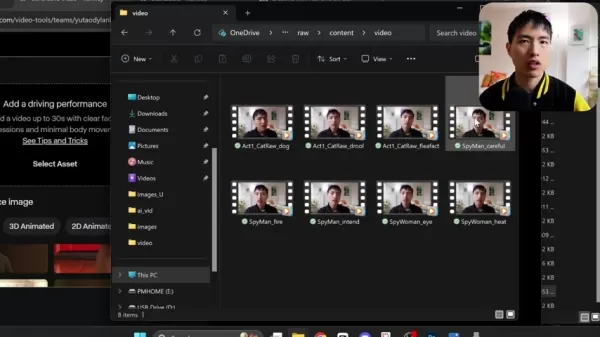
Simply upload a video of yourself performing a scene. By linking a reference image, the tool animates the footage. Press the generate button to start the animation process. The tool processes your video and converts it into an AI-driven animation with synchronized lip movements, facial expressions, and head motions. It functions like a dedicated AI actor, ready to realize your storyline. The technology analyzes the video and maps the facial performance onto an animation, guided by your reference photo. To use Act-One, select the feature and upload a video clip of your performance. Ensure you have adequate lighting and good video quality. Keep hand movements out of the frame, focusing the shot on your upper chest and head. You can upload your own images. Act-One takes your video and transposes the facial performance onto an animated character based on the reference photo. An ideal reference image has the head facing forward with all facial features clearly visible.
Runway ML’s Act-One streamlines animation, allowing for rapid iteration and scene refinement. Its automated facial tracking and expression mapping reduce the manual labor typical in traditional animation, freeing you to focus on creative decisions. The ease of uploading and testing different reference images unlocks endless potential for character design and stylistic variation. Act-One also fosters a collaborative community where creators exchange projects and techniques. This shared knowledge base provides continuous access to new methods and best practices, helping you refine your craft and produce increasingly captivating work. The AI revolution is making animation accessible to a broader audience.
ElevenLabs for Voice Changes
Enhancing AI Characters with Voice AI
ElevenLabs offers a powerful voice modulation tool. Using voice AI is crucial for adapting your voice to fit a character, such as changing a male voice to female. ElevenLabs provides the underlying Voice AI technology. You can choose between Text-to-Speech and Voice Changer functionalities. Text-to-Speech generates entirely new audio from typed text, offering a selection of diverse vocal profiles. The Voice Changer allows you to upload existing audio files and adjust voice attributes, simplifying alterations to pitch and gender.
ElevenLabs elevates AI films by refining character audio. By adjusting pitch, tone, and emotional inflections, you can create more powerful and convincing performances. Furthermore, ElevenLabs' AI technology minimizes audio artifacts, ensuring that modified voices sound smooth and natural. This degree of audio quality can significantly boost the overall impact of your AI productions. ElevenLabs also includes an API for real-time voice alteration, useful for interactive projects or live presentations. This flexibility allows you to tailor your creative process to your film's specific demands. Combining ElevenLabs with Runway ML unlocks new dimensions in film production, leading to more dynamic and engaging content.
Steps to Create AI Movies Using Runway ML and ElevenLabs
Step-by-Step Guide
Follow this step-by-step guide to create AI movies using Runway ML and ElevenLabs:
Step 1: Record Your Video Clip
- Film a short video of yourself performing a scene. Ensure proper lighting and clear sound. Clips can be a maximum of 30 seconds.
Step 2: Access Runway ML's Act-One Tool
- Visit Runway ML's website and find the 'Generative Video' tools section.
Step 3: Upload Your Video
- Upload your video clip into the Act-One tool.
Step 4: Select a Reference Image
- Pick a reference image that represents the character you wish to animate. The image should have the head facing forward with all facial features clear.
Step 5: Generate the AI Video
- Click 'Generate' and allow Runway ML to process the video into an AI animation.
Step 6: Export the AI Video
- After generation, export the finished AI video from the platform.
Step 7: Use ElevenLabs for Voice Change
- Go to the ElevenLabs website and upload the audio from your video.
Step 8: Change Your Voice
- Use the Voice Changer tool to adjust your voice to fit the AI character.
Step 9: Download the Changed Audio
- Download the modified audio file from ElevenLabs.
Step 10: Combine Video and Audio
- Use video editing software to synchronize the AI video with the new audio track.
By following these steps, you can produce an AI movie featuring believable character acting and matching voice work. This approach enables efficient content creation with minimal resources.
Pros and Cons of Using AI for Movie Creation
Pros
Accessibility: AI tools open up filmmaking to individuals without deep technical knowledge.
Cost-Effective: Lowers the dependency on large teams and costly equipment.
Efficiency: Accelerates the animation workflow, enabling quicker project turnaround.
Customization: Provides extensive control over character design and animation aesthetics.
Innovation: Fosters creative experimentation through iterative, AI-powered processes.
Cons
Quality Limitations: AI-generated output may not always reach the standard of traditional animation.
Technical Issues: Demands good lighting, clean audio, and high-quality video footage.
Voice Matching: The AI may not perfectly align the voice with the character, necessitating additional voice tools.
Limited Movement: The technology mainly concentrates on the upper torso and head, restricting full-body animation.
Ethical Concerns: Introduces discussions about copyright and artistic originality.
FAQ
What is Runway ML's Act-One tool?
Runway ML’s Act-One tool converts video recordings into AI animations featuring lip-syncing, facial expressions, and head movements. It animates the footage using a reference image to create convincing character performances.
How long can the video clips be that I upload to Runway ML?
Video clips uploaded to Runway ML can have a maximum duration of 30 seconds.
Why is it important to use a reference image with the head facing forward?
A forward-facing reference image guarantees that all facial features are visible, enabling the AI to map the face accurately and produce a more lifelike animation.
What is ElevenLabs, and how is it used in AI movie creation?
ElevenLabs is a voice AI platform that modifies your voice to align with your AI character. Its text-to-speech and voice changer features make it straightforward to adjust audio pitch and gender characteristics.
What factors contribute to the quality of AI movie creation?
Key factors for quality include effective lighting, clear audio recording, high-definition video quality, and limited hand motions in the source footage. Choosing appropriate reference images and applying suitable voice modifications also improve the end product.
Related Questions
How can I enhance the realism of my AI character's performance?
To improve the realism of your AI character's performance, concentrate on several crucial elements. First, record your video with good lighting and clean audio. High-quality source material enhances the AI's accuracy in replicating facial cues and lip movements. Second, pick a reference image that accurately reflects the intended character's look and style. This image guides the animation, so a well-suited reference can dramatically improve the outcome. Third, utilize ElevenLabs to adjust your voice to fit the character's gender, vocal pitch, and emotional delivery. Convincing voice work is vital for character believability. Also, minimize hand gestures in your video since the AI is optimized for the upper chest and head region. Lastly, refine your AI movie through repeated testing with various settings and reference images to reach the desired realism. Here are several tips for boosting your AI character's realism:Use Good Lighting: Properly lit video improves the AI's facial mapping accuracy.Ensure Clear Audio: High-fidelity audio results in better lip-sync and a more natural performance.Select a Suitable Reference Image: Choose an image that closely corresponds to your character's intended appearance and style.Optimize Voice with ElevenLabs: Fine-tune your voice using ElevenLabs to match the character's vocal traits.Avoid Excessive Hand Movements: Keep hands still to let the AI focus on facial and upper body animation.Iterate and Refine: Test different configurations and reference images to perfect the character's realism.
Related article
 Stripe to Acquire OpenRouter as AI Model Routing Gains Momentum
Stripe has agreed to acquire OpenRouter, an AI model-routing platform that gives developers access to hundreds of models through a single interface. The deal adds model selection and routing to Stripe’s existing work around AI usage and token-based b
Former OpenAI Researcher Barrett Zoph Returns to Google to Support Gemini Development
Barret Zoph, who previously abruptly left and joined OpenAI due to a disagreement with Thinking Machines Lab CEO Miriam Mularati, has once again changed employers. Alphabet's Google announced that Zoph will return as Vice President of Research, bring
How Recursive Intelligence Raised $335M at $4B Valuation in 4 Months
The co-founders of startup Ricursive Intelligence seemed destined to be co-founders.Anna Goldie, CEO, and Azalia Mirhoseini, CTO, are so well-known in the AI community that they were among those AI engineers who “got those weird emails from Zuckerber
Related Special Topic Recommendations
Design & Art
Stripe to Acquire OpenRouter as AI Model Routing Gains Momentum
Stripe has agreed to acquire OpenRouter, an AI model-routing platform that gives developers access to hundreds of models through a single interface. The deal adds model selection and routing to Stripe’s existing work around AI usage and token-based b
Former OpenAI Researcher Barrett Zoph Returns to Google to Support Gemini Development
Barret Zoph, who previously abruptly left and joined OpenAI due to a disagreement with Thinking Machines Lab CEO Miriam Mularati, has once again changed employers. Alphabet's Google announced that Zoph will return as Vice President of Research, bring
How Recursive Intelligence Raised $335M at $4B Valuation in 4 Months
The co-founders of startup Ricursive Intelligence seemed destined to be co-founders.Anna Goldie, CEO, and Azalia Mirhoseini, CTO, are so well-known in the AI community that they were among those AI engineers who “got those weird emails from Zuckerber
Related Special Topic Recommendations
Design & Art
 Top AI Illustration Tools: Create Editorial Scenes and Cover Art Faster
2026 Latest Top-rated AI Illustration Tools: Our curated list features the best powerfully designed tools for creating stunning editorial scenes and eye-catching cover art quickly. Each option has gone through rigorous real-world tests, offering a free vs paid comparison to help you find the perfect match for your workflow. Try these must-try solutions today to unlock your AI edge and boost your creative productivity. Explore now at XIX.AI.
 10 tools
 xix.ai
Education and Learning
Top AI Tutors for Exam Prep: Practice Math, Science, and English
xix.ai
Education and Learning
Top AI Tutors for Exam Prep: Practice Math, Science, and English
2026 Latest Top-Rated Best AI Tutors for Exam Prep are here on XIX.AI! Our curated list features powerful game-changing tools that offer free vs paid comparison, real-world tests, and weekly updated rankings. They help boost your writing efficiency, simplify complex topic learning, and unlock your academic potential. Explore now to Discover your perfect exam prep tool and Start creating today to Unlock your AI edge!
10 tools
xix.ai
Finance
AI Budget Planning Tools for Personal Money Management
2026 Latest Best Top-Rated AI Budget Planning Tools for Personal Money Management are here on XIX.AI! This curated collection features powerful, game-changing solutions that help you conduct real-world tests, understand spending habits, and create personalized plans to boost productivity. Enjoy a free vs paid comparison along with detailed rankings. Must-try tools designed to simplify money management and unlock your AI edge. Explore now!
11 tools
xix.ai
Health & Wellness
AI Sleep Tracking Assistants: Improve Recovery with Better Bedtime Habits
2026 Latest Best Top-Rated AI Sleep Tracking Assistants curated for ultimate recovery. This fully updated weekly guide features powerful tools that deliver real-world tests, free vs paid comparison, and detailed rankings to help you find the must-try solution that boosts sleep quality and supports better bedtime habits. Explore now at XIX.AI to Unlock your AI edge.
10 tools
xix.ai
Data Analysis
AI SQL Copilots for Product and Revenue Analytics
2026 Latest Best Top-Rated AI SQL Copilots for Product and Revenue Analytics! XIX.AI has curated a powerful, game-changing collection of must-try tools that undergo real-world tests through weekly updated rankings. These tools help users boost productivity significantly by accelerating data analysis, streamlining complex queries, and generating accurate insights to drive smarter business decisions. Explore now to Discover your perfect tool for unlocking your AI edge!
14 tools
xix.ai
Education and Learning
Best AI Homework Helpers That Teach: Learn Concepts, Not Just Answers
2026 Latest Best Top-Rated AI Homework Helpers That Teach Core Concepts Not Just Answers Powerful Tools for Students Must-Try Curated List Weekly Updated Free vs Paid Comparison Real-World Tests Accurate Rankings to Help You Unlock Your Full Learning Potential Explore now to Discover your perfect tool for smarter studying.
10 tools
xix.ai

 Comments (1)
0/500
Comments (1)
0/500
![DouglasMartínez]()
This is wild! Imagine indie filmmakers ditching expensive software and just using their phone footage to create pro-level animations. Runway's Act-One sounds like a game changer, but I wonder about the learning curve. Also, ethical concerns? Deepfake potential? Still, props for democratizing animation.
The filmmaking landscape is transforming with AI tools, empowering creators to produce animated films independently. Runway ML's Act-One platform lets you convert video footage into AI-driven animations. Enhance your digital characters with precise lip-syncing, expressive facial gestures, and natural head movements. Integrate voice modulation tools like ElevenLabs to further refine performances and learn professional techniques for producing polished animated content.
Key Points
Leverage Runway ML's Act-One tool to convert video recordings into AI-generated animations.
Incorporate lip-syncing, facial expressions, and head movements to bring AI characters to life.
Use character reference images to define and animate specific visual styles.
Record video clips up to 30 seconds in length for use within Runway ML.
Employ ElevenLabs to modify your voice, aligning it with your AI character’s identity.
Understanding AI Movie Creation
Creating AI Movies Independently
Producing films is now achievable on a personal scale, eliminating the need for large budgets or extensive teams. Tools like Runway ML's Act-One simplify the process, allowing anyone to bring their creative visions to screen. AI is redefining content creation, enabling individuals with limited technical expertise to produce high-quality animated work. You can start by filming yourself and then converting the footage into an animated AI film complete with lifelike character performances. Adding lip-sync, facial reactions, and head motions makes these characters appear more genuine and engaging. Act-One lets you upload a video performance and convert it into an AI animation with integrated lip-syncing, expressions, and head movements—essentially providing an AI actor to perform your script. This methodology grants a level of creative control and personalization that was once out of reach for independent creators. AI facilitates the exploration of diverse animation aesthetics and the development of compelling stories with unique characters. You can utilize brief video clips of your own acting as source material for the AI.
AI-driven filmmaking empowers creators by drastically cutting down the time and expenses linked to conventional animation. It democratizes advanced production methods, letting filmmakers concentrate more on narrative and less on technical hurdles. Moreover, the iterative nature of AI tools encourages ongoing experimentation and refinement, helping the final product closely match the creator's intent. Runway ML offers a wealth of creative possibilities for aspiring directors. Whether you're producing a short film, promotional material, or a full-length animated feature, AI provides a scalable and adaptable solution tailored to your specific creative requirements. Adopting AI in filmmaking opens a future where creative expression is limitless and innovative storytelling is available to all.
Using Runway ML's Act-One Tool
Runway ML’s Act-One tool democratizes the animation process. This feature enables you to inject a driving performance into your projects.
Simply upload a video of yourself performing a scene. By linking a reference image, the tool animates the footage. Press the generate button to start the animation process. The tool processes your video and converts it into an AI-driven animation with synchronized lip movements, facial expressions, and head motions. It functions like a dedicated AI actor, ready to realize your storyline. The technology analyzes the video and maps the facial performance onto an animation, guided by your reference photo. To use Act-One, select the feature and upload a video clip of your performance. Ensure you have adequate lighting and good video quality. Keep hand movements out of the frame, focusing the shot on your upper chest and head. You can upload your own images. Act-One takes your video and transposes the facial performance onto an animated character based on the reference photo. An ideal reference image has the head facing forward with all facial features clearly visible.
Runway ML’s Act-One streamlines animation, allowing for rapid iteration and scene refinement. Its automated facial tracking and expression mapping reduce the manual labor typical in traditional animation, freeing you to focus on creative decisions. The ease of uploading and testing different reference images unlocks endless potential for character design and stylistic variation. Act-One also fosters a collaborative community where creators exchange projects and techniques. This shared knowledge base provides continuous access to new methods and best practices, helping you refine your craft and produce increasingly captivating work. The AI revolution is making animation accessible to a broader audience.
ElevenLabs for Voice Changes
Enhancing AI Characters with Voice AI
ElevenLabs offers a powerful voice modulation tool. Using voice AI is crucial for adapting your voice to fit a character, such as changing a male voice to female. ElevenLabs provides the underlying Voice AI technology. You can choose between Text-to-Speech and Voice Changer functionalities. Text-to-Speech generates entirely new audio from typed text, offering a selection of diverse vocal profiles. The Voice Changer allows you to upload existing audio files and adjust voice attributes, simplifying alterations to pitch and gender.
ElevenLabs elevates AI films by refining character audio. By adjusting pitch, tone, and emotional inflections, you can create more powerful and convincing performances. Furthermore, ElevenLabs' AI technology minimizes audio artifacts, ensuring that modified voices sound smooth and natural. This degree of audio quality can significantly boost the overall impact of your AI productions. ElevenLabs also includes an API for real-time voice alteration, useful for interactive projects or live presentations. This flexibility allows you to tailor your creative process to your film's specific demands. Combining ElevenLabs with Runway ML unlocks new dimensions in film production, leading to more dynamic and engaging content.
Steps to Create AI Movies Using Runway ML and ElevenLabs
Step-by-Step Guide
Follow this step-by-step guide to create AI movies using Runway ML and ElevenLabs:
Step 1: Record Your Video Clip
- Film a short video of yourself performing a scene. Ensure proper lighting and clear sound. Clips can be a maximum of 30 seconds.
Step 2: Access Runway ML's Act-One Tool
- Visit Runway ML's website and find the 'Generative Video' tools section.
Step 3: Upload Your Video
- Upload your video clip into the Act-One tool.
Step 4: Select a Reference Image
- Pick a reference image that represents the character you wish to animate. The image should have the head facing forward with all facial features clear.
Step 5: Generate the AI Video
- Click 'Generate' and allow Runway ML to process the video into an AI animation.
Step 6: Export the AI Video
- After generation, export the finished AI video from the platform.
Step 7: Use ElevenLabs for Voice Change
- Go to the ElevenLabs website and upload the audio from your video.
Step 8: Change Your Voice
- Use the Voice Changer tool to adjust your voice to fit the AI character.
Step 9: Download the Changed Audio
- Download the modified audio file from ElevenLabs.
Step 10: Combine Video and Audio
- Use video editing software to synchronize the AI video with the new audio track.
By following these steps, you can produce an AI movie featuring believable character acting and matching voice work. This approach enables efficient content creation with minimal resources.
Pros and Cons of Using AI for Movie Creation
Pros
Accessibility: AI tools open up filmmaking to individuals without deep technical knowledge.
Cost-Effective: Lowers the dependency on large teams and costly equipment.
Efficiency: Accelerates the animation workflow, enabling quicker project turnaround.
Customization: Provides extensive control over character design and animation aesthetics.
Innovation: Fosters creative experimentation through iterative, AI-powered processes.
Cons
Quality Limitations: AI-generated output may not always reach the standard of traditional animation.
Technical Issues: Demands good lighting, clean audio, and high-quality video footage.
Voice Matching: The AI may not perfectly align the voice with the character, necessitating additional voice tools.
Limited Movement: The technology mainly concentrates on the upper torso and head, restricting full-body animation.
Ethical Concerns: Introduces discussions about copyright and artistic originality.
FAQ
What is Runway ML's Act-One tool?
Runway ML’s Act-One tool converts video recordings into AI animations featuring lip-syncing, facial expressions, and head movements. It animates the footage using a reference image to create convincing character performances.
How long can the video clips be that I upload to Runway ML?
Video clips uploaded to Runway ML can have a maximum duration of 30 seconds.
Why is it important to use a reference image with the head facing forward?
A forward-facing reference image guarantees that all facial features are visible, enabling the AI to map the face accurately and produce a more lifelike animation.
What is ElevenLabs, and how is it used in AI movie creation?
ElevenLabs is a voice AI platform that modifies your voice to align with your AI character. Its text-to-speech and voice changer features make it straightforward to adjust audio pitch and gender characteristics.
What factors contribute to the quality of AI movie creation?
Key factors for quality include effective lighting, clear audio recording, high-definition video quality, and limited hand motions in the source footage. Choosing appropriate reference images and applying suitable voice modifications also improve the end product.
Related Questions
How can I enhance the realism of my AI character's performance?
To improve the realism of your AI character's performance, concentrate on several crucial elements. First, record your video with good lighting and clean audio. High-quality source material enhances the AI's accuracy in replicating facial cues and lip movements. Second, pick a reference image that accurately reflects the intended character's look and style. This image guides the animation, so a well-suited reference can dramatically improve the outcome. Third, utilize ElevenLabs to adjust your voice to fit the character's gender, vocal pitch, and emotional delivery. Convincing voice work is vital for character believability. Also, minimize hand gestures in your video since the AI is optimized for the upper chest and head region. Lastly, refine your AI movie through repeated testing with various settings and reference images to reach the desired realism. Here are several tips for boosting your AI character's realism:Use Good Lighting: Properly lit video improves the AI's facial mapping accuracy.Ensure Clear Audio: High-fidelity audio results in better lip-sync and a more natural performance.Select a Suitable Reference Image: Choose an image that closely corresponds to your character's intended appearance and style.Optimize Voice with ElevenLabs: Fine-tune your voice using ElevenLabs to match the character's vocal traits.Avoid Excessive Hand Movements: Keep hands still to let the AI focus on facial and upper body animation.Iterate and Refine: Test different configurations and reference images to perfect the character's realism.








 Stripe to Acquire OpenRouter as AI Model Routing Gains Momentum
Stripe has agreed to acquire OpenRouter, an AI model-routing platform that gives developers access to hundreds of models through a single interface. The deal adds model selection and routing to Stripe’s existing work around AI usage and token-based b
Stripe to Acquire OpenRouter as AI Model Routing Gains Momentum
Stripe has agreed to acquire OpenRouter, an AI model-routing platform that gives developers access to hundreds of models through a single interface. The deal adds model selection and routing to Stripe’s existing work around AI usage and token-based b
 Former OpenAI Researcher Barrett Zoph Returns to Google to Support Gemini Development
Barret Zoph, who previously abruptly left and joined OpenAI due to a disagreement with Thinking Machines Lab CEO Miriam Mularati, has once again changed employers. Alphabet's Google announced that Zoph will return as Vice President of Research, bring
Former OpenAI Researcher Barrett Zoph Returns to Google to Support Gemini Development
Barret Zoph, who previously abruptly left and joined OpenAI due to a disagreement with Thinking Machines Lab CEO Miriam Mularati, has once again changed employers. Alphabet's Google announced that Zoph will return as Vice President of Research, bring
 How Recursive Intelligence Raised $335M at $4B Valuation in 4 Months
The co-founders of startup Ricursive Intelligence seemed destined to be co-founders.Anna Goldie, CEO, and Azalia Mirhoseini, CTO, are so well-known in the AI community that they were among those AI engineers who “got those weird emails from Zuckerber
How Recursive Intelligence Raised $335M at $4B Valuation in 4 Months
The co-founders of startup Ricursive Intelligence seemed destined to be co-founders.Anna Goldie, CEO, and Azalia Mirhoseini, CTO, are so well-known in the AI community that they were among those AI engineers who “got those weird emails from Zuckerber

2026 Latest Top-rated AI Illustration Tools: Our curated list features the best powerfully designed tools for creating stunning editorial scenes and eye-catching cover art quickly. Each option has gone through rigorous real-world tests, offering a free vs paid comparison to help you find the perfect match for your workflow. Try these must-try solutions today to unlock your AI edge and boost your creative productivity. Explore now at XIX.AI.
10 tools
xix.ai

2026 Latest Top-Rated Best AI Tutors for Exam Prep are here on XIX.AI! Our curated list features powerful game-changing tools that offer free vs paid comparison, real-world tests, and weekly updated rankings. They help boost your writing efficiency, simplify complex topic learning, and unlock your academic potential. Explore now to Discover your perfect exam prep tool and Start creating today to Unlock your AI edge!
10 tools
xix.ai

2026 Latest Best Top-Rated AI Budget Planning Tools for Personal Money Management are here on XIX.AI! This curated collection features powerful, game-changing solutions that help you conduct real-world tests, understand spending habits, and create personalized plans to boost productivity. Enjoy a free vs paid comparison along with detailed rankings. Must-try tools designed to simplify money management and unlock your AI edge. Explore now!
11 tools
xix.ai

2026 Latest Best Top-Rated AI Sleep Tracking Assistants curated for ultimate recovery. This fully updated weekly guide features powerful tools that deliver real-world tests, free vs paid comparison, and detailed rankings to help you find the must-try solution that boosts sleep quality and supports better bedtime habits. Explore now at XIX.AI to Unlock your AI edge.
10 tools
xix.ai

2026 Latest Best Top-Rated AI SQL Copilots for Product and Revenue Analytics! XIX.AI has curated a powerful, game-changing collection of must-try tools that undergo real-world tests through weekly updated rankings. These tools help users boost productivity significantly by accelerating data analysis, streamlining complex queries, and generating accurate insights to drive smarter business decisions. Explore now to Discover your perfect tool for unlocking your AI edge!
14 tools
xix.ai

2026 Latest Best Top-Rated AI Homework Helpers That Teach Core Concepts Not Just Answers Powerful Tools for Students Must-Try Curated List Weekly Updated Free vs Paid Comparison Real-World Tests Accurate Rankings to Help You Unlock Your Full Learning Potential Explore now to Discover your perfect tool for smarter studying.
10 tools
xix.ai

This is wild! Imagine indie filmmakers ditching expensive software and just using their phone footage to create pro-level animations. Runway's Act-One sounds like a game changer, but I wonder about the learning curve. Also, ethical concerns? Deepfake potential? Still, props for democratizing animation.












