


 Home
HomeFrom Sketch to Screen: Create 3D Renders with AI
In today's competitive digital world, a strong logo is essential for brand recognition. But what if you could easily turn a simple sketch into a professional 3D render in just seconds? This guide explains how to use AI-powered tools to create high-quality logos from initial idea to final design, improving your brand's visual identity with minimal time and effort.
Key Points
Use AI to turn sketches into professional logos.
Quickly create 3D renders from 2D designs.
Use Logo Diffusion for vectorization and logo enhancement.
Optimize logos using various styles and settings for the best appearance.
Upscale and refine logos for superior quality.
Easily place your logo on multiple different backgrounds.
Unleashing the Power of AI in Logo Design
The Evolution of Logo Creation
Traditionally, designing a logo involved a lot of manual effort, from initial drawings to digital creation. This process was often slow, costly, and required skills in graphic design software. The rise of AI logo generators has changed this, making professional logo design accessible to everyone. Now, anyone can turn a basic concept into a polished, attractive logo with little effort.
AI tools assess your design preferences, create multiple concepts, and offer customization choices. This repeated process enables quick prototyping and improvement, leading to a logo that accurately represents your brand.
Introducing Logo Diffusion: Your AI Logo Design Partner
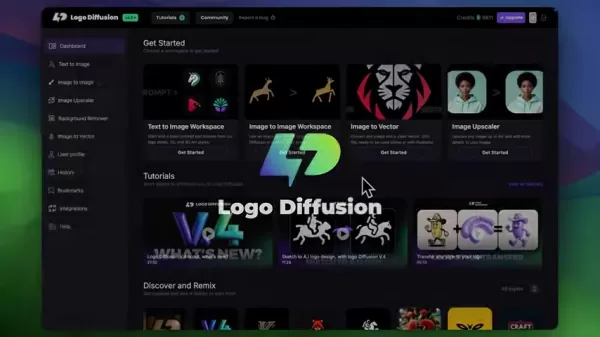
Logo Diffusion is a leading AI-powered platform for logo design.

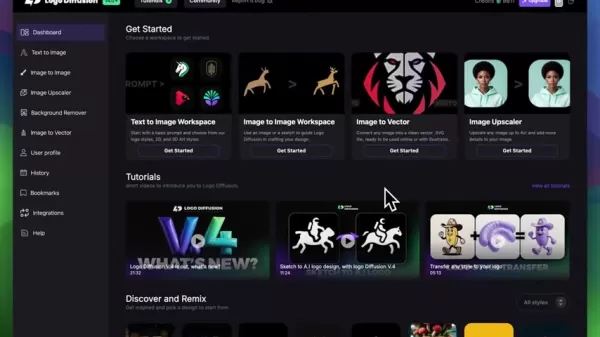
It lets users convert sketches or existing logos into high-quality 3D renders in seconds. The platform provides a set of features designed to simplify logo creation, making it suitable for businesses of all types and sizes. Logo Diffusion isn't just about automation; it focuses on creativity and control, giving you the power to realize your unique vision.
Key features include:
- Sketch to Logo Conversion
- 3D Rendering
- Vectorization
- Style Customization
- Image Upscaling
Step-by-Step Guide: From Sketch to Stunning 3D Logo
Step 1: Sketching Your Initial Concept
Start with a basic sketch.
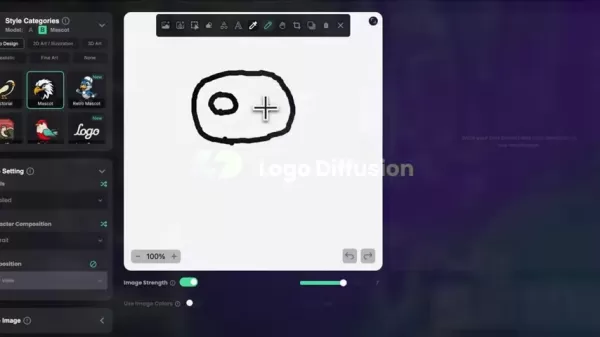
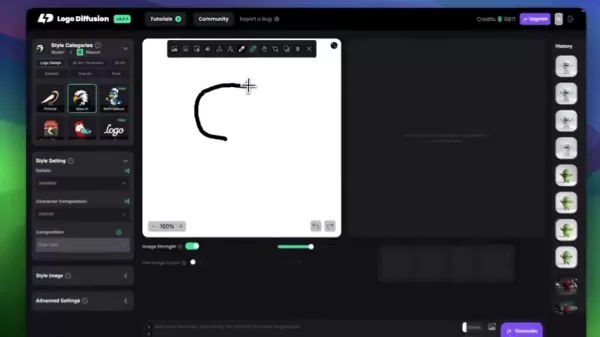
Don't aim for perfection here; the objective is to capture the core idea of your logo. Using Logo Diffusion's built-in sketching editor, you can quickly outline your concept. The platform enables you to:
- Select a pen color.
- Modify the pen thickness for accurate lines.
- Use different drawing tools for various effects.
Remember, AI doesn't need a perfect drawing. A rough sketch is enough for the platform to produce professional results. Consider it as providing the starting point for Logo Diffusion to create something amazing.
Step 2: Transforming the Sketch into a Professional Logo
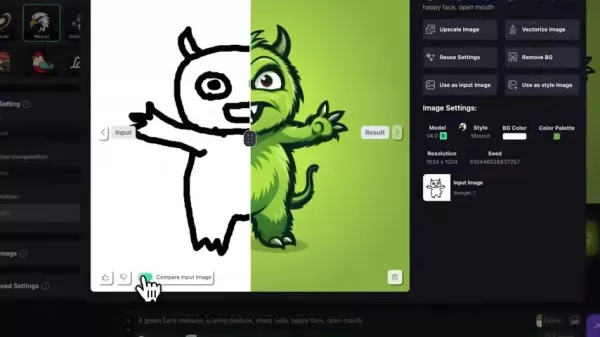
After completing your initial sketch, let Logo Diffusion generate logo options. Go to the Image to Image Workspace on the platform. This function lets you upload your sketch and use AI to produce different logo variations.
Here’s how to improve your design:
- Select a Style Category: Pick a style that matches your brand (for example, Mascot, Retro Mascot, or Logo).
- Modify Style Settings: Adjust details, character composition, and overall layout to fit your vision.
- Set the Image Strength: A higher Image Strength makes the final output more closely resemble your original sketch.
- Include a Prompt: Describe your logo's desired features (e.g., "a green furry monster, intimidating posture, sharp claws, cheerful expression, open mouth"). A more detailed Prompt helps the AI better understand what you want.
- Choose Colors: Specify the colors for the Primary and Secondary Color, Backgrounds, etc.
Tweaking these settings helps Logo Diffusion generate a variety of logo options from your initial sketch.
Step 3: Taking it to the Next Level: 3D Rendering and Style Customization
Once you have a professional logo, you can enhance it further by making a striking 3D render. Logo Diffusion provides multiple styles to convert your 2D logo into an eye-catching 3D design.
- Try realistic styles: For a more true-to-life image, use the realistic 3D rendering style to get a professional, high-quality result.
- Test Cinematic Styles: Produce a logo with a cinematic feel.
The goal is to try different looks and find the one that best fits your brand's style.
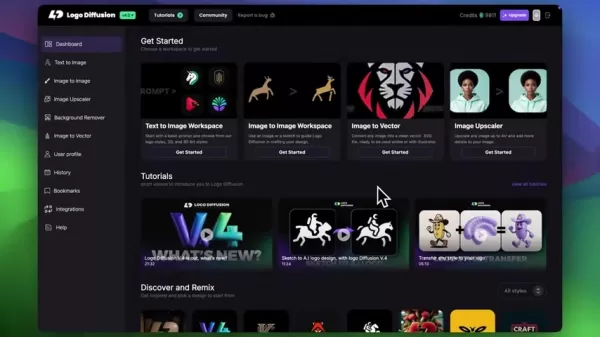
After finding a style you prefer, you can also choose to upscale your image, which we will cover in the following step.
Step 4: Vectorizing Your Logo for Scalability
To ensure maximum versatility, vectorizing your logo is crucial. Vector graphics are resolution-independent, meaning they can be resized to any dimension without quality loss.
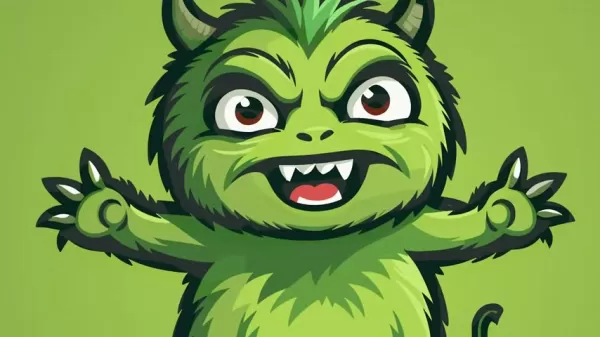
Logo Diffusion's vectorization tool converts your logo into an SVG file, guaranteeing it remains sharp and clear at any scale.
To vectorize your logo:
- Select the generated image to access its settings
- Click "Vectorizer image"
- Click "Vectorizer"
This method provides you with a high-quality image.
Step 5: Upscaling Your Logo for High-Quality Output
Before finalizing your logo, consider upscaling it to meet the highest quality standards. Logo Diffusion's upscaling tool increases your logo's resolution, adding finer details and sharpness. This is especially beneficial for large-scale uses like banners or billboards.
- Choose the generated image to open image settings
- Click the button labeled Upscale Image
- Adjust the Optimize For and Creativity settings; try different combinations for the best outcome.
By upscaling your logo, you guarantee it looks great on all media and applications.
Use Cases
Create eye-catching logos from simple sketches
Convert basic ideas into refined, professional logos using AI-driven style adjustments.
Quickly produce 3D renders of logos in varied styles
Rapidly generate 3D logo renders to see how your brand can appear visually across various platforms.
Logo Diffusion Pricing
Flexible Options for Every User
Logo Diffusion provides various pricing plans to meet different needs and budgets. These plans generally operate on a credit system, where credits are used based on the complexity of design and rendering tasks. Here is a typical overview:
- Free Plan: Offers a limited number of credits for basic logo generation and testing.
- Subscription Plans: Monthly or yearly subscriptions that provide a specific number of credits per period. These plans might also include extra benefits like priority support or access to special styles.
- Pay-as-You-Go: Buy extra credits as required for specific projects. This is perfect for users who don't need to create logos regularly.
Detailed pricing and the features included in each plan are listed on the Logo Diffusion website.
Be sure to evaluate the choices and select the plan that fits your logo design needs.
Logo Diffusion Core Features
AI-Powered Logo Generation
The foundation of Logo Diffusion is its advanced AI algorithms. These algorithms examine your design inputs—including sketches, prompts, and style choices—to produce a wide array of logo concepts. The platform's AI continuously learns and evolves, delivering high-quality and relevant outcomes.
Sketch-to-Logo Conversion
This groundbreaking feature allows you to upload a hand-drawn sketch and convert it into a digital logo. The AI smartly interprets your sketch and creates numerous logo variations from your initial idea.
3D Rendering Capabilities
Logo Diffusion elevates your 2D logos with its 3D rendering capabilities. You can effortlessly transform your logos into impressive 3D visuals, adding depth and strength to your brand's identity.
Vectorization Tool
The integrated vectorization tool transforms your logos into SVG files, ensuring they scale perfectly without losing quality. This is vital for logos that need to remain sharp at any size.
Style Customization Options
Logo Diffusion provides extensive style customization options, letting you adjust every detail of your logo. You can fine-tune specifics, character composition, and the overall design to achieve the look you want.
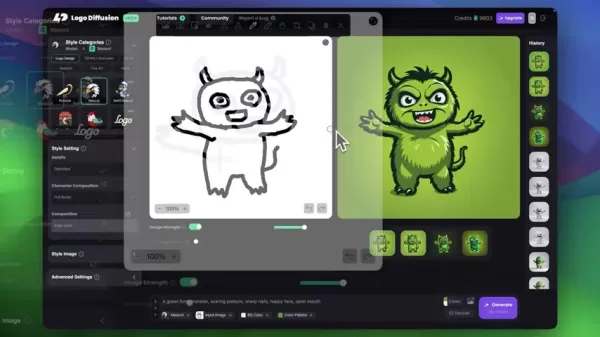
Image Upscaling
The image upscaling feature boosts your logo's resolution, increasing detail and clarity. This is especially helpful for large-format printing.
Frequently Asked Questions
Can I use Logo Diffusion to create logos for commercial purposes?
Yes, depending on your subscription plan, Logo Diffusion permits the commercial use of logos you create. Always check the licensing terms to ensure you are following the rules.
Does Logo Diffusion offer customer support?
Yes, Logo Diffusion offers customer support to help with any inquiries or problems. The extent of support can differ based on your subscription plan.
Is Logo Diffusion suitable for users with no prior design experience?
Definitely! Logo Diffusion is built to be easy to use for people at any skill level. The straightforward interface and AI-powered features make creating professional logos simple, even without design background.
Related Questions
What other AI tools can I use for branding?
Besides logo creators like Logo Diffusion, AI can assist with other branding activities, such as generating brand names, writing marketing content, and designing website layouts. Some well-known AI-powered branding tools are Copy.ai, Jasper.ai, and Wix ADI.
How can I ensure my logo is unique and memorable?
To design a unique and memorable logo, concentrate on expressing your brand's personality and core values. Study your target audience and competitors to find design opportunities. Use AI tools like Logo Diffusion to explore different ideas, but always add your personal touch through customization and detailed refinement.
What are the key elements of effective logo design?
Successful logo design relies on several important elements, including simplicity, memorability, scalability, versatility, and relevance. A great logo should be easily identifiable, function well on different platforms and uses, and correctly reflect your brand's identity.
Related article
 Apple Smart Glasses Could Debut at WWDC27, Highlighting Privacy Protection
Bloomberg’s Mark Gurman reports that Apple’s smart glasses, codenamed N50, are slated for a WWDC27 debut in June 2027, with a retail launch expected in autumn 2027. Originally targeted for late this year and early 2027, the device’s release has been
Inside Details Exposed About Next-Gen Gemini: Strained Computing Power, Internal Teams Disagreed on Development Priorities and Resource Allocation
Reports indicate that the launch of Google’s highly anticipated next-generation Gemini model has been pushed back. Internal disagreements over development priorities and resource allocation, combined with limited computing capacity and complex approv
OpenAI Dismisses Growth Slowdown Concerns, Says Multiple Business Units Accelerating
In response to external scrutiny regarding decelerating sales growth and missed internal benchmarks, AI leader OpenAI issued a confident statement on Tuesday, April 28. The company clarified that its consumer products and enterprise services are adva
Related Special Topic Recommendations
Data Analysis
Apple Smart Glasses Could Debut at WWDC27, Highlighting Privacy Protection
Bloomberg’s Mark Gurman reports that Apple’s smart glasses, codenamed N50, are slated for a WWDC27 debut in June 2027, with a retail launch expected in autumn 2027. Originally targeted for late this year and early 2027, the device’s release has been
Inside Details Exposed About Next-Gen Gemini: Strained Computing Power, Internal Teams Disagreed on Development Priorities and Resource Allocation
Reports indicate that the launch of Google’s highly anticipated next-generation Gemini model has been pushed back. Internal disagreements over development priorities and resource allocation, combined with limited computing capacity and complex approv
OpenAI Dismisses Growth Slowdown Concerns, Says Multiple Business Units Accelerating
In response to external scrutiny regarding decelerating sales growth and missed internal benchmarks, AI leader OpenAI issued a confident statement on Tuesday, April 28. The company clarified that its consumer products and enterprise services are adva
Related Special Topic Recommendations
Data Analysis
 AI SQL Copilots for Revenue Dashboards, Funnel Analysis, and Product Metrics
2026 Latest Best AI SQL Copilots Ranked Top-Rated! XIX.AI curates a powerful game-changing collection for weekly updated real-world tests. These must-try tools help you generate accurate revenue dashboards, analyze sales funnels, and track product metrics swiftly, boosting productivity massively. Explore now to Discover your perfect tool for data-driven decision making! 238 characters
 9 tools
 xix.ai
Music composition
Best AI Melody Writing Tools for Song Drafts
xix.ai
Music composition
Best AI Melody Writing Tools for Song Drafts
2026 Latest Best Top-Rated AI Melody Writing Tools for Song Drafts! XIX.AI has curated a highly powerful game-changing collection that goes through rigorous real-world tests to deliver the best writing experience. You can find detailed free vs paid comparisons, accurate rankings, and must-try options designed to help you create stunning song drafts effortlessly and boost your creative productivity significantly. Explore now to discover your perfect tool!
8 tools
xix.ai
chatbot
Best AI Conversation Trainer Tools for Interview Practice
2026 Latest Best Top-rated AI Conversation Trainer Tools for Interview Practice are here on XIX.AI! This curated collection features powerful, game-changing tools that go through rigorous real-world tests to deliver accurate feedback. You’ll find a free vs paid comparison and detailed rankings to help you choose the must-try option that boosts your confidence and skills. Explore now to Discover your perfect tool for interview success!
12 tools
xix.ai
Design & Art
Best AI Style Transfer Tools for Creative Experiments
2026 Latest Best Top-rated AI Style Transfer Tools for Creative Experiments! XIX.AI has curated a powerful, game-changing collection of must-try tools that deliver exceptional results through real-world tests and rigorous rankings. These top solutions help creatives boost productivity significantly by accelerating content creation and unlocking endless creative possibilities. Explore now to discover your perfect tool and start creating today!
9 tools
xix.ai
Comic Creation
Best AI Dialogue Bubble Tools for Visual Storytelling
2026 Latest Best Top-Rated AI Dialogue Bubble Tools for Visual Storytelling are here on XIX.AI! This curated collection features powerful, game-changing tools that help creators boost productivity and overcome creative bottlenecks. Get a free vs paid comparison, see real-world tests, and check the latest rankings to find the must-try solutions perfect for crafting engaging visual narratives. Explore now to discover your ideal tool!
10 tools
xix.ai
Meeting Assistant
Top AI Meeting Summary Tools: Track Decisions and Follow-Ups Clearly
2026 Latest Top-Rated Best AI Meeting Summary Tools for Clear Decision Tracking and Effortless Follow-Ups. This curated list showcases powerful, game-changing solutions that boost productivity dramatically by automating meeting notes, identifying key action items, and streamlining team coordination across all projects. Get a free vs paid comparison along with real-world tests and weekly updated rankings to help you find the perfect tool. Explore now to unlock your AI edge!
9 tools
xix.ai

 Comments (2)
0/500
Comments (2)
0/500
![DouglasAllen]()
I was totally shocked when I saw how fast those simple sketches turned into ultra-realistic 3D renders with this tool, it’s like magic! But I wonder if businesses will stop hiring 3D artists soon if everyone can do this at home?
![AnthonyMoore]()
C'est fou comme l'IA rend des trucs si techniques accessibles à tout le monde maintenant. Je me demande si cette facilité à créer des rendus 3D pro ne va pas forcément saturer le marché avec des designs un peu trop similaires... 🤔 C'est pratique, mais l'originalité humaine reste cruciale !
In today's competitive digital world, a strong logo is essential for brand recognition. But what if you could easily turn a simple sketch into a professional 3D render in just seconds? This guide explains how to use AI-powered tools to create high-quality logos from initial idea to final design, improving your brand's visual identity with minimal time and effort.
Key Points
Use AI to turn sketches into professional logos.
Quickly create 3D renders from 2D designs.
Use Logo Diffusion for vectorization and logo enhancement.
Optimize logos using various styles and settings for the best appearance.
Upscale and refine logos for superior quality.
Easily place your logo on multiple different backgrounds.
Unleashing the Power of AI in Logo Design
The Evolution of Logo Creation
Traditionally, designing a logo involved a lot of manual effort, from initial drawings to digital creation. This process was often slow, costly, and required skills in graphic design software. The rise of AI logo generators has changed this, making professional logo design accessible to everyone. Now, anyone can turn a basic concept into a polished, attractive logo with little effort.
AI tools assess your design preferences, create multiple concepts, and offer customization choices. This repeated process enables quick prototyping and improvement, leading to a logo that accurately represents your brand.
Introducing Logo Diffusion: Your AI Logo Design Partner
Logo Diffusion is a leading AI-powered platform for logo design.
It lets users convert sketches or existing logos into high-quality 3D renders in seconds. The platform provides a set of features designed to simplify logo creation, making it suitable for businesses of all types and sizes. Logo Diffusion isn't just about automation; it focuses on creativity and control, giving you the power to realize your unique vision.
Key features include:
- Sketch to Logo Conversion
- 3D Rendering
- Vectorization
- Style Customization
- Image Upscaling
Step-by-Step Guide: From Sketch to Stunning 3D Logo
Step 1: Sketching Your Initial Concept
Start with a basic sketch.
Don't aim for perfection here; the objective is to capture the core idea of your logo. Using Logo Diffusion's built-in sketching editor, you can quickly outline your concept. The platform enables you to:
- Select a pen color.
- Modify the pen thickness for accurate lines.
- Use different drawing tools for various effects.
Remember, AI doesn't need a perfect drawing. A rough sketch is enough for the platform to produce professional results. Consider it as providing the starting point for Logo Diffusion to create something amazing.
Step 2: Transforming the Sketch into a Professional Logo
After completing your initial sketch, let Logo Diffusion generate logo options. Go to the Image to Image Workspace on the platform. This function lets you upload your sketch and use AI to produce different logo variations.
Here’s how to improve your design:
- Select a Style Category: Pick a style that matches your brand (for example, Mascot, Retro Mascot, or Logo).
- Modify Style Settings: Adjust details, character composition, and overall layout to fit your vision.
- Set the Image Strength: A higher Image Strength makes the final output more closely resemble your original sketch.
- Include a Prompt: Describe your logo's desired features (e.g., "a green furry monster, intimidating posture, sharp claws, cheerful expression, open mouth"). A more detailed Prompt helps the AI better understand what you want.
- Choose Colors: Specify the colors for the Primary and Secondary Color, Backgrounds, etc.
Tweaking these settings helps Logo Diffusion generate a variety of logo options from your initial sketch.
Step 3: Taking it to the Next Level: 3D Rendering and Style Customization
Once you have a professional logo, you can enhance it further by making a striking 3D render. Logo Diffusion provides multiple styles to convert your 2D logo into an eye-catching 3D design.
- Try realistic styles: For a more true-to-life image, use the realistic 3D rendering style to get a professional, high-quality result.
- Test Cinematic Styles: Produce a logo with a cinematic feel.
The goal is to try different looks and find the one that best fits your brand's style.
After finding a style you prefer, you can also choose to upscale your image, which we will cover in the following step.
Step 4: Vectorizing Your Logo for Scalability
To ensure maximum versatility, vectorizing your logo is crucial. Vector graphics are resolution-independent, meaning they can be resized to any dimension without quality loss.
Logo Diffusion's vectorization tool converts your logo into an SVG file, guaranteeing it remains sharp and clear at any scale.
To vectorize your logo:
- Select the generated image to access its settings
- Click "Vectorizer image"
- Click "Vectorizer"
This method provides you with a high-quality image.
Step 5: Upscaling Your Logo for High-Quality Output
Before finalizing your logo, consider upscaling it to meet the highest quality standards. Logo Diffusion's upscaling tool increases your logo's resolution, adding finer details and sharpness. This is especially beneficial for large-scale uses like banners or billboards.
- Choose the generated image to open image settings
- Click the button labeled Upscale Image
- Adjust the Optimize For and Creativity settings; try different combinations for the best outcome.
By upscaling your logo, you guarantee it looks great on all media and applications.
Use Cases
Create eye-catching logos from simple sketches
Convert basic ideas into refined, professional logos using AI-driven style adjustments.
Quickly produce 3D renders of logos in varied styles
Rapidly generate 3D logo renders to see how your brand can appear visually across various platforms.
Logo Diffusion Pricing
Flexible Options for Every User
Logo Diffusion provides various pricing plans to meet different needs and budgets. These plans generally operate on a credit system, where credits are used based on the complexity of design and rendering tasks. Here is a typical overview:
- Free Plan: Offers a limited number of credits for basic logo generation and testing.
- Subscription Plans: Monthly or yearly subscriptions that provide a specific number of credits per period. These plans might also include extra benefits like priority support or access to special styles.
- Pay-as-You-Go: Buy extra credits as required for specific projects. This is perfect for users who don't need to create logos regularly.
Detailed pricing and the features included in each plan are listed on the Logo Diffusion website.
Be sure to evaluate the choices and select the plan that fits your logo design needs.
Logo Diffusion Core Features
AI-Powered Logo Generation
The foundation of Logo Diffusion is its advanced AI algorithms. These algorithms examine your design inputs—including sketches, prompts, and style choices—to produce a wide array of logo concepts. The platform's AI continuously learns and evolves, delivering high-quality and relevant outcomes.
Sketch-to-Logo Conversion
This groundbreaking feature allows you to upload a hand-drawn sketch and convert it into a digital logo. The AI smartly interprets your sketch and creates numerous logo variations from your initial idea.
3D Rendering Capabilities
Logo Diffusion elevates your 2D logos with its 3D rendering capabilities. You can effortlessly transform your logos into impressive 3D visuals, adding depth and strength to your brand's identity.
Vectorization Tool
The integrated vectorization tool transforms your logos into SVG files, ensuring they scale perfectly without losing quality. This is vital for logos that need to remain sharp at any size.
Style Customization Options
Logo Diffusion provides extensive style customization options, letting you adjust every detail of your logo. You can fine-tune specifics, character composition, and the overall design to achieve the look you want.
Image Upscaling
The image upscaling feature boosts your logo's resolution, increasing detail and clarity. This is especially helpful for large-format printing.
Frequently Asked Questions
Can I use Logo Diffusion to create logos for commercial purposes?
Yes, depending on your subscription plan, Logo Diffusion permits the commercial use of logos you create. Always check the licensing terms to ensure you are following the rules.
Does Logo Diffusion offer customer support?
Yes, Logo Diffusion offers customer support to help with any inquiries or problems. The extent of support can differ based on your subscription plan.
Is Logo Diffusion suitable for users with no prior design experience?
Definitely! Logo Diffusion is built to be easy to use for people at any skill level. The straightforward interface and AI-powered features make creating professional logos simple, even without design background.
Related Questions
What other AI tools can I use for branding?
Besides logo creators like Logo Diffusion, AI can assist with other branding activities, such as generating brand names, writing marketing content, and designing website layouts. Some well-known AI-powered branding tools are Copy.ai, Jasper.ai, and Wix ADI.
How can I ensure my logo is unique and memorable?
To design a unique and memorable logo, concentrate on expressing your brand's personality and core values. Study your target audience and competitors to find design opportunities. Use AI tools like Logo Diffusion to explore different ideas, but always add your personal touch through customization and detailed refinement.
What are the key elements of effective logo design?
Successful logo design relies on several important elements, including simplicity, memorability, scalability, versatility, and relevance. A great logo should be easily identifiable, function well on different platforms and uses, and correctly reflect your brand's identity.








 Apple Smart Glasses Could Debut at WWDC27, Highlighting Privacy Protection
Bloomberg’s Mark Gurman reports that Apple’s smart glasses, codenamed N50, are slated for a WWDC27 debut in June 2027, with a retail launch expected in autumn 2027. Originally targeted for late this year and early 2027, the device’s release has been
Apple Smart Glasses Could Debut at WWDC27, Highlighting Privacy Protection
Bloomberg’s Mark Gurman reports that Apple’s smart glasses, codenamed N50, are slated for a WWDC27 debut in June 2027, with a retail launch expected in autumn 2027. Originally targeted for late this year and early 2027, the device’s release has been
 Inside Details Exposed About Next-Gen Gemini: Strained Computing Power, Internal Teams Disagreed on Development Priorities and Resource Allocation
Reports indicate that the launch of Google’s highly anticipated next-generation Gemini model has been pushed back. Internal disagreements over development priorities and resource allocation, combined with limited computing capacity and complex approv
Inside Details Exposed About Next-Gen Gemini: Strained Computing Power, Internal Teams Disagreed on Development Priorities and Resource Allocation
Reports indicate that the launch of Google’s highly anticipated next-generation Gemini model has been pushed back. Internal disagreements over development priorities and resource allocation, combined with limited computing capacity and complex approv
 OpenAI Dismisses Growth Slowdown Concerns, Says Multiple Business Units Accelerating
In response to external scrutiny regarding decelerating sales growth and missed internal benchmarks, AI leader OpenAI issued a confident statement on Tuesday, April 28. The company clarified that its consumer products and enterprise services are adva
OpenAI Dismisses Growth Slowdown Concerns, Says Multiple Business Units Accelerating
In response to external scrutiny regarding decelerating sales growth and missed internal benchmarks, AI leader OpenAI issued a confident statement on Tuesday, April 28. The company clarified that its consumer products and enterprise services are adva

2026 Latest Best AI SQL Copilots Ranked Top-Rated! XIX.AI curates a powerful game-changing collection for weekly updated real-world tests. These must-try tools help you generate accurate revenue dashboards, analyze sales funnels, and track product metrics swiftly, boosting productivity massively. Explore now to Discover your perfect tool for data-driven decision making! 238 characters
9 tools
xix.ai

2026 Latest Best Top-Rated AI Melody Writing Tools for Song Drafts! XIX.AI has curated a highly powerful game-changing collection that goes through rigorous real-world tests to deliver the best writing experience. You can find detailed free vs paid comparisons, accurate rankings, and must-try options designed to help you create stunning song drafts effortlessly and boost your creative productivity significantly. Explore now to discover your perfect tool!
8 tools
xix.ai

2026 Latest Best Top-rated AI Conversation Trainer Tools for Interview Practice are here on XIX.AI! This curated collection features powerful, game-changing tools that go through rigorous real-world tests to deliver accurate feedback. You’ll find a free vs paid comparison and detailed rankings to help you choose the must-try option that boosts your confidence and skills. Explore now to Discover your perfect tool for interview success!
12 tools
xix.ai

2026 Latest Best Top-rated AI Style Transfer Tools for Creative Experiments! XIX.AI has curated a powerful, game-changing collection of must-try tools that deliver exceptional results through real-world tests and rigorous rankings. These top solutions help creatives boost productivity significantly by accelerating content creation and unlocking endless creative possibilities. Explore now to discover your perfect tool and start creating today!
9 tools
xix.ai

2026 Latest Best Top-Rated AI Dialogue Bubble Tools for Visual Storytelling are here on XIX.AI! This curated collection features powerful, game-changing tools that help creators boost productivity and overcome creative bottlenecks. Get a free vs paid comparison, see real-world tests, and check the latest rankings to find the must-try solutions perfect for crafting engaging visual narratives. Explore now to discover your ideal tool!
10 tools
xix.ai

2026 Latest Top-Rated Best AI Meeting Summary Tools for Clear Decision Tracking and Effortless Follow-Ups. This curated list showcases powerful, game-changing solutions that boost productivity dramatically by automating meeting notes, identifying key action items, and streamlining team coordination across all projects. Get a free vs paid comparison along with real-world tests and weekly updated rankings to help you find the perfect tool. Explore now to unlock your AI edge!
9 tools
xix.ai

I was totally shocked when I saw how fast those simple sketches turned into ultra-realistic 3D renders with this tool, it’s like magic! But I wonder if businesses will stop hiring 3D artists soon if everyone can do this at home?
C'est fou comme l'IA rend des trucs si techniques accessibles à tout le monde maintenant. Je me demande si cette facilité à créer des rendus 3D pro ne va pas forcément saturer le marché avec des designs un peu trop similaires... 🤔 C'est pratique, mais l'originalité humaine reste cruciale !












