


 Home
HomePixel Dojo AI Inpainting Tool: A Practical Guide for Image Editing
This comprehensive guide explores advanced AI inpainting techniques using Pixel Dojo's powerful toolkit for AI-powered image creation and editing. We will demonstrate how to generate images using Flux models and LoRAs, then refine them with AI inpainting tools to seamlessly remove or replace elements. Whether you're new to AI art or an experienced creator, this guide provides the knowledge to effectively leverage Pixel Dojo for your creative projects.
Key Points
Utilizing Pixel Dojo’s Flux Image Creator for AI-driven image generation.
Selecting from various Flux models like Schnell, Hyperflux, and DevLoRA for different artistic outcomes.
Incorporating specialized LoRA models such as Taylor Swift for personalized image creation.
Using AI Enhance to expand and refine prompts for more detailed imagery.
Applying Flux Inpainting to seamlessly remove and replace image elements.
Mastering both brush-based and prompt-based inpainting methods.
Understanding the application of Prompt Based Inpainting.
Saving and organizing generated images within the Pixel Dojo platform.
Getting Started with Pixel Dojo
What is Pixel Dojo?
Pixel Dojo is a versatile AI platform offering a comprehensive suite of tools for image creation and manipulation.
The platform enables users to create, enhance, and modify images using diverse AI models and techniques, catering to both beginners and advanced users through intuitive interfaces and powerful capabilities. Pixel Dojo provides access to an extensive model library, including Flux models and LoRA models. This service can generate realistic artwork, restore old photographs, design tattoos, and much more! Its modular toolset facilitates an iterative design process, offering flexibility for various creative needs. Whether generating images from scratch, editing existing photos, or maintaining consistent character designs, Pixel Dojo delivers a user-friendly yet robust creative environment.
Navigating the Flux Image Creator
The Flux Image Creator serves as Pixel Dojo's central image generation tool, designed for rapid iteration through prompts and concepts while producing high-quality results using different Flux models. These models are essential for creating images with distinct artistic styles and varying levels of realism. The platform enables users to select different models, aspect ratios, and LoRA models.
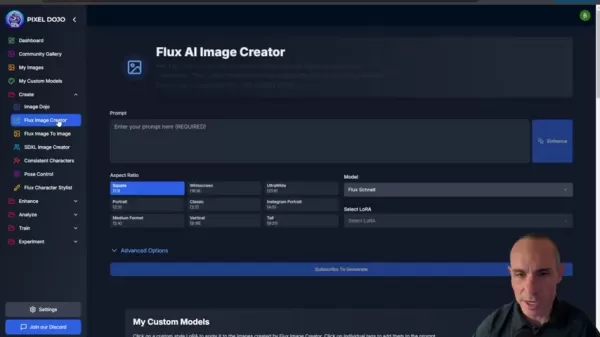
By experimenting with these configurations, users can quickly prototype diverse image styles and compositions. The Flux Image Creator simplifies the creative workflow, making it accessible to produce impressive AI-generated artwork. A key strength lies in the platform's diverse selection of available base models.
Exploring Flux Models and LoRAs
Flux Models: A Diverse Palette
Pixel Dojo offers multiple Flux models, each delivering unique artistic styles and rendering quality.
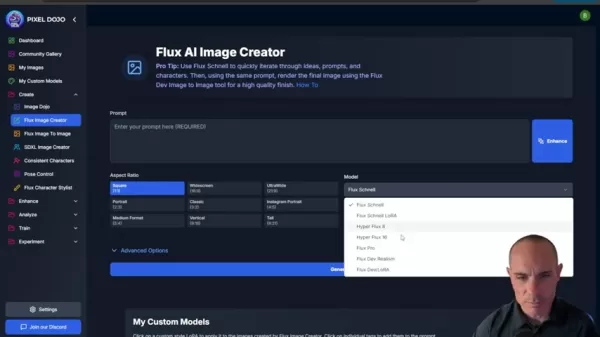
These models provide a wide spectrum of options, from quick conceptual iterations to high-fidelity final renders. Available Flux models include:
- Flux Schnell: Optimized for rapid prototyping and quick iterations.
- Flux Schnell LoRA: Combines fast iteration capabilities with LoRA model integration.
- Hyperflux 8/16: Delivers enhanced rendering quality for detailed images.
- Flux Pro: Professional-grade rendering for premium results.
- Flux Dev Realism: Specializes in photorealistic image generation.
- Flux Dev LoRA: Adds LoRA support to the realism-focused model.
Your model selection should align with your specific goals, whether prioritizing speed, detail, or particular artistic aesthetics.
Flux Model Description Flux Schnell Rapid iterations, perfect for prototyping Flux Schnell LoRA Fast iterations with integrated LoRA model support Hyperflux 8/16 Superior rendering quality for detailed imagery Flux Pro Professional-level rendering for high-end outcomes Flux Dev Realism Focuses on realistic image generation Flux Dev LoRA Realistic image generation enhanced with LoRA capabilities
LoRA models, or Low-Rank Adaptation models, enable fine-tuning AI models to specific styles or character representations. Pixel Dojo allows users to upload and train custom LoRA models, unlocking possibilities for personalized image creation—from replicating specific artistic styles to generating images of particular individuals. LoRA model integration ensures each creation remains unique and aligned with the user's creative vision.
Integrating LoRAs
The platform automatically inserts relevant tokens into the Prompt box when selecting a LoRA model.
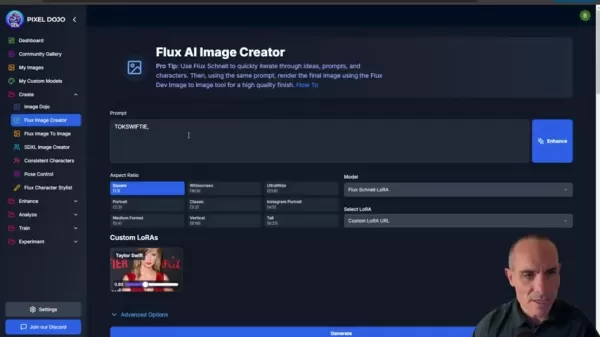
This guarantees the AI model properly recognizes and implements the custom style defined by the LoRA. Users can even integrate custom URLs for specialized LoRA models to further influence the AI's output. By effectively incorporating LoRA models, creators can elevate their projects to professional standards.
Step-by-Step Guide to Image Enhancement and Inpainting
Step 1: Generating an Initial Image
Begin by logging into Pixel Dojo and accessing the Flux Image Creator.
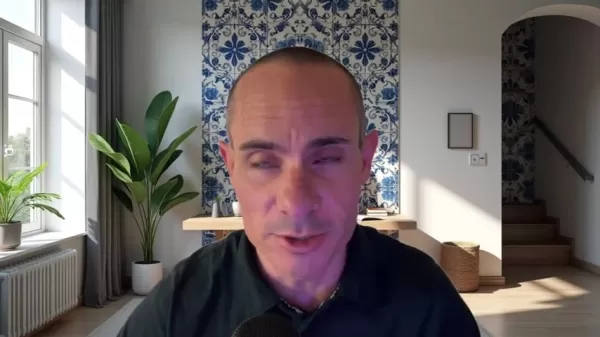
Select a Flux model that matches your artistic objectives. Input a descriptive prompt outlining the image you want to create, providing sufficient detail to guide the AI effectively.
Step 2: Enhancing the Prompt with AI Enhance
Enrich your initial concept using the AI Enhance feature.
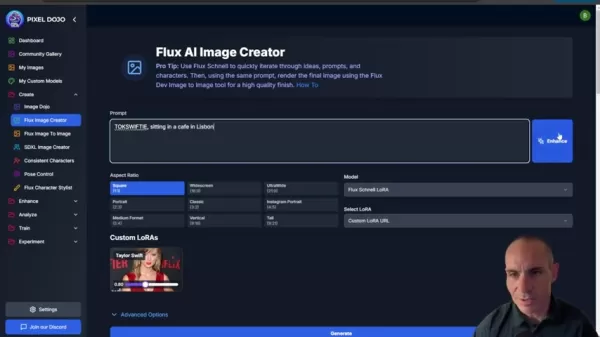
This functionality elaborates on your original prompt, adding contextual details and nuance. Enhanced prompts typically yield more sophisticated and detailed images.
Step 3: Fine-Tuning with LoRA Models
Personalize your image by incorporating a LoRA model from your collection.
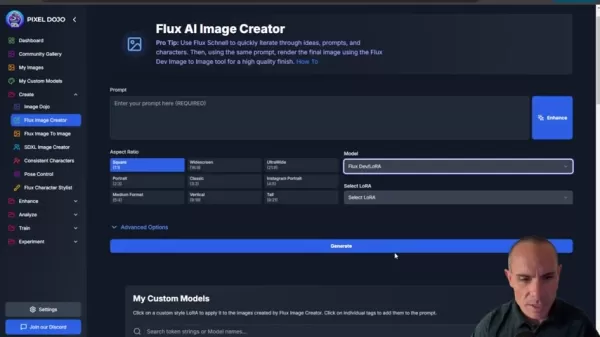
Pixel Dojo automatically inserts the corresponding token into your prompt, ensuring the custom style is properly applied. This step enables precise image customization through LoRA model integration.
Step 4: Using Flux Inpainting for Detailed Edits
Flux Inpainting enables seamless removal and replacement of image elements.
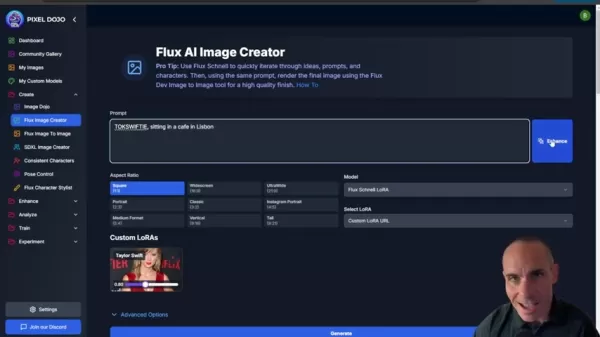
Navigate to the Enhance tab and select Flux Inpainting.
- Brush-Based Inpainting: Use the brush tool to mask areas requiring modification. Describe the element you want to generate within the masked region, and Pixel Dojo will create it accordingly.
- Prompt-Based Inpainting: Describe what elements to replace and what to preserve. Pixel Dojo intelligently modifies the image based on these instructions—this powerful functionality can remove or add virtually any element within your image!
Step 5: Saving and Exporting Your Image
Once satisfied with your edits, save the image to your Pixel Dojo library. From here, you can export the image in various formats for use in other projects. Your completed artwork can then be shared across social media platforms.
Pixel Dojo Subscription
Affordable Access to Creative AI
Pixel Dojo operates on a subscription model, providing complete access to all creative AI tools for a single monthly fee. This includes the Flux Image Creator, AI Enhance, Flux Inpainting, and additional features. With one subscription, users can unlock Pixel Dojo's full potential without requiring individual purchases or credit systems. By utilizing Pixel Dojo, content creators can optimize their budget, time, and creative effort.
Pros and Cons of Pixel Dojo
Pros
Comprehensive suite of AI-powered image creation and enhancement tools.
Access to diverse Flux models for various artistic expressions.
Integration support for LoRA models enabling personalized image generation.
Streamlined image editing through brush-based and prompt-based inpainting.
Intuitive and user-friendly interface design.
Subscription model provides accessible entry point.
Cons
AI dependency may limit specific creative control aspects.
Subscription may prove less cost-effective for occasional users.
Requires consistent internet connectivity.
Core Features of Pixel Dojo
Key Capabilities
Pixel Dojo's versatility stems from its extensive feature set. The platform supports iterative design processes while maintaining output quality. It also facilitates image refinement through custom LoRA models and simplifies the implementation of creative AI solutions.
Use Cases for Pixel Dojo
Creative Applications
Pixel Dojo serves numerous creative applications, from generating digital artwork and illustrations to enhancing photographic content. The platform also supports creating marketing materials, developing character designs, and conceptual visualization. Using Pixel Dojo can result in significant time and cost savings.
FAQ
What is Pixel Dojo?
Pixel Dojo is an online AI art generator that simplifies artwork creation, photo editing, and concept visualization.
What are Flux models?
Flux models represent a series of AI models featuring distinct styles and rendering qualities.
What are LoRA models?
LoRA models, or Low-Rank Adaptation models, enable fine-tuning AI models to specific styles or character representations.
Related Questions
Can Pixel Dojo be used for commercial purposes?
Pixel Dojo's terms of service agreement must be followed carefully, as commercial usage may involve specific restrictions that require reviewing the detailed policies.
Can custom models be incorporated?
Pixel Dojo supports LoRA models, allowing integration of custom models. The specific implementation methods may vary, so consulting the detailed documentation is recommended.
Is it easy to use the software?
The software enables programmatic application of complex techniques through preset options and logical workflow design. Users can achieve professional-quality results within a relatively short timeframe!
Related article
 Hygon DCU Runs Trillion-Parameter Models With Kimi K3 Expert Parallelism
Domestic computing infrastructure has successfully powered a trillion-parameter model for the first time. Hai Guang Information confirmed full-stack adaptation and performance validation of Kimi K3 on its DCU platform, demonstrating that executing su
MeituHub Unveils AI Image Production Line With Official Launch on August 5
The 2026 Meitu Image Festival has officially unveiled "AI Image Production Line" MeituHub, signaling Meitu's transition from a provider of single-scene AI tools to a comprehensive, customized image workflow service provider.As the flagship offering o
Microsoft Unveils MAI-Transcribe-2, Its Most Accurate Transcription Model Yet, Supporting 60 Languages at Just 0.67 Yuan Per Hour
Microsoft has launched MAI-Transcribe-2, positioning it as the industry’s fastest, most precise, and cost-efficient AI speech-to-text solution. Priced at a promotional rate of $0.10 (approx. 0.67 RMB) per hour, this offer remains valid through the en
Related Special Topic Recommendations
Finance
Hygon DCU Runs Trillion-Parameter Models With Kimi K3 Expert Parallelism
Domestic computing infrastructure has successfully powered a trillion-parameter model for the first time. Hai Guang Information confirmed full-stack adaptation and performance validation of Kimi K3 on its DCU platform, demonstrating that executing su
MeituHub Unveils AI Image Production Line With Official Launch on August 5
The 2026 Meitu Image Festival has officially unveiled "AI Image Production Line" MeituHub, signaling Meitu's transition from a provider of single-scene AI tools to a comprehensive, customized image workflow service provider.As the flagship offering o
Microsoft Unveils MAI-Transcribe-2, Its Most Accurate Transcription Model Yet, Supporting 60 Languages at Just 0.67 Yuan Per Hour
Microsoft has launched MAI-Transcribe-2, positioning it as the industry’s fastest, most precise, and cost-efficient AI speech-to-text solution. Priced at a promotional rate of $0.10 (approx. 0.67 RMB) per hour, this offer remains valid through the en
Related Special Topic Recommendations
Finance
 AI Cash Flow Forecasting Tools for Small Business Finance
2026 Latest Best Top-rated AI Cash Flow Forecasting Tools for Small Business Finance are here on XIX.AI! Our curated list features powerful, game-changing solutions that go through real-world tests to help small business owners boost financial accuracy, plan budgets more effectively, and avoid cash flow issues. Get a free vs paid comparison and explore now to find your perfect tool for seamless financial management.
 7 tools
 xix.ai
code
Best AI Coding Chatbots: Debug Python, JS, and SQL in One Place
xix.ai
code
Best AI Coding Chatbots: Debug Python, JS, and SQL in One Place
2026 Latest Best Top-Rated AI Coding Chatbots Curated for Developers! Experience powerful game-changing tools that help you debug Python, JS, and SQL issues quickly. Get a free vs paid comparison along with real-world tests and detailed rankings to find the perfect fit for boosting your coding productivity. Try XIX.AI today to unlock your AI edge! Explore now.
12 tools
xix.ai
Prompt
AI Prompt Versioning Platforms for Reusable Claude and ChatGPT Playbooks
2026 Latest Best Top-rated AI Prompt Versioning Platforms for Reusable Playbooks are here on XIX.AI! Our curated list includes powerful game-changing tools that help you keep track of all prompts, test variations efficiently, and boost productivity across writing, content creation, and more. Get a free vs paid comparison along with real-world tests and updated rankings weekly. Explore now to discover your perfect tool for staying ahead in AI tasks!
9 tools
xix.ai
writing
Best AI Writing Assistants for Long Articles: Outline and Draft Faster
2026 Latest Best AI Writing Assistants for Long Articles: Outline and Draft Faster. XIX.AI curates the top-rated, must-try tools that offer powerful, game-changing support to boost writing efficiency significantly. You’ll find detailed free vs paid comparison, real-world tests, and updated rankings weekly. Explore now to Discover your perfect tool and Start creating today to Unlock your AI edge.
8 tools
xix.ai
Education and Learning
ChatGPT Study Tools for Exam Revision, Flashcards, and Homework Explanations
2026 Latest Best ChatGPT Study Tools for Exam Revision, Flashcards, and Homework Explanations! XIX.AI has curated a top-rated list of powerful game-changing tools designed to boost your productivity. These must-try solutions offer free vs paid comparison, real-world tests, and detailed rankings to help you find the perfect option for efficient exam preparation and homework support. Explore now to unlock your AI edge!
10 tools
xix.ai
Education and Learning
AI Study Planner Tools for Exam Preparation
2026 Latest Best Top-Rated AI Study Planner Tools for Exam Preparation are here on XIX.AI! This curated collection features powerful, game-changing tools that help you streamline your review process, boost focus, and create personalized study schedules. We conduct real-world tests to determine the top options, offering a free vs paid comparison along with weekly updated rankings. Must-try solutions designed to maximize your productivity and help you ace every exam. Explore now to find your perfect tool!
14 tools
xix.ai

 Comments (4)
0/500
Comments (4)
0/500
![HarryGonzalez]()
Pixel Dojo's inpainting tool looks solid for Flux workflows, but I'm still cautious about how it handles complex textures in high-res outputs. Has anyone tried combining this with ControlNet for better structure? 🤔
![RaymondGarcia]()
Honestly, the inpainting demo looks cool, but I'm skeptical about the 'AI-powered' tagline — half the time these tools hallucinate weird stuff. Still, the step-by-step approach is better than most fly-by-night tutorials. Would love to see a comparison with manual cloning though.
![StevenNelson]()
この記事は本当に役に立ちますね!Pixel DojoのAI inpainting機能、FLUXモデルとLoRAを組み合わせて画像を生成・編集する流れが具体的に解説されていて、初心者にも分かりやすいと思いました。AI画像編集って難しそうなイメージがあったけど、ツールが進化すれば誰でもクリエイティブな作業に参加できるかも。ただ、倫理的な問題(例えば、プライバシーや著作権)はどう対応していくんでしょうか… 🤔 一度試してみたいな。
![GeorgeJones]()
이 글을 읽고 AI 이미지 편집 기술의 발전 속도에 정말 놀랐어요. 몇 년 전만 해도 이런 기능을 상상하기 힘들었는데, 이제는 일반 사용자도 쉽게 접근할 수 있게 되었네요. 특히 Flux 모델과 LoRA를 활용하는 부분이 인상적이에요. 다만 생성형 AI의 저작권 문제는 여전히 해결해야 할 과제로 보입니다. 🎨
This comprehensive guide explores advanced AI inpainting techniques using Pixel Dojo's powerful toolkit for AI-powered image creation and editing. We will demonstrate how to generate images using Flux models and LoRAs, then refine them with AI inpainting tools to seamlessly remove or replace elements. Whether you're new to AI art or an experienced creator, this guide provides the knowledge to effectively leverage Pixel Dojo for your creative projects.
Key Points
Utilizing Pixel Dojo’s Flux Image Creator for AI-driven image generation.
Selecting from various Flux models like Schnell, Hyperflux, and DevLoRA for different artistic outcomes.
Incorporating specialized LoRA models such as Taylor Swift for personalized image creation.
Using AI Enhance to expand and refine prompts for more detailed imagery.
Applying Flux Inpainting to seamlessly remove and replace image elements.
Mastering both brush-based and prompt-based inpainting methods.
Understanding the application of Prompt Based Inpainting.
Saving and organizing generated images within the Pixel Dojo platform.
Getting Started with Pixel Dojo
What is Pixel Dojo?
Pixel Dojo is a versatile AI platform offering a comprehensive suite of tools for image creation and manipulation.
The platform enables users to create, enhance, and modify images using diverse AI models and techniques, catering to both beginners and advanced users through intuitive interfaces and powerful capabilities. Pixel Dojo provides access to an extensive model library, including Flux models and LoRA models. This service can generate realistic artwork, restore old photographs, design tattoos, and much more! Its modular toolset facilitates an iterative design process, offering flexibility for various creative needs. Whether generating images from scratch, editing existing photos, or maintaining consistent character designs, Pixel Dojo delivers a user-friendly yet robust creative environment.
Navigating the Flux Image Creator
The Flux Image Creator serves as Pixel Dojo's central image generation tool, designed for rapid iteration through prompts and concepts while producing high-quality results using different Flux models. These models are essential for creating images with distinct artistic styles and varying levels of realism. The platform enables users to select different models, aspect ratios, and LoRA models.
By experimenting with these configurations, users can quickly prototype diverse image styles and compositions. The Flux Image Creator simplifies the creative workflow, making it accessible to produce impressive AI-generated artwork. A key strength lies in the platform's diverse selection of available base models.
Exploring Flux Models and LoRAs
Flux Models: A Diverse Palette
Pixel Dojo offers multiple Flux models, each delivering unique artistic styles and rendering quality.
These models provide a wide spectrum of options, from quick conceptual iterations to high-fidelity final renders. Available Flux models include:
- Flux Schnell: Optimized for rapid prototyping and quick iterations.
- Flux Schnell LoRA: Combines fast iteration capabilities with LoRA model integration.
- Hyperflux 8/16: Delivers enhanced rendering quality for detailed images.
- Flux Pro: Professional-grade rendering for premium results.
- Flux Dev Realism: Specializes in photorealistic image generation.
- Flux Dev LoRA: Adds LoRA support to the realism-focused model.
Your model selection should align with your specific goals, whether prioritizing speed, detail, or particular artistic aesthetics.
| Flux Model | Description |
|---|---|
| Flux Schnell | Rapid iterations, perfect for prototyping |
| Flux Schnell LoRA | Fast iterations with integrated LoRA model support |
| Hyperflux 8/16 | Superior rendering quality for detailed imagery |
| Flux Pro | Professional-level rendering for high-end outcomes |
| Flux Dev Realism | Focuses on realistic image generation |
| Flux Dev LoRA | Realistic image generation enhanced with LoRA capabilities |
LoRA models, or Low-Rank Adaptation models, enable fine-tuning AI models to specific styles or character representations. Pixel Dojo allows users to upload and train custom LoRA models, unlocking possibilities for personalized image creation—from replicating specific artistic styles to generating images of particular individuals. LoRA model integration ensures each creation remains unique and aligned with the user's creative vision.
Integrating LoRAs
The platform automatically inserts relevant tokens into the Prompt box when selecting a LoRA model.
This guarantees the AI model properly recognizes and implements the custom style defined by the LoRA. Users can even integrate custom URLs for specialized LoRA models to further influence the AI's output. By effectively incorporating LoRA models, creators can elevate their projects to professional standards.
Step-by-Step Guide to Image Enhancement and Inpainting
Step 1: Generating an Initial Image
Begin by logging into Pixel Dojo and accessing the Flux Image Creator.
Select a Flux model that matches your artistic objectives. Input a descriptive prompt outlining the image you want to create, providing sufficient detail to guide the AI effectively.
Step 2: Enhancing the Prompt with AI Enhance
Enrich your initial concept using the AI Enhance feature.
This functionality elaborates on your original prompt, adding contextual details and nuance. Enhanced prompts typically yield more sophisticated and detailed images.
Step 3: Fine-Tuning with LoRA Models
Personalize your image by incorporating a LoRA model from your collection.
Pixel Dojo automatically inserts the corresponding token into your prompt, ensuring the custom style is properly applied. This step enables precise image customization through LoRA model integration.
Step 4: Using Flux Inpainting for Detailed Edits
Flux Inpainting enables seamless removal and replacement of image elements.
Navigate to the Enhance tab and select Flux Inpainting.
- Brush-Based Inpainting: Use the brush tool to mask areas requiring modification. Describe the element you want to generate within the masked region, and Pixel Dojo will create it accordingly.
- Prompt-Based Inpainting: Describe what elements to replace and what to preserve. Pixel Dojo intelligently modifies the image based on these instructions—this powerful functionality can remove or add virtually any element within your image!
Step 5: Saving and Exporting Your Image
Once satisfied with your edits, save the image to your Pixel Dojo library. From here, you can export the image in various formats for use in other projects. Your completed artwork can then be shared across social media platforms.
Pixel Dojo Subscription
Affordable Access to Creative AI
Pixel Dojo operates on a subscription model, providing complete access to all creative AI tools for a single monthly fee. This includes the Flux Image Creator, AI Enhance, Flux Inpainting, and additional features. With one subscription, users can unlock Pixel Dojo's full potential without requiring individual purchases or credit systems. By utilizing Pixel Dojo, content creators can optimize their budget, time, and creative effort.
Pros and Cons of Pixel Dojo
Pros
Comprehensive suite of AI-powered image creation and enhancement tools.
Access to diverse Flux models for various artistic expressions.
Integration support for LoRA models enabling personalized image generation.
Streamlined image editing through brush-based and prompt-based inpainting.
Intuitive and user-friendly interface design.
Subscription model provides accessible entry point.
Cons
AI dependency may limit specific creative control aspects.
Subscription may prove less cost-effective for occasional users.
Requires consistent internet connectivity.
Core Features of Pixel Dojo
Key Capabilities
Pixel Dojo's versatility stems from its extensive feature set. The platform supports iterative design processes while maintaining output quality. It also facilitates image refinement through custom LoRA models and simplifies the implementation of creative AI solutions.
Use Cases for Pixel Dojo
Creative Applications
Pixel Dojo serves numerous creative applications, from generating digital artwork and illustrations to enhancing photographic content. The platform also supports creating marketing materials, developing character designs, and conceptual visualization. Using Pixel Dojo can result in significant time and cost savings.
FAQ
What is Pixel Dojo?
Pixel Dojo is an online AI art generator that simplifies artwork creation, photo editing, and concept visualization.
What are Flux models?
Flux models represent a series of AI models featuring distinct styles and rendering qualities.
What are LoRA models?
LoRA models, or Low-Rank Adaptation models, enable fine-tuning AI models to specific styles or character representations.
Related Questions
Can Pixel Dojo be used for commercial purposes?
Pixel Dojo's terms of service agreement must be followed carefully, as commercial usage may involve specific restrictions that require reviewing the detailed policies.
Can custom models be incorporated?
Pixel Dojo supports LoRA models, allowing integration of custom models. The specific implementation methods may vary, so consulting the detailed documentation is recommended.
Is it easy to use the software?
The software enables programmatic application of complex techniques through preset options and logical workflow design. Users can achieve professional-quality results within a relatively short timeframe!








 Hygon DCU Runs Trillion-Parameter Models With Kimi K3 Expert Parallelism
Domestic computing infrastructure has successfully powered a trillion-parameter model for the first time. Hai Guang Information confirmed full-stack adaptation and performance validation of Kimi K3 on its DCU platform, demonstrating that executing su
Hygon DCU Runs Trillion-Parameter Models With Kimi K3 Expert Parallelism
Domestic computing infrastructure has successfully powered a trillion-parameter model for the first time. Hai Guang Information confirmed full-stack adaptation and performance validation of Kimi K3 on its DCU platform, demonstrating that executing su
 MeituHub Unveils AI Image Production Line With Official Launch on August 5
The 2026 Meitu Image Festival has officially unveiled "AI Image Production Line" MeituHub, signaling Meitu's transition from a provider of single-scene AI tools to a comprehensive, customized image workflow service provider.As the flagship offering o
MeituHub Unveils AI Image Production Line With Official Launch on August 5
The 2026 Meitu Image Festival has officially unveiled "AI Image Production Line" MeituHub, signaling Meitu's transition from a provider of single-scene AI tools to a comprehensive, customized image workflow service provider.As the flagship offering o
 Microsoft Unveils MAI-Transcribe-2, Its Most Accurate Transcription Model Yet, Supporting 60 Languages at Just 0.67 Yuan Per Hour
Microsoft has launched MAI-Transcribe-2, positioning it as the industry’s fastest, most precise, and cost-efficient AI speech-to-text solution. Priced at a promotional rate of $0.10 (approx. 0.67 RMB) per hour, this offer remains valid through the en
Microsoft Unveils MAI-Transcribe-2, Its Most Accurate Transcription Model Yet, Supporting 60 Languages at Just 0.67 Yuan Per Hour
Microsoft has launched MAI-Transcribe-2, positioning it as the industry’s fastest, most precise, and cost-efficient AI speech-to-text solution. Priced at a promotional rate of $0.10 (approx. 0.67 RMB) per hour, this offer remains valid through the en

2026 Latest Best Top-rated AI Cash Flow Forecasting Tools for Small Business Finance are here on XIX.AI! Our curated list features powerful, game-changing solutions that go through real-world tests to help small business owners boost financial accuracy, plan budgets more effectively, and avoid cash flow issues. Get a free vs paid comparison and explore now to find your perfect tool for seamless financial management.
7 tools
xix.ai

2026 Latest Best Top-Rated AI Coding Chatbots Curated for Developers! Experience powerful game-changing tools that help you debug Python, JS, and SQL issues quickly. Get a free vs paid comparison along with real-world tests and detailed rankings to find the perfect fit for boosting your coding productivity. Try XIX.AI today to unlock your AI edge! Explore now.
12 tools
xix.ai
2026 Latest Best Top-rated AI Prompt Versioning Platforms for Reusable Playbooks are here on XIX.AI! Our curated list includes powerful game-changing tools that help you keep track of all prompts, test variations efficiently, and boost productivity across writing, content creation, and more. Get a free vs paid comparison along with real-world tests and updated rankings weekly. Explore now to discover your perfect tool for staying ahead in AI tasks!
9 tools
xix.ai
2026 Latest Best AI Writing Assistants for Long Articles: Outline and Draft Faster. XIX.AI curates the top-rated, must-try tools that offer powerful, game-changing support to boost writing efficiency significantly. You’ll find detailed free vs paid comparison, real-world tests, and updated rankings weekly. Explore now to Discover your perfect tool and Start creating today to Unlock your AI edge.
8 tools
xix.ai
2026 Latest Best ChatGPT Study Tools for Exam Revision, Flashcards, and Homework Explanations! XIX.AI has curated a top-rated list of powerful game-changing tools designed to boost your productivity. These must-try solutions offer free vs paid comparison, real-world tests, and detailed rankings to help you find the perfect option for efficient exam preparation and homework support. Explore now to unlock your AI edge!
10 tools
xix.ai

2026 Latest Best Top-Rated AI Study Planner Tools for Exam Preparation are here on XIX.AI! This curated collection features powerful, game-changing tools that help you streamline your review process, boost focus, and create personalized study schedules. We conduct real-world tests to determine the top options, offering a free vs paid comparison along with weekly updated rankings. Must-try solutions designed to maximize your productivity and help you ace every exam. Explore now to find your perfect tool!
14 tools
xix.ai

Pixel Dojo's inpainting tool looks solid for Flux workflows, but I'm still cautious about how it handles complex textures in high-res outputs. Has anyone tried combining this with ControlNet for better structure? 🤔
Honestly, the inpainting demo looks cool, but I'm skeptical about the 'AI-powered' tagline — half the time these tools hallucinate weird stuff. Still, the step-by-step approach is better than most fly-by-night tutorials. Would love to see a comparison with manual cloning though.
この記事は本当に役に立ちますね!Pixel DojoのAI inpainting機能、FLUXモデルとLoRAを組み合わせて画像を生成・編集する流れが具体的に解説されていて、初心者にも分かりやすいと思いました。AI画像編集って難しそうなイメージがあったけど、ツールが進化すれば誰でもクリエイティブな作業に参加できるかも。ただ、倫理的な問題(例えば、プライバシーや著作権)はどう対応していくんでしょうか… 🤔 一度試してみたいな。
이 글을 읽고 AI 이미지 편집 기술의 발전 속도에 정말 놀랐어요. 몇 년 전만 해도 이런 기능을 상상하기 힘들었는데, 이제는 일반 사용자도 쉽게 접근할 수 있게 되었네요. 특히 Flux 모델과 LoRA를 활용하는 부분이 인상적이에요. 다만 생성형 AI의 저작권 문제는 여전히 해결해야 할 과제로 보입니다. 🎨












