


 Home
HomeHow to use PDNob AI for instant text translation in images? 2025 guide.
In our fast-paced digital world, the ability to instantly translate text from images is more valuable than ever. Whether you're dealing with a screenshot, a social media meme, or a scanned document, deciphering text in a foreign language can be a slow process. The PDNob AI Image Translator offers a powerful solution, using advanced AI-powered OCR technology to deliver instant, accurate translations directly from your images.
Key Points
PDNob's AI Image Translator quickly converts text from images and screenshots into your preferred language.
It leverages precise AI-OCR technology for reliable text recognition and translation.
The tool supports a wide array of input and output languages.
PDNob features batch processing to handle multiple images at once.
Translated text can be easily copied and used in other applications.
Introduction to AI Image Translation
The Growing Need for Image Translation
As content becomes increasingly global, encountering text within images in different languages is an everyday occurrence. Manual translation is often slow and prone to mistakes. AI-powered image translators solve this by automatically and accurately recognizing and translating text. These tools break down language barriers, making information accessible to all, regardless of language skills.
What is PDNob AI Image Translator?
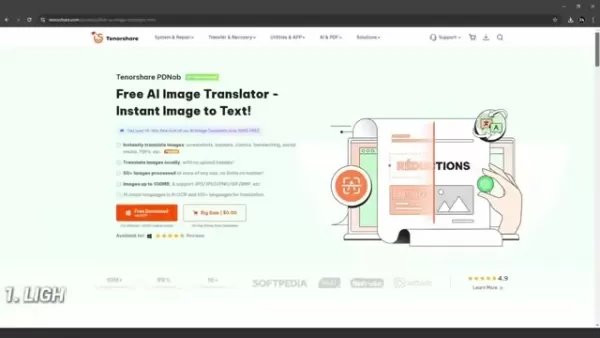
The PDNob AI Image Translator is a highly effective tool for extracting, copying, translating, and editing text from images and screenshots. It uses sophisticated AI OCR technology to reliably recognize text in numerous languages and provide immediate translations. Features like batch processing and in-app editing streamline the entire process, saving time and boosting productivity.
Pricing Plans and Affordability
Understanding PDNob's Cost Structure
PDNob AI Image Translator provides a free trial, allowing users to evaluate its capabilities fully before purchase. For ongoing use, users can choose from a variety of flexible and competitively priced subscription options, including a one-time purchase plan. PDNob delivers a cost-effective solution for both personal tasks, like translating study materials, and professional needs, such as managing international business communications.
How to Use PDNob AI Image Translator
Downloading and Installing PDNob
- Visit the Tenorshare Official Website:
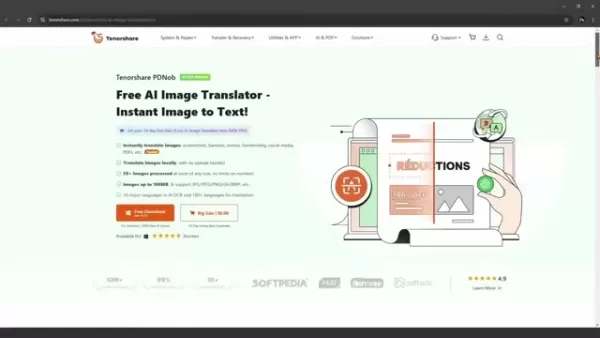
Navigate to the Tenorshare website to download the PDNob AI Image Translator.
- Download the Translator: Click the 'Free Download' button and select the version for your operating system (Windows or Mac).
- Install the Software: Run the installer and follow the simple on-screen instructions.
Initiating the Translation Process
- Launch PDNob: Open the PDNob software from your system tray or applications folder.
- Select an Image: Add an image using one of three convenient methods:
- Screen Capture: Take a new screenshot directly.
- Paste from Clipboard: Paste an image you've already copied.
- Click to Add: Import up to 30 image files from your device.
- Reviewing and Exporting: Choose the file you wish to translate.
- Select Languages:
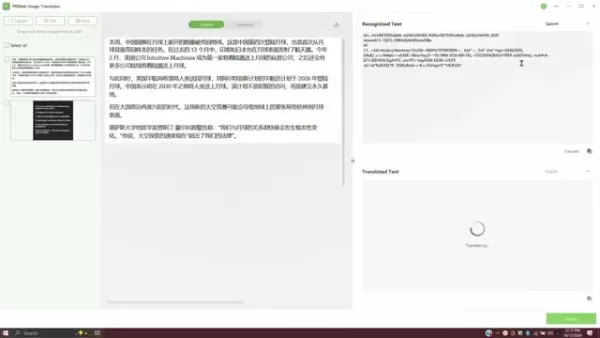
Pick the source and target languages from the dropdown menus.
- Edit and Copy: Make any necessary edits to the recognized text, then copy the final translation.
- Export: Save or export the results for use in other applications.
Advantages and Disadvantages of PDNob AI Image Translator
Pros
Delivers a fast and private translation experience.
High accuracy powered by advanced AI OCR.
Batch processing capability for significant time savings.
Extensive language support.
Intuitive, user-friendly interface.
Cons
Requires installation as desktop software.
Translation accuracy can be affected by image quality.
Minor recognition errors may happen on occasion.
PDNob AI Image Translator Core Features
Advanced AI OCR Technology
PDNob utilizes cutting-edge AI OCR technology to accurately identify text from a variety of image types. This ensures precise translations, even with challenging source material like low-resolution images or intricate fonts. The translator supports over 16 languages for AI recognition and more than 100 for translation, making it a versatile choice for diverse needs.
Batch Processing Capability
A key feature of PDNob is its ability to process many images at the same time.
This batch processing function is a major time-saver for large projects, boosting overall efficiency. Users can import multiple files and translate them all in a single operation.
Direct Editing and Copying
PDNob enables users to edit extracted text directly within the app. This is ideal for correcting minor recognition mistakes or polishing the final translation. Users can then instantly copy the text and paste it into other programs for further work.
PDNob AI Image Translator: Use Cases
Use Cases in Professional Settings
In the workplace, PDNob can translate documents, presentations, and marketing materials for international partners. It also streamlines data extraction from scanned documents, converting them into editable formats to enhance workflow and productivity.
Use Cases in Educational Settings
For students and academics, PDNob helps translate foreign-language textbooks, research papers, and study guides. It can also digitize handwritten notes, making information easier to organize, search, and share.
Use Cases in Everyday Life
In daily life, PDNob is perfect for translating restaurant menus, travel instructions, or product manuals while abroad. It also helps you understand social media posts and messages from friends and family in different languages, improving communication.
Frequently Asked Questions (FAQ)
What is AI OCR technology, and how does it work in PDNob AI Image Translator?
AI OCR (Artificial Intelligence Optical Character Recognition) combines artificial intelligence and machine learning to accurately detect and extract text from images. In PDNob, this technology scans the image, identifies the characters, and converts them into editable text ready for translation.
How accurate is the translation provided by PDNob AI Image Translator?
PDNob delivers highly accurate translations due to its sophisticated AI OCR and integration with leading translation engines. Accuracy can be influenced by factors like image clarity, font style, and linguistic complexity.
What file formats does PDNob AI Image Translator support for image input?
PDNob supports a broad range of common image formats, including JPG, PNG, BMP, and TIFF. This wide compatibility ensures you can translate text from almost any image source without issues.
Can I use PDNob AI Image Translator offline, or does it require an internet connection?
PDNob AI Image Translator requires an active internet connection to function. It uses cloud-based AI OCR and translation services, guaranteeing access to the most current language models and updates.
Related Questions
Are there any other AI-powered image translation tools available?
Yes, other notable tools include Google Translate, Microsoft Translator, and iTranslate. Each platform offers distinct features, language support, and pricing. Comparing them can help you find the best match for your specific requirements.
How can I improve the accuracy of image translation using AI OCR technology?
For best results, use clear, high-resolution images with well-lit text. Selecting the correct source language and reviewing the recognized text for errors before translating can also significantly improve accuracy.
What are some common challenges in AI-powered image translation?
Typical challenges include translating text from blurry images, unusual fonts, complex layouts, or idiomatic language. These factors can impact both text recognition and translation quality, sometimes necessitating manual review and correction.
Related article
 Anthropic Expands Claude AI Coding Tools to Japan in Push for Overseas Growth
Anthropic, a prominent U.S. artificial intelligence firm, is intensifying its global outreach. On Wednesday, the company hosted a major developer gathering, "Code with Claude," in Tokyo, drawing close to 500 software engineers. This initiative seeks
India’s Software Giant Cuts Hiring, Promises No Layoffs as AI Agents Scale Up
As artificial intelligence reshapes traditional labor-intensive business models, Tata Consultancy Services (TCS), a premier Indian software outsourcing firm, has unveiled its strategic response. During Tuesday’s annual general meeting, the chairman o
China Locks AI Models During Gaokam to Block Instant Homework Help
With the 2026 Gaokao fast approaching, rumors regarding the suspension of AI tools during the exam period have ignited intense online debate. In response to public concern, major AI platforms and educational apps have clarified their stance: rather t
Related Special Topic Recommendations
Design & Art
Anthropic Expands Claude AI Coding Tools to Japan in Push for Overseas Growth
Anthropic, a prominent U.S. artificial intelligence firm, is intensifying its global outreach. On Wednesday, the company hosted a major developer gathering, "Code with Claude," in Tokyo, drawing close to 500 software engineers. This initiative seeks
India’s Software Giant Cuts Hiring, Promises No Layoffs as AI Agents Scale Up
As artificial intelligence reshapes traditional labor-intensive business models, Tata Consultancy Services (TCS), a premier Indian software outsourcing firm, has unveiled its strategic response. During Tuesday’s annual general meeting, the chairman o
China Locks AI Models During Gaokam to Block Instant Homework Help
With the 2026 Gaokao fast approaching, rumors regarding the suspension of AI tools during the exam period have ignited intense online debate. In response to public concern, major AI platforms and educational apps have clarified their stance: rather t
Related Special Topic Recommendations
Design & Art
 Best AI Style Transfer Tools for Creative Experiments
2026 Latest Best Top-rated AI Style Transfer Tools for Creative Experiments! XIX.AI has curated a powerful, game-changing collection of must-try tools that deliver exceptional results through real-world tests and rigorous rankings. These top solutions help creatives boost productivity significantly by accelerating content creation and unlocking endless creative possibilities. Explore now to discover your perfect tool and start creating today!
 9 tools
 xix.ai
Comic Creation
Best AI Dialogue Bubble Tools for Visual Storytelling
xix.ai
Comic Creation
Best AI Dialogue Bubble Tools for Visual Storytelling
2026 Latest Best Top-Rated AI Dialogue Bubble Tools for Visual Storytelling are here on XIX.AI! This curated collection features powerful, game-changing tools that help creators boost productivity and overcome creative bottlenecks. Get a free vs paid comparison, see real-world tests, and check the latest rankings to find the must-try solutions perfect for crafting engaging visual narratives. Explore now to discover your ideal tool!
10 tools
xix.ai
Meeting Assistant
Top AI Meeting Summary Tools: Track Decisions and Follow-Ups Clearly
2026 Latest Top-Rated Best AI Meeting Summary Tools for Clear Decision Tracking and Effortless Follow-Ups. This curated list showcases powerful, game-changing solutions that boost productivity dramatically by automating meeting notes, identifying key action items, and streamlining team coordination across all projects. Get a free vs paid comparison along with real-world tests and weekly updated rankings to help you find the perfect tool. Explore now to unlock your AI edge!
9 tools
xix.ai
Data Analysis
Best AI Data Cleaning Tools: Fix Missing Values and Duplicates Fast
2026 Latest Best Top-rated AI Data Cleaning Tools for quick fixing of missing values and duplicates. This curated list showcases powerful, game-changing solutions that boost productivity significantly. Each option has undergone rigorous real-world tests to ensure reliability. Get a free vs paid comparison and discover the must-try tool that fits your needs best. Explore now at XIX.AI to Unlock your AI edge.
11 tools
xix.ai
Design & Art
Best AI Creative Ideation Tools for Artists: Break Through Visual Blocks
2026 Latest Best Top-Rated AI Creative Ideation Tools for Artists are curated by XIX.AI to help creators break through visual blocks and boost creativity instantly. These powerful game-changing tools offer real-world tests, detailed free vs paid comparison, and weekly updated rankings. Discover your perfect tool to accelerate content creation and unlock your AI edge today. Explore now!
14 tools
xix.ai
Music composition
AI Beat Makers for TikTok Background Tracks, Reels Audio, and Creator Promo Music
2026 Latest Best AI Beat Makers for TikTok Background Tracks, Reels Audio, and Creator Promo Music! XIX.AI has curated a top-rated list of powerful game-changing tools that go through real-world tests to deliver flawless music for every content need. You’ll find detailed free vs paid comparison data, weekly updated rankings, and must-try options to help you boost creativity and productivity. Explore now to discover your perfect tool!
11 tools
xix.ai

 Comments (3)
0/500
Comments (3)
0/500
![RobertGonzalez]()
Wait, so this AI can translate text from images instantly? That's wild! I've been manually typing out text from screenshots like a caveman. 😂 Definitely need to try PDNob AI for my travel photos. But how accurate is it with handwritten notes though? 🤔
![AlbertThomas]()
와 이 기능 정말 유용하네요! 특히 해외 여행 중에 메뉴판이나 표지판을 번역해야 할 때 바로 쓸 수 있을 것 같아요. 근데 AI 번역이 100% 정확하지 않을 때가 있어서 중요한 문서에는 조심해야 할 듯 ㅋㅋ 그래도 일상생활엔 충분할 것 같아요.
![BrianWalker]()
この記事実用的過ぎる!私も旅行先でメニュー訳す時にいつも困ってた。AI翻訳の精度次第では、紙の辞書が本当になくなっちゃうかも…笑 でも、もし写真に手書き文字が含まれてたら正しく認識できるのか少し気になるな。あとプライバシー的には、画像のアップロード先は大丈夫なのかな?開発元の情報も少し載せてくれたらもっと親切かも。
In our fast-paced digital world, the ability to instantly translate text from images is more valuable than ever. Whether you're dealing with a screenshot, a social media meme, or a scanned document, deciphering text in a foreign language can be a slow process. The PDNob AI Image Translator offers a powerful solution, using advanced AI-powered OCR technology to deliver instant, accurate translations directly from your images.
Key Points
PDNob's AI Image Translator quickly converts text from images and screenshots into your preferred language.
It leverages precise AI-OCR technology for reliable text recognition and translation.
The tool supports a wide array of input and output languages.
PDNob features batch processing to handle multiple images at once.
Translated text can be easily copied and used in other applications.
Introduction to AI Image Translation
The Growing Need for Image Translation
As content becomes increasingly global, encountering text within images in different languages is an everyday occurrence. Manual translation is often slow and prone to mistakes. AI-powered image translators solve this by automatically and accurately recognizing and translating text. These tools break down language barriers, making information accessible to all, regardless of language skills.
What is PDNob AI Image Translator?
The PDNob AI Image Translator is a highly effective tool for extracting, copying, translating, and editing text from images and screenshots. It uses sophisticated AI OCR technology to reliably recognize text in numerous languages and provide immediate translations. Features like batch processing and in-app editing streamline the entire process, saving time and boosting productivity.
Pricing Plans and Affordability
Understanding PDNob's Cost Structure
PDNob AI Image Translator provides a free trial, allowing users to evaluate its capabilities fully before purchase. For ongoing use, users can choose from a variety of flexible and competitively priced subscription options, including a one-time purchase plan. PDNob delivers a cost-effective solution for both personal tasks, like translating study materials, and professional needs, such as managing international business communications.
How to Use PDNob AI Image Translator
Downloading and Installing PDNob
- Visit the Tenorshare Official Website:
Navigate to the Tenorshare website to download the PDNob AI Image Translator.
- Download the Translator: Click the 'Free Download' button and select the version for your operating system (Windows or Mac).
- Install the Software: Run the installer and follow the simple on-screen instructions.
Initiating the Translation Process
- Launch PDNob: Open the PDNob software from your system tray or applications folder.
- Select an Image: Add an image using one of three convenient methods:
- Screen Capture: Take a new screenshot directly.
- Paste from Clipboard: Paste an image you've already copied.
- Click to Add: Import up to 30 image files from your device.
- Reviewing and Exporting: Choose the file you wish to translate.
- Select Languages:
Pick the source and target languages from the dropdown menus.
- Edit and Copy: Make any necessary edits to the recognized text, then copy the final translation.
- Export: Save or export the results for use in other applications.
Advantages and Disadvantages of PDNob AI Image Translator
Pros
Delivers a fast and private translation experience.
High accuracy powered by advanced AI OCR.
Batch processing capability for significant time savings.
Extensive language support.
Intuitive, user-friendly interface.
Cons
Requires installation as desktop software.
Translation accuracy can be affected by image quality.
Minor recognition errors may happen on occasion.
PDNob AI Image Translator Core Features
Advanced AI OCR Technology
PDNob utilizes cutting-edge AI OCR technology to accurately identify text from a variety of image types. This ensures precise translations, even with challenging source material like low-resolution images or intricate fonts. The translator supports over 16 languages for AI recognition and more than 100 for translation, making it a versatile choice for diverse needs.
Batch Processing Capability
A key feature of PDNob is its ability to process many images at the same time.
This batch processing function is a major time-saver for large projects, boosting overall efficiency. Users can import multiple files and translate them all in a single operation.
Direct Editing and Copying
PDNob enables users to edit extracted text directly within the app. This is ideal for correcting minor recognition mistakes or polishing the final translation. Users can then instantly copy the text and paste it into other programs for further work.
PDNob AI Image Translator: Use Cases
Use Cases in Professional Settings
In the workplace, PDNob can translate documents, presentations, and marketing materials for international partners. It also streamlines data extraction from scanned documents, converting them into editable formats to enhance workflow and productivity.
Use Cases in Educational Settings
For students and academics, PDNob helps translate foreign-language textbooks, research papers, and study guides. It can also digitize handwritten notes, making information easier to organize, search, and share.
Use Cases in Everyday Life
In daily life, PDNob is perfect for translating restaurant menus, travel instructions, or product manuals while abroad. It also helps you understand social media posts and messages from friends and family in different languages, improving communication.
Frequently Asked Questions (FAQ)
What is AI OCR technology, and how does it work in PDNob AI Image Translator?
AI OCR (Artificial Intelligence Optical Character Recognition) combines artificial intelligence and machine learning to accurately detect and extract text from images. In PDNob, this technology scans the image, identifies the characters, and converts them into editable text ready for translation.
How accurate is the translation provided by PDNob AI Image Translator?
PDNob delivers highly accurate translations due to its sophisticated AI OCR and integration with leading translation engines. Accuracy can be influenced by factors like image clarity, font style, and linguistic complexity.
What file formats does PDNob AI Image Translator support for image input?
PDNob supports a broad range of common image formats, including JPG, PNG, BMP, and TIFF. This wide compatibility ensures you can translate text from almost any image source without issues.
Can I use PDNob AI Image Translator offline, or does it require an internet connection?
PDNob AI Image Translator requires an active internet connection to function. It uses cloud-based AI OCR and translation services, guaranteeing access to the most current language models and updates.
Related Questions
Are there any other AI-powered image translation tools available?
Yes, other notable tools include Google Translate, Microsoft Translator, and iTranslate. Each platform offers distinct features, language support, and pricing. Comparing them can help you find the best match for your specific requirements.
How can I improve the accuracy of image translation using AI OCR technology?
For best results, use clear, high-resolution images with well-lit text. Selecting the correct source language and reviewing the recognized text for errors before translating can also significantly improve accuracy.
What are some common challenges in AI-powered image translation?
Typical challenges include translating text from blurry images, unusual fonts, complex layouts, or idiomatic language. These factors can impact both text recognition and translation quality, sometimes necessitating manual review and correction.








 Anthropic Expands Claude AI Coding Tools to Japan in Push for Overseas Growth
Anthropic, a prominent U.S. artificial intelligence firm, is intensifying its global outreach. On Wednesday, the company hosted a major developer gathering, "Code with Claude," in Tokyo, drawing close to 500 software engineers. This initiative seeks
Anthropic Expands Claude AI Coding Tools to Japan in Push for Overseas Growth
Anthropic, a prominent U.S. artificial intelligence firm, is intensifying its global outreach. On Wednesday, the company hosted a major developer gathering, "Code with Claude," in Tokyo, drawing close to 500 software engineers. This initiative seeks
 India’s Software Giant Cuts Hiring, Promises No Layoffs as AI Agents Scale Up
As artificial intelligence reshapes traditional labor-intensive business models, Tata Consultancy Services (TCS), a premier Indian software outsourcing firm, has unveiled its strategic response. During Tuesday’s annual general meeting, the chairman o
India’s Software Giant Cuts Hiring, Promises No Layoffs as AI Agents Scale Up
As artificial intelligence reshapes traditional labor-intensive business models, Tata Consultancy Services (TCS), a premier Indian software outsourcing firm, has unveiled its strategic response. During Tuesday’s annual general meeting, the chairman o
 China Locks AI Models During Gaokam to Block Instant Homework Help
With the 2026 Gaokao fast approaching, rumors regarding the suspension of AI tools during the exam period have ignited intense online debate. In response to public concern, major AI platforms and educational apps have clarified their stance: rather t
China Locks AI Models During Gaokam to Block Instant Homework Help
With the 2026 Gaokao fast approaching, rumors regarding the suspension of AI tools during the exam period have ignited intense online debate. In response to public concern, major AI platforms and educational apps have clarified their stance: rather t

2026 Latest Best Top-rated AI Style Transfer Tools for Creative Experiments! XIX.AI has curated a powerful, game-changing collection of must-try tools that deliver exceptional results through real-world tests and rigorous rankings. These top solutions help creatives boost productivity significantly by accelerating content creation and unlocking endless creative possibilities. Explore now to discover your perfect tool and start creating today!
9 tools
xix.ai

2026 Latest Best Top-Rated AI Dialogue Bubble Tools for Visual Storytelling are here on XIX.AI! This curated collection features powerful, game-changing tools that help creators boost productivity and overcome creative bottlenecks. Get a free vs paid comparison, see real-world tests, and check the latest rankings to find the must-try solutions perfect for crafting engaging visual narratives. Explore now to discover your ideal tool!
10 tools
xix.ai

2026 Latest Top-Rated Best AI Meeting Summary Tools for Clear Decision Tracking and Effortless Follow-Ups. This curated list showcases powerful, game-changing solutions that boost productivity dramatically by automating meeting notes, identifying key action items, and streamlining team coordination across all projects. Get a free vs paid comparison along with real-world tests and weekly updated rankings to help you find the perfect tool. Explore now to unlock your AI edge!
9 tools
xix.ai

2026 Latest Best Top-rated AI Data Cleaning Tools for quick fixing of missing values and duplicates. This curated list showcases powerful, game-changing solutions that boost productivity significantly. Each option has undergone rigorous real-world tests to ensure reliability. Get a free vs paid comparison and discover the must-try tool that fits your needs best. Explore now at XIX.AI to Unlock your AI edge.
11 tools
xix.ai

2026 Latest Best Top-Rated AI Creative Ideation Tools for Artists are curated by XIX.AI to help creators break through visual blocks and boost creativity instantly. These powerful game-changing tools offer real-world tests, detailed free vs paid comparison, and weekly updated rankings. Discover your perfect tool to accelerate content creation and unlock your AI edge today. Explore now!
14 tools
xix.ai

2026 Latest Best AI Beat Makers for TikTok Background Tracks, Reels Audio, and Creator Promo Music! XIX.AI has curated a top-rated list of powerful game-changing tools that go through real-world tests to deliver flawless music for every content need. You’ll find detailed free vs paid comparison data, weekly updated rankings, and must-try options to help you boost creativity and productivity. Explore now to discover your perfect tool!
11 tools
xix.ai

Wait, so this AI can translate text from images instantly? That's wild! I've been manually typing out text from screenshots like a caveman. 😂 Definitely need to try PDNob AI for my travel photos. But how accurate is it with handwritten notes though? 🤔
와 이 기능 정말 유용하네요! 특히 해외 여행 중에 메뉴판이나 표지판을 번역해야 할 때 바로 쓸 수 있을 것 같아요. 근데 AI 번역이 100% 정확하지 않을 때가 있어서 중요한 문서에는 조심해야 할 듯 ㅋㅋ 그래도 일상생활엔 충분할 것 같아요.
この記事実用的過ぎる!私も旅行先でメニュー訳す時にいつも困ってた。AI翻訳の精度次第では、紙の辞書が本当になくなっちゃうかも…笑 でも、もし写真に手書き文字が含まれてたら正しく認識できるのか少し気になるな。あとプライバシー的には、画像のアップロード先は大丈夫なのかな?開発元の情報も少し載せてくれたらもっと親切かも。












