


 Home
HomeBing Image Creator Transforms AI-Powered Visual Generation
The rise of artificial intelligence is revolutionizing creative industries worldwide, and visual content creation stands at the forefront of this transformation. Platforms like Bing Image Creator now make professional-grade image generation accessible to everyone. Whether you're just starting out or have experience with digital tools, this comprehensive walkthrough will help you master AI-powered image creation through Bing. Discover how to effortlessly translate your vision into stunning visuals with remarkable accuracy.
Key Points
Generate prompts effortlessly by drafting them first in your native language using translation tools.
Find Bing's image generation feature directly within the Bing search platform.
Develop comprehensive descriptions to steer the AI's creative output.
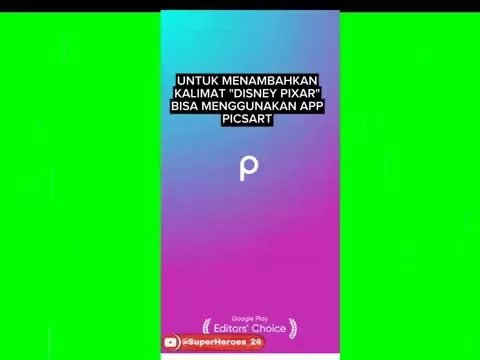
Incorporate distinctive Disney Pixar visual elements into your image requests.
Customize your creations further using photo editing applications like PicsArt.
Include culturally specific terms for precise visual targeting.
Experiment with expressive descriptors to enrich image details.
Test various artistic approaches to broaden your visual repertoire.
Obtain high-resolution AI artwork suitable for diverse applications.
Getting Started with AI Image Generation
The Role of AI in Visual Content Creation
Artificial intelligence is fundamentally changing visual content development. Where traditional methods demanded specialized skills and substantial resources, modern AI tools like Bing Image Creator empower anyone to produce professional visuals through simple text descriptions. This breakthrough creates unprecedented opportunities for creators across all fields to develop compelling imagery effortlessly.
Sophisticated algorithms analyze text inputs and generate corresponding visuals by drawing from extensive visual databases. The technology offers impressive control over artistic style, composition, and subject matter. As AI continues evolving, we anticipate even more intuitive and powerful capabilities emerging.
The advantages of AI-driven visual creation include:
- Speed: Produce images within minutes rather than days
- Universal access: Requires no specialized training
- Budget-friendly: Eliminates costly photography or design expenses
- Creative freedom: Enables exploration of previously inaccessible artistic directions
Understanding Bing Image Creator
Microsoft's Bing Image Creator transforms text descriptions into visual art through advanced AI technology. Integrated within the Bing search platform, this powerful tool utilizes DALL-E's renowned image generation capabilities.
The platform operates through a straightforward search interface - users simply enter descriptive text to receive matching visual results. These creations can be downloaded for various applications including digital content, presentations, and artistic projects.
Notable features include:
- Instant text-to-visual conversion
- Customizable artistic styles
- Precise detail adjustment options
- Seamless browser integration
- Complimentary generation credits
Advanced Tips and Tricks for Bing Image Creator
Refining Your Prompts for Better Results
Successful AI image generation relies heavily on well-crafted prompts. The following strategies can significantly enhance your outcomes:
- Precision: Detailed descriptions yield better matches to your vision
- Rich vocabulary: Paint vivid mental pictures for the AI
- Strategic terminology: Use style-specific keywords
- Iterative refinement: Multiple attempts often produce superior results
Exploring Different Artistic Styles
The platform supports numerous creative approaches:
- Animated looks: Achieve cartoon-style renditions
- Three-dimensional renders: Create lifelike digital models
- Photorealistic outputs: Generate natural-looking compositions
- Experimental designs: Produce unconventional abstract works
Leveraging External Tools for Enhanced Customization
Complement Bing Image Creator with dedicated editing software:
- Photo adjustment: Fine-tune technical elements
- Graphic enhancement: Add text and visual elements
- Special effects: Apply distinctive filters
Step-by-Step Guide: Creating AI Images with Bing
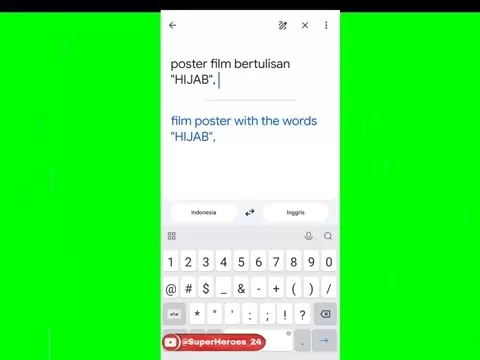
Step 1: Crafting Your Prompt with Google Translate
Begin by developing your concept in your native language:
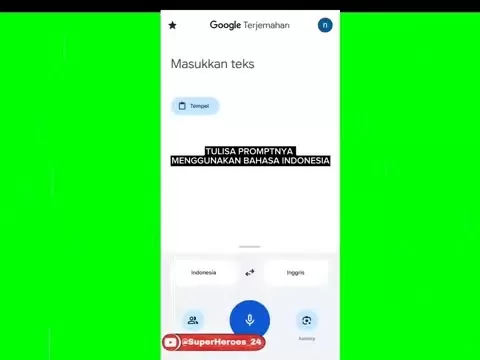
Launch Google Translate in your preferred browser
- Set translation to your native language
- Enter your detailed visual description
- Verify English translation accuracy
Step 2: Accessing Bing Image Creator
Locate the image generation feature:
Navigate to Bing's search platform
- Authenticate your Microsoft account
- Search for the image creator tool
- Access the dedicated interface
Step 3: Entering Your Prompt
Input your refined description:
- Locate the description field
- Insert your translated text
- Review for clarity and completeness
Step 4: Generating Your Image
Initiate the creation process:
Activate generation
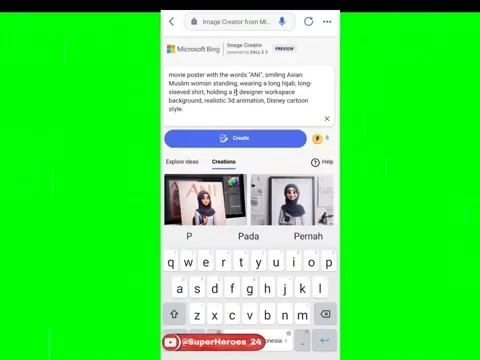
Wait for processing completion
Evaluate initial results
Generate alternatives if needed
Step 5: Downloading Your Image
Save your creations:
Select preferred output
Locate download option
Specify save location
Organize files appropriately
Step 6: Editing and Enhancing Your Image with PicsArt
Finalize your images:
- Launch editing application
- Import AI-generated file
- Apply technical adjustments
- Add textual elements
- Incorporate graphic enhancements
- Preserve finalized version
Pricing of Bing Image Creator
Understanding Bing Image Creator's Free Tier
The platform's accessible model includes:
- Complimentary generation credits
- Periodic credit refresh
- Certain feature restrictions
Subscription and Paid Options
Premium benefits may include:
- Superior image quality
- Accelerated processing
- Ad-free experience
Pros and Cons of Bing Image Creator
Pros
Intuitive interface
Impressive output quality
Universal accessibility
Search engine integration
Budget-friendly options
Cons
Customization restrictions
Variable consistency
Prompt dependence
Initial learning period
Ethical implications
Core Features of Bing Image Creator
Text-to-Image Conversion
Foundation capabilities include:
- Advanced language interpretation
- Visual element synthesis
- Artistic style adaptation
Style Customization
Creative control options:
- Keyword-based styling
- Preconfigured aesthetic options
- Hybrid style creation
Detail Control
Precision adjustment methods:
- Comprehensive descriptive prompts
- Exclusion specifications
- Post-generation refinement
Use Cases for Bing Image Creator
Social Media Content Creation
Ideal applications:
- Distinctive visual branding
- Consistent aesthetic maintenance
- Efficient content production
Marketing and Advertising
Commercial benefits:
- Cost-efficient visual solutions
- Targeted message visualization
- Performance testing capabilities
Creative Projects
Artistic applications:
- Concept development
- Rapid prototyping
- Collaborative opportunities
Frequently Asked Questions
Is Bing Image Creator free to use?
The platform offers complimentary generation capabilities with certain limitations. Enhanced features may require subscription.
What types of prompts work best with Bing Image Creator?
Clear, detailed descriptions incorporating specific visual elements and stylistic preferences yield optimal results.
Can I use Bing Image Creator for commercial purposes?
Commercial usage is permitted within Microsoft's established guidelines.
What are the limitations of Bing Image Creator?
Limitations may include output resolution, processing speed, and prompt interpretation accuracy.
Can I edit the images generated by Bing Image Creator?
Post-generation editing using compatible software is fully supported.
Related Questions
How can I improve the quality of AI-generated images?
Enhancing AI-generated visuals involves multiple approaches:Detailed Descriptions: Provide comprehensive specifications covering subject matter, artistic style, and composition elements.Vivid Terminology: Utilize descriptive language that clearly conveys visual concepts.Keyword Strategy: Implement aesthetic-specific terms for stylistic precision.Iterative Development: Generate multiple versions with adjusted prompts.Visual Experimentation: Explore diverse creative directions.Editing Enhancement: Utilize post-production tools for technical refinements.Ultra-HD Options: Select maximum resolution settings when available.Implementing these techniques can dramatically improve both technical quality and visual appeal, producing AI-generated artwork suitable for professional applications.
Related article
 Apple Smart Glasses Could Debut at WWDC27, Highlighting Privacy Protection
Bloomberg’s Mark Gurman reports that Apple’s smart glasses, codenamed N50, are slated for a WWDC27 debut in June 2027, with a retail launch expected in autumn 2027. Originally targeted for late this year and early 2027, the device’s release has been
Inside Details Exposed About Next-Gen Gemini: Strained Computing Power, Internal Teams Disagreed on Development Priorities and Resource Allocation
Reports indicate that the launch of Google’s highly anticipated next-generation Gemini model has been pushed back. Internal disagreements over development priorities and resource allocation, combined with limited computing capacity and complex approv
OpenAI Dismisses Growth Slowdown Concerns, Says Multiple Business Units Accelerating
In response to external scrutiny regarding decelerating sales growth and missed internal benchmarks, AI leader OpenAI issued a confident statement on Tuesday, April 28. The company clarified that its consumer products and enterprise services are adva
Related Special Topic Recommendations
Data Analysis
Apple Smart Glasses Could Debut at WWDC27, Highlighting Privacy Protection
Bloomberg’s Mark Gurman reports that Apple’s smart glasses, codenamed N50, are slated for a WWDC27 debut in June 2027, with a retail launch expected in autumn 2027. Originally targeted for late this year and early 2027, the device’s release has been
Inside Details Exposed About Next-Gen Gemini: Strained Computing Power, Internal Teams Disagreed on Development Priorities and Resource Allocation
Reports indicate that the launch of Google’s highly anticipated next-generation Gemini model has been pushed back. Internal disagreements over development priorities and resource allocation, combined with limited computing capacity and complex approv
OpenAI Dismisses Growth Slowdown Concerns, Says Multiple Business Units Accelerating
In response to external scrutiny regarding decelerating sales growth and missed internal benchmarks, AI leader OpenAI issued a confident statement on Tuesday, April 28. The company clarified that its consumer products and enterprise services are adva
Related Special Topic Recommendations
Data Analysis
 AI SQL Copilots for Revenue Dashboards, Funnel Analysis, and Product Metrics
2026 Latest Best AI SQL Copilots Ranked Top-Rated! XIX.AI curates a powerful game-changing collection for weekly updated real-world tests. These must-try tools help you generate accurate revenue dashboards, analyze sales funnels, and track product metrics swiftly, boosting productivity massively. Explore now to Discover your perfect tool for data-driven decision making! 238 characters
 9 tools
 xix.ai
Music composition
Best AI Melody Writing Tools for Song Drafts
xix.ai
Music composition
Best AI Melody Writing Tools for Song Drafts
2026 Latest Best Top-Rated AI Melody Writing Tools for Song Drafts! XIX.AI has curated a highly powerful game-changing collection that goes through rigorous real-world tests to deliver the best writing experience. You can find detailed free vs paid comparisons, accurate rankings, and must-try options designed to help you create stunning song drafts effortlessly and boost your creative productivity significantly. Explore now to discover your perfect tool!
8 tools
xix.ai
chatbot
Best AI Conversation Trainer Tools for Interview Practice
2026 Latest Best Top-rated AI Conversation Trainer Tools for Interview Practice are here on XIX.AI! This curated collection features powerful, game-changing tools that go through rigorous real-world tests to deliver accurate feedback. You’ll find a free vs paid comparison and detailed rankings to help you choose the must-try option that boosts your confidence and skills. Explore now to Discover your perfect tool for interview success!
12 tools
xix.ai
Design & Art
Best AI Style Transfer Tools for Creative Experiments
2026 Latest Best Top-rated AI Style Transfer Tools for Creative Experiments! XIX.AI has curated a powerful, game-changing collection of must-try tools that deliver exceptional results through real-world tests and rigorous rankings. These top solutions help creatives boost productivity significantly by accelerating content creation and unlocking endless creative possibilities. Explore now to discover your perfect tool and start creating today!
9 tools
xix.ai
Comic Creation
Best AI Dialogue Bubble Tools for Visual Storytelling
2026 Latest Best Top-Rated AI Dialogue Bubble Tools for Visual Storytelling are here on XIX.AI! This curated collection features powerful, game-changing tools that help creators boost productivity and overcome creative bottlenecks. Get a free vs paid comparison, see real-world tests, and check the latest rankings to find the must-try solutions perfect for crafting engaging visual narratives. Explore now to discover your ideal tool!
10 tools
xix.ai
Meeting Assistant
Top AI Meeting Summary Tools: Track Decisions and Follow-Ups Clearly
2026 Latest Top-Rated Best AI Meeting Summary Tools for Clear Decision Tracking and Effortless Follow-Ups. This curated list showcases powerful, game-changing solutions that boost productivity dramatically by automating meeting notes, identifying key action items, and streamlining team coordination across all projects. Get a free vs paid comparison along with real-world tests and weekly updated rankings to help you find the perfect tool. Explore now to unlock your AI edge!
9 tools
xix.ai

 Comments (0)
0/500
Comments (0)
0/500
The rise of artificial intelligence is revolutionizing creative industries worldwide, and visual content creation stands at the forefront of this transformation. Platforms like Bing Image Creator now make professional-grade image generation accessible to everyone. Whether you're just starting out or have experience with digital tools, this comprehensive walkthrough will help you master AI-powered image creation through Bing. Discover how to effortlessly translate your vision into stunning visuals with remarkable accuracy.
Key Points
Generate prompts effortlessly by drafting them first in your native language using translation tools.
Find Bing's image generation feature directly within the Bing search platform.
Develop comprehensive descriptions to steer the AI's creative output.
Incorporate distinctive Disney Pixar visual elements into your image requests.
Customize your creations further using photo editing applications like PicsArt.
Include culturally specific terms for precise visual targeting.
Experiment with expressive descriptors to enrich image details.
Test various artistic approaches to broaden your visual repertoire.
Obtain high-resolution AI artwork suitable for diverse applications.
Getting Started with AI Image Generation
The Role of AI in Visual Content Creation
Artificial intelligence is fundamentally changing visual content development. Where traditional methods demanded specialized skills and substantial resources, modern AI tools like Bing Image Creator empower anyone to produce professional visuals through simple text descriptions. This breakthrough creates unprecedented opportunities for creators across all fields to develop compelling imagery effortlessly.
Sophisticated algorithms analyze text inputs and generate corresponding visuals by drawing from extensive visual databases. The technology offers impressive control over artistic style, composition, and subject matter. As AI continues evolving, we anticipate even more intuitive and powerful capabilities emerging.
The advantages of AI-driven visual creation include:
- Speed: Produce images within minutes rather than days
- Universal access: Requires no specialized training
- Budget-friendly: Eliminates costly photography or design expenses
- Creative freedom: Enables exploration of previously inaccessible artistic directions
Understanding Bing Image Creator
Microsoft's Bing Image Creator transforms text descriptions into visual art through advanced AI technology. Integrated within the Bing search platform, this powerful tool utilizes DALL-E's renowned image generation capabilities.
The platform operates through a straightforward search interface - users simply enter descriptive text to receive matching visual results. These creations can be downloaded for various applications including digital content, presentations, and artistic projects.
Notable features include:
- Instant text-to-visual conversion
- Customizable artistic styles
- Precise detail adjustment options
- Seamless browser integration
- Complimentary generation credits
Advanced Tips and Tricks for Bing Image Creator
Refining Your Prompts for Better Results
Successful AI image generation relies heavily on well-crafted prompts. The following strategies can significantly enhance your outcomes:
- Precision: Detailed descriptions yield better matches to your vision
- Rich vocabulary: Paint vivid mental pictures for the AI
- Strategic terminology: Use style-specific keywords
- Iterative refinement: Multiple attempts often produce superior results
Exploring Different Artistic Styles
The platform supports numerous creative approaches:
- Animated looks: Achieve cartoon-style renditions
- Three-dimensional renders: Create lifelike digital models
- Photorealistic outputs: Generate natural-looking compositions
- Experimental designs: Produce unconventional abstract works
Leveraging External Tools for Enhanced Customization
Complement Bing Image Creator with dedicated editing software:
- Photo adjustment: Fine-tune technical elements
- Graphic enhancement: Add text and visual elements
- Special effects: Apply distinctive filters
Step-by-Step Guide: Creating AI Images with Bing
Step 1: Crafting Your Prompt with Google Translate
Begin by developing your concept in your native language:
Launch Google Translate in your preferred browser
- Set translation to your native language
- Enter your detailed visual description
- Verify English translation accuracy
Step 2: Accessing Bing Image Creator
Locate the image generation feature:
Navigate to Bing's search platform
- Authenticate your Microsoft account
- Search for the image creator tool
- Access the dedicated interface
Step 3: Entering Your Prompt
Input your refined description:
- Locate the description field
- Insert your translated text
- Review for clarity and completeness
Step 4: Generating Your Image
Initiate the creation process:
Activate generation
Wait for processing completion
Evaluate initial results
Generate alternatives if needed
Step 5: Downloading Your Image
Save your creations:
Select preferred output
Locate download option
Specify save location
Organize files appropriately
Step 6: Editing and Enhancing Your Image with PicsArt
Finalize your images:
- Launch editing application
- Import AI-generated file
- Apply technical adjustments
- Add textual elements
- Incorporate graphic enhancements
- Preserve finalized version
Pricing of Bing Image Creator
Understanding Bing Image Creator's Free Tier
The platform's accessible model includes:
- Complimentary generation credits
- Periodic credit refresh
- Certain feature restrictions
Subscription and Paid Options
Premium benefits may include:
- Superior image quality
- Accelerated processing
- Ad-free experience
Pros and Cons of Bing Image Creator
Pros
Intuitive interface
Impressive output quality
Universal accessibility
Search engine integration
Budget-friendly options
Cons
Customization restrictions
Variable consistency
Prompt dependence
Initial learning period
Ethical implications
Core Features of Bing Image Creator
Text-to-Image Conversion
Foundation capabilities include:
- Advanced language interpretation
- Visual element synthesis
- Artistic style adaptation
Style Customization
Creative control options:
- Keyword-based styling
- Preconfigured aesthetic options
- Hybrid style creation
Detail Control
Precision adjustment methods:
- Comprehensive descriptive prompts
- Exclusion specifications
- Post-generation refinement
Use Cases for Bing Image Creator
Social Media Content Creation
Ideal applications:
- Distinctive visual branding
- Consistent aesthetic maintenance
- Efficient content production
Marketing and Advertising
Commercial benefits:
- Cost-efficient visual solutions
- Targeted message visualization
- Performance testing capabilities
Creative Projects
Artistic applications:
- Concept development
- Rapid prototyping
- Collaborative opportunities
Frequently Asked Questions
Is Bing Image Creator free to use?
The platform offers complimentary generation capabilities with certain limitations. Enhanced features may require subscription.
What types of prompts work best with Bing Image Creator?
Clear, detailed descriptions incorporating specific visual elements and stylistic preferences yield optimal results.
Can I use Bing Image Creator for commercial purposes?
Commercial usage is permitted within Microsoft's established guidelines.
What are the limitations of Bing Image Creator?
Limitations may include output resolution, processing speed, and prompt interpretation accuracy.
Can I edit the images generated by Bing Image Creator?
Post-generation editing using compatible software is fully supported.
Related Questions
How can I improve the quality of AI-generated images?
Enhancing AI-generated visuals involves multiple approaches:Detailed Descriptions: Provide comprehensive specifications covering subject matter, artistic style, and composition elements.Vivid Terminology: Utilize descriptive language that clearly conveys visual concepts.Keyword Strategy: Implement aesthetic-specific terms for stylistic precision.Iterative Development: Generate multiple versions with adjusted prompts.Visual Experimentation: Explore diverse creative directions.Editing Enhancement: Utilize post-production tools for technical refinements.Ultra-HD Options: Select maximum resolution settings when available.Implementing these techniques can dramatically improve both technical quality and visual appeal, producing AI-generated artwork suitable for professional applications.








 Apple Smart Glasses Could Debut at WWDC27, Highlighting Privacy Protection
Bloomberg’s Mark Gurman reports that Apple’s smart glasses, codenamed N50, are slated for a WWDC27 debut in June 2027, with a retail launch expected in autumn 2027. Originally targeted for late this year and early 2027, the device’s release has been
Apple Smart Glasses Could Debut at WWDC27, Highlighting Privacy Protection
Bloomberg’s Mark Gurman reports that Apple’s smart glasses, codenamed N50, are slated for a WWDC27 debut in June 2027, with a retail launch expected in autumn 2027. Originally targeted for late this year and early 2027, the device’s release has been
 Inside Details Exposed About Next-Gen Gemini: Strained Computing Power, Internal Teams Disagreed on Development Priorities and Resource Allocation
Reports indicate that the launch of Google’s highly anticipated next-generation Gemini model has been pushed back. Internal disagreements over development priorities and resource allocation, combined with limited computing capacity and complex approv
Inside Details Exposed About Next-Gen Gemini: Strained Computing Power, Internal Teams Disagreed on Development Priorities and Resource Allocation
Reports indicate that the launch of Google’s highly anticipated next-generation Gemini model has been pushed back. Internal disagreements over development priorities and resource allocation, combined with limited computing capacity and complex approv
 OpenAI Dismisses Growth Slowdown Concerns, Says Multiple Business Units Accelerating
In response to external scrutiny regarding decelerating sales growth and missed internal benchmarks, AI leader OpenAI issued a confident statement on Tuesday, April 28. The company clarified that its consumer products and enterprise services are adva
OpenAI Dismisses Growth Slowdown Concerns, Says Multiple Business Units Accelerating
In response to external scrutiny regarding decelerating sales growth and missed internal benchmarks, AI leader OpenAI issued a confident statement on Tuesday, April 28. The company clarified that its consumer products and enterprise services are adva

2026 Latest Best AI SQL Copilots Ranked Top-Rated! XIX.AI curates a powerful game-changing collection for weekly updated real-world tests. These must-try tools help you generate accurate revenue dashboards, analyze sales funnels, and track product metrics swiftly, boosting productivity massively. Explore now to Discover your perfect tool for data-driven decision making! 238 characters
9 tools
xix.ai

2026 Latest Best Top-Rated AI Melody Writing Tools for Song Drafts! XIX.AI has curated a highly powerful game-changing collection that goes through rigorous real-world tests to deliver the best writing experience. You can find detailed free vs paid comparisons, accurate rankings, and must-try options designed to help you create stunning song drafts effortlessly and boost your creative productivity significantly. Explore now to discover your perfect tool!
8 tools
xix.ai

2026 Latest Best Top-rated AI Conversation Trainer Tools for Interview Practice are here on XIX.AI! This curated collection features powerful, game-changing tools that go through rigorous real-world tests to deliver accurate feedback. You’ll find a free vs paid comparison and detailed rankings to help you choose the must-try option that boosts your confidence and skills. Explore now to Discover your perfect tool for interview success!
12 tools
xix.ai

2026 Latest Best Top-rated AI Style Transfer Tools for Creative Experiments! XIX.AI has curated a powerful, game-changing collection of must-try tools that deliver exceptional results through real-world tests and rigorous rankings. These top solutions help creatives boost productivity significantly by accelerating content creation and unlocking endless creative possibilities. Explore now to discover your perfect tool and start creating today!
9 tools
xix.ai

2026 Latest Best Top-Rated AI Dialogue Bubble Tools for Visual Storytelling are here on XIX.AI! This curated collection features powerful, game-changing tools that help creators boost productivity and overcome creative bottlenecks. Get a free vs paid comparison, see real-world tests, and check the latest rankings to find the must-try solutions perfect for crafting engaging visual narratives. Explore now to discover your ideal tool!
10 tools
xix.ai

2026 Latest Top-Rated Best AI Meeting Summary Tools for Clear Decision Tracking and Effortless Follow-Ups. This curated list showcases powerful, game-changing solutions that boost productivity dramatically by automating meeting notes, identifying key action items, and streamlining team coordination across all projects. Get a free vs paid comparison along with real-world tests and weekly updated rankings to help you find the perfect tool. Explore now to unlock your AI edge!
9 tools
xix.ai












