


 Home
HomeRemini AI Transforms Photos with Realistic Gender Swap Feature
Artificial intelligence has completely transformed photo editing, putting powerful tools that were once reserved for professionals right at our fingertips. One of the most intriguing AI applications is the ability to perform gender swaps on photos, giving you a glimpse of what you might look like as the opposite gender. This guide walks you through using Remini AI Photo Enhancer, an intuitive app that makes AI gender swapping accessible to everyone. You'll discover how to install and use the app, explore its capabilities, and create your own AI-generated gender-swapped portraits.
Key Points
Use AI gender swap technology to explore different gender identities through photo transformation.
Learn to install and configure Remini AI Photo Enhancer for the best results.
Master the steps for uploading photos and creating gender-swapped images with AI.
Understand how to save, delete, and generate more AI images.
Discover the advantages of AI-powered photo editing for creativity and fun.
Improve your understanding of smartphone features and digital skills.
Learn to get the most out of mobile apps on both Android and iPhone.
Use AI-enhanced tools to navigate social media platforms more effectively.
Understanding AI Gender Swap Technology
What is AI Gender Swap?
AI gender swap technology uses artificial intelligence algorithms to modify images, changing facial features, hairstyles, and other traits to simulate a person's appearance as the opposite gender.
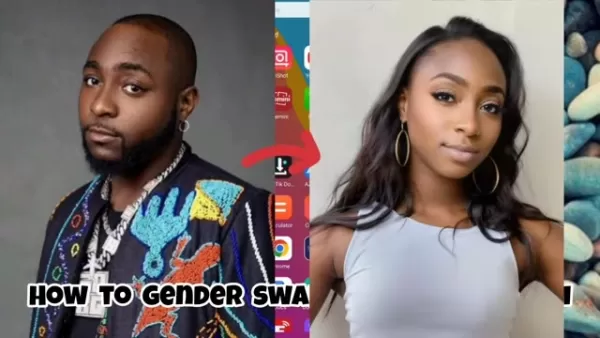
This process relies on sophisticated machine learning models that analyze the original photo and apply intelligent adjustments to produce a realistic and convincing outcome. It's a unique use of AI that provides a fascinating look into identity exploration and creative expression.
The foundation of AI gender swap is built on generative adversarial networks (GANs), a type of machine learning framework. GANs involve two neural networks: a generator and a discriminator. The generator creates new images, while the discriminator assesses how realistic they are. Through ongoing feedback and refinement, the generator becomes increasingly skilled at producing images that look authentic. For gender swapping, the generator learns to adjust specific attributes in a photo to match characteristics typically associated with the opposite gender, while the discriminator ensures the final image remains believable and coherent.
The uses for AI gender swap go beyond simple entertainment. It can be applied in:
- Entertainment: Creating amusing and engaging content for social media and personal enjoyment.
- Identity Exploration: Enabling individuals to visualize themselves in different gender presentations.
- Artistic Expression: Offering artists a new medium to investigate themes of gender and identity.
- Character Design: Helping creators develop diverse and interesting characters for games and films.
AI gender swap technology is a powerful tool with broad potential applications, fueled by ongoing progress in artificial intelligence and machine learning. Its capacity to transform images realistically opens up new avenues for creative projects and personal discovery.
Key benefits of AI Gender Swap Technology:
- Accessibility: Easy-to-use apps like Remini AI Photo Enhancer let anyone with a smartphone try AI gender swapping.
- Realism: Advanced algorithms create lifelike and compelling transformations.
- Creative Expression: Enables users to explore different facets of identity and gender.
- Entertainment Value: Offers a fun and interactive way to experiment with photo editing.
- Versatility: Useful across various areas, including entertainment, art, and character design.
Benefits of Knowing Your Smartphone
In today's connected world, understanding what your smartphone can do is essential for getting the most out of it and improving your digital abilities. A smartphone is more than just a device for calls and texts; it's a versatile tool for getting things done, expressing creativity, and staying connected.
- Enhanced Productivity: Knowing how to use your smartphone efficiently helps you streamline tasks and boost productivity. From handling emails and schedules to accessing cloud storage and editing files, a smartphone can manage numerous responsibilities.
- Improved Connectivity: Smartphones keep you linked to others through social media, messaging apps, and video calls. Understanding how to use these platforms effectively helps you maintain connections with friends, family, and coworkers.
- Creative Expression: Smartphones come with a wide array of creative applications, including photo and video editors, drawing programs, and music production software. Learning to use these tools can unlock your creative abilities and provide new ways to express yourself.
- Digital Skills Development: As technology advances, building strong digital skills is increasingly important. Familiarity with your smartphone helps you navigate the digital world with confidence.
- Access to Information: Smartphones give you immediate access to vast amounts of information via search engines, news apps, and online databases. Knowing how to find and assess information effectively is a crucial skill in the modern era.
Key Digital Skills Enhanced by Smartphone Mastery:
Skill Description Communication Using messaging apps, email, and social media effectively for both personal and professional communication. Information Literacy Assessing the reliability and relevance of information found online. Content Creation Using applications for photo and video editing, drawing, and music creation. Problem Solving Addressing technical issues and finding solutions to common smartphone problems. Digital Security Safeguarding personal information and data from online risks.
Maximizing Mobilephone App Potential
Android & iPhone App Optimization
Getting the most out of mobile apps is important for both Android and iPhone users. With countless apps available, knowing how to optimize their use can greatly improve your mobile experience. This means choosing the right apps, adjusting settings to your liking, and using features that increase productivity and creativity. By managing apps thoughtfully, users can simplify their digital routines and accomplish more with their devices.
- Selecting the Right Apps: The first step to maximizing app potential is finding apps that suit your specific needs and interests. Whether you're looking for productivity aids, creative tools, or entertainment options, picking the right apps can elevate your mobile experience.
- Customizing App Settings: Many apps provide customizable options that let you adjust their functionality to your preferences. This includes setting notification preferences, privacy controls, and display settings to create a tailored experience.
- Leveraging Advanced Features: Mobile apps often include advanced features that can significantly boost their usefulness. This involves using AI-powered tools, integrating with other apps, and utilizing cloud storage for easy access to your files.
Essential Tips for Maximizing App Potential:
- Stay Updated: Keep your apps up to date to access the latest features and security improvements.
- Manage Notifications: Adjust notification settings to reduce interruptions and maintain focus.
- Explore Advanced Features: Spend time discovering the advanced capabilities of your favorite apps to unlock their full potential.
- Optimize Storage: Manage app storage to free up device space and enhance performance.
- Review Privacy Settings: Regularly check and update privacy settings to protect your personal data.
Step-by-Step Guide to Using Remini AI Photo Enhancer for Gender Swapping
Step 1: Installing Remini AI Photo Enhancer
To get started, install Remini AI Photo Enhancer on your smartphone. The app is available for both Android and iPhone.
- Android: Open the Google Play Store and search for "Remini AI Photo Enhancer." Tap "Install" to download and set up the app. Once installed, tap "Open" to launch it.
- iPhone: Open the App Store and search for "Remini AI Photo Enhancer." Tap "Get" to download and install the app. After installation, tap "Open" to start the app.
Step 2: Setting Up Your AI Profile
After installing the app, you'll need to create your AI profile. This involves providing some basic details and uploading photos for the AI to use in generating gender-swapped images.
- Open the App: Launch Remini AI Photo Enhancer on your device.
- Select Your Gender: Choose your gender (Female, Male, or Other) to personalize the experience.
- Upload Photos: Tap "Upload 8 Selfies" to select eight photos of yourself from your gallery. Use clear, well-lit photos for the best outcomes. The AI uses these images to learn your facial features and create accurate transformations. Clearer photos generally lead to better results.
Step 3: Generating Gender-Swapped Images
Once your AI profile is set up, you can begin creating gender-swapped images.
- Browse AI Models: Scroll through the available AI models and find the "Gender Swap" option. This model is specifically designed for gender transformations.
- Select the Gender Swap Model: Tap on the "Gender Swap" model to start the transformation process.
- Wait for the AI to Work: The app will process your photos and generate the AI images. An estimated time is shown, but it usually takes under 5 minutes. If it's your first time using the tool, expect the initial generation to take a bit longer.
- View Your Results: When the images are ready, tap "Take a Look" to see your gender-swapped photos. You'll be presented with multiple transformed versions to review.
Step 4: Saving, Deleting, and Generating More Images
After generating AI images, you have several options:
- Saving Images: To save an image to your gallery, swipe right or tap the save icon. A message will confirm the image has been saved.
- Deleting Images: To remove an image, tap the delete icon. The image will be deleted from your list.
- Generating More Images: Tap "Generate More" to create additional images with the same settings. You can also use the "Change Content" option to try other AI models.
Remini AI Pricing
Subscription Model
Remini AI Photo Enhancer uses a subscription model, offering both free and premium features. The free version includes a limited number of uses per day, while a premium subscription gives unlimited access to all features, including AI gender swap. Pricing can vary based on your location and device.
- Free Version: Provides a limited number of daily uses.
- Premium Subscription: Grants unlimited access to all features, including AI gender swap.
Premium Subscription Tiers (Approximate):
Tier Features Price (USD) Billing Cycle Weekly Unlimited access, no ads $4.99 Weekly Monthly Unlimited access, no ads $19.99 Monthly Yearly Unlimited access, no ads $99.99 Yearly
Evaluating Remini AI Photo Enhancer for Gender Swap
Pros
User-friendly interface
Realistic AI transformations
Wide range of AI models
Available on both Android and iPhone
Easy to save and share images
Cons
Subscription-based pricing
Requires a minimum of eight selfies to set up AI profile
Image processing may take some time
Some AI models may produce inconsistent results
Dependence on the internet for photo uploads and processing
Core Features of Remini AI Photo Enhancer
AI-Powered Photo Enhancement
Remini AI Photo Enhancer employs advanced AI algorithms to improve the quality of old, blurry, or low-resolution photos. It can sharpen details, restore colors, and remove imperfections to revitalize your images. This feature is especially helpful for restoring old family pictures or enhancing photos taken on older cameras.
AI Gender Swap
The AI gender swap feature transforms your photos by adjusting facial features and hairstyles to show how you might appear as the opposite gender. It's an entertaining and creative way to explore different aspects of identity.
AI Model Options
Remini provides a variety of AI models that apply different styles and effects to your photos. From “Country” and “Mob Wife” to “Old Money” and “Curriculum,” these models offer diverse creative options for altering your images. Each model applies a distinct aesthetic, allowing for personalized and varied outcomes.
Save and Share
After generating your AI images, you can easily save them to your phone's gallery or share them on social media. This makes it simple to show off your creative transformations with others.
Use Cases for Remini AI Photo Enhancer
Personal Entertainment
Many people use Remini for fun, creating amusing and engaging content for social media. The AI gender swap feature adds a novel and creative element, letting users play with different identity concepts in a light-hearted manner.
Artistic Expression
Artists and creatives can use Remini to investigate themes of gender, identity, and transformation in their projects. The AI tools offer a unique method for experimentation and can help artists expand their creative boundaries.
Character Design
Remini can be a useful resource for character designers, helping them visualize characters in different gender roles or explore various visual styles. The AI models provide a quick and easy way to generate reference images for character development.
FAQ
Is Remini AI Photo Enhancer free to use?
Remini has a free version with a limited number of uses per day. For unlimited access to all features, you can subscribe to a premium plan.
How many photos do I need to upload to set up my AI profile?
You need to upload at least eight selfies to set up your AI profile. Providing more photos can improve the AI's results, yielding clearer and more detailed images.
Can I use Remini on both Android and iPhone devices?
Yes, Remini AI Photo Enhancer is available for both Android and iPhone.
How long does it take to generate AI images?
The generation time can vary, but it's typically under 5 minutes. The process might take longer during your first use of the tool.
Can I share my AI-generated images on social media?
Yes, Remini lets you save your AI images to your gallery and share them directly on social media platforms.
Related Questions
Are there other AI gender swap tools available?
Yes, several other AI gender swap tools are available online and as mobile apps. These tools use similar AI algorithms to transform images and offer different levels of customization and realism. Popular alternatives include FaceApp, Reface, and YouCam Makeup. However, Remini AI Photo Enhancer is often praised for its user-friendly design, realistic results, and diverse selection of AI models.
Related article
 Former OpenAI Chief Scientist Ilya’s SSI Unveils First Model
AI has achieved another major milestone. Following his departure from OpenAI, former chief scientist Ilya Sutskever established Safe Superintelligence Inc. (SSI), which has recently unveiled details regarding its inaugural model. Reports from oversea
Lovable Leads Atech's Seed Round as AI Ambient Coding Officially Enters the Hardware Field
On May 14, 2026, AI application development platform Lovable announced its participation in the $800,000 seed funding round for Danish hardware startup Atech. Led by Lovable, the round attracted top-tier venture capital firms including the a16z Scout
Anthropic Expands Claude AI Coding Tools to Japan in Push for Overseas Growth
Anthropic, a prominent U.S. artificial intelligence firm, is intensifying its global outreach. On Wednesday, the company hosted a major developer gathering, "Code with Claude," in Tokyo, drawing close to 500 software engineers. This initiative seeks
Related Special Topic Recommendations
chatbot
Former OpenAI Chief Scientist Ilya’s SSI Unveils First Model
AI has achieved another major milestone. Following his departure from OpenAI, former chief scientist Ilya Sutskever established Safe Superintelligence Inc. (SSI), which has recently unveiled details regarding its inaugural model. Reports from oversea
Lovable Leads Atech's Seed Round as AI Ambient Coding Officially Enters the Hardware Field
On May 14, 2026, AI application development platform Lovable announced its participation in the $800,000 seed funding round for Danish hardware startup Atech. Led by Lovable, the round attracted top-tier venture capital firms including the a16z Scout
Anthropic Expands Claude AI Coding Tools to Japan in Push for Overseas Growth
Anthropic, a prominent U.S. artificial intelligence firm, is intensifying its global outreach. On Wednesday, the company hosted a major developer gathering, "Code with Claude," in Tokyo, drawing close to 500 software engineers. This initiative seeks
Related Special Topic Recommendations
chatbot
 Best AI Conversation Trainer Tools for Interview Practice
2026 Latest Best Top-rated AI Conversation Trainer Tools for Interview Practice are here on XIX.AI! This curated collection features powerful, game-changing tools that go through rigorous real-world tests to deliver accurate feedback. You’ll find a free vs paid comparison and detailed rankings to help you choose the must-try option that boosts your confidence and skills. Explore now to Discover your perfect tool for interview success!
 12 tools
 xix.ai
Design & Art
Best AI Style Transfer Tools for Creative Experiments
xix.ai
Design & Art
Best AI Style Transfer Tools for Creative Experiments
2026 Latest Best Top-rated AI Style Transfer Tools for Creative Experiments! XIX.AI has curated a powerful, game-changing collection of must-try tools that deliver exceptional results through real-world tests and rigorous rankings. These top solutions help creatives boost productivity significantly by accelerating content creation and unlocking endless creative possibilities. Explore now to discover your perfect tool and start creating today!
9 tools
xix.ai
Comic Creation
Best AI Dialogue Bubble Tools for Visual Storytelling
2026 Latest Best Top-Rated AI Dialogue Bubble Tools for Visual Storytelling are here on XIX.AI! This curated collection features powerful, game-changing tools that help creators boost productivity and overcome creative bottlenecks. Get a free vs paid comparison, see real-world tests, and check the latest rankings to find the must-try solutions perfect for crafting engaging visual narratives. Explore now to discover your ideal tool!
10 tools
xix.ai
Meeting Assistant
Top AI Meeting Summary Tools: Track Decisions and Follow-Ups Clearly
2026 Latest Top-Rated Best AI Meeting Summary Tools for Clear Decision Tracking and Effortless Follow-Ups. This curated list showcases powerful, game-changing solutions that boost productivity dramatically by automating meeting notes, identifying key action items, and streamlining team coordination across all projects. Get a free vs paid comparison along with real-world tests and weekly updated rankings to help you find the perfect tool. Explore now to unlock your AI edge!
9 tools
xix.ai
Data Analysis
Best AI Data Cleaning Tools: Fix Missing Values and Duplicates Fast
2026 Latest Best Top-rated AI Data Cleaning Tools for quick fixing of missing values and duplicates. This curated list showcases powerful, game-changing solutions that boost productivity significantly. Each option has undergone rigorous real-world tests to ensure reliability. Get a free vs paid comparison and discover the must-try tool that fits your needs best. Explore now at XIX.AI to Unlock your AI edge.
11 tools
xix.ai
Design & Art
Best AI Creative Ideation Tools for Artists: Break Through Visual Blocks
2026 Latest Best Top-Rated AI Creative Ideation Tools for Artists are curated by XIX.AI to help creators break through visual blocks and boost creativity instantly. These powerful game-changing tools offer real-world tests, detailed free vs paid comparison, and weekly updated rankings. Discover your perfect tool to accelerate content creation and unlock your AI edge today. Explore now!
14 tools
xix.ai

 Comments (1)
0/500
Comments (1)
0/500
![PaulThomas]()
Не знаю, стоит ли смеяться или пугаться... Технология стала слишком реалистичной. Как думаете, это развлечение или начало проблем с идентичностью? 😅 Интересно, как бы выглядел Пушкин в женском облике?
Artificial intelligence has completely transformed photo editing, putting powerful tools that were once reserved for professionals right at our fingertips. One of the most intriguing AI applications is the ability to perform gender swaps on photos, giving you a glimpse of what you might look like as the opposite gender. This guide walks you through using Remini AI Photo Enhancer, an intuitive app that makes AI gender swapping accessible to everyone. You'll discover how to install and use the app, explore its capabilities, and create your own AI-generated gender-swapped portraits.
Key Points
Use AI gender swap technology to explore different gender identities through photo transformation.
Learn to install and configure Remini AI Photo Enhancer for the best results.
Master the steps for uploading photos and creating gender-swapped images with AI.
Understand how to save, delete, and generate more AI images.
Discover the advantages of AI-powered photo editing for creativity and fun.
Improve your understanding of smartphone features and digital skills.
Learn to get the most out of mobile apps on both Android and iPhone.
Use AI-enhanced tools to navigate social media platforms more effectively.
Understanding AI Gender Swap Technology
What is AI Gender Swap?
AI gender swap technology uses artificial intelligence algorithms to modify images, changing facial features, hairstyles, and other traits to simulate a person's appearance as the opposite gender.
This process relies on sophisticated machine learning models that analyze the original photo and apply intelligent adjustments to produce a realistic and convincing outcome. It's a unique use of AI that provides a fascinating look into identity exploration and creative expression.
The foundation of AI gender swap is built on generative adversarial networks (GANs), a type of machine learning framework. GANs involve two neural networks: a generator and a discriminator. The generator creates new images, while the discriminator assesses how realistic they are. Through ongoing feedback and refinement, the generator becomes increasingly skilled at producing images that look authentic. For gender swapping, the generator learns to adjust specific attributes in a photo to match characteristics typically associated with the opposite gender, while the discriminator ensures the final image remains believable and coherent.
The uses for AI gender swap go beyond simple entertainment. It can be applied in:
- Entertainment: Creating amusing and engaging content for social media and personal enjoyment.
- Identity Exploration: Enabling individuals to visualize themselves in different gender presentations.
- Artistic Expression: Offering artists a new medium to investigate themes of gender and identity.
- Character Design: Helping creators develop diverse and interesting characters for games and films.
AI gender swap technology is a powerful tool with broad potential applications, fueled by ongoing progress in artificial intelligence and machine learning. Its capacity to transform images realistically opens up new avenues for creative projects and personal discovery.
Key benefits of AI Gender Swap Technology:
- Accessibility: Easy-to-use apps like Remini AI Photo Enhancer let anyone with a smartphone try AI gender swapping.
- Realism: Advanced algorithms create lifelike and compelling transformations.
- Creative Expression: Enables users to explore different facets of identity and gender.
- Entertainment Value: Offers a fun and interactive way to experiment with photo editing.
- Versatility: Useful across various areas, including entertainment, art, and character design.
Benefits of Knowing Your Smartphone
In today's connected world, understanding what your smartphone can do is essential for getting the most out of it and improving your digital abilities. A smartphone is more than just a device for calls and texts; it's a versatile tool for getting things done, expressing creativity, and staying connected.
- Enhanced Productivity: Knowing how to use your smartphone efficiently helps you streamline tasks and boost productivity. From handling emails and schedules to accessing cloud storage and editing files, a smartphone can manage numerous responsibilities.
- Improved Connectivity: Smartphones keep you linked to others through social media, messaging apps, and video calls. Understanding how to use these platforms effectively helps you maintain connections with friends, family, and coworkers.
- Creative Expression: Smartphones come with a wide array of creative applications, including photo and video editors, drawing programs, and music production software. Learning to use these tools can unlock your creative abilities and provide new ways to express yourself.
- Digital Skills Development: As technology advances, building strong digital skills is increasingly important. Familiarity with your smartphone helps you navigate the digital world with confidence.
- Access to Information: Smartphones give you immediate access to vast amounts of information via search engines, news apps, and online databases. Knowing how to find and assess information effectively is a crucial skill in the modern era.
Key Digital Skills Enhanced by Smartphone Mastery:
| Skill | Description |
|---|---|
| Communication | Using messaging apps, email, and social media effectively for both personal and professional communication. |
| Information Literacy | Assessing the reliability and relevance of information found online. |
| Content Creation | Using applications for photo and video editing, drawing, and music creation. |
| Problem Solving | Addressing technical issues and finding solutions to common smartphone problems. |
| Digital Security | Safeguarding personal information and data from online risks. |
Maximizing Mobilephone App Potential
Android & iPhone App Optimization
Getting the most out of mobile apps is important for both Android and iPhone users. With countless apps available, knowing how to optimize their use can greatly improve your mobile experience. This means choosing the right apps, adjusting settings to your liking, and using features that increase productivity and creativity. By managing apps thoughtfully, users can simplify their digital routines and accomplish more with their devices.
- Selecting the Right Apps: The first step to maximizing app potential is finding apps that suit your specific needs and interests. Whether you're looking for productivity aids, creative tools, or entertainment options, picking the right apps can elevate your mobile experience.
- Customizing App Settings: Many apps provide customizable options that let you adjust their functionality to your preferences. This includes setting notification preferences, privacy controls, and display settings to create a tailored experience.
- Leveraging Advanced Features: Mobile apps often include advanced features that can significantly boost their usefulness. This involves using AI-powered tools, integrating with other apps, and utilizing cloud storage for easy access to your files.
Essential Tips for Maximizing App Potential:
- Stay Updated: Keep your apps up to date to access the latest features and security improvements.
- Manage Notifications: Adjust notification settings to reduce interruptions and maintain focus.
- Explore Advanced Features: Spend time discovering the advanced capabilities of your favorite apps to unlock their full potential.
- Optimize Storage: Manage app storage to free up device space and enhance performance.
- Review Privacy Settings: Regularly check and update privacy settings to protect your personal data.
Step-by-Step Guide to Using Remini AI Photo Enhancer for Gender Swapping
Step 1: Installing Remini AI Photo Enhancer
To get started, install Remini AI Photo Enhancer on your smartphone. The app is available for both Android and iPhone.
- Android: Open the Google Play Store and search for "Remini AI Photo Enhancer." Tap "Install" to download and set up the app. Once installed, tap "Open" to launch it.
- iPhone: Open the App Store and search for "Remini AI Photo Enhancer." Tap "Get" to download and install the app. After installation, tap "Open" to start the app.
Step 2: Setting Up Your AI Profile
After installing the app, you'll need to create your AI profile. This involves providing some basic details and uploading photos for the AI to use in generating gender-swapped images.
- Open the App: Launch Remini AI Photo Enhancer on your device.
- Select Your Gender: Choose your gender (Female, Male, or Other) to personalize the experience.
- Upload Photos: Tap "Upload 8 Selfies" to select eight photos of yourself from your gallery. Use clear, well-lit photos for the best outcomes. The AI uses these images to learn your facial features and create accurate transformations. Clearer photos generally lead to better results.
Step 3: Generating Gender-Swapped Images
Once your AI profile is set up, you can begin creating gender-swapped images.
- Browse AI Models: Scroll through the available AI models and find the "Gender Swap" option. This model is specifically designed for gender transformations.
- Select the Gender Swap Model: Tap on the "Gender Swap" model to start the transformation process.
- Wait for the AI to Work: The app will process your photos and generate the AI images. An estimated time is shown, but it usually takes under 5 minutes. If it's your first time using the tool, expect the initial generation to take a bit longer.
- View Your Results: When the images are ready, tap "Take a Look" to see your gender-swapped photos. You'll be presented with multiple transformed versions to review.
Step 4: Saving, Deleting, and Generating More Images
After generating AI images, you have several options:
- Saving Images: To save an image to your gallery, swipe right or tap the save icon. A message will confirm the image has been saved.
- Deleting Images: To remove an image, tap the delete icon. The image will be deleted from your list.
- Generating More Images: Tap "Generate More" to create additional images with the same settings. You can also use the "Change Content" option to try other AI models.
Remini AI Pricing
Subscription Model
Remini AI Photo Enhancer uses a subscription model, offering both free and premium features. The free version includes a limited number of uses per day, while a premium subscription gives unlimited access to all features, including AI gender swap. Pricing can vary based on your location and device.
- Free Version: Provides a limited number of daily uses.
- Premium Subscription: Grants unlimited access to all features, including AI gender swap.
Premium Subscription Tiers (Approximate):
| Tier | Features | Price (USD) | Billing Cycle |
|---|---|---|---|
| Weekly | Unlimited access, no ads | $4.99 | Weekly |
| Monthly | Unlimited access, no ads | $19.99 | Monthly |
| Yearly | Unlimited access, no ads | $99.99 | Yearly |
Evaluating Remini AI Photo Enhancer for Gender Swap
Pros
User-friendly interface
Realistic AI transformations
Wide range of AI models
Available on both Android and iPhone
Easy to save and share images
Cons
Subscription-based pricing
Requires a minimum of eight selfies to set up AI profile
Image processing may take some time
Some AI models may produce inconsistent results
Dependence on the internet for photo uploads and processing
Core Features of Remini AI Photo Enhancer
AI-Powered Photo Enhancement
Remini AI Photo Enhancer employs advanced AI algorithms to improve the quality of old, blurry, or low-resolution photos. It can sharpen details, restore colors, and remove imperfections to revitalize your images. This feature is especially helpful for restoring old family pictures or enhancing photos taken on older cameras.
AI Gender Swap
The AI gender swap feature transforms your photos by adjusting facial features and hairstyles to show how you might appear as the opposite gender. It's an entertaining and creative way to explore different aspects of identity.
AI Model Options
Remini provides a variety of AI models that apply different styles and effects to your photos. From “Country” and “Mob Wife” to “Old Money” and “Curriculum,” these models offer diverse creative options for altering your images. Each model applies a distinct aesthetic, allowing for personalized and varied outcomes.
Save and Share
After generating your AI images, you can easily save them to your phone's gallery or share them on social media. This makes it simple to show off your creative transformations with others.
Use Cases for Remini AI Photo Enhancer
Personal Entertainment
Many people use Remini for fun, creating amusing and engaging content for social media. The AI gender swap feature adds a novel and creative element, letting users play with different identity concepts in a light-hearted manner.
Artistic Expression
Artists and creatives can use Remini to investigate themes of gender, identity, and transformation in their projects. The AI tools offer a unique method for experimentation and can help artists expand their creative boundaries.
Character Design
Remini can be a useful resource for character designers, helping them visualize characters in different gender roles or explore various visual styles. The AI models provide a quick and easy way to generate reference images for character development.
FAQ
Is Remini AI Photo Enhancer free to use?
Remini has a free version with a limited number of uses per day. For unlimited access to all features, you can subscribe to a premium plan.
How many photos do I need to upload to set up my AI profile?
You need to upload at least eight selfies to set up your AI profile. Providing more photos can improve the AI's results, yielding clearer and more detailed images.
Can I use Remini on both Android and iPhone devices?
Yes, Remini AI Photo Enhancer is available for both Android and iPhone.
How long does it take to generate AI images?
The generation time can vary, but it's typically under 5 minutes. The process might take longer during your first use of the tool.
Can I share my AI-generated images on social media?
Yes, Remini lets you save your AI images to your gallery and share them directly on social media platforms.
Related Questions
Are there other AI gender swap tools available?
Yes, several other AI gender swap tools are available online and as mobile apps. These tools use similar AI algorithms to transform images and offer different levels of customization and realism. Popular alternatives include FaceApp, Reface, and YouCam Makeup. However, Remini AI Photo Enhancer is often praised for its user-friendly design, realistic results, and diverse selection of AI models.








 Former OpenAI Chief Scientist Ilya’s SSI Unveils First Model
AI has achieved another major milestone. Following his departure from OpenAI, former chief scientist Ilya Sutskever established Safe Superintelligence Inc. (SSI), which has recently unveiled details regarding its inaugural model. Reports from oversea
Former OpenAI Chief Scientist Ilya’s SSI Unveils First Model
AI has achieved another major milestone. Following his departure from OpenAI, former chief scientist Ilya Sutskever established Safe Superintelligence Inc. (SSI), which has recently unveiled details regarding its inaugural model. Reports from oversea
 Lovable Leads Atech's Seed Round as AI Ambient Coding Officially Enters the Hardware Field
On May 14, 2026, AI application development platform Lovable announced its participation in the $800,000 seed funding round for Danish hardware startup Atech. Led by Lovable, the round attracted top-tier venture capital firms including the a16z Scout
Lovable Leads Atech's Seed Round as AI Ambient Coding Officially Enters the Hardware Field
On May 14, 2026, AI application development platform Lovable announced its participation in the $800,000 seed funding round for Danish hardware startup Atech. Led by Lovable, the round attracted top-tier venture capital firms including the a16z Scout
 Anthropic Expands Claude AI Coding Tools to Japan in Push for Overseas Growth
Anthropic, a prominent U.S. artificial intelligence firm, is intensifying its global outreach. On Wednesday, the company hosted a major developer gathering, "Code with Claude," in Tokyo, drawing close to 500 software engineers. This initiative seeks
Anthropic Expands Claude AI Coding Tools to Japan in Push for Overseas Growth
Anthropic, a prominent U.S. artificial intelligence firm, is intensifying its global outreach. On Wednesday, the company hosted a major developer gathering, "Code with Claude," in Tokyo, drawing close to 500 software engineers. This initiative seeks

2026 Latest Best Top-rated AI Conversation Trainer Tools for Interview Practice are here on XIX.AI! This curated collection features powerful, game-changing tools that go through rigorous real-world tests to deliver accurate feedback. You’ll find a free vs paid comparison and detailed rankings to help you choose the must-try option that boosts your confidence and skills. Explore now to Discover your perfect tool for interview success!
12 tools
xix.ai

2026 Latest Best Top-rated AI Style Transfer Tools for Creative Experiments! XIX.AI has curated a powerful, game-changing collection of must-try tools that deliver exceptional results through real-world tests and rigorous rankings. These top solutions help creatives boost productivity significantly by accelerating content creation and unlocking endless creative possibilities. Explore now to discover your perfect tool and start creating today!
9 tools
xix.ai

2026 Latest Best Top-Rated AI Dialogue Bubble Tools for Visual Storytelling are here on XIX.AI! This curated collection features powerful, game-changing tools that help creators boost productivity and overcome creative bottlenecks. Get a free vs paid comparison, see real-world tests, and check the latest rankings to find the must-try solutions perfect for crafting engaging visual narratives. Explore now to discover your ideal tool!
10 tools
xix.ai

2026 Latest Top-Rated Best AI Meeting Summary Tools for Clear Decision Tracking and Effortless Follow-Ups. This curated list showcases powerful, game-changing solutions that boost productivity dramatically by automating meeting notes, identifying key action items, and streamlining team coordination across all projects. Get a free vs paid comparison along with real-world tests and weekly updated rankings to help you find the perfect tool. Explore now to unlock your AI edge!
9 tools
xix.ai

2026 Latest Best Top-rated AI Data Cleaning Tools for quick fixing of missing values and duplicates. This curated list showcases powerful, game-changing solutions that boost productivity significantly. Each option has undergone rigorous real-world tests to ensure reliability. Get a free vs paid comparison and discover the must-try tool that fits your needs best. Explore now at XIX.AI to Unlock your AI edge.
11 tools
xix.ai

2026 Latest Best Top-Rated AI Creative Ideation Tools for Artists are curated by XIX.AI to help creators break through visual blocks and boost creativity instantly. These powerful game-changing tools offer real-world tests, detailed free vs paid comparison, and weekly updated rankings. Discover your perfect tool to accelerate content creation and unlock your AI edge today. Explore now!
14 tools
xix.ai

Не знаю, стоит ли смеяться или пугаться... Технология стала слишком реалистичной. Как думаете, это развлечение или начало проблем с идентичностью? 😅 Интересно, как бы выглядел Пушкин в женском облике?












