


 Home
HomeAI Comic Factory Effortlessly Converts Your Stories into Comics
The fusion of artificial intelligence and creative arts is unlocking new possibilities in the digital era. Tools like AI Comic Factory empower users to turn their stories into engaging visual comics with minimal effort. This piece delves into the features of AI Comic Factory, its advantages for storytellers, and how it compares to other AI-powered narrative platforms.
Key Points
AI Comic Factory streamlines comic creation using simple text prompts.
It provides a variety of artistic styles to suit different storytelling purposes.
The platform is available via Hugging Face Spaces.
It enables rapid visualization of narratives in comic form.
The tool prioritizes high-quality artwork, even with limited text integration.
While impressive, output quality can be inconsistent and may require fine-tuning.
Unleashing the Power of AI Comic Creation
What is AI Comic Factory?
AI Comic Factory is a creative tool available on Hugging Face Spaces
that generates comic strips from text descriptions. It allows anyone to craft visually compelling stories without artistic training. Unlike traditional comic creation that demands significant time and skill, this AI-powered solution makes the process accessible to writers, educators, and content creators seeking to enhance their projects with striking visuals.
The platform's main strength is its capacity to interpret written concepts and translate them into sequential artwork. By inputting scene descriptions, users receive complete comic panels featuring characters, settings, and layouts. This dramatically lowers the entry barrier for comic production.
Current limitations include the tool's text integration capabilities. The AI sometimes generates placeholder text or stylized characters rather than readable dialogue. While visuals are generally high-quality, text elements often need additional refinement. Therefore, AI Comic Factory works best as a creative springboard or visualization aid rather than a final production tool.
Despite these constraints, the technology marks significant progress in AI-assisted creation. It demonstrates how artificial intelligence can democratize creative processes, making them more inclusive and efficient. As AI evolves, future tools will likely offer even more sophisticated integration of human creativity and machine intelligence.
Exploring the Features: Styles and Layouts
AI Comic Factory includes multiple customization options for generated comics. Users can select from various artistic styles and panel arrangements to match their story's aesthetic requirements.
Art Styles: The platform offers several distinct visual approaches, each creating a unique atmosphere:
- American (Modern): This style captures classic comic book aesthetics with bold lines, dynamic compositions, and vibrant colors reminiscent of superhero publications.
- Japanese: Inspired by manga and anime, this approach emphasizes expressive characters, detailed backgrounds, and emotional visual storytelling.
- Nihonga: Mimicking traditional Japanese painting, this style features delicate brushwork, subtle colors, and serene compositions.
- 3D Render: Using computer-generated imagery, this option creates three-dimensional, realistic visuals suitable for futuristic or contemporary stories.
- Egyptian: This style incorporates ancient Egyptian artistic motifs, including stylized figures, symbolic elements, and rich cultural references.
Experimenting with these styles helps creators find the perfect visual match for their narrative tone.
Panel Layouts: Beyond artistic styles, the tool provides various panel configurations. These layouts control the sequence and sizing of comic panels, influencing narrative pacing and visual rhythm. Users can choose predefined arrangements or customize layouts to support specific storytelling needs.
A Step-by-Step Guide to Creating Comics with AI Comic Factory
Accessing AI Comic Factory on Hugging Face
- Navigate to Hugging Face Spaces: Begin by visiting the Hugging Face platform, which hosts numerous AI models and applications including AI Comic Factory.
- Search for AI Comic Factory: Use the search function to locate the tool by entering the creator's username
.
- Access the Tool: From the search results, select jblilcke-hf/ai-comic-factory to reach the application interface
.
Crafting Your Comic: Prompts, Styles, and Layouts
Input Your Story: The main text area is where you provide detailed scene or story descriptions. Clear, comprehensive prompts yield better visual results.
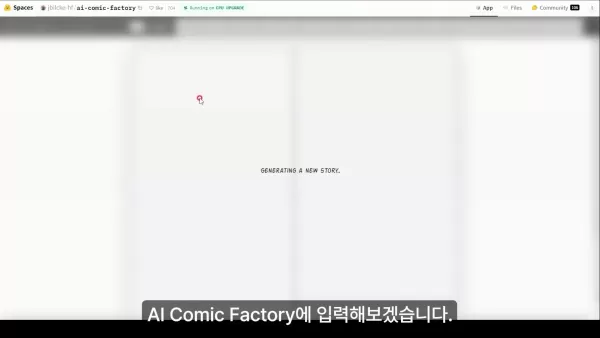
Select Your Art Style: Choose from available artistic styles like American (Modern), Japanese, Nihonga, 3D Render, and Egyptian to establish your comic's visual identity.
Choose a Layout: Select a panel arrangement that complements your story's rhythm and emphasis.
Generate the Comic: After configuring your preferences, initiate the creation process by clicking the generation button
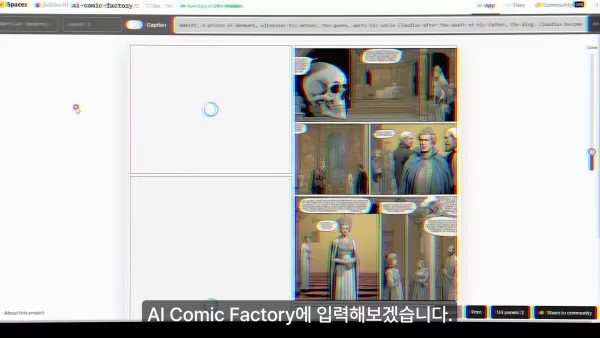
. The AI will process your input and produce a comic strip matching your specifications.
Fine-Tuning and Optimization: Tips and Considerations
Iterate on Prompts: Output quality depends heavily on prompt clarity. Experiment with different descriptions to achieve optimal results.
Divide Complex Stories: Break lengthy narratives into smaller, focused prompts for more coherent and consistent panel generation.
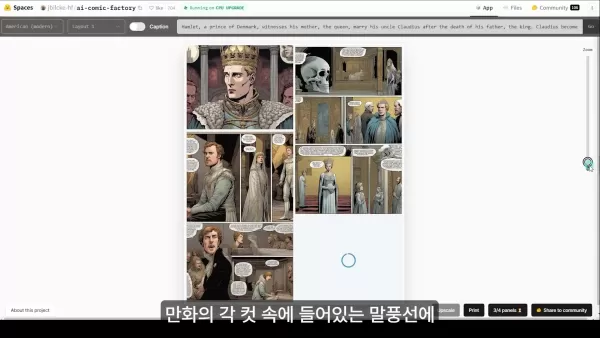
.
Focus on Visual Storytelling: Since text integration remains challenging, emphasize visual narrative elements that can be enhanced later with editing tools.
Embrace the Unexpected: AI generation can produce surprising creative outcomes. Consider unconventional results as opportunities for innovation.
Consider Combining with Other Tools: Enhance final output by integrating AI Comic Factory with other creative software for text addition or image refinement.
Detailed Steps on How to Use AI Comic Factory
Step 1: Accessing Hugging Face and Finding AI Comic Factory
Begin your AI comic creation journey by accessing the Hugging Face platform, a community-driven space hosting various AI models. To reach AI Comic Factory:
- Open your web browser.
- Navigate to the Hugging Face website.
- Enter jblilcke-hf in the search bar to locate the project.
- Select jblilcke-hf/ai-comic-factory from the results.
Step 2: Understanding the AI Comic Factory Interface
Familiarize yourself with the tool's user-friendly interface:
- Art Style Selection: The first dropdown menu controls the visual style of your comic, including options like American (Modern) and Japanese styles.
- Layout Selection: The second dropdown determines panel arrangement and comic structure.
- Story Input: The main text box accepts your narrative prompt, guiding the AI's visual interpretation.
- Generate Button: After setting preferences, click the generation button to create your comic.
Step 3: Crafting the Perfect Prompt for AI Comic Factory
Effective prompts are crucial for quality results. Consider these guidelines:
- Be Descriptive: Include specific details about scenes, characters, and actions for better AI comprehension.
- Keep it Concise: While detailed, avoid overly complex sentences that might confuse the AI.
- Focus on Key Elements: Highlight the most important visual components you want emphasized.
- Specify the Desired Tone: Mention the emotional atmosphere or mood to guide visual choices.
Example prompt:A brave knight stands before a towering dragon, sword drawn, ready for battle. Dramatic lighting, medieval setting.
Step 4: Generating and Reviewing Your Comic
After setting preferences and entering your prompt, initiate the generation process.
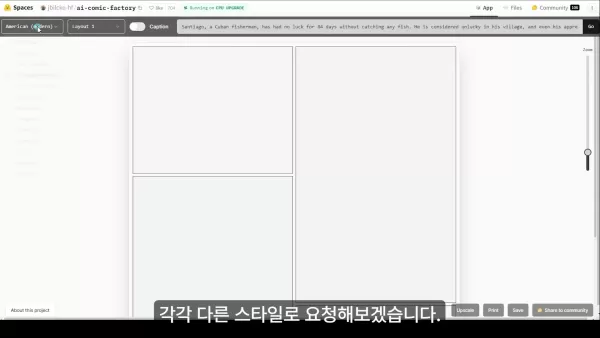
The AI will process your request and create comics based on your instructions.
- Review the Results: Carefully examine generated panels for accuracy and alignment with your vision.
- Iterate and Refine: Adjust prompts and settings as needed to improve results through experimentation.
- Save Your Comic: When satisfied with the output, use the download options to export your creation.
Analyzing AI Comic Factory: Weighing the Benefits and Drawbacks
Pros
User-Friendly: Makes comic creation accessible to those without artistic training.
Rapid Generation: Produces comics quickly, saving valuable time.
Style Variety: Offers multiple artistic approaches for different narrative needs.
Visualization: Transforms written stories into engaging visual formats.
Creative Inspiration: Can spark new ideas and unexplored creative directions.
Cons
Text Integration: Dialogue and captions often need manual improvement.
Limited Customization: Users have restricted control over specific visual elements.
Inconsistent Output: Generated quality can vary, requiring multiple attempts.
Copyright Questions: Raises concerns about intellectual property and originality.
Skill Development: Over-reliance might slow the cultivation of traditional artistic abilities.
Frequently Asked Questions about AI Comic Factory
What is AI Comic Factory?
AI Comic Factory is an AI-driven platform that creates comic strips from text descriptions. It streamlines the creative process by handling visual aspects automatically.
How do I access AI Comic Factory?
Access the tool through Hugging Face Spaces by searching for jblilcke-hf/ai-comic-factory.
What art styles are available in AI Comic Factory?
The platform typically includes artistic styles such as American (Modern), Japanese, Nihonga, 3D Render, and Egyptian.
Can I customize the panel layout of my comic?
Yes, AI Comic Factory provides multiple panel layout options to control your story's visual progression.
Is AI Comic Factory free to use?
Most tools on Hugging Face Spaces are available at no cost, though verifying current policies on their website is recommended.
Related Questions about AI-Driven Content Creation
How does AI enhance storytelling?
AI augments storytelling through multiple channels. It can generate concepts, develop characters, structure plots, and create dialogue. Visualization tools like AI Comic Factory make narratives more immersive and accessible. By automating technical aspects, AI enables creators to concentrate on creative development while exploring new narrative techniques and production methods.
What are the ethical considerations of using AI in art?
AI art creation involves several ethical dimensions. Copyright issues arise from training models on existing artwork collections. The technology's growing capabilities also prompt discussions about human artist displacement and the authenticity of machine-generated creations. Additionally, AI models may perpetuate societal biases. Addressing these concerns is essential for responsible adoption of AI in creative fields.
What other AI tools are available for content creation?
Beyond AI Comic Factory, numerous AI tools support content development across various media. Some popular options include:UseChatGPT.AI: A comprehensive prompt directory for ChatGPT interactions.Microsoft Office 365 Copilot: An AI assistant integrated into Office applications for productivity enhancement.Claude 2: A versatile AI companion supporting tasks from summarization to creative writing.Writtn: An AI writing assistant designed for rapid content generation.This represents just a sampling of available tools that can augment different stages of the creative workflow.
Related article
 Stripe to Acquire OpenRouter as AI Model Routing Gains Momentum
Stripe has agreed to acquire OpenRouter, an AI model-routing platform that gives developers access to hundreds of models through a single interface. The deal adds model selection and routing to Stripe’s existing work around AI usage and token-based b
Former OpenAI Researcher Barrett Zoph Returns to Google to Support Gemini Development
Barret Zoph, who previously abruptly left and joined OpenAI due to a disagreement with Thinking Machines Lab CEO Miriam Mularati, has once again changed employers. Alphabet's Google announced that Zoph will return as Vice President of Research, bring
How Recursive Intelligence Raised $335M at $4B Valuation in 4 Months
The co-founders of startup Ricursive Intelligence seemed destined to be co-founders.Anna Goldie, CEO, and Azalia Mirhoseini, CTO, are so well-known in the AI community that they were among those AI engineers who “got those weird emails from Zuckerber
Related Special Topic Recommendations
Design & Art
Stripe to Acquire OpenRouter as AI Model Routing Gains Momentum
Stripe has agreed to acquire OpenRouter, an AI model-routing platform that gives developers access to hundreds of models through a single interface. The deal adds model selection and routing to Stripe’s existing work around AI usage and token-based b
Former OpenAI Researcher Barrett Zoph Returns to Google to Support Gemini Development
Barret Zoph, who previously abruptly left and joined OpenAI due to a disagreement with Thinking Machines Lab CEO Miriam Mularati, has once again changed employers. Alphabet's Google announced that Zoph will return as Vice President of Research, bring
How Recursive Intelligence Raised $335M at $4B Valuation in 4 Months
The co-founders of startup Ricursive Intelligence seemed destined to be co-founders.Anna Goldie, CEO, and Azalia Mirhoseini, CTO, are so well-known in the AI community that they were among those AI engineers who “got those weird emails from Zuckerber
Related Special Topic Recommendations
Design & Art
 Top AI Illustration Tools: Create Editorial Scenes and Cover Art Faster
2026 Latest Top-rated AI Illustration Tools: Our curated list features the best powerfully designed tools for creating stunning editorial scenes and eye-catching cover art quickly. Each option has gone through rigorous real-world tests, offering a free vs paid comparison to help you find the perfect match for your workflow. Try these must-try solutions today to unlock your AI edge and boost your creative productivity. Explore now at XIX.AI.
 10 tools
 xix.ai
Education and Learning
Top AI Tutors for Exam Prep: Practice Math, Science, and English
xix.ai
Education and Learning
Top AI Tutors for Exam Prep: Practice Math, Science, and English
2026 Latest Top-Rated Best AI Tutors for Exam Prep are here on XIX.AI! Our curated list features powerful game-changing tools that offer free vs paid comparison, real-world tests, and weekly updated rankings. They help boost your writing efficiency, simplify complex topic learning, and unlock your academic potential. Explore now to Discover your perfect exam prep tool and Start creating today to Unlock your AI edge!
10 tools
xix.ai
Finance
AI Budget Planning Tools for Personal Money Management
2026 Latest Best Top-Rated AI Budget Planning Tools for Personal Money Management are here on XIX.AI! This curated collection features powerful, game-changing solutions that help you conduct real-world tests, understand spending habits, and create personalized plans to boost productivity. Enjoy a free vs paid comparison along with detailed rankings. Must-try tools designed to simplify money management and unlock your AI edge. Explore now!
11 tools
xix.ai
Health & Wellness
AI Sleep Tracking Assistants: Improve Recovery with Better Bedtime Habits
2026 Latest Best Top-Rated AI Sleep Tracking Assistants curated for ultimate recovery. This fully updated weekly guide features powerful tools that deliver real-world tests, free vs paid comparison, and detailed rankings to help you find the must-try solution that boosts sleep quality and supports better bedtime habits. Explore now at XIX.AI to Unlock your AI edge.
10 tools
xix.ai
Data Analysis
AI SQL Copilots for Product and Revenue Analytics
2026 Latest Best Top-Rated AI SQL Copilots for Product and Revenue Analytics! XIX.AI has curated a powerful, game-changing collection of must-try tools that undergo real-world tests through weekly updated rankings. These tools help users boost productivity significantly by accelerating data analysis, streamlining complex queries, and generating accurate insights to drive smarter business decisions. Explore now to Discover your perfect tool for unlocking your AI edge!
14 tools
xix.ai
Education and Learning
Best AI Homework Helpers That Teach: Learn Concepts, Not Just Answers
2026 Latest Best Top-Rated AI Homework Helpers That Teach Core Concepts Not Just Answers Powerful Tools for Students Must-Try Curated List Weekly Updated Free vs Paid Comparison Real-World Tests Accurate Rankings to Help You Unlock Your Full Learning Potential Explore now to Discover your perfect tool for smarter studying.
10 tools
xix.ai

 Comments (1)
0/500
Comments (1)
0/500
![JohnWilson]()
Love this! Finally, a tool that makes comic creation accessible without needing pro-level drawing skills. The AI really handles the heavy lifting, letting storytellers focus on the narrative. Can't wait to test it with my sci-fi ideas! 🚀✨
The fusion of artificial intelligence and creative arts is unlocking new possibilities in the digital era. Tools like AI Comic Factory empower users to turn their stories into engaging visual comics with minimal effort. This piece delves into the features of AI Comic Factory, its advantages for storytellers, and how it compares to other AI-powered narrative platforms.
Key Points
AI Comic Factory streamlines comic creation using simple text prompts.
It provides a variety of artistic styles to suit different storytelling purposes.
The platform is available via Hugging Face Spaces.
It enables rapid visualization of narratives in comic form.
The tool prioritizes high-quality artwork, even with limited text integration.
While impressive, output quality can be inconsistent and may require fine-tuning.
Unleashing the Power of AI Comic Creation
What is AI Comic Factory?
AI Comic Factory is a creative tool available on Hugging Face Spaces
that generates comic strips from text descriptions. It allows anyone to craft visually compelling stories without artistic training. Unlike traditional comic creation that demands significant time and skill, this AI-powered solution makes the process accessible to writers, educators, and content creators seeking to enhance their projects with striking visuals.
The platform's main strength is its capacity to interpret written concepts and translate them into sequential artwork. By inputting scene descriptions, users receive complete comic panels featuring characters, settings, and layouts. This dramatically lowers the entry barrier for comic production.
Current limitations include the tool's text integration capabilities. The AI sometimes generates placeholder text or stylized characters rather than readable dialogue. While visuals are generally high-quality, text elements often need additional refinement. Therefore, AI Comic Factory works best as a creative springboard or visualization aid rather than a final production tool.
Despite these constraints, the technology marks significant progress in AI-assisted creation. It demonstrates how artificial intelligence can democratize creative processes, making them more inclusive and efficient. As AI evolves, future tools will likely offer even more sophisticated integration of human creativity and machine intelligence.
Exploring the Features: Styles and Layouts
AI Comic Factory includes multiple customization options for generated comics. Users can select from various artistic styles and panel arrangements to match their story's aesthetic requirements.
Art Styles: The platform offers several distinct visual approaches, each creating a unique atmosphere:
- American (Modern): This style captures classic comic book aesthetics with bold lines, dynamic compositions, and vibrant colors reminiscent of superhero publications.
- Japanese: Inspired by manga and anime, this approach emphasizes expressive characters, detailed backgrounds, and emotional visual storytelling.
- Nihonga: Mimicking traditional Japanese painting, this style features delicate brushwork, subtle colors, and serene compositions.
- 3D Render: Using computer-generated imagery, this option creates three-dimensional, realistic visuals suitable for futuristic or contemporary stories.
- Egyptian: This style incorporates ancient Egyptian artistic motifs, including stylized figures, symbolic elements, and rich cultural references.
Experimenting with these styles helps creators find the perfect visual match for their narrative tone.
Panel Layouts: Beyond artistic styles, the tool provides various panel configurations. These layouts control the sequence and sizing of comic panels, influencing narrative pacing and visual rhythm. Users can choose predefined arrangements or customize layouts to support specific storytelling needs.
A Step-by-Step Guide to Creating Comics with AI Comic Factory
Accessing AI Comic Factory on Hugging Face
- Navigate to Hugging Face Spaces: Begin by visiting the Hugging Face platform, which hosts numerous AI models and applications including AI Comic Factory.
- Search for AI Comic Factory: Use the search function to locate the tool by entering the creator's username
.
- Access the Tool: From the search results, select jblilcke-hf/ai-comic-factory to reach the application interface
.
Crafting Your Comic: Prompts, Styles, and Layouts
Input Your Story: The main text area is where you provide detailed scene or story descriptions. Clear, comprehensive prompts yield better visual results.
Select Your Art Style: Choose from available artistic styles like American (Modern), Japanese, Nihonga, 3D Render, and Egyptian to establish your comic's visual identity.
Choose a Layout: Select a panel arrangement that complements your story's rhythm and emphasis.
Generate the Comic: After configuring your preferences, initiate the creation process by clicking the generation button
. The AI will process your input and produce a comic strip matching your specifications.
Fine-Tuning and Optimization: Tips and Considerations
Iterate on Prompts: Output quality depends heavily on prompt clarity. Experiment with different descriptions to achieve optimal results.
Divide Complex Stories: Break lengthy narratives into smaller, focused prompts for more coherent and consistent panel generation.
.
Focus on Visual Storytelling: Since text integration remains challenging, emphasize visual narrative elements that can be enhanced later with editing tools.
Embrace the Unexpected: AI generation can produce surprising creative outcomes. Consider unconventional results as opportunities for innovation.
Consider Combining with Other Tools: Enhance final output by integrating AI Comic Factory with other creative software for text addition or image refinement.
Detailed Steps on How to Use AI Comic Factory
Step 1: Accessing Hugging Face and Finding AI Comic Factory
Begin your AI comic creation journey by accessing the Hugging Face platform, a community-driven space hosting various AI models. To reach AI Comic Factory:
- Open your web browser.
- Navigate to the Hugging Face website.
- Enter jblilcke-hf in the search bar to locate the project.
- Select jblilcke-hf/ai-comic-factory from the results.
Step 2: Understanding the AI Comic Factory Interface
Familiarize yourself with the tool's user-friendly interface:
- Art Style Selection: The first dropdown menu controls the visual style of your comic, including options like American (Modern) and Japanese styles.
- Layout Selection: The second dropdown determines panel arrangement and comic structure.
- Story Input: The main text box accepts your narrative prompt, guiding the AI's visual interpretation.
- Generate Button: After setting preferences, click the generation button to create your comic.
Step 3: Crafting the Perfect Prompt for AI Comic Factory
Effective prompts are crucial for quality results. Consider these guidelines:
- Be Descriptive: Include specific details about scenes, characters, and actions for better AI comprehension.
- Keep it Concise: While detailed, avoid overly complex sentences that might confuse the AI.
- Focus on Key Elements: Highlight the most important visual components you want emphasized.
- Specify the Desired Tone: Mention the emotional atmosphere or mood to guide visual choices.
Example prompt:A brave knight stands before a towering dragon, sword drawn, ready for battle. Dramatic lighting, medieval setting.
Step 4: Generating and Reviewing Your Comic
After setting preferences and entering your prompt, initiate the generation process.
The AI will process your request and create comics based on your instructions.
- Review the Results: Carefully examine generated panels for accuracy and alignment with your vision.
- Iterate and Refine: Adjust prompts and settings as needed to improve results through experimentation.
- Save Your Comic: When satisfied with the output, use the download options to export your creation.
Analyzing AI Comic Factory: Weighing the Benefits and Drawbacks
Pros
User-Friendly: Makes comic creation accessible to those without artistic training.
Rapid Generation: Produces comics quickly, saving valuable time.
Style Variety: Offers multiple artistic approaches for different narrative needs.
Visualization: Transforms written stories into engaging visual formats.
Creative Inspiration: Can spark new ideas and unexplored creative directions.
Cons
Text Integration: Dialogue and captions often need manual improvement.
Limited Customization: Users have restricted control over specific visual elements.
Inconsistent Output: Generated quality can vary, requiring multiple attempts.
Copyright Questions: Raises concerns about intellectual property and originality.
Skill Development: Over-reliance might slow the cultivation of traditional artistic abilities.
Frequently Asked Questions about AI Comic Factory
What is AI Comic Factory?
AI Comic Factory is an AI-driven platform that creates comic strips from text descriptions. It streamlines the creative process by handling visual aspects automatically.
How do I access AI Comic Factory?
Access the tool through Hugging Face Spaces by searching for jblilcke-hf/ai-comic-factory.
What art styles are available in AI Comic Factory?
The platform typically includes artistic styles such as American (Modern), Japanese, Nihonga, 3D Render, and Egyptian.
Can I customize the panel layout of my comic?
Yes, AI Comic Factory provides multiple panel layout options to control your story's visual progression.
Is AI Comic Factory free to use?
Most tools on Hugging Face Spaces are available at no cost, though verifying current policies on their website is recommended.
Related Questions about AI-Driven Content Creation
How does AI enhance storytelling?
AI augments storytelling through multiple channels. It can generate concepts, develop characters, structure plots, and create dialogue. Visualization tools like AI Comic Factory make narratives more immersive and accessible. By automating technical aspects, AI enables creators to concentrate on creative development while exploring new narrative techniques and production methods.
What are the ethical considerations of using AI in art?
AI art creation involves several ethical dimensions. Copyright issues arise from training models on existing artwork collections. The technology's growing capabilities also prompt discussions about human artist displacement and the authenticity of machine-generated creations. Additionally, AI models may perpetuate societal biases. Addressing these concerns is essential for responsible adoption of AI in creative fields.
What other AI tools are available for content creation?
Beyond AI Comic Factory, numerous AI tools support content development across various media. Some popular options include:UseChatGPT.AI: A comprehensive prompt directory for ChatGPT interactions.Microsoft Office 365 Copilot: An AI assistant integrated into Office applications for productivity enhancement.Claude 2: A versatile AI companion supporting tasks from summarization to creative writing.Writtn: An AI writing assistant designed for rapid content generation.This represents just a sampling of available tools that can augment different stages of the creative workflow.








 Stripe to Acquire OpenRouter as AI Model Routing Gains Momentum
Stripe has agreed to acquire OpenRouter, an AI model-routing platform that gives developers access to hundreds of models through a single interface. The deal adds model selection and routing to Stripe’s existing work around AI usage and token-based b
Stripe to Acquire OpenRouter as AI Model Routing Gains Momentum
Stripe has agreed to acquire OpenRouter, an AI model-routing platform that gives developers access to hundreds of models through a single interface. The deal adds model selection and routing to Stripe’s existing work around AI usage and token-based b
 Former OpenAI Researcher Barrett Zoph Returns to Google to Support Gemini Development
Barret Zoph, who previously abruptly left and joined OpenAI due to a disagreement with Thinking Machines Lab CEO Miriam Mularati, has once again changed employers. Alphabet's Google announced that Zoph will return as Vice President of Research, bring
Former OpenAI Researcher Barrett Zoph Returns to Google to Support Gemini Development
Barret Zoph, who previously abruptly left and joined OpenAI due to a disagreement with Thinking Machines Lab CEO Miriam Mularati, has once again changed employers. Alphabet's Google announced that Zoph will return as Vice President of Research, bring
 How Recursive Intelligence Raised $335M at $4B Valuation in 4 Months
The co-founders of startup Ricursive Intelligence seemed destined to be co-founders.Anna Goldie, CEO, and Azalia Mirhoseini, CTO, are so well-known in the AI community that they were among those AI engineers who “got those weird emails from Zuckerber
How Recursive Intelligence Raised $335M at $4B Valuation in 4 Months
The co-founders of startup Ricursive Intelligence seemed destined to be co-founders.Anna Goldie, CEO, and Azalia Mirhoseini, CTO, are so well-known in the AI community that they were among those AI engineers who “got those weird emails from Zuckerber

2026 Latest Top-rated AI Illustration Tools: Our curated list features the best powerfully designed tools for creating stunning editorial scenes and eye-catching cover art quickly. Each option has gone through rigorous real-world tests, offering a free vs paid comparison to help you find the perfect match for your workflow. Try these must-try solutions today to unlock your AI edge and boost your creative productivity. Explore now at XIX.AI.
10 tools
xix.ai

2026 Latest Top-Rated Best AI Tutors for Exam Prep are here on XIX.AI! Our curated list features powerful game-changing tools that offer free vs paid comparison, real-world tests, and weekly updated rankings. They help boost your writing efficiency, simplify complex topic learning, and unlock your academic potential. Explore now to Discover your perfect exam prep tool and Start creating today to Unlock your AI edge!
10 tools
xix.ai

2026 Latest Best Top-Rated AI Budget Planning Tools for Personal Money Management are here on XIX.AI! This curated collection features powerful, game-changing solutions that help you conduct real-world tests, understand spending habits, and create personalized plans to boost productivity. Enjoy a free vs paid comparison along with detailed rankings. Must-try tools designed to simplify money management and unlock your AI edge. Explore now!
11 tools
xix.ai

2026 Latest Best Top-Rated AI Sleep Tracking Assistants curated for ultimate recovery. This fully updated weekly guide features powerful tools that deliver real-world tests, free vs paid comparison, and detailed rankings to help you find the must-try solution that boosts sleep quality and supports better bedtime habits. Explore now at XIX.AI to Unlock your AI edge.
10 tools
xix.ai

2026 Latest Best Top-Rated AI SQL Copilots for Product and Revenue Analytics! XIX.AI has curated a powerful, game-changing collection of must-try tools that undergo real-world tests through weekly updated rankings. These tools help users boost productivity significantly by accelerating data analysis, streamlining complex queries, and generating accurate insights to drive smarter business decisions. Explore now to Discover your perfect tool for unlocking your AI edge!
14 tools
xix.ai

2026 Latest Best Top-Rated AI Homework Helpers That Teach Core Concepts Not Just Answers Powerful Tools for Students Must-Try Curated List Weekly Updated Free vs Paid Comparison Real-World Tests Accurate Rankings to Help You Unlock Your Full Learning Potential Explore now to Discover your perfect tool for smarter studying.
10 tools
xix.ai

Love this! Finally, a tool that makes comic creation accessible without needing pro-level drawing skills. The AI really handles the heavy lifting, letting storytellers focus on the narrative. Can't wait to test it with my sci-fi ideas! 🚀✨












