


 Home
HomeAI-Powered Palette Generator Transforms Text Prompts into Vibrant Color Schemes
Navigating the modern design landscape often presents challenges in color selection, but AI Colors revolutionizes this process by using AI-powered text prompts to create tailored palettes. This guide examines AI Colors' capabilities, advantages, and practical applications for design professionals.
Key Points
AI Colors transforms text inputs into cohesive color schemes
Features an intuitive, zero-learning-curve interface
Immediate access without registration requirements
Includes extensive library of ready-made palettes
Enables live customization during palette creation
Facilitates seamless color code exporting
Specialized templates for apps, dashboards, websites, and portfolios
Exploring AI Colors
What is AI Colors?
AI Colors represents a paradigm shift in digital color selection, employing machine learning to translate creative concepts into harmonious schemes. By interpreting natural language prompts, it eliminates traditional color selection barriers while maintaining artistic integrity.
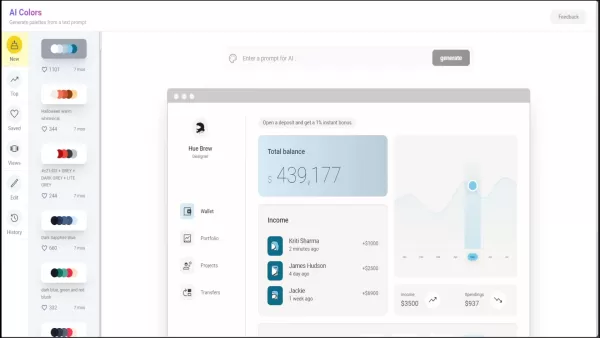
The platform achieves remarkable flexibility, converting everything from abstract concepts to specific color requests into usable palettes. Designed for accessibility, its uncomplicated interface welcomes both novice designers and seasoned professionals without mandatory accounts - an important consideration when evaluating design tools.
Navigating the Dashboard
The thoughtfully organized interface maximizes workflow efficiency.
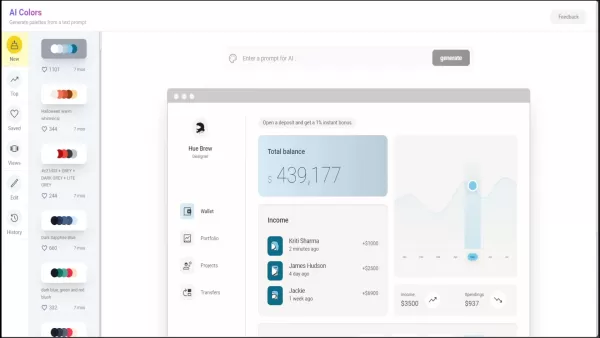
Navigation unfolds logically: 'New' showcases latest algorithmic creations; 'Top' reveals community trending selections; 'Saved' tracks personal favorites; 'Views' organizes by functional applications.
Core navigation features include:
- New: Freshly generated designer-approved palettes
- Top: Currently popular combinations across industries
- Saved: Personalized color library storage
- Views: Context-specific palette collections
- Edit: Fine-tuning workspace
- History: Previously explored configurations
This intelligent structuring transforms palette selection from tedious guesswork into efficient matching, aligning potential schemes with project requirements through logical categorization.
Customizing Color Palettes in Real-Time
The platform's dynamic editing distinguishes it from static alternatives.
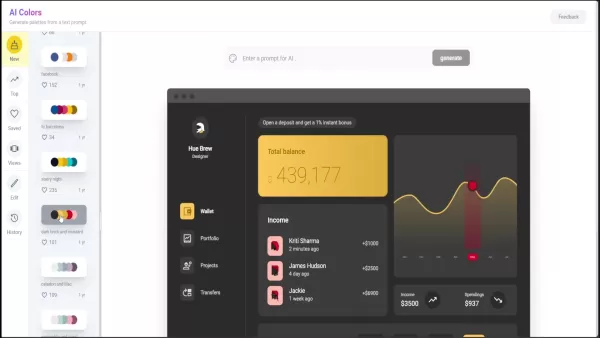
Adjustments propagate instantly across the preview dashboard, demonstrating how modifications affect visual hierarchy and readability. Direct color code copying integrates seamlessly with major design platforms.
Customization workflow:
- Choose foundation palette
- Access editing tools
- Modify HSB/RGB values
- Observe live application updates
This responsive approach bridges imagination and execution, eliminating the iteration lag inherent in traditional color workflows.
Categorized Views: Mobile App, Dashboard, Portfolio, and Landing Page
Context-specific templates address unique project requirements.
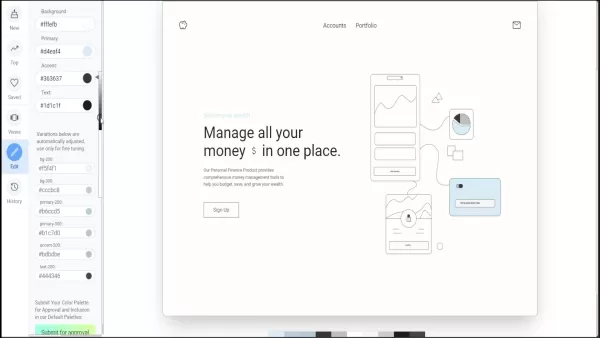
Preconfigured displays demonstrate how palettes perform in targeted applications, helping designers anticipate UX considerations and aesthetic impacts.
- Mobile App: Optimized for small-screen legibility
- Dashboard: Data visualization focused
- Portfolio: Portfolio-focused color storytelling
- Landing Page: Conversion-oriented combinations
These scenario-driven views significantly reduce adaptation time when transitioning palettes between medium-specific projects.
Generating Palettes from AI Prompts
The text-to-palette conversion system encourages creative exploration.
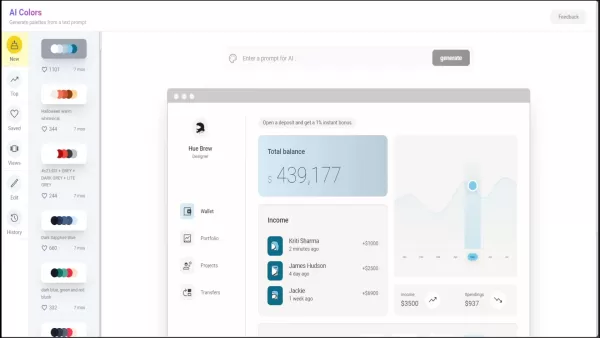
Descriptive inputs ranging from emotional states to environmental phenomena yield surprisingly accurate interpretations, expanding traditional color vocabulary.
Prompt generation process:
- Access prompt interface
- Input descriptive language
- Generate initial concept
- Refine through iterations
Effective prompt examples:
- 'Mediterranean coastal village'
- 'Corporate financial dashboard'
- 'Gourmet food photography'
- 'Biotech startup branding'
- 'Retro gaming console'
This semantic approach democratizes professional-grade color theory application.
Enhancing Productivity with AI Colors
Streamlining the Design Workflow
The platform condenses hours of manual color exploration into focused creative sessions. Rapid prototyping capabilities allow designers to evaluate multiple aesthetic directions efficiently, while maintaining centralized palette management ensures brand consistency across collaborative projects.
Inspiring Creative Exploration
By revealing unconventional color relationships, the AI encourages designers to transcend habitual selections. The community palette sharing feature exposes users to successful configurations from diverse industries and applications.
Improving Design Consistency
The organized storage system transforms color management from fragmented swatches to systematic library building. Version-controlled palette histories track aesthetic evolution while maintaining access to previous successful combinations.
Step-by-Step Guide to Using AI Colors
Generating a Color Palette from a Text Prompt
- Initiate creation workflow
- Input descriptive parameters
- Generate preliminary scheme
- Evaluate functional application
- Fine-tune technical specifications
Selecting a Pre-Generated Color Palette
- Browse categorized templates
- Preview contextual applications
- Assess technical properties
- Customize industry-specific versions
Saving and Exporting Color Palettes
- Organize successful combinations
- Establish naming conventions
- Extract technical specifications
- Integrate with production pipelines
AI Colors Pricing
Accessibility and Cost
The platform currently offers comprehensive functionality without financial barriers. Future enterprise solutions may introduce advanced collaboration features for organizational deployment.
Weighing the Advantages and Disadvantages of AI Colors
Pros
Accelerated conceptual development
Empirical color relationship visualization
Standardized technical outputs
Cross-medium application previews
Low-threshold accessibility
Cons
Advanced brand management limitations
Subjective algorithmic interpretation
Integration pipeline restrictions
Frequently Asked Questions (FAQ)
What is AI Colors?
A computational design assistant transforming creative language into applied color mathematics.
Do I need to sign up to use AI Colors?
Immediate access accommodates spontaneous creative sessions without administrative friction.
How do I generate a color palette from a text prompt?
Linguistic input undergoes spectral analysis to produce mathematically harmonious interpretations.
Can I customize the generated color palettes?
Real-time parametric adjustments enable precision refinements while maintaining underlying harmonies.
How can I save my favorite color palettes?
Personalized libraries support iterative design processes and version-controlled experimentation.
What are the different categorized views in AI Colors?
Contextual previews simulate real-world applications across digital and print mediums.
How do I export the color codes for a palette?
Standardized output formats ensure compatibility with professional design ecosystems.
Related Questions
What other AI tools can help with graphic design?
Emerging computational creativity tools span layout generation, typographic pairing, and asset production.
How can I improve my skills in color palette design?
Analytical observation combined with systematic experimentation develops professional intuition.
Are there any limitations to using AI-generated color palettes?
Algorithmic outputs require human oversight for brand-specific nuance and accessibility compliance.
Related article
 Anthropic Expands Claude AI Coding Tools to Japan in Push for Overseas Growth
Anthropic, a prominent U.S. artificial intelligence firm, is intensifying its global outreach. On Wednesday, the company hosted a major developer gathering, "Code with Claude," in Tokyo, drawing close to 500 software engineers. This initiative seeks
India’s Software Giant Cuts Hiring, Promises No Layoffs as AI Agents Scale Up
As artificial intelligence reshapes traditional labor-intensive business models, Tata Consultancy Services (TCS), a premier Indian software outsourcing firm, has unveiled its strategic response. During Tuesday’s annual general meeting, the chairman o
China Locks AI Models During Gaokam to Block Instant Homework Help
With the 2026 Gaokao fast approaching, rumors regarding the suspension of AI tools during the exam period have ignited intense online debate. In response to public concern, major AI platforms and educational apps have clarified their stance: rather t
Related Special Topic Recommendations
Design & Art
Anthropic Expands Claude AI Coding Tools to Japan in Push for Overseas Growth
Anthropic, a prominent U.S. artificial intelligence firm, is intensifying its global outreach. On Wednesday, the company hosted a major developer gathering, "Code with Claude," in Tokyo, drawing close to 500 software engineers. This initiative seeks
India’s Software Giant Cuts Hiring, Promises No Layoffs as AI Agents Scale Up
As artificial intelligence reshapes traditional labor-intensive business models, Tata Consultancy Services (TCS), a premier Indian software outsourcing firm, has unveiled its strategic response. During Tuesday’s annual general meeting, the chairman o
China Locks AI Models During Gaokam to Block Instant Homework Help
With the 2026 Gaokao fast approaching, rumors regarding the suspension of AI tools during the exam period have ignited intense online debate. In response to public concern, major AI platforms and educational apps have clarified their stance: rather t
Related Special Topic Recommendations
Design & Art
 Best AI Style Transfer Tools for Creative Experiments
2026 Latest Best Top-rated AI Style Transfer Tools for Creative Experiments! XIX.AI has curated a powerful, game-changing collection of must-try tools that deliver exceptional results through real-world tests and rigorous rankings. These top solutions help creatives boost productivity significantly by accelerating content creation and unlocking endless creative possibilities. Explore now to discover your perfect tool and start creating today!
 9 tools
 xix.ai
Comic Creation
Best AI Dialogue Bubble Tools for Visual Storytelling
xix.ai
Comic Creation
Best AI Dialogue Bubble Tools for Visual Storytelling
2026 Latest Best Top-Rated AI Dialogue Bubble Tools for Visual Storytelling are here on XIX.AI! This curated collection features powerful, game-changing tools that help creators boost productivity and overcome creative bottlenecks. Get a free vs paid comparison, see real-world tests, and check the latest rankings to find the must-try solutions perfect for crafting engaging visual narratives. Explore now to discover your ideal tool!
10 tools
xix.ai
Meeting Assistant
Top AI Meeting Summary Tools: Track Decisions and Follow-Ups Clearly
2026 Latest Top-Rated Best AI Meeting Summary Tools for Clear Decision Tracking and Effortless Follow-Ups. This curated list showcases powerful, game-changing solutions that boost productivity dramatically by automating meeting notes, identifying key action items, and streamlining team coordination across all projects. Get a free vs paid comparison along with real-world tests and weekly updated rankings to help you find the perfect tool. Explore now to unlock your AI edge!
9 tools
xix.ai
Data Analysis
Best AI Data Cleaning Tools: Fix Missing Values and Duplicates Fast
2026 Latest Best Top-rated AI Data Cleaning Tools for quick fixing of missing values and duplicates. This curated list showcases powerful, game-changing solutions that boost productivity significantly. Each option has undergone rigorous real-world tests to ensure reliability. Get a free vs paid comparison and discover the must-try tool that fits your needs best. Explore now at XIX.AI to Unlock your AI edge.
11 tools
xix.ai
Design & Art
Best AI Creative Ideation Tools for Artists: Break Through Visual Blocks
2026 Latest Best Top-Rated AI Creative Ideation Tools for Artists are curated by XIX.AI to help creators break through visual blocks and boost creativity instantly. These powerful game-changing tools offer real-world tests, detailed free vs paid comparison, and weekly updated rankings. Discover your perfect tool to accelerate content creation and unlock your AI edge today. Explore now!
14 tools
xix.ai
Music composition
AI Beat Makers for TikTok Background Tracks, Reels Audio, and Creator Promo Music
2026 Latest Best AI Beat Makers for TikTok Background Tracks, Reels Audio, and Creator Promo Music! XIX.AI has curated a top-rated list of powerful game-changing tools that go through real-world tests to deliver flawless music for every content need. You’ll find detailed free vs paid comparison data, weekly updated rankings, and must-try options to help you boost creativity and productivity. Explore now to discover your perfect tool!
11 tools
xix.ai

 Comments (1)
0/500
Comments (1)
0/500
![GaryRoberts]()
Finally, an AI that understands color theory! 🎨 I used to spend hours tweaking hex codes, but this tool saves so much time. The generated palettes are surprisingly vibrant and on-brand. Definitely a game-changer for UI designers who hate picking colors manually. #DesignTools #AI
Navigating the modern design landscape often presents challenges in color selection, but AI Colors revolutionizes this process by using AI-powered text prompts to create tailored palettes. This guide examines AI Colors' capabilities, advantages, and practical applications for design professionals.
Key Points
AI Colors transforms text inputs into cohesive color schemes
Features an intuitive, zero-learning-curve interface
Immediate access without registration requirements
Includes extensive library of ready-made palettes
Enables live customization during palette creation
Facilitates seamless color code exporting
Specialized templates for apps, dashboards, websites, and portfolios
Exploring AI Colors
What is AI Colors?
AI Colors represents a paradigm shift in digital color selection, employing machine learning to translate creative concepts into harmonious schemes. By interpreting natural language prompts, it eliminates traditional color selection barriers while maintaining artistic integrity.
The platform achieves remarkable flexibility, converting everything from abstract concepts to specific color requests into usable palettes. Designed for accessibility, its uncomplicated interface welcomes both novice designers and seasoned professionals without mandatory accounts - an important consideration when evaluating design tools.
Navigating the Dashboard
The thoughtfully organized interface maximizes workflow efficiency.
Navigation unfolds logically: 'New' showcases latest algorithmic creations; 'Top' reveals community trending selections; 'Saved' tracks personal favorites; 'Views' organizes by functional applications.
Core navigation features include:
- New: Freshly generated designer-approved palettes
- Top: Currently popular combinations across industries
- Saved: Personalized color library storage
- Views: Context-specific palette collections
- Edit: Fine-tuning workspace
- History: Previously explored configurations
This intelligent structuring transforms palette selection from tedious guesswork into efficient matching, aligning potential schemes with project requirements through logical categorization.
Customizing Color Palettes in Real-Time
The platform's dynamic editing distinguishes it from static alternatives.
Adjustments propagate instantly across the preview dashboard, demonstrating how modifications affect visual hierarchy and readability. Direct color code copying integrates seamlessly with major design platforms.
Customization workflow:
- Choose foundation palette
- Access editing tools
- Modify HSB/RGB values
- Observe live application updates
This responsive approach bridges imagination and execution, eliminating the iteration lag inherent in traditional color workflows.
Categorized Views: Mobile App, Dashboard, Portfolio, and Landing Page
Context-specific templates address unique project requirements.
Preconfigured displays demonstrate how palettes perform in targeted applications, helping designers anticipate UX considerations and aesthetic impacts.
- Mobile App: Optimized for small-screen legibility
- Dashboard: Data visualization focused
- Portfolio: Portfolio-focused color storytelling
- Landing Page: Conversion-oriented combinations
These scenario-driven views significantly reduce adaptation time when transitioning palettes between medium-specific projects.
Generating Palettes from AI Prompts
The text-to-palette conversion system encourages creative exploration.
Descriptive inputs ranging from emotional states to environmental phenomena yield surprisingly accurate interpretations, expanding traditional color vocabulary.
Prompt generation process:
- Access prompt interface
- Input descriptive language
- Generate initial concept
- Refine through iterations
Effective prompt examples:
- 'Mediterranean coastal village'
- 'Corporate financial dashboard'
- 'Gourmet food photography'
- 'Biotech startup branding'
- 'Retro gaming console'
This semantic approach democratizes professional-grade color theory application.
Enhancing Productivity with AI Colors
Streamlining the Design Workflow
The platform condenses hours of manual color exploration into focused creative sessions. Rapid prototyping capabilities allow designers to evaluate multiple aesthetic directions efficiently, while maintaining centralized palette management ensures brand consistency across collaborative projects.
Inspiring Creative Exploration
By revealing unconventional color relationships, the AI encourages designers to transcend habitual selections. The community palette sharing feature exposes users to successful configurations from diverse industries and applications.
Improving Design Consistency
The organized storage system transforms color management from fragmented swatches to systematic library building. Version-controlled palette histories track aesthetic evolution while maintaining access to previous successful combinations.
Step-by-Step Guide to Using AI Colors
Generating a Color Palette from a Text Prompt
- Initiate creation workflow
- Input descriptive parameters
- Generate preliminary scheme
- Evaluate functional application
- Fine-tune technical specifications
Selecting a Pre-Generated Color Palette
- Browse categorized templates
- Preview contextual applications
- Assess technical properties
- Customize industry-specific versions
Saving and Exporting Color Palettes
- Organize successful combinations
- Establish naming conventions
- Extract technical specifications
- Integrate with production pipelines
AI Colors Pricing
Accessibility and Cost
The platform currently offers comprehensive functionality without financial barriers. Future enterprise solutions may introduce advanced collaboration features for organizational deployment.
Weighing the Advantages and Disadvantages of AI Colors
Pros
Accelerated conceptual development
Empirical color relationship visualization
Standardized technical outputs
Cross-medium application previews
Low-threshold accessibility
Cons
Advanced brand management limitations
Subjective algorithmic interpretation
Integration pipeline restrictions
Frequently Asked Questions (FAQ)
What is AI Colors?
A computational design assistant transforming creative language into applied color mathematics.
Do I need to sign up to use AI Colors?
Immediate access accommodates spontaneous creative sessions without administrative friction.
How do I generate a color palette from a text prompt?
Linguistic input undergoes spectral analysis to produce mathematically harmonious interpretations.
Can I customize the generated color palettes?
Real-time parametric adjustments enable precision refinements while maintaining underlying harmonies.
How can I save my favorite color palettes?
Personalized libraries support iterative design processes and version-controlled experimentation.
What are the different categorized views in AI Colors?
Contextual previews simulate real-world applications across digital and print mediums.
How do I export the color codes for a palette?
Standardized output formats ensure compatibility with professional design ecosystems.
Related Questions
What other AI tools can help with graphic design?
Emerging computational creativity tools span layout generation, typographic pairing, and asset production.
How can I improve my skills in color palette design?
Analytical observation combined with systematic experimentation develops professional intuition.
Are there any limitations to using AI-generated color palettes?
Algorithmic outputs require human oversight for brand-specific nuance and accessibility compliance.








 Anthropic Expands Claude AI Coding Tools to Japan in Push for Overseas Growth
Anthropic, a prominent U.S. artificial intelligence firm, is intensifying its global outreach. On Wednesday, the company hosted a major developer gathering, "Code with Claude," in Tokyo, drawing close to 500 software engineers. This initiative seeks
Anthropic Expands Claude AI Coding Tools to Japan in Push for Overseas Growth
Anthropic, a prominent U.S. artificial intelligence firm, is intensifying its global outreach. On Wednesday, the company hosted a major developer gathering, "Code with Claude," in Tokyo, drawing close to 500 software engineers. This initiative seeks
 India’s Software Giant Cuts Hiring, Promises No Layoffs as AI Agents Scale Up
As artificial intelligence reshapes traditional labor-intensive business models, Tata Consultancy Services (TCS), a premier Indian software outsourcing firm, has unveiled its strategic response. During Tuesday’s annual general meeting, the chairman o
India’s Software Giant Cuts Hiring, Promises No Layoffs as AI Agents Scale Up
As artificial intelligence reshapes traditional labor-intensive business models, Tata Consultancy Services (TCS), a premier Indian software outsourcing firm, has unveiled its strategic response. During Tuesday’s annual general meeting, the chairman o
 China Locks AI Models During Gaokam to Block Instant Homework Help
With the 2026 Gaokao fast approaching, rumors regarding the suspension of AI tools during the exam period have ignited intense online debate. In response to public concern, major AI platforms and educational apps have clarified their stance: rather t
China Locks AI Models During Gaokam to Block Instant Homework Help
With the 2026 Gaokao fast approaching, rumors regarding the suspension of AI tools during the exam period have ignited intense online debate. In response to public concern, major AI platforms and educational apps have clarified their stance: rather t

2026 Latest Best Top-rated AI Style Transfer Tools for Creative Experiments! XIX.AI has curated a powerful, game-changing collection of must-try tools that deliver exceptional results through real-world tests and rigorous rankings. These top solutions help creatives boost productivity significantly by accelerating content creation and unlocking endless creative possibilities. Explore now to discover your perfect tool and start creating today!
9 tools
xix.ai

2026 Latest Best Top-Rated AI Dialogue Bubble Tools for Visual Storytelling are here on XIX.AI! This curated collection features powerful, game-changing tools that help creators boost productivity and overcome creative bottlenecks. Get a free vs paid comparison, see real-world tests, and check the latest rankings to find the must-try solutions perfect for crafting engaging visual narratives. Explore now to discover your ideal tool!
10 tools
xix.ai

2026 Latest Top-Rated Best AI Meeting Summary Tools for Clear Decision Tracking and Effortless Follow-Ups. This curated list showcases powerful, game-changing solutions that boost productivity dramatically by automating meeting notes, identifying key action items, and streamlining team coordination across all projects. Get a free vs paid comparison along with real-world tests and weekly updated rankings to help you find the perfect tool. Explore now to unlock your AI edge!
9 tools
xix.ai

2026 Latest Best Top-rated AI Data Cleaning Tools for quick fixing of missing values and duplicates. This curated list showcases powerful, game-changing solutions that boost productivity significantly. Each option has undergone rigorous real-world tests to ensure reliability. Get a free vs paid comparison and discover the must-try tool that fits your needs best. Explore now at XIX.AI to Unlock your AI edge.
11 tools
xix.ai

2026 Latest Best Top-Rated AI Creative Ideation Tools for Artists are curated by XIX.AI to help creators break through visual blocks and boost creativity instantly. These powerful game-changing tools offer real-world tests, detailed free vs paid comparison, and weekly updated rankings. Discover your perfect tool to accelerate content creation and unlock your AI edge today. Explore now!
14 tools
xix.ai

2026 Latest Best AI Beat Makers for TikTok Background Tracks, Reels Audio, and Creator Promo Music! XIX.AI has curated a top-rated list of powerful game-changing tools that go through real-world tests to deliver flawless music for every content need. You’ll find detailed free vs paid comparison data, weekly updated rankings, and must-try options to help you boost creativity and productivity. Explore now to discover your perfect tool!
11 tools
xix.ai

Finally, an AI that understands color theory! 🎨 I used to spend hours tweaking hex codes, but this tool saves so much time. The generated palettes are surprisingly vibrant and on-brand. Definitely a game-changer for UI designers who hate picking colors manually. #DesignTools #AI












