


 Home
HomeHow do AI animation tools (Gemini/ChatGPT/Deepseek) compare in 2025?
Artificial intelligence is swiftly reshaping creative industries, with animation being a prime example. AI tools can now offer detailed instructions and guidance for animation creation, lowering the barrier to entry for novices and streamlining workflows for professionals. This article compares three leading AI animation assistants: Google Gemini, ChatGPT, and the emergent Deepseek. We will analyze their strengths and weaknesses in delivering practical animation guidance to help you decide which AI can best translate your creative concepts into motion. Our goal is to equip you with the insights needed to select the right tool for your projects, boosting both your efficiency and creative results.
Key Points
Google Gemini excels at delivering structured, step-by-step animation guidance.
ChatGPT offers exceptionally detailed, frame-by-frame fight choreography.
Deepseek generates creative animation concepts but often lacks clear, actionable instructions.
The three AI tools differ significantly in their ability to generate usable background images.
Advice on timing and pacing is critical and can dramatically improve an animation's final impact.
A tool's ease of use and the clarity of its guidance are vital considerations for animators.
Real-world user feedback provides essential context for evaluating an AI's practical performance.
Comparing AI Tools for Animation Instructions
Google Gemini: Detailed and Organized
Google Gemini is built to deliver detailed animation instructions in a clear, sequential format.

It excels at deconstructing complex actions into simple, manageable steps, making it a valuable resource for animators at any skill level. This methodical approach allows users to follow the process with confidence, leading to a more efficient creation workflow.
User Experience with Gemini
The user experience with Google Gemini is defined by its clarity and logical structure. Instructions are presented in an easily digestible manner, which is especially helpful for those new to animation. This positions Gemini as an excellent choice for beginners seeking to understand core animation principles and kickstart their projects with solid, well-organized advice.
Limitations of Gemini
Despite its advantages, Gemini has notable shortcomings. A key area of concern is its unreliable image generation. It can sometimes fail to produce appropriate backgrounds or visual elements, which may disrupt the animation process and require users to seek supplementary tools.
The Importance of Backgrounds
Backgrounds are fundamental in animation, establishing the setting and enriching the visual narrative. Manually editing a generated background is a time-intensive task. A well-crafted background is a crucial component. The more detailed and accurate the AI's contribution, the more time the animator saves.
ChatGPT: Comprehensive Choreography
ChatGPT shines in its ability to provide exhaustive fight choreography broken down for individual frames.
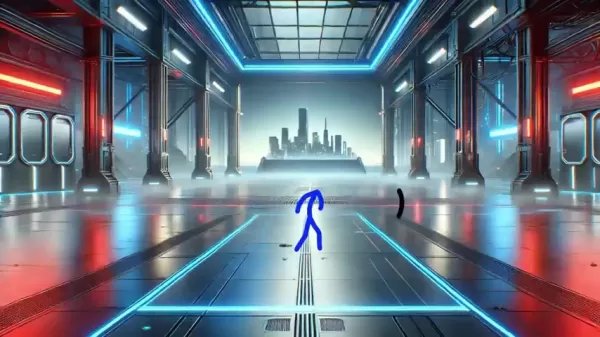
This granular detail is a major asset for animators crafting dynamic action sequences. Its precision in outlining specific movements per frame offers a level of meticulous planning that is difficult to replicate manually.
Frame-by-Frame Guidance
ChatGPT's frame-by-frame guidance ensures every motion is carefully plotted and timed. This meticulous approach is particularly advantageous for complex animations demanding exact coordination, offering comprehensive support to perfect your action scenes with explicit direction.
Incorporating Motion Blur
ChatGPT frequently advises incorporating motion blur to add realism to rapid movements. This tip is especially useful for conveying speed and force, adding a layer of depth and dynamism that elevates the overall quality of the animation through more lifelike motion.
Deepseek: Creative but Less Clear
Deepseek, a newer entrant in the AI animation space, provides imaginative prompts and concepts, though its instructions can be vague.
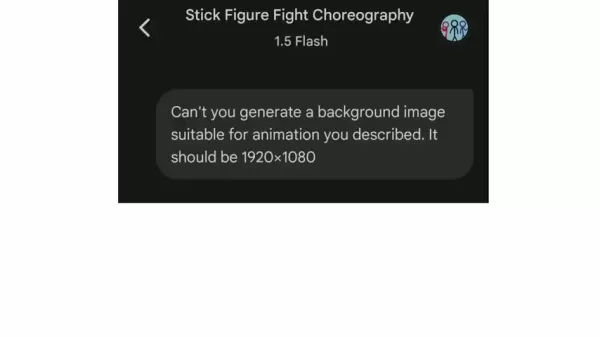
While it fosters creative, dramatic movements and poses, translating these ideas into practical steps can be challenging. Its overall effectiveness is sometimes hampered by a lack of concrete, detailed guidance.
Balancing Creativity with Clarity
Deepseek's strength lies in inspiring animators to explore novel ideas. The main challenge, however, is converting that inspiration into actionable steps. The tool could be enhanced by providing more practical, structured direction to complement its creative suggestions.
Areas for Improvement
To become a more robust animation tool, Deepseek would benefit from offering clearer, more structured instructions. Improved guidance on timing, pacing, and visual execution would boost its usability and appeal to a wider audience. Deepseek shows promise as a creative partner but is still evolving.
How to use (Gemini, ChatGPT, Deepseek)
Using Gemini for Animation
Using Gemini for animation is a straightforward process. Begin by entering your animation prompt into its interface to receive detailed choreography instructions. Follow these steps:
- Prompt Gemini: Input your animation concept, like a 10-second stick figure fight at 12 frames per second, to get detailed choreography steps.
- Evaluate Instructions: Review the step-by-step guidance from Gemini to check for clarity and practicality.
- Ask for a background image: If required, prompt Gemini to generate a suitable background. Be prepared to re-prompt if it fails on the first attempt, as a good background greatly enhances an animation.
- Implement instructions: Animate based on the provided guidance, carefully considering timing and spacing.
Following this approach allows you to utilize Gemini's structured methodology to create coherent animations, even as a beginner, thanks to its clear instructions for crafting compelling animations.
Using ChatGPT for Animation
Leveraging ChatGPT for animation involves prompting it for detailed fight choreography and applying its frame-by-frame advice. Here is a guide for using ChatGPT for your animation projects.
- Prompt ChatGPT: Input your animation idea with specifics like frame count and key actions to receive in-depth choreography.
- Assess Frame-by-Frame Instructions: Carefully review the instructions for each frame set and plan your work based on its suggestions.
- Implement instructions: Use ChatGPT's detailed guidance to create your animation sequence.
- Add the details: Apply specialized tips like motion blur to finalize the animation, then refine it to your satisfaction.
By adhering to these steps, you can harness ChatGPT's comprehensive, frame-specific advice to produce professional-grade animations.
Using Deepseek for Animation
Using Deepseek for animation involves tapping into its creative ideas, even when the execution guidance is less defined. Follow these steps to utilize its creative input.
- Prompt Deepseek: Input your animation concept with relevant details to elicit creative prompts and ideas.
- Get an Imgae: Note that Deepseek cannot generate images or graphics, so you will need to source visual assets separately.
- Animate to the Details: Begin animating based on the provided concepts, supplementing with your own creative interpretation and style.
- Analyze The Results: Evaluate whether Deepseek's input was helpful. It excels at guiding you toward more dramatic and expressive creations.
Deepseek can be a valuable tool for injecting creativity and dramatic flair into your animation projects.
Frequently Asked Questions
Which AI tool is best for beginner animators?
For beginners, Google Gemini is often the top choice due to its detailed, well-organized instructions. Its step-by-step methodology simplifies learning animation fundamentals, helping newcomers build skills and confidence without feeling overwhelmed. While ChatGPT and Deepseek have unique strengths, Gemini's structured guidance is particularly suited for those starting out, allowing them to focus on core principles and establish a strong foundation for their creative development.
Can these AI tools generate background images for animations?
The capability to generate background images differs across these AI tools. Google Gemini, despite its strong instructional output, has shown inconsistency in creating suitable backgrounds, which may require further editing or other resources. ChatGPT generally performs better at generating usable background imagery. Deepseek currently lacks any background generation functionality. Understanding these differences is key when choosing a tool for your visual asset needs.
How important is timing and pacing in animation instructions?
Timing and pacing are crucial elements in animation, directly affecting the narrative flow and emotional impact of the final piece. Effective AI guidance must account for these aspects. The timing should match the animation's intended mood—swift for fast action, deliberate for dramatic moments—ensuring a cohesive and engaging viewer experience.
Related Questions
What are some additional tips for enhancing animation quality?
To enhance animation quality, consider exaggerating movements for greater appeal and impact. Incorporate dramatic poses and motions to add energy. Utilize techniques like motion blur to make fast actions feel more realistic. Strive for believable movement physics. Also, carefully manage spacing—the distance between poses—to control the perceived speed and weight of actions, such as ensuring a punch has tight, powerful spacing. Each action has unique spacing requirements that contribute to its feel.
Related article
 Florida sues OpenAI, Sam Altman over violent incidents
Florida’s Attorney General filed a first-of-its-kind state lawsuit against OpenAI and CEO Sam Altman on Monday, alleging the company’s ChatGPT is linked to multiple violent incidents.The complaint argues that OpenAI prioritized winning “the AI arms r
OpenAI unveils advanced voice models for more natural real-time conversations
OpenAI has launched new conversational models, GPT-Live-1 and GPT-Live-1 mini, designed to sound more natural and manage turn-taking more effectively. These full-duplex models can speak and listen simultaneously, allowing users to interrupt naturally
OpenAI unveils GPT-5.6, the newest addition to its model family
OpenAI launched its latest model family on Thursday, introducing powerful new options into an increasingly competitive AI landscape.GPT-5.6 comes in three variants: Sol (designed as the primary workhorse), Terra (a mid-range option), and Luna (the bu
Related Special Topic Recommendations
Music composition
Florida sues OpenAI, Sam Altman over violent incidents
Florida’s Attorney General filed a first-of-its-kind state lawsuit against OpenAI and CEO Sam Altman on Monday, alleging the company’s ChatGPT is linked to multiple violent incidents.The complaint argues that OpenAI prioritized winning “the AI arms r
OpenAI unveils advanced voice models for more natural real-time conversations
OpenAI has launched new conversational models, GPT-Live-1 and GPT-Live-1 mini, designed to sound more natural and manage turn-taking more effectively. These full-duplex models can speak and listen simultaneously, allowing users to interrupt naturally
OpenAI unveils GPT-5.6, the newest addition to its model family
OpenAI launched its latest model family on Thursday, introducing powerful new options into an increasingly competitive AI landscape.GPT-5.6 comes in three variants: Sol (designed as the primary workhorse), Terra (a mid-range option), and Luna (the bu
Related Special Topic Recommendations
Music composition
 Best AI Melody Writing Tools for Song Drafts
2026 Latest Best Top-Rated AI Melody Writing Tools for Song Drafts! XIX.AI has curated a highly powerful game-changing collection that goes through rigorous real-world tests to deliver the best writing experience. You can find detailed free vs paid comparisons, accurate rankings, and must-try options designed to help you create stunning song drafts effortlessly and boost your creative productivity significantly. Explore now to discover your perfect tool!
 8 tools
 xix.ai
chatbot
Best AI Conversation Trainer Tools for Interview Practice
xix.ai
chatbot
Best AI Conversation Trainer Tools for Interview Practice
2026 Latest Best Top-rated AI Conversation Trainer Tools for Interview Practice are here on XIX.AI! This curated collection features powerful, game-changing tools that go through rigorous real-world tests to deliver accurate feedback. You’ll find a free vs paid comparison and detailed rankings to help you choose the must-try option that boosts your confidence and skills. Explore now to Discover your perfect tool for interview success!
12 tools
xix.ai
Design & Art
Best AI Style Transfer Tools for Creative Experiments
2026 Latest Best Top-rated AI Style Transfer Tools for Creative Experiments! XIX.AI has curated a powerful, game-changing collection of must-try tools that deliver exceptional results through real-world tests and rigorous rankings. These top solutions help creatives boost productivity significantly by accelerating content creation and unlocking endless creative possibilities. Explore now to discover your perfect tool and start creating today!
9 tools
xix.ai
Comic Creation
Best AI Dialogue Bubble Tools for Visual Storytelling
2026 Latest Best Top-Rated AI Dialogue Bubble Tools for Visual Storytelling are here on XIX.AI! This curated collection features powerful, game-changing tools that help creators boost productivity and overcome creative bottlenecks. Get a free vs paid comparison, see real-world tests, and check the latest rankings to find the must-try solutions perfect for crafting engaging visual narratives. Explore now to discover your ideal tool!
10 tools
xix.ai
Meeting Assistant
Top AI Meeting Summary Tools: Track Decisions and Follow-Ups Clearly
2026 Latest Top-Rated Best AI Meeting Summary Tools for Clear Decision Tracking and Effortless Follow-Ups. This curated list showcases powerful, game-changing solutions that boost productivity dramatically by automating meeting notes, identifying key action items, and streamlining team coordination across all projects. Get a free vs paid comparison along with real-world tests and weekly updated rankings to help you find the perfect tool. Explore now to unlock your AI edge!
9 tools
xix.ai
Data Analysis
Best AI Data Cleaning Tools: Fix Missing Values and Duplicates Fast
2026 Latest Best Top-rated AI Data Cleaning Tools for quick fixing of missing values and duplicates. This curated list showcases powerful, game-changing solutions that boost productivity significantly. Each option has undergone rigorous real-world tests to ensure reliability. Get a free vs paid comparison and discover the must-try tool that fits your needs best. Explore now at XIX.AI to Unlock your AI edge.
11 tools
xix.ai

 Comments (5)
0/500
Comments (5)
0/500
![JasonHill]()
2025年了还在纠结用Gemini还是ChatGPT做动画?其实工具只是辅助,创意才是核心。最近试了下Deepseek的生成效果,虽然细节还有点生硬,但确实省了不少前期工作。你们觉得AI会取代传统动画师吗?我觉得更多是解放双手,让我们去搞更有意思的设定。
![WillPerez]()
Honestly, the comparison is interesting but I feel like Deepseek is still underrated for animation prompts. Gemini's integration with Google ecosystem gives it an edge though. Anyone tried them for character rigging? 🤔
![PaulMartínez]()
Die Entwicklung ist echt krass! Vor ein paar Jahren hätte man sich das nicht vorstellen können, dass KI so tief in kreative Bereiche eindringt. Aber mal ehrlich, macht das die Animationsbranche nicht auch irgendwie... austauschbar? Wenn jeder mit ein paar Prompts coole Animationen erstellen kann, wo bleibt dann die Handschrift des Künstlers? 🧐 Trotzdem, als Hobbyist finde ich es super, endlich mal was auszuprobieren, ohne Jahre lernen zu müssen. Hoffentlich bleibt es bezahlbar und wird nicht nur für große Studios zugänglich.
![ScottMartinez]()
Die Tools werden immer besser, aber ich frage mich, ob das am Ende nicht dazu führt, dass viele Animationsjobs verschwinden. Andererseits ist es natürlich super, dass jetzt jeder seine Ideen umsetzen kann, ohne jahrelang lernen zu müssen. Mal sehen, wer sich 2025 wirklich durchsetzt. 🤔
![StevenMartin]()
So we're at the point where choosing an AI animation tool is like picking a favorite streaming service? 😅 Honestly, the real comparison for me in 2025 will be the hidden costs - subscription fatigue is real! The intro says it lowers entry barriers, but how long until we see a 'premium feature' wall for the good stuff? Still, the idea of getting detailed guidance is super cool for hobbyists.
Artificial intelligence is swiftly reshaping creative industries, with animation being a prime example. AI tools can now offer detailed instructions and guidance for animation creation, lowering the barrier to entry for novices and streamlining workflows for professionals. This article compares three leading AI animation assistants: Google Gemini, ChatGPT, and the emergent Deepseek. We will analyze their strengths and weaknesses in delivering practical animation guidance to help you decide which AI can best translate your creative concepts into motion. Our goal is to equip you with the insights needed to select the right tool for your projects, boosting both your efficiency and creative results.
Key Points
Google Gemini excels at delivering structured, step-by-step animation guidance.
ChatGPT offers exceptionally detailed, frame-by-frame fight choreography.
Deepseek generates creative animation concepts but often lacks clear, actionable instructions.
The three AI tools differ significantly in their ability to generate usable background images.
Advice on timing and pacing is critical and can dramatically improve an animation's final impact.
A tool's ease of use and the clarity of its guidance are vital considerations for animators.
Real-world user feedback provides essential context for evaluating an AI's practical performance.
Comparing AI Tools for Animation Instructions
Google Gemini: Detailed and Organized
Google Gemini is built to deliver detailed animation instructions in a clear, sequential format.
It excels at deconstructing complex actions into simple, manageable steps, making it a valuable resource for animators at any skill level. This methodical approach allows users to follow the process with confidence, leading to a more efficient creation workflow.
User Experience with Gemini
The user experience with Google Gemini is defined by its clarity and logical structure. Instructions are presented in an easily digestible manner, which is especially helpful for those new to animation. This positions Gemini as an excellent choice for beginners seeking to understand core animation principles and kickstart their projects with solid, well-organized advice.
Limitations of Gemini
Despite its advantages, Gemini has notable shortcomings. A key area of concern is its unreliable image generation. It can sometimes fail to produce appropriate backgrounds or visual elements, which may disrupt the animation process and require users to seek supplementary tools.
The Importance of Backgrounds
Backgrounds are fundamental in animation, establishing the setting and enriching the visual narrative. Manually editing a generated background is a time-intensive task. A well-crafted background is a crucial component. The more detailed and accurate the AI's contribution, the more time the animator saves.
ChatGPT: Comprehensive Choreography
ChatGPT shines in its ability to provide exhaustive fight choreography broken down for individual frames.
This granular detail is a major asset for animators crafting dynamic action sequences. Its precision in outlining specific movements per frame offers a level of meticulous planning that is difficult to replicate manually.
Frame-by-Frame Guidance
ChatGPT's frame-by-frame guidance ensures every motion is carefully plotted and timed. This meticulous approach is particularly advantageous for complex animations demanding exact coordination, offering comprehensive support to perfect your action scenes with explicit direction.
Incorporating Motion Blur
ChatGPT frequently advises incorporating motion blur to add realism to rapid movements. This tip is especially useful for conveying speed and force, adding a layer of depth and dynamism that elevates the overall quality of the animation through more lifelike motion.
Deepseek: Creative but Less Clear
Deepseek, a newer entrant in the AI animation space, provides imaginative prompts and concepts, though its instructions can be vague.
While it fosters creative, dramatic movements and poses, translating these ideas into practical steps can be challenging. Its overall effectiveness is sometimes hampered by a lack of concrete, detailed guidance.
Balancing Creativity with Clarity
Deepseek's strength lies in inspiring animators to explore novel ideas. The main challenge, however, is converting that inspiration into actionable steps. The tool could be enhanced by providing more practical, structured direction to complement its creative suggestions.
Areas for Improvement
To become a more robust animation tool, Deepseek would benefit from offering clearer, more structured instructions. Improved guidance on timing, pacing, and visual execution would boost its usability and appeal to a wider audience. Deepseek shows promise as a creative partner but is still evolving.
How to use (Gemini, ChatGPT, Deepseek)
Using Gemini for Animation
Using Gemini for animation is a straightforward process. Begin by entering your animation prompt into its interface to receive detailed choreography instructions. Follow these steps:
- Prompt Gemini: Input your animation concept, like a 10-second stick figure fight at 12 frames per second, to get detailed choreography steps.
- Evaluate Instructions: Review the step-by-step guidance from Gemini to check for clarity and practicality.
- Ask for a background image: If required, prompt Gemini to generate a suitable background. Be prepared to re-prompt if it fails on the first attempt, as a good background greatly enhances an animation.
- Implement instructions: Animate based on the provided guidance, carefully considering timing and spacing.
Following this approach allows you to utilize Gemini's structured methodology to create coherent animations, even as a beginner, thanks to its clear instructions for crafting compelling animations.
Using ChatGPT for Animation
Leveraging ChatGPT for animation involves prompting it for detailed fight choreography and applying its frame-by-frame advice. Here is a guide for using ChatGPT for your animation projects.
- Prompt ChatGPT: Input your animation idea with specifics like frame count and key actions to receive in-depth choreography.
- Assess Frame-by-Frame Instructions: Carefully review the instructions for each frame set and plan your work based on its suggestions.
- Implement instructions: Use ChatGPT's detailed guidance to create your animation sequence.
- Add the details: Apply specialized tips like motion blur to finalize the animation, then refine it to your satisfaction.
By adhering to these steps, you can harness ChatGPT's comprehensive, frame-specific advice to produce professional-grade animations.
Using Deepseek for Animation
Using Deepseek for animation involves tapping into its creative ideas, even when the execution guidance is less defined. Follow these steps to utilize its creative input.
- Prompt Deepseek: Input your animation concept with relevant details to elicit creative prompts and ideas.
- Get an Imgae: Note that Deepseek cannot generate images or graphics, so you will need to source visual assets separately.
- Animate to the Details: Begin animating based on the provided concepts, supplementing with your own creative interpretation and style.
- Analyze The Results: Evaluate whether Deepseek's input was helpful. It excels at guiding you toward more dramatic and expressive creations.
Deepseek can be a valuable tool for injecting creativity and dramatic flair into your animation projects.
Frequently Asked Questions
Which AI tool is best for beginner animators?
For beginners, Google Gemini is often the top choice due to its detailed, well-organized instructions. Its step-by-step methodology simplifies learning animation fundamentals, helping newcomers build skills and confidence without feeling overwhelmed. While ChatGPT and Deepseek have unique strengths, Gemini's structured guidance is particularly suited for those starting out, allowing them to focus on core principles and establish a strong foundation for their creative development.
Can these AI tools generate background images for animations?
The capability to generate background images differs across these AI tools. Google Gemini, despite its strong instructional output, has shown inconsistency in creating suitable backgrounds, which may require further editing or other resources. ChatGPT generally performs better at generating usable background imagery. Deepseek currently lacks any background generation functionality. Understanding these differences is key when choosing a tool for your visual asset needs.
How important is timing and pacing in animation instructions?
Timing and pacing are crucial elements in animation, directly affecting the narrative flow and emotional impact of the final piece. Effective AI guidance must account for these aspects. The timing should match the animation's intended mood—swift for fast action, deliberate for dramatic moments—ensuring a cohesive and engaging viewer experience.
Related Questions
What are some additional tips for enhancing animation quality?
To enhance animation quality, consider exaggerating movements for greater appeal and impact. Incorporate dramatic poses and motions to add energy. Utilize techniques like motion blur to make fast actions feel more realistic. Strive for believable movement physics. Also, carefully manage spacing—the distance between poses—to control the perceived speed and weight of actions, such as ensuring a punch has tight, powerful spacing. Each action has unique spacing requirements that contribute to its feel.








 Florida sues OpenAI, Sam Altman over violent incidents
Florida’s Attorney General filed a first-of-its-kind state lawsuit against OpenAI and CEO Sam Altman on Monday, alleging the company’s ChatGPT is linked to multiple violent incidents.The complaint argues that OpenAI prioritized winning “the AI arms r
Florida sues OpenAI, Sam Altman over violent incidents
Florida’s Attorney General filed a first-of-its-kind state lawsuit against OpenAI and CEO Sam Altman on Monday, alleging the company’s ChatGPT is linked to multiple violent incidents.The complaint argues that OpenAI prioritized winning “the AI arms r
 OpenAI unveils advanced voice models for more natural real-time conversations
OpenAI has launched new conversational models, GPT-Live-1 and GPT-Live-1 mini, designed to sound more natural and manage turn-taking more effectively. These full-duplex models can speak and listen simultaneously, allowing users to interrupt naturally
OpenAI unveils advanced voice models for more natural real-time conversations
OpenAI has launched new conversational models, GPT-Live-1 and GPT-Live-1 mini, designed to sound more natural and manage turn-taking more effectively. These full-duplex models can speak and listen simultaneously, allowing users to interrupt naturally
 OpenAI unveils GPT-5.6, the newest addition to its model family
OpenAI launched its latest model family on Thursday, introducing powerful new options into an increasingly competitive AI landscape.GPT-5.6 comes in three variants: Sol (designed as the primary workhorse), Terra (a mid-range option), and Luna (the bu
OpenAI unveils GPT-5.6, the newest addition to its model family
OpenAI launched its latest model family on Thursday, introducing powerful new options into an increasingly competitive AI landscape.GPT-5.6 comes in three variants: Sol (designed as the primary workhorse), Terra (a mid-range option), and Luna (the bu

2026 Latest Best Top-Rated AI Melody Writing Tools for Song Drafts! XIX.AI has curated a highly powerful game-changing collection that goes through rigorous real-world tests to deliver the best writing experience. You can find detailed free vs paid comparisons, accurate rankings, and must-try options designed to help you create stunning song drafts effortlessly and boost your creative productivity significantly. Explore now to discover your perfect tool!
8 tools
xix.ai

2026 Latest Best Top-rated AI Conversation Trainer Tools for Interview Practice are here on XIX.AI! This curated collection features powerful, game-changing tools that go through rigorous real-world tests to deliver accurate feedback. You’ll find a free vs paid comparison and detailed rankings to help you choose the must-try option that boosts your confidence and skills. Explore now to Discover your perfect tool for interview success!
12 tools
xix.ai

2026 Latest Best Top-rated AI Style Transfer Tools for Creative Experiments! XIX.AI has curated a powerful, game-changing collection of must-try tools that deliver exceptional results through real-world tests and rigorous rankings. These top solutions help creatives boost productivity significantly by accelerating content creation and unlocking endless creative possibilities. Explore now to discover your perfect tool and start creating today!
9 tools
xix.ai

2026 Latest Best Top-Rated AI Dialogue Bubble Tools for Visual Storytelling are here on XIX.AI! This curated collection features powerful, game-changing tools that help creators boost productivity and overcome creative bottlenecks. Get a free vs paid comparison, see real-world tests, and check the latest rankings to find the must-try solutions perfect for crafting engaging visual narratives. Explore now to discover your ideal tool!
10 tools
xix.ai

2026 Latest Top-Rated Best AI Meeting Summary Tools for Clear Decision Tracking and Effortless Follow-Ups. This curated list showcases powerful, game-changing solutions that boost productivity dramatically by automating meeting notes, identifying key action items, and streamlining team coordination across all projects. Get a free vs paid comparison along with real-world tests and weekly updated rankings to help you find the perfect tool. Explore now to unlock your AI edge!
9 tools
xix.ai

2026 Latest Best Top-rated AI Data Cleaning Tools for quick fixing of missing values and duplicates. This curated list showcases powerful, game-changing solutions that boost productivity significantly. Each option has undergone rigorous real-world tests to ensure reliability. Get a free vs paid comparison and discover the must-try tool that fits your needs best. Explore now at XIX.AI to Unlock your AI edge.
11 tools
xix.ai

2025年了还在纠结用Gemini还是ChatGPT做动画?其实工具只是辅助,创意才是核心。最近试了下Deepseek的生成效果,虽然细节还有点生硬,但确实省了不少前期工作。你们觉得AI会取代传统动画师吗?我觉得更多是解放双手,让我们去搞更有意思的设定。
Honestly, the comparison is interesting but I feel like Deepseek is still underrated for animation prompts. Gemini's integration with Google ecosystem gives it an edge though. Anyone tried them for character rigging? 🤔
Die Entwicklung ist echt krass! Vor ein paar Jahren hätte man sich das nicht vorstellen können, dass KI so tief in kreative Bereiche eindringt. Aber mal ehrlich, macht das die Animationsbranche nicht auch irgendwie... austauschbar? Wenn jeder mit ein paar Prompts coole Animationen erstellen kann, wo bleibt dann die Handschrift des Künstlers? 🧐 Trotzdem, als Hobbyist finde ich es super, endlich mal was auszuprobieren, ohne Jahre lernen zu müssen. Hoffentlich bleibt es bezahlbar und wird nicht nur für große Studios zugänglich.
Die Tools werden immer besser, aber ich frage mich, ob das am Ende nicht dazu führt, dass viele Animationsjobs verschwinden. Andererseits ist es natürlich super, dass jetzt jeder seine Ideen umsetzen kann, ohne jahrelang lernen zu müssen. Mal sehen, wer sich 2025 wirklich durchsetzt. 🤔
So we're at the point where choosing an AI animation tool is like picking a favorite streaming service? 😅 Honestly, the real comparison for me in 2025 will be the hidden costs - subscription fatigue is real! The intro says it lowers entry barriers, but how long until we see a 'premium feature' wall for the good stuff? Still, the idea of getting detailed guidance is super cool for hobbyists.












