


 Home
HomeHow to build free AI Agent automation with n8n for 2025 workflow?
In today's fast-paced business world, automation is essential. Picture having a digital assistant that tirelessly manages repetitive tasks, freeing you to concentrate on strategic goals. This is the power of AI agents. This guide explains how to build a fully functional AI agent for free, even without coding experience, using the powerful n8n platform. Discover the core traits of AI agents and receive step-by-step instructions to configure your own automated workflow. Automate tasks like sending invoice reminders for overdue payments and step into the future of work.
Key Points
Build a free AI agent using n8n, no coding required.
Learn the key characteristics of AI agents: reasoning, tool use, and memory.
Configure Docker Desktop to self-host n8n and run AI workflows.
Connect Google Gemini to n8n to give your AI agent reasoning capabilities.
Automate business processes like invoice reminders using n8n and AI.
Explore n8n's workflow automation potential for diverse business needs.
Unlocking AI Agent Automation with n8n
What is an AI Agent?
An AI agent is an intelligent digital system that functions like a productive team member

. It's more advanced than a simple chatbot; it's a proactive system capable of reasoning, accessing various tools, and learning from past interactions to enhance its performance.
Here's the key difference: a traditional chatbot needs explicit, step-by-step commands. An AI agent can accept a high-level objective and independently determine the best way to accomplish it. This capability is built on three core pillars:
- Reasoning Skills: Unlike chatbots that require detailed instructions, AI agents can interpret a goal and plan the steps to reach it. For instance, instead of being told to ‘summarize this article and format it for LinkedIn,’ an AI agent can be asked to ‘create a LinkedIn post from this article’ and handle the summarization and formatting automatically. This enables a much more streamlined process.
- Tool Access: AI agents are not limited to one app. They can interact with numerous tools to automate actions like processing payments, sending emails, ordering stock, or posting on social media. This connectivity unlocks a wider range of applications.
- Memory: A capable AI agent retains context from past interactions and learns from experience, similar to a human colleague. It maintains continuity within and across tasks, improving its efficiency over time.
While concerns about AI replacing jobs exist, the real opportunity lies in using them to augment and support human work. By understanding their strengths, we can leverage AI agents to optimize processes and create time for higher-value strategic work. A well-configured AI agent becomes a powerful asset.
n8n: The No-Code AI Automation Platform
n8n is a versatile workflow automation platform built for technical users

. It lets you build with the precision of code or the simplicity of a visual editor, enabling you to create multi-step AI agents and connect various applications. In essence, n8n is a workflow automation tool similar to Zapier or Make.com. New users receive a 14-day free trial and up to 1000 monthly workflow executions for free.
n8n distinguishes itself through flexibility and self-hosting options. While cloud services offer convenience, n8n allows you to run workflows on your own infrastructure, giving you full control over data security and privacy. This is crucial when handling sensitive business information. Setting up n8n for self-hosting involves more initial steps, but the added control and security are worthwhile.
To run n8n for free:
- Install Docker Desktop: Download and install Docker Desktop from docker.com/products/docker-desktop/. This software is essential for containerized applications and self-hosting n8n.
- Enable WSL (Windows Subsystem for Linux): If you're on Windows, enable WSL when prompted during Docker Desktop setup. This allows Linux-based containers to run on Windows.
- Create a Docker Volume: Open Command Prompt and run
docker volume create n8n_data. This creates dedicated storage for n8n's data. - Run the Docker Command: Execute the following command in the command prompt (ensure all characters are lowercase):
docker run -it --rm -p 5678:5678 -v n8n_data:/home/node/.n8n n8n/n8n
This command downloads and starts the n8n container, maps local port 5678, and attaches the n8n_data volume to preserve your information.
- Access n8n: After a moment, n8n will start. Open a browser and navigate to
http://localhost:5678 to access the n8n dashboard.
From the n8n dashboard, you can create an account and begin building your first workflow.
Building Your First AI-Powered Workflow
Using Templates for AI workflows
Jumpstart your AI agent project by using one of n8n's many pre-built templates. These templates serve as foundations for common automations and can be tailored to your specific requirements. You can browse templates directly from the main n8n dashboard. They are excellent starting points and provide practical learning examples.
n8n offers a library of over 3500 templates covering a vast array of use cases. If you prefer not to use a template, you can also build workflows entirely from scratch. Often, if you have a specific automation in mind, a relevant template already exists to help.
Walking Through the First AI Agent
Let's walk through setting up a basic AI agent in n8n. Start by clicking the "Test a simple AI agent example" button
. This loads a template with two main components. The first node acts as the trigger, initiating the workflow (e.g., a command saying "Hi"). The second part contains three key configuration fields:
- Chat Model
- Memory
- Tool
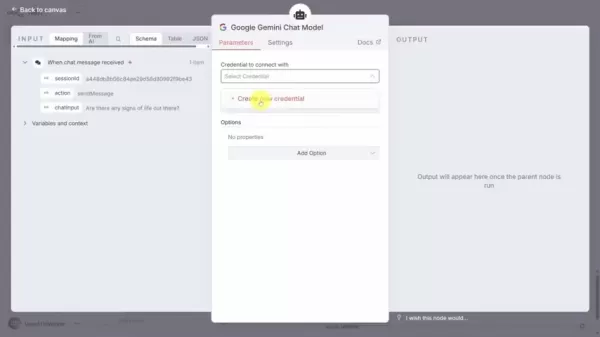
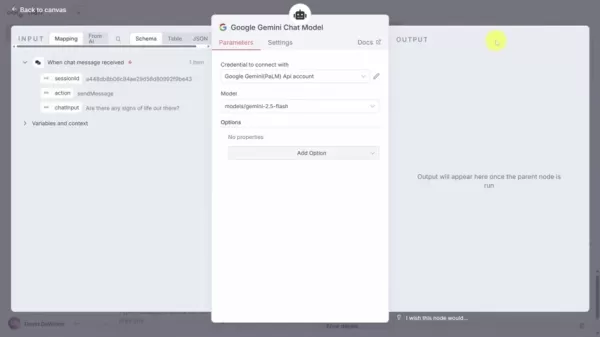
First, configure the chat model. Remove the default OpenAI model by clicking the delete icon, then add a new model. Select the Google Gemini chat model for a free powerful option. This requires connecting n8n to Google Gemini via an API key. Create a new credential, paste your Gemini API key, test the connection, and save. Now, with the AI model connected, you can craft more specific prompts for your agent.
The Importance of a tool with Quickbooks and final workflow
Next, empower your agent with context through tools, granting it the ability to perform specific actions. Tools provide crucial direction and functionality. For a finance automation example, integrating a tool like QuickBooks allows the AI to search for and analyze invoice data to prepare appropriate responses
.
A final critical component is human-in-the-loop approval. This ensures all actions, like sending a payment reminder email, are verified for accuracy before proceeding. This step typically involves integrating a messaging app like Discord for notifications, which requires additional setup. The detailed steps for this are extensive, so we'll cover them in a separate guide.
With the context, tools, and approval steps in place, your AI agent is now configured to help manage overdue invoice follow-ups. Congratulations on building your first AI agent with n8n!
n8n How To
Step By Step Guide
- Visit n8n.io to install and set up n8n, gaining access to its workflow automation features.
- Install and configure Docker to run n8n workflows independently of the cloud platform.
- Integrate necessary services and plugins (e.g., Google, QuickBooks) and link them to your n8n workflow.
- A basic understanding of JavaScript is beneficial for advanced customizations and creating more complex logic.
n8n Pricing
Current Cost
n8n offers a 14-day free trial with up to 1000 workflow executions. After the trial, subscription pricing depends on your required execution volume and features. Visit their website for the latest plans to find the best fit for your needs.
Weighing the Benefits: Pros
and Cons
of n8n
Pros
Affordability: The ability to self-host n8n and use free AI models like Google Gemini makes it a cost-effective solution for building AI agents.
No-Code Accessibility: The intuitive drag-and-drop interface makes automation accessible to users without deep coding knowledge.
Flexibility: n8n's adaptable structure allows for extensive customization and integration with a wide array of apps and services.
Control: Self-hosting provides complete ownership over your data and its security.
Cons
Setup Complexity: Self-hosting n8n requires some technical expertise, particularly when setting up Docker and WSL.
Maintenance: Self-hosting entails server maintenance and ensuring the n8n instance remains operational and updated.
The cloud-based version has limited functionality on the free tier.
Note that platform features may evolve. What works today might be updated in future releases.
Top Core Features of n8n
Features
- Flexibility: Adapts to various technical skill levels, combining code-level precision with visual, drag-and-drop simplicity, making it usable across teams.
- Workflow Executions: Each complete run of a connected series of actions in a workflow counts as one execution. Every trigger and its resulting actions consume an execution.
- Prebuilt Templates: Leverage a vast library of community-built workflows to save development time and kickstart projects.
- Drag-and-Drop Interface: Enables users with minimal coding experience to build and manage powerful automation workflows.
Typical Use Cases For n8n
Automation With n8n
- AI Agent Construction: Build sophisticated AI agents to handle complex, multi-step tasks without heavy coding.
- Integration with Google Services: Seamlessly connect with Google tools like Gemini, Sheets, and Gmail to create intelligent, data-driven workflows.
- Business Process Automation: Automate financial, sales, marketing, or operational tasks by integrating with business software like QuickBooks, CRMs, and communication platforms.
FAQ
Can I build AI agent without coding?
Yes, n8n's primary interface is a visual, drag-and-drop editor, making a no-code approach entirely possible.
How can i get n8n for free?
By self-hosting the platform using Docker, you can run n8n for free indefinitely, as outlined in the guide above.
Can the AI agent make human approval decisions?
AI agents can be configured to pause and request human input for key decisions. In n8n, this feature is known as "Human-in-the-Loop."
Related Questions
Is there coding invovled?
While advanced customizations benefit from coding knowledge, n8n's core functionality is accessible without code. You can use templates and configure nodes visually. For developers, n8n supports adding custom JavaScript or Python code within workflows, offering flexibility for both beginners and experts.
Is the Google AI model used paid or free?
This tutorial uses Google's Gemini model, which offers a generous free tier, allowing you to create a functional AI agent at no cost. However, n8n is compatible with numerous AI platforms, so you can also integrate paid models if desired.
Related article
 Stripe to Acquire OpenRouter as AI Model Routing Gains Momentum
Stripe has agreed to acquire OpenRouter, an AI model-routing platform that gives developers access to hundreds of models through a single interface. The deal adds model selection and routing to Stripe’s existing work around AI usage and token-based b
Former OpenAI Researcher Barrett Zoph Returns to Google to Support Gemini Development
Barret Zoph, who previously abruptly left and joined OpenAI due to a disagreement with Thinking Machines Lab CEO Miriam Mularati, has once again changed employers. Alphabet's Google announced that Zoph will return as Vice President of Research, bring
How Recursive Intelligence Raised $335M at $4B Valuation in 4 Months
The co-founders of startup Ricursive Intelligence seemed destined to be co-founders.Anna Goldie, CEO, and Azalia Mirhoseini, CTO, are so well-known in the AI community that they were among those AI engineers who “got those weird emails from Zuckerber
Related Special Topic Recommendations
Design & Art
Stripe to Acquire OpenRouter as AI Model Routing Gains Momentum
Stripe has agreed to acquire OpenRouter, an AI model-routing platform that gives developers access to hundreds of models through a single interface. The deal adds model selection and routing to Stripe’s existing work around AI usage and token-based b
Former OpenAI Researcher Barrett Zoph Returns to Google to Support Gemini Development
Barret Zoph, who previously abruptly left and joined OpenAI due to a disagreement with Thinking Machines Lab CEO Miriam Mularati, has once again changed employers. Alphabet's Google announced that Zoph will return as Vice President of Research, bring
How Recursive Intelligence Raised $335M at $4B Valuation in 4 Months
The co-founders of startup Ricursive Intelligence seemed destined to be co-founders.Anna Goldie, CEO, and Azalia Mirhoseini, CTO, are so well-known in the AI community that they were among those AI engineers who “got those weird emails from Zuckerber
Related Special Topic Recommendations
Design & Art
 Top AI Illustration Tools: Create Editorial Scenes and Cover Art Faster
2026 Latest Top-rated AI Illustration Tools: Our curated list features the best powerfully designed tools for creating stunning editorial scenes and eye-catching cover art quickly. Each option has gone through rigorous real-world tests, offering a free vs paid comparison to help you find the perfect match for your workflow. Try these must-try solutions today to unlock your AI edge and boost your creative productivity. Explore now at XIX.AI.
 10 tools
 xix.ai
Education and Learning
Top AI Tutors for Exam Prep: Practice Math, Science, and English
xix.ai
Education and Learning
Top AI Tutors for Exam Prep: Practice Math, Science, and English
2026 Latest Top-Rated Best AI Tutors for Exam Prep are here on XIX.AI! Our curated list features powerful game-changing tools that offer free vs paid comparison, real-world tests, and weekly updated rankings. They help boost your writing efficiency, simplify complex topic learning, and unlock your academic potential. Explore now to Discover your perfect exam prep tool and Start creating today to Unlock your AI edge!
10 tools
xix.ai
Finance
AI Budget Planning Tools for Personal Money Management
2026 Latest Best Top-Rated AI Budget Planning Tools for Personal Money Management are here on XIX.AI! This curated collection features powerful, game-changing solutions that help you conduct real-world tests, understand spending habits, and create personalized plans to boost productivity. Enjoy a free vs paid comparison along with detailed rankings. Must-try tools designed to simplify money management and unlock your AI edge. Explore now!
11 tools
xix.ai
Health & Wellness
AI Sleep Tracking Assistants: Improve Recovery with Better Bedtime Habits
2026 Latest Best Top-Rated AI Sleep Tracking Assistants curated for ultimate recovery. This fully updated weekly guide features powerful tools that deliver real-world tests, free vs paid comparison, and detailed rankings to help you find the must-try solution that boosts sleep quality and supports better bedtime habits. Explore now at XIX.AI to Unlock your AI edge.
10 tools
xix.ai
Data Analysis
AI SQL Copilots for Product and Revenue Analytics
2026 Latest Best Top-Rated AI SQL Copilots for Product and Revenue Analytics! XIX.AI has curated a powerful, game-changing collection of must-try tools that undergo real-world tests through weekly updated rankings. These tools help users boost productivity significantly by accelerating data analysis, streamlining complex queries, and generating accurate insights to drive smarter business decisions. Explore now to Discover your perfect tool for unlocking your AI edge!
14 tools
xix.ai
Education and Learning
Best AI Homework Helpers That Teach: Learn Concepts, Not Just Answers
2026 Latest Best Top-Rated AI Homework Helpers That Teach Core Concepts Not Just Answers Powerful Tools for Students Must-Try Curated List Weekly Updated Free vs Paid Comparison Real-World Tests Accurate Rankings to Help You Unlock Your Full Learning Potential Explore now to Discover your perfect tool for smarter studying.
10 tools
xix.ai

 Comments (2)
0/500
Comments (2)
0/500
![LawrenceGarcía]()
This is exactly what I've been looking for! I've been messing around with n8n but never thought about using it for AI agents. Does it support OpenAI's new models? Would love to see a step-by-step video tutorial. 😎
![EricNelson]()
Automação gratuita com IA? Parece bom demais pra ser verdade, mas esse tutorial do n8n despertou minha curiosidade! 🧐 É complicado de configurar? Meu maior medo é que esses 'agentes' acabem criando mais problemas do que soluções, exigindo supervisão o tempo todo. Alguém já testou isso em produção? Gostaria de saber sobre a pegadinha real!
In today's fast-paced business world, automation is essential. Picture having a digital assistant that tirelessly manages repetitive tasks, freeing you to concentrate on strategic goals. This is the power of AI agents. This guide explains how to build a fully functional AI agent for free, even without coding experience, using the powerful n8n platform. Discover the core traits of AI agents and receive step-by-step instructions to configure your own automated workflow. Automate tasks like sending invoice reminders for overdue payments and step into the future of work.
Key Points
Build a free AI agent using n8n, no coding required.
Learn the key characteristics of AI agents: reasoning, tool use, and memory.
Configure Docker Desktop to self-host n8n and run AI workflows.
Connect Google Gemini to n8n to give your AI agent reasoning capabilities.
Automate business processes like invoice reminders using n8n and AI.
Explore n8n's workflow automation potential for diverse business needs.
Unlocking AI Agent Automation with n8n
What is an AI Agent?
An AI agent is an intelligent digital system that functions like a productive team member
. It's more advanced than a simple chatbot; it's a proactive system capable of reasoning, accessing various tools, and learning from past interactions to enhance its performance.
Here's the key difference: a traditional chatbot needs explicit, step-by-step commands. An AI agent can accept a high-level objective and independently determine the best way to accomplish it. This capability is built on three core pillars:
- Reasoning Skills: Unlike chatbots that require detailed instructions, AI agents can interpret a goal and plan the steps to reach it. For instance, instead of being told to ‘summarize this article and format it for LinkedIn,’ an AI agent can be asked to ‘create a LinkedIn post from this article’ and handle the summarization and formatting automatically. This enables a much more streamlined process.
- Tool Access: AI agents are not limited to one app. They can interact with numerous tools to automate actions like processing payments, sending emails, ordering stock, or posting on social media. This connectivity unlocks a wider range of applications.
- Memory: A capable AI agent retains context from past interactions and learns from experience, similar to a human colleague. It maintains continuity within and across tasks, improving its efficiency over time.
While concerns about AI replacing jobs exist, the real opportunity lies in using them to augment and support human work. By understanding their strengths, we can leverage AI agents to optimize processes and create time for higher-value strategic work. A well-configured AI agent becomes a powerful asset.
n8n: The No-Code AI Automation Platform
n8n is a versatile workflow automation platform built for technical users
. It lets you build with the precision of code or the simplicity of a visual editor, enabling you to create multi-step AI agents and connect various applications. In essence, n8n is a workflow automation tool similar to Zapier or Make.com. New users receive a 14-day free trial and up to 1000 monthly workflow executions for free.
n8n distinguishes itself through flexibility and self-hosting options. While cloud services offer convenience, n8n allows you to run workflows on your own infrastructure, giving you full control over data security and privacy. This is crucial when handling sensitive business information. Setting up n8n for self-hosting involves more initial steps, but the added control and security are worthwhile.
To run n8n for free:
- Install Docker Desktop: Download and install Docker Desktop from docker.com/products/docker-desktop/. This software is essential for containerized applications and self-hosting n8n.
- Enable WSL (Windows Subsystem for Linux): If you're on Windows, enable WSL when prompted during Docker Desktop setup. This allows Linux-based containers to run on Windows.
- Create a Docker Volume: Open Command Prompt and run
docker volume create n8n_data. This creates dedicated storage for n8n's data. - Run the Docker Command: Execute the following command in the command prompt (ensure all characters are lowercase):
docker run -it --rm -p 5678:5678 -v n8n_data:/home/node/.n8n n8n/n8nThis command downloads and starts the n8n container, maps local port 5678, and attaches the
n8n_datavolume to preserve your information. - Access n8n: After a moment, n8n will start. Open a browser and navigate to
http://localhost:5678to access the n8n dashboard.
From the n8n dashboard, you can create an account and begin building your first workflow.
Building Your First AI-Powered Workflow
Using Templates for AI workflows
Jumpstart your AI agent project by using one of n8n's many pre-built templates. These templates serve as foundations for common automations and can be tailored to your specific requirements. You can browse templates directly from the main n8n dashboard. They are excellent starting points and provide practical learning examples.
n8n offers a library of over 3500 templates covering a vast array of use cases. If you prefer not to use a template, you can also build workflows entirely from scratch. Often, if you have a specific automation in mind, a relevant template already exists to help.
Walking Through the First AI Agent
Let's walk through setting up a basic AI agent in n8n. Start by clicking the "Test a simple AI agent example" button
. This loads a template with two main components. The first node acts as the trigger, initiating the workflow (e.g., a command saying "Hi"). The second part contains three key configuration fields:
- Chat Model
- Memory
- Tool
First, configure the chat model. Remove the default OpenAI model by clicking the delete icon, then add a new model. Select the Google Gemini chat model for a free powerful option. This requires connecting n8n to Google Gemini via an API key. Create a new credential, paste your Gemini API key, test the connection, and save. Now, with the AI model connected, you can craft more specific prompts for your agent.
The Importance of a tool with Quickbooks and final workflow
Next, empower your agent with context through tools, granting it the ability to perform specific actions. Tools provide crucial direction and functionality. For a finance automation example, integrating a tool like QuickBooks allows the AI to search for and analyze invoice data to prepare appropriate responses
.
A final critical component is human-in-the-loop approval. This ensures all actions, like sending a payment reminder email, are verified for accuracy before proceeding. This step typically involves integrating a messaging app like Discord for notifications, which requires additional setup. The detailed steps for this are extensive, so we'll cover them in a separate guide.
With the context, tools, and approval steps in place, your AI agent is now configured to help manage overdue invoice follow-ups. Congratulations on building your first AI agent with n8n!
n8n How To
Step By Step Guide
- Visit n8n.io to install and set up n8n, gaining access to its workflow automation features.
- Install and configure Docker to run n8n workflows independently of the cloud platform.
- Integrate necessary services and plugins (e.g., Google, QuickBooks) and link them to your n8n workflow.
- A basic understanding of JavaScript is beneficial for advanced customizations and creating more complex logic.
n8n Pricing
Current Cost
n8n offers a 14-day free trial with up to 1000 workflow executions. After the trial, subscription pricing depends on your required execution volume and features. Visit their website for the latest plans to find the best fit for your needs.
Weighing the Benefits: Pros
and Cons
of n8n
Pros
Affordability: The ability to self-host n8n and use free AI models like Google Gemini makes it a cost-effective solution for building AI agents.
No-Code Accessibility: The intuitive drag-and-drop interface makes automation accessible to users without deep coding knowledge.
Flexibility: n8n's adaptable structure allows for extensive customization and integration with a wide array of apps and services.
Control: Self-hosting provides complete ownership over your data and its security.
Cons
Setup Complexity: Self-hosting n8n requires some technical expertise, particularly when setting up Docker and WSL.
Maintenance: Self-hosting entails server maintenance and ensuring the n8n instance remains operational and updated.
The cloud-based version has limited functionality on the free tier.
Note that platform features may evolve. What works today might be updated in future releases.
Top Core Features of n8n
Features
- Flexibility: Adapts to various technical skill levels, combining code-level precision with visual, drag-and-drop simplicity, making it usable across teams.
- Workflow Executions: Each complete run of a connected series of actions in a workflow counts as one execution. Every trigger and its resulting actions consume an execution.
- Prebuilt Templates: Leverage a vast library of community-built workflows to save development time and kickstart projects.
- Drag-and-Drop Interface: Enables users with minimal coding experience to build and manage powerful automation workflows.
Typical Use Cases For n8n
Automation With n8n
- AI Agent Construction: Build sophisticated AI agents to handle complex, multi-step tasks without heavy coding.
- Integration with Google Services: Seamlessly connect with Google tools like Gemini, Sheets, and Gmail to create intelligent, data-driven workflows.
- Business Process Automation: Automate financial, sales, marketing, or operational tasks by integrating with business software like QuickBooks, CRMs, and communication platforms.
FAQ
Can I build AI agent without coding?
Yes, n8n's primary interface is a visual, drag-and-drop editor, making a no-code approach entirely possible.
How can i get n8n for free?
By self-hosting the platform using Docker, you can run n8n for free indefinitely, as outlined in the guide above.
Can the AI agent make human approval decisions?
AI agents can be configured to pause and request human input for key decisions. In n8n, this feature is known as "Human-in-the-Loop."
Related Questions
Is there coding invovled?
While advanced customizations benefit from coding knowledge, n8n's core functionality is accessible without code. You can use templates and configure nodes visually. For developers, n8n supports adding custom JavaScript or Python code within workflows, offering flexibility for both beginners and experts.
Is the Google AI model used paid or free?
This tutorial uses Google's Gemini model, which offers a generous free tier, allowing you to create a functional AI agent at no cost. However, n8n is compatible with numerous AI platforms, so you can also integrate paid models if desired.








 Stripe to Acquire OpenRouter as AI Model Routing Gains Momentum
Stripe has agreed to acquire OpenRouter, an AI model-routing platform that gives developers access to hundreds of models through a single interface. The deal adds model selection and routing to Stripe’s existing work around AI usage and token-based b
Stripe to Acquire OpenRouter as AI Model Routing Gains Momentum
Stripe has agreed to acquire OpenRouter, an AI model-routing platform that gives developers access to hundreds of models through a single interface. The deal adds model selection and routing to Stripe’s existing work around AI usage and token-based b
 Former OpenAI Researcher Barrett Zoph Returns to Google to Support Gemini Development
Barret Zoph, who previously abruptly left and joined OpenAI due to a disagreement with Thinking Machines Lab CEO Miriam Mularati, has once again changed employers. Alphabet's Google announced that Zoph will return as Vice President of Research, bring
Former OpenAI Researcher Barrett Zoph Returns to Google to Support Gemini Development
Barret Zoph, who previously abruptly left and joined OpenAI due to a disagreement with Thinking Machines Lab CEO Miriam Mularati, has once again changed employers. Alphabet's Google announced that Zoph will return as Vice President of Research, bring
 How Recursive Intelligence Raised $335M at $4B Valuation in 4 Months
The co-founders of startup Ricursive Intelligence seemed destined to be co-founders.Anna Goldie, CEO, and Azalia Mirhoseini, CTO, are so well-known in the AI community that they were among those AI engineers who “got those weird emails from Zuckerber
How Recursive Intelligence Raised $335M at $4B Valuation in 4 Months
The co-founders of startup Ricursive Intelligence seemed destined to be co-founders.Anna Goldie, CEO, and Azalia Mirhoseini, CTO, are so well-known in the AI community that they were among those AI engineers who “got those weird emails from Zuckerber

2026 Latest Top-rated AI Illustration Tools: Our curated list features the best powerfully designed tools for creating stunning editorial scenes and eye-catching cover art quickly. Each option has gone through rigorous real-world tests, offering a free vs paid comparison to help you find the perfect match for your workflow. Try these must-try solutions today to unlock your AI edge and boost your creative productivity. Explore now at XIX.AI.
10 tools
xix.ai

2026 Latest Top-Rated Best AI Tutors for Exam Prep are here on XIX.AI! Our curated list features powerful game-changing tools that offer free vs paid comparison, real-world tests, and weekly updated rankings. They help boost your writing efficiency, simplify complex topic learning, and unlock your academic potential. Explore now to Discover your perfect exam prep tool and Start creating today to Unlock your AI edge!
10 tools
xix.ai

2026 Latest Best Top-Rated AI Budget Planning Tools for Personal Money Management are here on XIX.AI! This curated collection features powerful, game-changing solutions that help you conduct real-world tests, understand spending habits, and create personalized plans to boost productivity. Enjoy a free vs paid comparison along with detailed rankings. Must-try tools designed to simplify money management and unlock your AI edge. Explore now!
11 tools
xix.ai

2026 Latest Best Top-Rated AI Sleep Tracking Assistants curated for ultimate recovery. This fully updated weekly guide features powerful tools that deliver real-world tests, free vs paid comparison, and detailed rankings to help you find the must-try solution that boosts sleep quality and supports better bedtime habits. Explore now at XIX.AI to Unlock your AI edge.
10 tools
xix.ai

2026 Latest Best Top-Rated AI SQL Copilots for Product and Revenue Analytics! XIX.AI has curated a powerful, game-changing collection of must-try tools that undergo real-world tests through weekly updated rankings. These tools help users boost productivity significantly by accelerating data analysis, streamlining complex queries, and generating accurate insights to drive smarter business decisions. Explore now to Discover your perfect tool for unlocking your AI edge!
14 tools
xix.ai

2026 Latest Best Top-Rated AI Homework Helpers That Teach Core Concepts Not Just Answers Powerful Tools for Students Must-Try Curated List Weekly Updated Free vs Paid Comparison Real-World Tests Accurate Rankings to Help You Unlock Your Full Learning Potential Explore now to Discover your perfect tool for smarter studying.
10 tools
xix.ai

This is exactly what I've been looking for! I've been messing around with n8n but never thought about using it for AI agents. Does it support OpenAI's new models? Would love to see a step-by-step video tutorial. 😎
Automação gratuita com IA? Parece bom demais pra ser verdade, mas esse tutorial do n8n despertou minha curiosidade! 🧐 É complicado de configurar? Meu maior medo é que esses 'agentes' acabem criando mais problemas do que soluções, exigindo supervisão o tempo todo. Alguém já testou isso em produção? Gostaria de saber sobre a pegadinha real!












