


 Home
HomeAdobe Acrobat AI Assistant Transforms PDF Experience via Chat Interface
Picture a future where documents answer your queries, distill complex information, and engage in meaningful dialogue. Adobe is turning this vision into reality through its revolutionary AI Assistant for Acrobat. This pioneering advancement converts static PDFs into dynamic interactions, boosting efficiency and streamlining document workflows.
Key Points
Adobe unveils conversational AI functionality for Acrobat and Reader applications.
The intelligent assistant summarizes content and provides contextual responses.
Designed to increase productivity and optimize document management.
Exclusively available in Adobe's premium Acrobat and Reader subscriptions.
This innovation fundamentally changes our engagement with PDF documents.
Unveiling Adobe's Conversational AI for PDFs
The Dawn of Interactive Documents
Adobe, long recognized as an innovation leader in creative technologies, is transforming Portable Document Format (PDF) interactions.

The company's latest conversational AI service breathes life into static documents, creating intelligent, responsive PDF experiences that enhance accessibility and productivity.
Unlike standard assistants, this sophisticated feature is deeply integrated into Adobe's premium Acrobat and Reader applications, enabling natural language interactions with document content.
Consider instantly extracting detailed answers from technical manuals or obtaining concise summaries of lengthy reports. Adobe's conversational AI represents a significant leap forward in unlocking document potential.
The technology addresses common PDF frustrations by delivering immediate insights and precise answers. As information overload becomes increasingly problematic, rapid document processing capabilities prove invaluable for knowledge workers.
Core advantages include:
- Workflow optimization: Accelerate information retrieval through smart summarization and query resolution.
- Simplified navigation: Effortlessly parse complex documents without manual searching.
- Dynamic engagement: Maintain dialogue with documents through natural language interactions.
- Enhanced understanding: Rapidly identify crucial data points within comprehensive materials.
Adobe's breakthrough transcends conventional document handling, reshaping research methodologies and professional workflows.
Why Conversational AI for PDFs Matters
The digital landscape contains staggering PDF volumes that necessitate smarter solutions.

Given approximately 400 billion annual PDF openings, document productivity tools carry substantial implications. But why does Adobe's entry into this space warrant attention?
The answer reflects contemporary information processing demands. Despite their ubiquity, PDFs frequently create navigational challenges that hinder productivity. Adobe's AI-powered solution delivers intuitive document interactions suited for modern workflows.
Key statistics highlight market potential:
- 400 Billion Annual PDF Openings: Demonstrates massive addressable market for AI-enhanced document handling.
- 16 Billion Adobe Acrobat Edits: Confirms extensive professional demand for advanced PDF capabilities.
These metrics validate the need for intelligent document processing solutions. Adobe's assistant addresses these requirements across individual and organizational contexts.
Features and Benefits of Adobe's AI Assistant
Key Features
Adobe's AI Assistant introduces transformative PDF interaction capabilities.
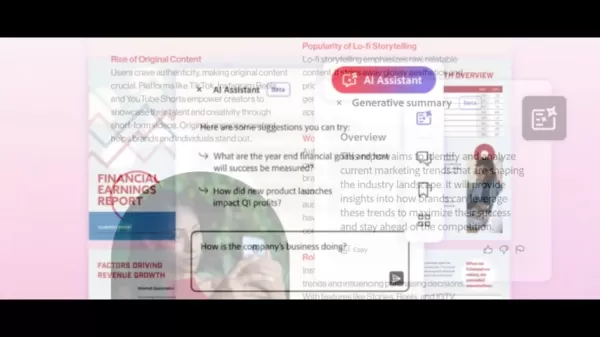
Core functionalities include:
- Dynamic Summarization: Instant distillation of lengthy documents into concise overviews.
- Contextual Q&A: Natural language questioning with precise document-derived responses.
- Smart Navigation: Rapid location of specific content within complex files.
- Selective Extraction: Convenient copying of relevant text and visual elements.
- Native Integration: Direct accessibility within existing Adobe Acrobat workflows.
Feature Description Summarization Generates brief document overviews saving valuable processing time. Q&A Responds to natural language queries with document-specific answers. Navigation Simplifies content retrieval across dense PDF materials. Content Extraction Facilitates direct copying of relevant document segments. Integration Operates natively within Adobe Acrobat environment.
This conversational AI integration establishes new productivity benchmarks for PDF management across professional contexts.
Benefits for Different Users
Adobe's solution delivers specialized advantages across user categories:
- Researchers: Accelerates literature reviews through intelligent summarization and targeted questioning, enabling more efficient knowledge synthesis.
- Students: Enhances learning by distilling educational materials and clarifying concepts through conversational interactions.
- Legal Professionals: Streamlines document review processes with rapid clause identification and regulation verification.
- Business Analysts: Facilitates data-driven decisions through immediate insights extraction from business intelligence reports.
Getting Started with Adobe's AI Assistant
Simple Steps to Conversational PDFs
Implementing Adobe's AI Assistant follows a straightforward process:
Obtain Adobe Acrobat Subscription: Ensure premium Adobe Acrobat access as the AI assistant requires subscription status.
Launch Target Document: Open relevant PDF files needing interactive functionality.
Activate AI Panel: Locate the assistant interface typically positioned along the right application boundary.
Initiate Dialogue: Submit natural language inquiries ranging from specific questions to general summary requests.
Evaluate Responses: Assess generated answers and refine queries for optimal accuracy.
Optimization recommendations:
- Specificity: Frame precise inquiries yielding more targeted responses.
- Keyword Usage: Incorporate relevant terminology enhancing search precision.
- Query Variation: Experiment with alternative phrasing exploring response nuances.
The anticipated release model involves separate add-on subscription availability post-beta.
Adobe Acrobat Pricing and Subscription Plans
Subscription Details
Adobe offers tiered subscription models accommodating varying user requirements:
- Adobe Acrobat Pro: Comprehensive feature suite including AI Assistant access for advanced PDF management.
- Adobe Acrobat Standard: Core PDF editing functionality suitable for fundamental document handling.
- Adobe Reader Free: Baseline PDF viewing with annotation capability excluding advanced editing.
The AI Assistant will reportedly transition from beta via dedicated subscription extension.
Evaluating Adobe's AI Assistant: Weighing the Pros and Cons
Pros
Workflow acceleration through intelligent document analysis.
Native incorporation within established Acrobat environment.
Improved document comprehension and information retrieval.
Cross-industry applicability enhancing professional productivity.
Cons
Adobe Acrobat subscription prerequisite.
Output dependence on source document quality.
Potential response refinement requirements.
Expected availability through supplemental subscription model.
Key Features of Adobe Acrobat's AI Assistant
Unlocking the Power of Conversational AI
Core functionalities include:
- Automated Summarization: Rapid distillation of lengthy content preserving key details.
- Conversational Interaction: Natural dialogue engagement with document substance.
- Contextual Analysis: Sophisticated document comprehension ensuring relevance.
- Seamless Operation: Native integration maintaining workflow continuity.
- Multilingual Support: Diverse language interaction capabilities.
Transforming Workflows with AI: Use Cases for Adobe Acrobat's AI Assistant
Real-World Applications
Practical implementations span:
- Legal Review: Enhanced contract examination through clause identification.
- Academic Research: Accelerated literature processing with key insight highlighting.
- Educational Support: Streamlined textbook comprehension for students.
- Business Intelligence: Efficient report analysis supporting strategic decisions.
- Instructional Development: Interactive learning material creation.
Frequently Asked Questions
What is Adobe Acrobat's AI Assistant?
A conversational interface enabling interactive document engagement through summarization and question resolution.
How do I access Adobe Acrobat's AI Assistant?
Premium Adobe Acrobat subscription delivers integrated assistant functionality.
What are the key features of Adobe Acrobat's AI Assistant?
Core capabilities include intelligent summarization, contextual Q&A, and seamless Acrobat integration.
What are the benefits of using Adobe Acrobat's AI Assistant?
Productivity enhancement, simplified document handling, and improved content comprehension.
Who can benefit from using Adobe Acrobat's AI Assistant?
Professionals and students engaging extensively with document content.
Related Questions
How does Adobe's AI Assistant compare to other AI-powered document tools?
Adobe's solution differentiates through deep Acrobat integration and specialized PDF optimization.
What are the potential limitations of Adobe's AI Assistant?
Potential constraints include document quality sensitivity and connection requirements.
What are the future possibilities for AI in document management?
Future developments may feature enhanced precision, predictive analytics, and personalized document handling.
Related article
 Former OpenAI Researcher Barrett Zoph Returns to Google to Support Gemini Development
Barret Zoph, who previously abruptly left and joined OpenAI due to a disagreement with Thinking Machines Lab CEO Miriam Mularati, has once again changed employers. Alphabet's Google announced that Zoph will return as Vice President of Research, bring
How Recursive Intelligence Raised $335M at $4B Valuation in 4 Months
The co-founders of startup Ricursive Intelligence seemed destined to be co-founders.Anna Goldie, CEO, and Azalia Mirhoseini, CTO, are so well-known in the AI community that they were among those AI engineers who “got those weird emails from Zuckerber
AI race won’t wait, nor will this TechCrunch Disrupt 25% discount
Every founder building in AI right now is asking the same question: Are we moving fast enough, and effectively enough? TechCrunch Disrupt 2026 puts you in the same room as the people wrestling with that existential question at the highest levels. Fro
Related Special Topic Recommendations
Design & Art
Former OpenAI Researcher Barrett Zoph Returns to Google to Support Gemini Development
Barret Zoph, who previously abruptly left and joined OpenAI due to a disagreement with Thinking Machines Lab CEO Miriam Mularati, has once again changed employers. Alphabet's Google announced that Zoph will return as Vice President of Research, bring
How Recursive Intelligence Raised $335M at $4B Valuation in 4 Months
The co-founders of startup Ricursive Intelligence seemed destined to be co-founders.Anna Goldie, CEO, and Azalia Mirhoseini, CTO, are so well-known in the AI community that they were among those AI engineers who “got those weird emails from Zuckerber
AI race won’t wait, nor will this TechCrunch Disrupt 25% discount
Every founder building in AI right now is asking the same question: Are we moving fast enough, and effectively enough? TechCrunch Disrupt 2026 puts you in the same room as the people wrestling with that existential question at the highest levels. Fro
Related Special Topic Recommendations
Design & Art
 Top AI Illustration Tools: Create Editorial Scenes and Cover Art Faster
2026 Latest Top-rated AI Illustration Tools: Our curated list features the best powerfully designed tools for creating stunning editorial scenes and eye-catching cover art quickly. Each option has gone through rigorous real-world tests, offering a free vs paid comparison to help you find the perfect match for your workflow. Try these must-try solutions today to unlock your AI edge and boost your creative productivity. Explore now at XIX.AI.
 10 tools
 xix.ai
Education and Learning
Top AI Tutors for Exam Prep: Practice Math, Science, and English
xix.ai
Education and Learning
Top AI Tutors for Exam Prep: Practice Math, Science, and English
2026 Latest Top-Rated Best AI Tutors for Exam Prep are here on XIX.AI! Our curated list features powerful game-changing tools that offer free vs paid comparison, real-world tests, and weekly updated rankings. They help boost your writing efficiency, simplify complex topic learning, and unlock your academic potential. Explore now to Discover your perfect exam prep tool and Start creating today to Unlock your AI edge!
10 tools
xix.ai
Finance
AI Budget Planning Tools for Personal Money Management
2026 Latest Best Top-Rated AI Budget Planning Tools for Personal Money Management are here on XIX.AI! This curated collection features powerful, game-changing solutions that help you conduct real-world tests, understand spending habits, and create personalized plans to boost productivity. Enjoy a free vs paid comparison along with detailed rankings. Must-try tools designed to simplify money management and unlock your AI edge. Explore now!
11 tools
xix.ai
Health & Wellness
AI Sleep Tracking Assistants: Improve Recovery with Better Bedtime Habits
2026 Latest Best Top-Rated AI Sleep Tracking Assistants curated for ultimate recovery. This fully updated weekly guide features powerful tools that deliver real-world tests, free vs paid comparison, and detailed rankings to help you find the must-try solution that boosts sleep quality and supports better bedtime habits. Explore now at XIX.AI to Unlock your AI edge.
10 tools
xix.ai
Data Analysis
AI SQL Copilots for Product and Revenue Analytics
2026 Latest Best Top-Rated AI SQL Copilots for Product and Revenue Analytics! XIX.AI has curated a powerful, game-changing collection of must-try tools that undergo real-world tests through weekly updated rankings. These tools help users boost productivity significantly by accelerating data analysis, streamlining complex queries, and generating accurate insights to drive smarter business decisions. Explore now to Discover your perfect tool for unlocking your AI edge!
14 tools
xix.ai
Education and Learning
Best AI Homework Helpers That Teach: Learn Concepts, Not Just Answers
2026 Latest Best Top-Rated AI Homework Helpers That Teach Core Concepts Not Just Answers Powerful Tools for Students Must-Try Curated List Weekly Updated Free vs Paid Comparison Real-World Tests Accurate Rankings to Help You Unlock Your Full Learning Potential Explore now to Discover your perfect tool for smarter studying.
10 tools
xix.ai

 Comments (0)
0/500
Comments (0)
0/500
Picture a future where documents answer your queries, distill complex information, and engage in meaningful dialogue. Adobe is turning this vision into reality through its revolutionary AI Assistant for Acrobat. This pioneering advancement converts static PDFs into dynamic interactions, boosting efficiency and streamlining document workflows.
Key Points
Adobe unveils conversational AI functionality for Acrobat and Reader applications.
The intelligent assistant summarizes content and provides contextual responses.
Designed to increase productivity and optimize document management.
Exclusively available in Adobe's premium Acrobat and Reader subscriptions.
This innovation fundamentally changes our engagement with PDF documents.
Unveiling Adobe's Conversational AI for PDFs
The Dawn of Interactive Documents
Adobe, long recognized as an innovation leader in creative technologies, is transforming Portable Document Format (PDF) interactions.
The company's latest conversational AI service breathes life into static documents, creating intelligent, responsive PDF experiences that enhance accessibility and productivity.
Unlike standard assistants, this sophisticated feature is deeply integrated into Adobe's premium Acrobat and Reader applications, enabling natural language interactions with document content.
Consider instantly extracting detailed answers from technical manuals or obtaining concise summaries of lengthy reports. Adobe's conversational AI represents a significant leap forward in unlocking document potential.
The technology addresses common PDF frustrations by delivering immediate insights and precise answers. As information overload becomes increasingly problematic, rapid document processing capabilities prove invaluable for knowledge workers.
Core advantages include:
- Workflow optimization: Accelerate information retrieval through smart summarization and query resolution.
- Simplified navigation: Effortlessly parse complex documents without manual searching.
- Dynamic engagement: Maintain dialogue with documents through natural language interactions.
- Enhanced understanding: Rapidly identify crucial data points within comprehensive materials.
Adobe's breakthrough transcends conventional document handling, reshaping research methodologies and professional workflows.
Why Conversational AI for PDFs Matters
The digital landscape contains staggering PDF volumes that necessitate smarter solutions.
Given approximately 400 billion annual PDF openings, document productivity tools carry substantial implications. But why does Adobe's entry into this space warrant attention?
The answer reflects contemporary information processing demands. Despite their ubiquity, PDFs frequently create navigational challenges that hinder productivity. Adobe's AI-powered solution delivers intuitive document interactions suited for modern workflows.
Key statistics highlight market potential:
- 400 Billion Annual PDF Openings: Demonstrates massive addressable market for AI-enhanced document handling.
- 16 Billion Adobe Acrobat Edits: Confirms extensive professional demand for advanced PDF capabilities.
These metrics validate the need for intelligent document processing solutions. Adobe's assistant addresses these requirements across individual and organizational contexts.
Features and Benefits of Adobe's AI Assistant
Key Features
Adobe's AI Assistant introduces transformative PDF interaction capabilities.
Core functionalities include:
- Dynamic Summarization: Instant distillation of lengthy documents into concise overviews.
- Contextual Q&A: Natural language questioning with precise document-derived responses.
- Smart Navigation: Rapid location of specific content within complex files.
- Selective Extraction: Convenient copying of relevant text and visual elements.
- Native Integration: Direct accessibility within existing Adobe Acrobat workflows.
| Feature | Description |
|---|---|
| Summarization | Generates brief document overviews saving valuable processing time. |
| Q&A | Responds to natural language queries with document-specific answers. |
| Navigation | Simplifies content retrieval across dense PDF materials. |
| Content Extraction | Facilitates direct copying of relevant document segments. |
| Integration | Operates natively within Adobe Acrobat environment. |
This conversational AI integration establishes new productivity benchmarks for PDF management across professional contexts.
Benefits for Different Users
Adobe's solution delivers specialized advantages across user categories:
- Researchers: Accelerates literature reviews through intelligent summarization and targeted questioning, enabling more efficient knowledge synthesis.
- Students: Enhances learning by distilling educational materials and clarifying concepts through conversational interactions.
- Legal Professionals: Streamlines document review processes with rapid clause identification and regulation verification.
- Business Analysts: Facilitates data-driven decisions through immediate insights extraction from business intelligence reports.
Getting Started with Adobe's AI Assistant
Simple Steps to Conversational PDFs
Implementing Adobe's AI Assistant follows a straightforward process:
Obtain Adobe Acrobat Subscription: Ensure premium Adobe Acrobat access as the AI assistant requires subscription status.
Launch Target Document: Open relevant PDF files needing interactive functionality.
Activate AI Panel: Locate the assistant interface typically positioned along the right application boundary.
Initiate Dialogue: Submit natural language inquiries ranging from specific questions to general summary requests.
Evaluate Responses: Assess generated answers and refine queries for optimal accuracy.
Optimization recommendations:
- Specificity: Frame precise inquiries yielding more targeted responses.
- Keyword Usage: Incorporate relevant terminology enhancing search precision.
- Query Variation: Experiment with alternative phrasing exploring response nuances.
The anticipated release model involves separate add-on subscription availability post-beta.
Adobe Acrobat Pricing and Subscription Plans
Subscription Details
Adobe offers tiered subscription models accommodating varying user requirements:
- Adobe Acrobat Pro: Comprehensive feature suite including AI Assistant access for advanced PDF management.
- Adobe Acrobat Standard: Core PDF editing functionality suitable for fundamental document handling.
- Adobe Reader Free: Baseline PDF viewing with annotation capability excluding advanced editing.
The AI Assistant will reportedly transition from beta via dedicated subscription extension.
Evaluating Adobe's AI Assistant: Weighing the Pros and Cons
Pros
Workflow acceleration through intelligent document analysis.
Native incorporation within established Acrobat environment.
Improved document comprehension and information retrieval.
Cross-industry applicability enhancing professional productivity.
Cons
Adobe Acrobat subscription prerequisite.
Output dependence on source document quality.
Potential response refinement requirements.
Expected availability through supplemental subscription model.
Key Features of Adobe Acrobat's AI Assistant
Unlocking the Power of Conversational AI
Core functionalities include:
- Automated Summarization: Rapid distillation of lengthy content preserving key details.
- Conversational Interaction: Natural dialogue engagement with document substance.
- Contextual Analysis: Sophisticated document comprehension ensuring relevance.
- Seamless Operation: Native integration maintaining workflow continuity.
- Multilingual Support: Diverse language interaction capabilities.
Transforming Workflows with AI: Use Cases for Adobe Acrobat's AI Assistant
Real-World Applications
Practical implementations span:
- Legal Review: Enhanced contract examination through clause identification.
- Academic Research: Accelerated literature processing with key insight highlighting.
- Educational Support: Streamlined textbook comprehension for students.
- Business Intelligence: Efficient report analysis supporting strategic decisions.
- Instructional Development: Interactive learning material creation.
Frequently Asked Questions
What is Adobe Acrobat's AI Assistant?
A conversational interface enabling interactive document engagement through summarization and question resolution.
How do I access Adobe Acrobat's AI Assistant?
Premium Adobe Acrobat subscription delivers integrated assistant functionality.
What are the key features of Adobe Acrobat's AI Assistant?
Core capabilities include intelligent summarization, contextual Q&A, and seamless Acrobat integration.
What are the benefits of using Adobe Acrobat's AI Assistant?
Productivity enhancement, simplified document handling, and improved content comprehension.
Who can benefit from using Adobe Acrobat's AI Assistant?
Professionals and students engaging extensively with document content.
Related Questions
How does Adobe's AI Assistant compare to other AI-powered document tools?
Adobe's solution differentiates through deep Acrobat integration and specialized PDF optimization.
What are the potential limitations of Adobe's AI Assistant?
Potential constraints include document quality sensitivity and connection requirements.
What are the future possibilities for AI in document management?
Future developments may feature enhanced precision, predictive analytics, and personalized document handling.








 Former OpenAI Researcher Barrett Zoph Returns to Google to Support Gemini Development
Barret Zoph, who previously abruptly left and joined OpenAI due to a disagreement with Thinking Machines Lab CEO Miriam Mularati, has once again changed employers. Alphabet's Google announced that Zoph will return as Vice President of Research, bring
Former OpenAI Researcher Barrett Zoph Returns to Google to Support Gemini Development
Barret Zoph, who previously abruptly left and joined OpenAI due to a disagreement with Thinking Machines Lab CEO Miriam Mularati, has once again changed employers. Alphabet's Google announced that Zoph will return as Vice President of Research, bring
 How Recursive Intelligence Raised $335M at $4B Valuation in 4 Months
The co-founders of startup Ricursive Intelligence seemed destined to be co-founders.Anna Goldie, CEO, and Azalia Mirhoseini, CTO, are so well-known in the AI community that they were among those AI engineers who “got those weird emails from Zuckerber
How Recursive Intelligence Raised $335M at $4B Valuation in 4 Months
The co-founders of startup Ricursive Intelligence seemed destined to be co-founders.Anna Goldie, CEO, and Azalia Mirhoseini, CTO, are so well-known in the AI community that they were among those AI engineers who “got those weird emails from Zuckerber
 AI race won’t wait, nor will this TechCrunch Disrupt 25% discount
Every founder building in AI right now is asking the same question: Are we moving fast enough, and effectively enough? TechCrunch Disrupt 2026 puts you in the same room as the people wrestling with that existential question at the highest levels. Fro
AI race won’t wait, nor will this TechCrunch Disrupt 25% discount
Every founder building in AI right now is asking the same question: Are we moving fast enough, and effectively enough? TechCrunch Disrupt 2026 puts you in the same room as the people wrestling with that existential question at the highest levels. Fro

2026 Latest Top-rated AI Illustration Tools: Our curated list features the best powerfully designed tools for creating stunning editorial scenes and eye-catching cover art quickly. Each option has gone through rigorous real-world tests, offering a free vs paid comparison to help you find the perfect match for your workflow. Try these must-try solutions today to unlock your AI edge and boost your creative productivity. Explore now at XIX.AI.
10 tools
xix.ai

2026 Latest Top-Rated Best AI Tutors for Exam Prep are here on XIX.AI! Our curated list features powerful game-changing tools that offer free vs paid comparison, real-world tests, and weekly updated rankings. They help boost your writing efficiency, simplify complex topic learning, and unlock your academic potential. Explore now to Discover your perfect exam prep tool and Start creating today to Unlock your AI edge!
10 tools
xix.ai

2026 Latest Best Top-Rated AI Budget Planning Tools for Personal Money Management are here on XIX.AI! This curated collection features powerful, game-changing solutions that help you conduct real-world tests, understand spending habits, and create personalized plans to boost productivity. Enjoy a free vs paid comparison along with detailed rankings. Must-try tools designed to simplify money management and unlock your AI edge. Explore now!
11 tools
xix.ai

2026 Latest Best Top-Rated AI Sleep Tracking Assistants curated for ultimate recovery. This fully updated weekly guide features powerful tools that deliver real-world tests, free vs paid comparison, and detailed rankings to help you find the must-try solution that boosts sleep quality and supports better bedtime habits. Explore now at XIX.AI to Unlock your AI edge.
10 tools
xix.ai

2026 Latest Best Top-Rated AI SQL Copilots for Product and Revenue Analytics! XIX.AI has curated a powerful, game-changing collection of must-try tools that undergo real-world tests through weekly updated rankings. These tools help users boost productivity significantly by accelerating data analysis, streamlining complex queries, and generating accurate insights to drive smarter business decisions. Explore now to Discover your perfect tool for unlocking your AI edge!
14 tools
xix.ai

2026 Latest Best Top-Rated AI Homework Helpers That Teach Core Concepts Not Just Answers Powerful Tools for Students Must-Try Curated List Weekly Updated Free vs Paid Comparison Real-World Tests Accurate Rankings to Help You Unlock Your Full Learning Potential Explore now to Discover your perfect tool for smarter studying.
10 tools
xix.ai












