


 Home
HomeTop AI Image Enhancement and Upscaling Tools for April 2025
Artificial intelligence (AI) image upscaling and enhancement tools offer powerful ways to improve your photos and adjust their dimensions. In today's digital-centric world, we capture over a trillion photos annually, making digital imagery a fundamental part of our lives. Image upscaling tools are particularly vital for professionals in fields like social media, where visual quality is paramount.
Using high-quality images is essential for capturing attention. However, a vast number of images online suffer from low resolution and noticeable digital noise.
Recent advancements in AI have revolutionized upscaling technology, making it simpler to transform low-resolution pictures into professional, high-quality assets.
Here are some of the top AI image enhancer and upscaler tools available today:
1. PromeAI – HD Upscaler

PromeAI's image upscaler is part of a comprehensive suite of AI-powered tools designed to transform how professionals and enthusiasts create and edit visual content. It delivers exceptional high-definition upscaling by adding intricate details, repairing flaws, and allowing multiple rounds of size doubling for superior clarity.
Inspired by Prometheus, who brought fire to humanity, PromeAI aims to empower users with the transformative potential of artificial intelligence.
Beyond its advanced HD upscaler, PromeAI includes a wide array of creative functions:
- Sketch Rendering and Photo to Sketch convert pictures into artistic drawings.
- AI Image Generator and Creative Fusion produce new images and merge elements from different sources.
- Image Variation creates different versions of the same image.
- Background Diffusion and Background Remover modify or remove backgrounds.
- AI Supermodel, AI Headshot Generator, and Relight enhance portrait photography with professional features and lighting adjustments.
- Text Effects add creative typography to images.
- Image Editing covers everything from basic tweaks to complex alterations.
- Erase & Replace and Outpainting allow precise editing and expansion of image boundaries.
- Video, Image to Video, and Text to Video tools convert static images into dynamic video content.
PromeAI serves a diverse audience, including hobbyists, architects, interior designers, product designers, and gaming and animation professionals, providing the tools needed to turn creative ideas into professional results.
Read Review →
Visit PromeAI →
2. Image Upscaler by BasedLabs
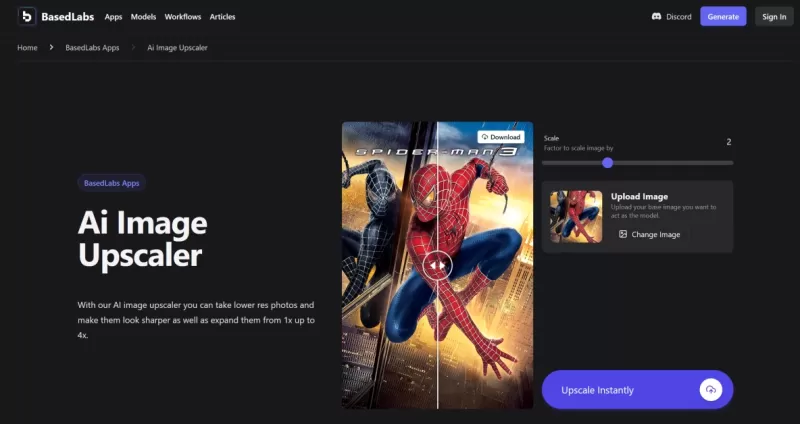
This platform's AI image upscaler enhances lower-resolution photos, sharpening them and enlarging their size by up to 4x. Using sophisticated AI upscaling technology, it upgrades images to high-resolution quality, producing crisp enlargements suitable for personal and professional use.
With an interactive scaling slider and face-swapping capabilities, the platform offers versatile tools for customizing and improving images. Users can easily create engaging content, from viral memes to professional photos, in just a few clicks.
Key features of this Image Upscaler include:
- Instant upscaling
- Beginner-friendly design
- Up to 4x improvement in quality and resolution
- Intuitive and easy-to-use scale slider
Read Review →
Visit BasedLabs →
3. HitPaw Photo Enhancer
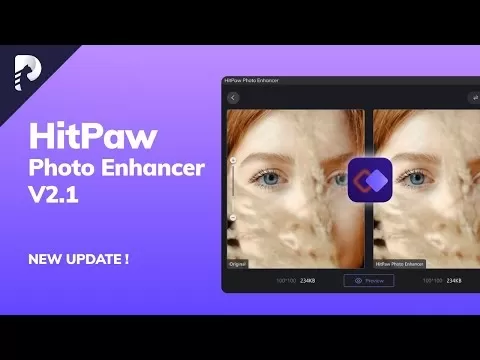
Leading our list is HitPaw Photo Enhancer, a top-tier AI tool for reducing blur and enlarging images without sacrificing quality.
This professional-grade tool effectively fixes blurry photos with its versatile AI models, suitable for any scenario. It can revitalize old photographs, offering an AI face enhancer to perfect facial features and colorize black-and-white images with a single click.
The denoise model automatically removes grain from high-ISO and low-light images using advanced AI noise reduction, also improving the clarity of cartoon images.
For real-world scenes like landscapes and architecture, the general model provides straightforward enhancement. The AI sharpener also upscales image quality to bring out detail in subjects like animals or flowers.
Notable features of HitPaw:
- Top AI image enhancer for Windows and Mac
- One-click quality and resolution improvement
- Effortlessly reduce blur and eliminate noise
- Enlarge and upscale images without quality loss
Read Review →
Visit HitPaw →
4. Picsart
The Picsart Image Enhancer is an AI-powered tool that instantly improves photo quality and resolution. It sharpens details, reduces blur, and increases resolution, enabling users to create crisp, high-quality images in seconds. Ideal for personal photos, professional visuals, or restoring old pictures, it simplifies the enhancement process: upload, apply AI, and download a clearer, more detailed version.
Perfect for social media, eCommerce, or print projects, it eliminates the need for expensive equipment or software. Users can upscale images for close-up edits, large prints, or marketing materials with an intuitive interface. Integrated with Picsart’s photo editor and offering customizable adjustments, it’s a comprehensive, free solution for easy photo enhancement.
- AI-powered instant photo quality and resolution enhancement
- Sharpens details and reduces blur for high-resolution results
- Ideal for personal, professional, and eCommerce use
- User-friendly interface with quick upload, enhance, and download steps
- Free to use with additional editing tools for customization
Read Review →
Visit Picsart →
5. AVC Labs
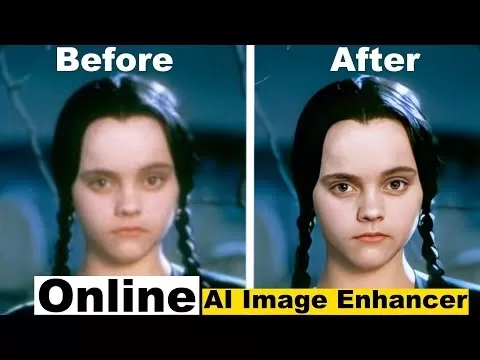
AVCLabs Photo Enhancer AI is a specialized image upscaler that uses deep learning to increase resolution by 400%, improve details, and remove defects and compression artifacts. Trained on millions of images—including portraits, wildlife, anime, landscapes, and architecture—it upscales various image types naturally while preserving accurate details.
It includes intelligent noise removal to automatically reduce graininess and enhance quality.
The AI Face Refinement model simplifies portrait enhancement, allowing users to achieve high-quality results with one click by improving skin tone, removing blemishes, and enhancing features like eyes and lips.
Key features of AVC Labs:
- Super-resolution upscaling from low to high resolution
- Fix blurry photos by removing noise, grain, and sharpening
- AI Face Retouching for beautified portraits and selfies
- AI Photo Colorizer to naturally colorize black-and-white photos
- AI Color Calibration to correct color issues
- AI Background Removal for transparent backgrounds
Read Review →
Visit AVC Labs →
6. Icons8
Next on our list is Icons8, an AI-driven image upscaler that allows free online upscaling. Using machine learning, it enlarges images by 2x or 4x without quality loss.
Icons8 also automatically corrects imperfections during upscaling. Simply drag and drop an image, wait a few seconds for processing, and download the result.
The platform combines sharpening, noise reduction, and upscaling in a fully automated process. Trained on a dataset of 5 million images (and growing), it stores upscaled images securely, allowing users to view their history and redownload enlarged photos without heavy GPU use. Your images are not used for machine learning or shared publicly.
Main features of Icons8:
- Free upscaling service
- Upscale up to 4x in size
- Automatic imperfection correction
- History viewing and redownloading of enlarged photos
Visit Icons8 →
7. Deep Image AI
Deep Image AI is another excellent upscaling tool compatible with Windows and Mac. It simplifies online image upscaling and mobile photo enhancement.
Note that the platform limits upscaled images to 5000 x 5000 pixels (25 megapixels) for all users.
The process is straightforward: visit the site, upload an image, and begin upscaling. Advanced AI algorithms ensure natural-looking results. Developers can also use its API to integrate upscaling into their own projects.
Key features of Deep Image AI:
- API support for developers
- Bulk editing mode
- AI-powered predictive enhancement
- 25-megapixel limit for upscaled images
8. VanceAI Image Upscaler

VanceAI Image Upscaler offers several key features, including an 8x upscaler for low-resolution photos and a dedicated AI anime upscaler that enlarges anime images up to 16x.
The platform includes security measures, such as automatic deletion of processed images within 24 hours.
Upscaling is simple: upload a photo, choose the AI model and magnification level (2x, 4x, or 8x), and download the high-resolution result.
Main features of VanceAI Image Upscaler:
- Upscale images up to 8x without quality loss
- Noise suppression and blur removal
- Specialized algorithms for anime upscaling
- Automatic compression for images exceeding 2000 x 2000 pixels
9. Let’s Enhance
Let’s Enhance is an online AI photo upscaler that delivers 4K upscaling without quality loss. It uses AI to enhance colors, recover textures, remove compression artifacts, and more, supporting up to 16x enlargement.
The free version requires only dragging an image onto the page to begin upscaling, making it exceptionally user-friendly.
Its AI technology effectively reduces noise and artifacts, producing professional, highly detailed photos.
Key features of Let’s Enhance:
- 4K upscaling without quality loss
- Color enhancement, texture recovery, and compression removal
- Easy to use
- Noise and artifact reduction
10. Cre8tiveAI
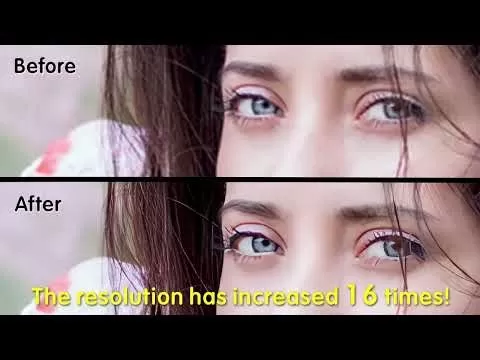
Cre8tiveAI upscales images by 16x in seconds, making it ideal for preparing small images for printing. Its deep learning technology enlarges images without quality loss.
Unlike conventional methods that stretch and interpolate pixels, its AI infers high-resolution details from low-resolution inputs, producing superior results.
Main features of Cre8tiveAI:
- 16x image upscaling in seconds
- Ideal for print preparation
- Deep learning technology
- User-friendly interface
Summary
The growing need for high-quality digital images makes AI enhancers and upscalers indispensable. These tools improve resolution, reduce noise, and enhance details, benefiting professionals and social media users alike. AI advancements have transformed upscaling technology, enabling the conversion of low-resolution photos into high-quality visuals. With a variety of tools available, users can select the best option for their needs, ensuring superior image quality and professional outcomes for any project.
Related article
 Stripe to Acquire OpenRouter as AI Model Routing Gains Momentum
Stripe has agreed to acquire OpenRouter, an AI model-routing platform that gives developers access to hundreds of models through a single interface. The deal adds model selection and routing to Stripe’s existing work around AI usage and token-based b
Google AI Overviews Gain Ground in Search Results
According to Similarweb’s 2026 Generative AI Landscape report, Google’s AI-generated summaries appeared in 43% of US searches, a significant rise from 15% recorded a year prior.While AI Overviews present generated summaries within standard search res
Sequoia-backed Empirik raises $21M to forecast outages before they strike
Before joining Sequoia Capital in 2020 as chief digital and information officer, Avon Puri spent over a decade running infrastructure at Rubrik and VMware. Three years ago, as large language models began showing their true potential, Puri, alongside
Related Special Topic Recommendations
Design & Art
Stripe to Acquire OpenRouter as AI Model Routing Gains Momentum
Stripe has agreed to acquire OpenRouter, an AI model-routing platform that gives developers access to hundreds of models through a single interface. The deal adds model selection and routing to Stripe’s existing work around AI usage and token-based b
Google AI Overviews Gain Ground in Search Results
According to Similarweb’s 2026 Generative AI Landscape report, Google’s AI-generated summaries appeared in 43% of US searches, a significant rise from 15% recorded a year prior.While AI Overviews present generated summaries within standard search res
Sequoia-backed Empirik raises $21M to forecast outages before they strike
Before joining Sequoia Capital in 2020 as chief digital and information officer, Avon Puri spent over a decade running infrastructure at Rubrik and VMware. Three years ago, as large language models began showing their true potential, Puri, alongside
Related Special Topic Recommendations
Design & Art
 Top AI Illustration Tools: Create Editorial Scenes and Cover Art Faster
2026 Latest Top-rated AI Illustration Tools: Our curated list features the best powerfully designed tools for creating stunning editorial scenes and eye-catching cover art quickly. Each option has gone through rigorous real-world tests, offering a free vs paid comparison to help you find the perfect match for your workflow. Try these must-try solutions today to unlock your AI edge and boost your creative productivity. Explore now at XIX.AI.
 10 tools
 xix.ai
Education and Learning
Top AI Tutors for Exam Prep: Practice Math, Science, and English
xix.ai
Education and Learning
Top AI Tutors for Exam Prep: Practice Math, Science, and English
2026 Latest Top-Rated Best AI Tutors for Exam Prep are here on XIX.AI! Our curated list features powerful game-changing tools that offer free vs paid comparison, real-world tests, and weekly updated rankings. They help boost your writing efficiency, simplify complex topic learning, and unlock your academic potential. Explore now to Discover your perfect exam prep tool and Start creating today to Unlock your AI edge!
10 tools
xix.ai
Finance
AI Budget Planning Tools for Personal Money Management
2026 Latest Best Top-Rated AI Budget Planning Tools for Personal Money Management are here on XIX.AI! This curated collection features powerful, game-changing solutions that help you conduct real-world tests, understand spending habits, and create personalized plans to boost productivity. Enjoy a free vs paid comparison along with detailed rankings. Must-try tools designed to simplify money management and unlock your AI edge. Explore now!
11 tools
xix.ai
Health & Wellness
AI Sleep Tracking Assistants: Improve Recovery with Better Bedtime Habits
2026 Latest Best Top-Rated AI Sleep Tracking Assistants curated for ultimate recovery. This fully updated weekly guide features powerful tools that deliver real-world tests, free vs paid comparison, and detailed rankings to help you find the must-try solution that boosts sleep quality and supports better bedtime habits. Explore now at XIX.AI to Unlock your AI edge.
10 tools
xix.ai
Data Analysis
AI SQL Copilots for Product and Revenue Analytics
2026 Latest Best Top-Rated AI SQL Copilots for Product and Revenue Analytics! XIX.AI has curated a powerful, game-changing collection of must-try tools that undergo real-world tests through weekly updated rankings. These tools help users boost productivity significantly by accelerating data analysis, streamlining complex queries, and generating accurate insights to drive smarter business decisions. Explore now to Discover your perfect tool for unlocking your AI edge!
14 tools
xix.ai
Education and Learning
Best AI Homework Helpers That Teach: Learn Concepts, Not Just Answers
2026 Latest Best Top-Rated AI Homework Helpers That Teach Core Concepts Not Just Answers Powerful Tools for Students Must-Try Curated List Weekly Updated Free vs Paid Comparison Real-World Tests Accurate Rankings to Help You Unlock Your Full Learning Potential Explore now to Discover your perfect tool for smarter studying.
10 tools
xix.ai

 Comments (1)
0/500
Comments (1)
0/500
![ThomasJones]()
I've been messing around with AI upscalers for years, and the progress is honestly terrifying in a good way. 😅 The April 2025 list seems solid, but I'm still waiting for a free tool that doesn't leave that weird plastic-y sheen on faces. Any recommendations for something that actually preserves texture without making me pay a kidney? 💸
Artificial intelligence (AI) image upscaling and enhancement tools offer powerful ways to improve your photos and adjust their dimensions. In today's digital-centric world, we capture over a trillion photos annually, making digital imagery a fundamental part of our lives. Image upscaling tools are particularly vital for professionals in fields like social media, where visual quality is paramount.
Using high-quality images is essential for capturing attention. However, a vast number of images online suffer from low resolution and noticeable digital noise.
Recent advancements in AI have revolutionized upscaling technology, making it simpler to transform low-resolution pictures into professional, high-quality assets.
Here are some of the top AI image enhancer and upscaler tools available today:
1. PromeAI – HD Upscaler
PromeAI's image upscaler is part of a comprehensive suite of AI-powered tools designed to transform how professionals and enthusiasts create and edit visual content. It delivers exceptional high-definition upscaling by adding intricate details, repairing flaws, and allowing multiple rounds of size doubling for superior clarity.
Inspired by Prometheus, who brought fire to humanity, PromeAI aims to empower users with the transformative potential of artificial intelligence.
Beyond its advanced HD upscaler, PromeAI includes a wide array of creative functions:
- Sketch Rendering and Photo to Sketch convert pictures into artistic drawings.
- AI Image Generator and Creative Fusion produce new images and merge elements from different sources.
- Image Variation creates different versions of the same image.
- Background Diffusion and Background Remover modify or remove backgrounds.
- AI Supermodel, AI Headshot Generator, and Relight enhance portrait photography with professional features and lighting adjustments.
- Text Effects add creative typography to images.
- Image Editing covers everything from basic tweaks to complex alterations.
- Erase & Replace and Outpainting allow precise editing and expansion of image boundaries.
- Video, Image to Video, and Text to Video tools convert static images into dynamic video content.
PromeAI serves a diverse audience, including hobbyists, architects, interior designers, product designers, and gaming and animation professionals, providing the tools needed to turn creative ideas into professional results.
Read Review →
Visit PromeAI →
2. Image Upscaler by BasedLabs
This platform's AI image upscaler enhances lower-resolution photos, sharpening them and enlarging their size by up to 4x. Using sophisticated AI upscaling technology, it upgrades images to high-resolution quality, producing crisp enlargements suitable for personal and professional use.
With an interactive scaling slider and face-swapping capabilities, the platform offers versatile tools for customizing and improving images. Users can easily create engaging content, from viral memes to professional photos, in just a few clicks.
Key features of this Image Upscaler include:
- Instant upscaling
- Beginner-friendly design
- Up to 4x improvement in quality and resolution
- Intuitive and easy-to-use scale slider
Read Review →
Visit BasedLabs →
3. HitPaw Photo Enhancer
Leading our list is HitPaw Photo Enhancer, a top-tier AI tool for reducing blur and enlarging images without sacrificing quality.
This professional-grade tool effectively fixes blurry photos with its versatile AI models, suitable for any scenario. It can revitalize old photographs, offering an AI face enhancer to perfect facial features and colorize black-and-white images with a single click.
The denoise model automatically removes grain from high-ISO and low-light images using advanced AI noise reduction, also improving the clarity of cartoon images.
For real-world scenes like landscapes and architecture, the general model provides straightforward enhancement. The AI sharpener also upscales image quality to bring out detail in subjects like animals or flowers.
Notable features of HitPaw:
- Top AI image enhancer for Windows and Mac
- One-click quality and resolution improvement
- Effortlessly reduce blur and eliminate noise
- Enlarge and upscale images without quality loss
Read Review →
Visit HitPaw →
4. Picsart
The Picsart Image Enhancer is an AI-powered tool that instantly improves photo quality and resolution. It sharpens details, reduces blur, and increases resolution, enabling users to create crisp, high-quality images in seconds. Ideal for personal photos, professional visuals, or restoring old pictures, it simplifies the enhancement process: upload, apply AI, and download a clearer, more detailed version.
Perfect for social media, eCommerce, or print projects, it eliminates the need for expensive equipment or software. Users can upscale images for close-up edits, large prints, or marketing materials with an intuitive interface. Integrated with Picsart’s photo editor and offering customizable adjustments, it’s a comprehensive, free solution for easy photo enhancement.
- AI-powered instant photo quality and resolution enhancement
- Sharpens details and reduces blur for high-resolution results
- Ideal for personal, professional, and eCommerce use
- User-friendly interface with quick upload, enhance, and download steps
- Free to use with additional editing tools for customization
Read Review →
Visit Picsart →
5. AVC Labs
AVCLabs Photo Enhancer AI is a specialized image upscaler that uses deep learning to increase resolution by 400%, improve details, and remove defects and compression artifacts. Trained on millions of images—including portraits, wildlife, anime, landscapes, and architecture—it upscales various image types naturally while preserving accurate details.
It includes intelligent noise removal to automatically reduce graininess and enhance quality.
The AI Face Refinement model simplifies portrait enhancement, allowing users to achieve high-quality results with one click by improving skin tone, removing blemishes, and enhancing features like eyes and lips.
Key features of AVC Labs:
- Super-resolution upscaling from low to high resolution
- Fix blurry photos by removing noise, grain, and sharpening
- AI Face Retouching for beautified portraits and selfies
- AI Photo Colorizer to naturally colorize black-and-white photos
- AI Color Calibration to correct color issues
- AI Background Removal for transparent backgrounds
Read Review →
Visit AVC Labs →
6. Icons8
Next on our list is Icons8, an AI-driven image upscaler that allows free online upscaling. Using machine learning, it enlarges images by 2x or 4x without quality loss.
Icons8 also automatically corrects imperfections during upscaling. Simply drag and drop an image, wait a few seconds for processing, and download the result.
The platform combines sharpening, noise reduction, and upscaling in a fully automated process. Trained on a dataset of 5 million images (and growing), it stores upscaled images securely, allowing users to view their history and redownload enlarged photos without heavy GPU use. Your images are not used for machine learning or shared publicly.
Main features of Icons8:
- Free upscaling service
- Upscale up to 4x in size
- Automatic imperfection correction
- History viewing and redownloading of enlarged photos
Visit Icons8 →
7. Deep Image AI
Deep Image AI is another excellent upscaling tool compatible with Windows and Mac. It simplifies online image upscaling and mobile photo enhancement.
Note that the platform limits upscaled images to 5000 x 5000 pixels (25 megapixels) for all users.
The process is straightforward: visit the site, upload an image, and begin upscaling. Advanced AI algorithms ensure natural-looking results. Developers can also use its API to integrate upscaling into their own projects.
Key features of Deep Image AI:
- API support for developers
- Bulk editing mode
- AI-powered predictive enhancement
- 25-megapixel limit for upscaled images
8. VanceAI Image Upscaler
VanceAI Image Upscaler offers several key features, including an 8x upscaler for low-resolution photos and a dedicated AI anime upscaler that enlarges anime images up to 16x.
The platform includes security measures, such as automatic deletion of processed images within 24 hours.
Upscaling is simple: upload a photo, choose the AI model and magnification level (2x, 4x, or 8x), and download the high-resolution result.
Main features of VanceAI Image Upscaler:
- Upscale images up to 8x without quality loss
- Noise suppression and blur removal
- Specialized algorithms for anime upscaling
- Automatic compression for images exceeding 2000 x 2000 pixels
9. Let’s Enhance
Let’s Enhance is an online AI photo upscaler that delivers 4K upscaling without quality loss. It uses AI to enhance colors, recover textures, remove compression artifacts, and more, supporting up to 16x enlargement.
The free version requires only dragging an image onto the page to begin upscaling, making it exceptionally user-friendly.
Its AI technology effectively reduces noise and artifacts, producing professional, highly detailed photos.
Key features of Let’s Enhance:
- 4K upscaling without quality loss
- Color enhancement, texture recovery, and compression removal
- Easy to use
- Noise and artifact reduction
10. Cre8tiveAI
Cre8tiveAI upscales images by 16x in seconds, making it ideal for preparing small images for printing. Its deep learning technology enlarges images without quality loss.
Unlike conventional methods that stretch and interpolate pixels, its AI infers high-resolution details from low-resolution inputs, producing superior results.
Main features of Cre8tiveAI:
- 16x image upscaling in seconds
- Ideal for print preparation
- Deep learning technology
- User-friendly interface
Summary
The growing need for high-quality digital images makes AI enhancers and upscalers indispensable. These tools improve resolution, reduce noise, and enhance details, benefiting professionals and social media users alike. AI advancements have transformed upscaling technology, enabling the conversion of low-resolution photos into high-quality visuals. With a variety of tools available, users can select the best option for their needs, ensuring superior image quality and professional outcomes for any project.








 Stripe to Acquire OpenRouter as AI Model Routing Gains Momentum
Stripe has agreed to acquire OpenRouter, an AI model-routing platform that gives developers access to hundreds of models through a single interface. The deal adds model selection and routing to Stripe’s existing work around AI usage and token-based b
Stripe to Acquire OpenRouter as AI Model Routing Gains Momentum
Stripe has agreed to acquire OpenRouter, an AI model-routing platform that gives developers access to hundreds of models through a single interface. The deal adds model selection and routing to Stripe’s existing work around AI usage and token-based b
 Google AI Overviews Gain Ground in Search Results
According to Similarweb’s 2026 Generative AI Landscape report, Google’s AI-generated summaries appeared in 43% of US searches, a significant rise from 15% recorded a year prior.While AI Overviews present generated summaries within standard search res
Google AI Overviews Gain Ground in Search Results
According to Similarweb’s 2026 Generative AI Landscape report, Google’s AI-generated summaries appeared in 43% of US searches, a significant rise from 15% recorded a year prior.While AI Overviews present generated summaries within standard search res
 Sequoia-backed Empirik raises $21M to forecast outages before they strike
Before joining Sequoia Capital in 2020 as chief digital and information officer, Avon Puri spent over a decade running infrastructure at Rubrik and VMware. Three years ago, as large language models began showing their true potential, Puri, alongside
Sequoia-backed Empirik raises $21M to forecast outages before they strike
Before joining Sequoia Capital in 2020 as chief digital and information officer, Avon Puri spent over a decade running infrastructure at Rubrik and VMware. Three years ago, as large language models began showing their true potential, Puri, alongside

2026 Latest Top-rated AI Illustration Tools: Our curated list features the best powerfully designed tools for creating stunning editorial scenes and eye-catching cover art quickly. Each option has gone through rigorous real-world tests, offering a free vs paid comparison to help you find the perfect match for your workflow. Try these must-try solutions today to unlock your AI edge and boost your creative productivity. Explore now at XIX.AI.
10 tools
xix.ai

2026 Latest Top-Rated Best AI Tutors for Exam Prep are here on XIX.AI! Our curated list features powerful game-changing tools that offer free vs paid comparison, real-world tests, and weekly updated rankings. They help boost your writing efficiency, simplify complex topic learning, and unlock your academic potential. Explore now to Discover your perfect exam prep tool and Start creating today to Unlock your AI edge!
10 tools
xix.ai

2026 Latest Best Top-Rated AI Budget Planning Tools for Personal Money Management are here on XIX.AI! This curated collection features powerful, game-changing solutions that help you conduct real-world tests, understand spending habits, and create personalized plans to boost productivity. Enjoy a free vs paid comparison along with detailed rankings. Must-try tools designed to simplify money management and unlock your AI edge. Explore now!
11 tools
xix.ai

2026 Latest Best Top-Rated AI Sleep Tracking Assistants curated for ultimate recovery. This fully updated weekly guide features powerful tools that deliver real-world tests, free vs paid comparison, and detailed rankings to help you find the must-try solution that boosts sleep quality and supports better bedtime habits. Explore now at XIX.AI to Unlock your AI edge.
10 tools
xix.ai

2026 Latest Best Top-Rated AI SQL Copilots for Product and Revenue Analytics! XIX.AI has curated a powerful, game-changing collection of must-try tools that undergo real-world tests through weekly updated rankings. These tools help users boost productivity significantly by accelerating data analysis, streamlining complex queries, and generating accurate insights to drive smarter business decisions. Explore now to Discover your perfect tool for unlocking your AI edge!
14 tools
xix.ai

2026 Latest Best Top-Rated AI Homework Helpers That Teach Core Concepts Not Just Answers Powerful Tools for Students Must-Try Curated List Weekly Updated Free vs Paid Comparison Real-World Tests Accurate Rankings to Help You Unlock Your Full Learning Potential Explore now to Discover your perfect tool for smarter studying.
10 tools
xix.ai

I've been messing around with AI upscalers for years, and the progress is honestly terrifying in a good way. 😅 The April 2025 list seems solid, but I'm still waiting for a free tool that doesn't leave that weird plastic-y sheen on faces. Any recommendations for something that actually preserves texture without making me pay a kidney? 💸












