


 Home
HomeStackMind.AI - Intelligent ChatGPT History Organizer & Search



Helps TikTok sellers, brands, MCNs, and TAPs discover winning products and find creators.

HelpLook is an AI-powered all-in-one knowledge base tool that helps businesses quickly build knowledge bases, help centers, and...

Your AI Workspace

302.AI is an enterprise-grade AI resource platform with pay-as-you-go pricing, API access to a full range of AI models, and ready-to-use online applications.

剧火AI — AI Screenwriter + Director, a One-Person Short Drama Studio In one sentence, what is it?

What is QuickBox AI?QuickBox AI offers a handy browser extension that integrates a suite of AI tools directly into your browser. Pressing cmd+k (or ctrl+k) brings up a compact overlay on your current tab, enabling instant access to AI utilities. You
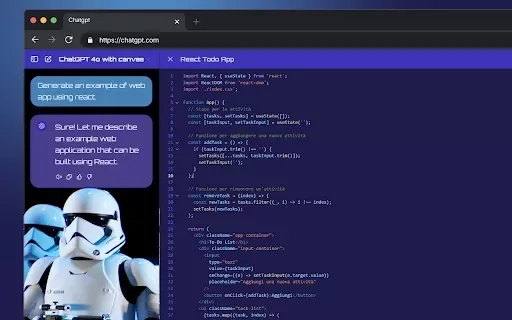
What is StylerGPT: ChatGPT Customization?StylerGPT is a Chrome extension that reimagines your ChatGPT interface as a fully customizable digital workspace. Choose from diverse color palettes, upload custom backgrounds, adjust fonts, and more to create

What is Make a Sign?MakeSign is an online platform that enables users to easily design custom signs. It offers a broad selection of templates, design tools, and customization features to help you create professional and attention-grabbing signage for
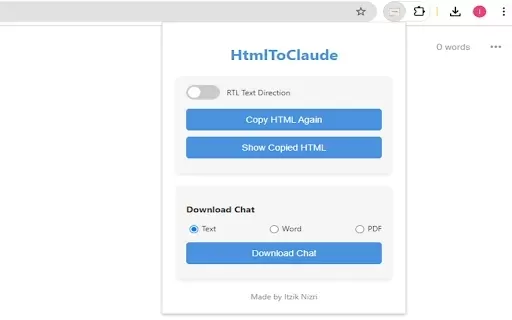
What is HtmlToClaude?HtmlToClaude is a Chrome extension that simplifies your work with Claude AI. It enables you to effortlessly capture HTML content from any webpage and paste it directly into your conversations with Claude. The tool also lets you d
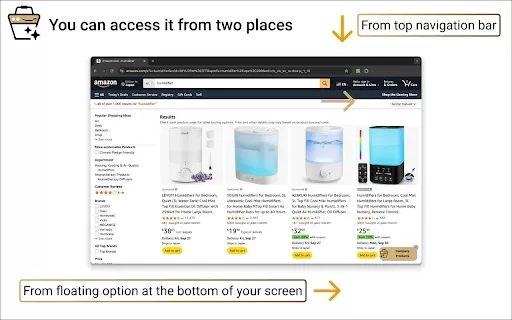
What is Product Comparison Tool?The Smart Amazon Product Comparer is a free Chrome extension that helps you make smarter buying choices on Amazon. It leverages OpenAI's ChatGPT to deliver AI-driven analysis, automatically evaluating product features,
StackMind.AI - Intelligent ChatGPT History Organizer & Search Product Information
What Is StackMind.AI? Your Intelligent ChatGPT History Organizer & Search Tool
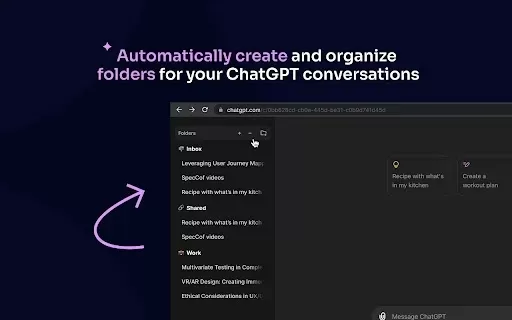
StackMind.AI is an intelligent organizer and search tool designed for your ChatGPT history. It uses advanced AI to analyze patterns, automatically creating and organizing folders for your conversations. This Chrome extension lets you instantly search through your ChatGPT conversations using a sidebar button or a hotkey. With customizable folder structures, you can manage your chat data locally, ensuring your privacy. Pinning important conversations and leveraging efficient AI search capabilities turn your history into a valuable resource, boosting productivity and streamlining your workflow.
Who Will Use StackMind.AI? The Intelligent ChatGPT History Organizer & Search Tool
- ChatGPT Users
- Professionals
- Researchers
- Students
- Productivity Enthusiasts
How to Use StackMind.AI: Your Intelligent ChatGPT History Organizer & Search Tool
- Step 1: Install the StackMind.AI Chrome extension.
- Step 2: Open your ChatGPT conversations.
- Step 3: Use the sidebar button or hotkey (Ctrl+Shift+P) to access indexed conversations.
- Step 4: Create and manage custom folders to organize your chats.
- Step 5: Pin important conversations for quick access.
- Step 6: Use AI search to explore the full content of your conversations.
Platform
- Chrome
StackMind.AI - The Intelligent ChatGPT History Organizer & Search: Core Features & Benefits
Core Features
- AI-Powered Chat Organization
- Instant Conversation Search
- Customizable Folder Structure
- Conversation Pinning
- Local Data Storage
Benefits
- Enhanced Productivity
- Efficient Workload Management
- Organized Workflows
- Private Data Handling
- Quick Access to Important Chats
StackMind.AI - Intelligent ChatGPT History Organizer & Search: Main Use Cases and Applications
- Managing Large Volumes of ChatGPT Conversations
- Organizing Research Discussions
- Quickly Retrieving Past Interactions
- Enhanced Data Privacy
- Improving Workflow Efficiency
FAQs: StackMind.AI - Intelligent ChatGPT History Organizer & Search
What Is StackMind.AI?
StackMind.AI is an intelligent tool that helps you manage and search your ChatGPT history using AI-powered organization.
How Do I Install StackMind.AI?
You can install it from the Chrome Web Store and then follow the setup instructions.
Can I Create Custom Folders?
Yes, you can create and manage custom folders to organize your ChatGPT conversations effectively.
Is My Data Stored Privately?
Yes, all your data is stored locally and remains under your control.
Can I Pin Important Conversations?
Yes, you can pin important conversations for quick access.
How Do I Search for Conversations?
Use the sidebar button or hotkey (Ctrl+Shift+P) to search through your indexed conversations.
Does the Tool Index Chat Contents?
Yes, both chat names and messages are indexed for search.
Is There an Initial Setup Delay?
Yes, fetching the initial index takes some time. Chat names are available immediately, while messages may take a few minutes.
Who Can Benefit from Using StackMind.AI?
ChatGPT users, professionals, researchers, students, and anyone looking to enhance productivity can benefit from StackMind.AI.
Is StackMind.AI Free to Use?
Please check the Chrome Web Store listing for the latest pricing details.
StackMind.AI - Intelligent ChatGPT History Organizer & Search: Company Information
- StackMind.AI
- https://stackmind.ai
StackMind.AI - Intelligent ChatGPT History Organizer & Search Screenshot



2026 Latest Best Top-Rated AI Melody Writing Tools for Song Drafts! XIX.AI has curated a highly powerful game-changing collection that goes through rigorous real-world tests to deliver the best writing experience. You can find detailed free vs paid comparisons, accurate rankings, and must-try options designed to help you create stunning song drafts effortlessly and boost your creative productivity significantly. Explore now to discover your perfect tool!
 8 tools
 xix.ai

2026 Latest Best Top-rated AI Conversation Trainer Tools for Interview Practice are here on XIX.AI! This curated collection features powerful, game-changing tools that go through rigorous real-world tests to deliver accurate feedback. You’ll find a free vs paid comparison and detailed rankings to help you choose the must-try option that boosts your confidence and skills. Explore now to Discover your perfect tool for interview success!
12 tools
xix.ai

2026 Latest Best Top-rated AI Style Transfer Tools for Creative Experiments! XIX.AI has curated a powerful, game-changing collection of must-try tools that deliver exceptional results through real-world tests and rigorous rankings. These top solutions help creatives boost productivity significantly by accelerating content creation and unlocking endless creative possibilities. Explore now to discover your perfect tool and start creating today!
9 tools
xix.ai

2026 Latest Best Top-Rated AI Dialogue Bubble Tools for Visual Storytelling are here on XIX.AI! This curated collection features powerful, game-changing tools that help creators boost productivity and overcome creative bottlenecks. Get a free vs paid comparison, see real-world tests, and check the latest rankings to find the must-try solutions perfect for crafting engaging visual narratives. Explore now to discover your ideal tool!
10 tools
xix.ai

2026 Latest Top-Rated Best AI Meeting Summary Tools for Clear Decision Tracking and Effortless Follow-Ups. This curated list showcases powerful, game-changing solutions that boost productivity dramatically by automating meeting notes, identifying key action items, and streamlining team coordination across all projects. Get a free vs paid comparison along with real-world tests and weekly updated rankings to help you find the perfect tool. Explore now to unlock your AI edge!
9 tools
xix.ai

2026 Latest Best Top-rated AI Data Cleaning Tools for quick fixing of missing values and duplicates. This curated list showcases powerful, game-changing solutions that boost productivity significantly. Each option has undergone rigorous real-world tests to ensure reliability. Get a free vs paid comparison and discover the must-try tool that fits your needs best. Explore now at XIX.AI to Unlock your AI edge.
11 tools
xix.ai


