


 Home
HomeProduct Comparison Tool



Helps TikTok sellers, brands, MCNs, and TAPs discover winning products and find creators.

HelpLook is an AI-powered all-in-one knowledge base tool that helps businesses quickly build knowledge bases, help centers, and...

Your AI Workspace

302.AI is an enterprise-grade AI resource platform with pay-as-you-go pricing, API access to a full range of AI models, and ready-to-use online applications.

剧火AI — AI Screenwriter + Director, a One-Person Short Drama Studio In one sentence, what is it?
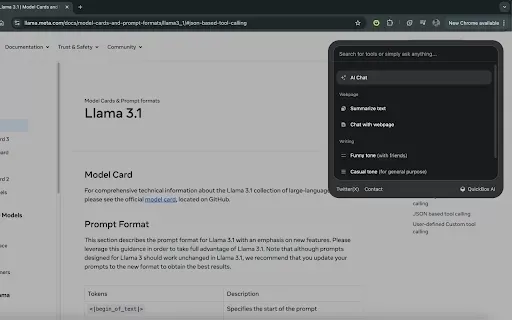
What is QuickBox AI?QuickBox AI offers a handy browser extension that integrates a suite of AI tools directly into your browser. Pressing cmd+k (or ctrl+k) brings up a compact overlay on your current tab, enabling instant access to AI utilities. You
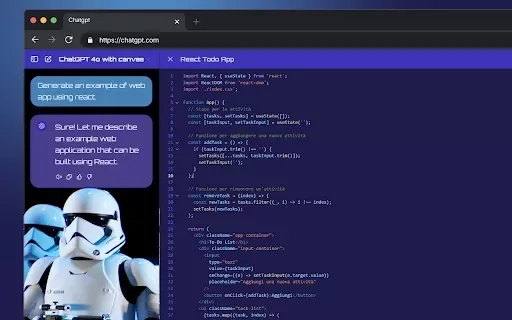
What is StylerGPT: ChatGPT Customization?StylerGPT is a Chrome extension that reimagines your ChatGPT interface as a fully customizable digital workspace. Choose from diverse color palettes, upload custom backgrounds, adjust fonts, and more to create
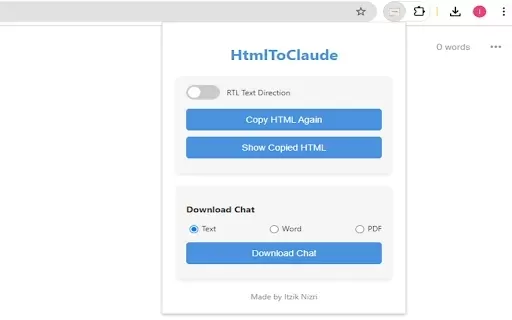
What is HtmlToClaude?HtmlToClaude is a Chrome extension that simplifies your work with Claude AI. It enables you to effortlessly capture HTML content from any webpage and paste it directly into your conversations with Claude. The tool also lets you d

What is Make a Sign?MakeSign is an online platform that enables users to easily design custom signs. It offers a broad selection of templates, design tools, and customization features to help you create professional and attention-grabbing signage for

What is Facememe?FaceMeme is an advanced AI tool that enables you to upload a photo and instantly transform it into a popular meme character. Ideal for crafting personalized memes for social media, generating fun content for friends, or simply having
Product Comparison Tool Product Information
What is Product Comparison Tool?
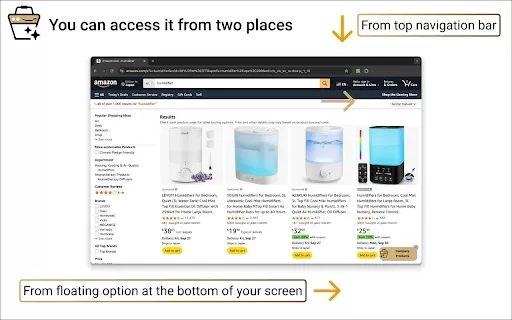
The Smart Amazon Product Comparer is a free Chrome extension that helps you make smarter buying choices on Amazon. It leverages OpenAI's ChatGPT to deliver AI-driven analysis, automatically evaluating product features, pricing, reviews, and descriptions. Built with privacy in mind, your API key is stored securely in your local browser. This open-source tool’s code is publicly available on GitHub, promoting transparency and community collaboration. Whether you're shopping for gadgets, home essentials, or other items, it streamlines the process to help you decide with confidence.
Who will use Product Comparison Tool?
- Online shoppers
- Amazon customers
- Technology enthusiasts
- Fans of AI tools
How to use the Product Comparison Tool?
- Step 1: Install the Extension: Get the Smart Amazon Product Comparer from the Chrome Web Store.
- Step 2: Set Up Your API Key: Navigate to the extension settings and input your OpenAI API key.
- Step 3: Begin Comparing: Go to an Amazon product page and choose the items you wish to compare.
- Step 4: Review the Analysis: Receive detailed comparisons and AI-powered recommendations directly in your browser.
Platform
- Chrome
Product Comparison Tool’s Core Features & Benefits
The Core Features
- Effortless Comparison
- AI-Powered Insights
- Privacy-First Design
- Customizable Options
- Open-Source Transparency
The Benefits
- Make well-informed purchase decisions
- Save time on product research
- Enjoy secure, private browsing
- Adapt settings to your needs
- Participate in a transparent, collaborative project
Product Comparison Tool’s Main Use Cases & Applications
- Comparing multiple products on Amazon
- Identifying the best value and deals
- Accessing unbiased review summaries
- Making fast, informed purchase choices
FAQs of Product Comparison Tool
How do I install the Smart Amazon Product Comparer?
Install it directly from the Chrome Web Store.
Is my data secure when using this extension?
Yes, your OpenAI API key is stored locally and securely in your browser.
Do I need an OpenAI API key to use this extension?
Yes, you must enter your own OpenAI API key in the extension’s settings.
Can I customize the extension settings?
Yes, you can adjust the settings and store your API key securely within the browser.
Where can I view the source code?
The source code is hosted on GitHub at https://github.com/nobari/product-compare.
Is the extension free to use?
Yes, it is completely free and open-source.
How do I start comparing products?
Visit any Amazon product page, and the extension will assist you in selecting and comparing items.
Does it work on other e-commerce sites?
Currently, it is optimized exclusively for Amazon.
Can I contribute to the project?
Yes, contributions are encouraged via the GitHub repository.
How often are updates released?
Updates are released regularly to enhance features and address any issues.
Product Comparison Tool Company Information
- SADEGH HEYRANINOBARI
- https://github.com/nobari
Product Comparison Tool Screenshot


2026 Latest Best Top-rated AI Systematic Review Tools for Screening Abstracts, Datasets, and Citation Networks are curated by XIX.AI through rigorous real-world tests. These powerful game-changing tools offer a free vs paid comparison to help researchers boost productivity significantly. Explore now to discover your perfect tool for accelerating scientific research.
 9 tools
 xix.ai

2026 Latest Best Top-rated AI Multilingual Voice Tools for Global Content are here on XIX.AI! This curated list features powerful, game-changing options that deliver flawless speech in dozens of languages, perfect for creating high-quality content fast and boosting writing efficiency across global markets. Get a free vs paid comparison along with real-world tests and our updated weekly rankings to help you find the must-try tool that suits your needs. Explore now to unlock your AI edge!
10 tools
xix.ai

2026 Latest Best Top-rated AI Persona Builders help you turn valuable CRM data into actionable customer profiles quickly. This curated list showcases powerful, game-changing tools that go through real-world tests to deliver accurate insights. Get a free vs paid comparison and discover which option suits your needs best. XIX.AI is also included in this must-try selection. Explore now to Unlock your AI edge!
9 tools
xix.ai

2026 Latest Best Top-rated AI SQL Analysis Tools for Business Intelligence Teams! XIX.AI has curated a powerful, game-changing collection that goes through rigorous real-world tests. You’ll find a free vs paid comparison, detailed rankings, and in-depth insights to help you boost productivity significantly. Must-try options are available to unlock your AI edge. Explore now!
11 tools
xix.ai

2026 Latest Best Top-rated AI Batch Background Removal Tools for Catalog Images are curated by XIX.AI for quick, powerful removal of backgrounds from multiple images at once. These tools offer real-world tests and free vs paid comparison to help you find the most efficient solution that boosts your productivity significantly. Must-try options are regularly updated weekly. Explore now to Discover your perfect tool and Unlock your AI edge.
14 tools
xix.ai

2026 Latest Best Top-Rated AI Academic Writing Helpers for Students & Researchers! XIX.AI has curated a powerful, game-changing collection of tools that undergo real-world tests to boost writing efficiency significantly. You’ll find detailed free vs paid comparison, weekly updated rankings, and insights on how these tools can help refine abstracts, structure papers, and overcome common academic writing challenges. Must-try for anyone aiming to unlock their AI edge in academic work. Explore now!
8 tools
xix.ai


