


 Home
HomeSafe Kids AI for Email
Email Safety for Kids with AI



Helps TikTok sellers, brands, MCNs, and TAPs discover winning products and find creators.

HelpLook is an AI-powered all-in-one knowledge base tool that helps businesses quickly build knowledge bases, help centers, and...

Your AI Workspace

302.AI is an enterprise-grade AI resource platform with pay-as-you-go pricing, API access to a full range of AI models, and ready-to-use online applications.

剧火AI — AI Screenwriter + Director, a One-Person Short Drama Studio In one sentence, what is it?
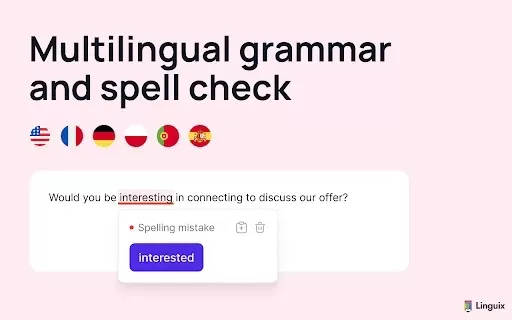
What is Linguix — Grammar Checker and AI Writing App?Linguix is an all-in-one grammar checker and AI-powered writing assistant that elevates your text across websites and applications. It supports multiple languages such as English, French, German, S

What is WenXiu?WenXiu is an intelligent service platform that improves writing efficiency by automatically detecting and correcting text errors in multiple languages, such as Chinese (Simplified and Traditional) and English. It specializes in multili
What is Twiser?Twiser is an all-in-one Talent Management Platform. It helps organizations by combining essential tools like OKRs, a robust Learning Management System (LMS), and Succession Planning into a single, unified system. Designed to align and
What is Cheatoz?Cheatoz revolutionizes how you access information by integrating an advanced AI question solver directly into your Chrome browser. Simply highlight a query on any webpage, and Cheatoz instantly delivers an accurate answer in a conveni
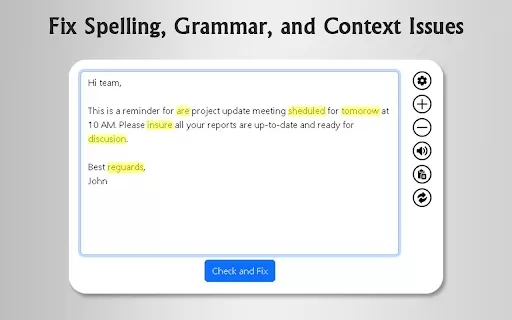
What is GrammFix?GrammFix is a cutting-edge browser extension that helps users elevate their writing. Leveraging advanced AI, it instantly identifies and fixes grammar, spelling, and punctuation errors. Ideal for students, professionals, and anyone l
Safe Kids AI for Email Product Information
What is Safe Kids AI for Email?
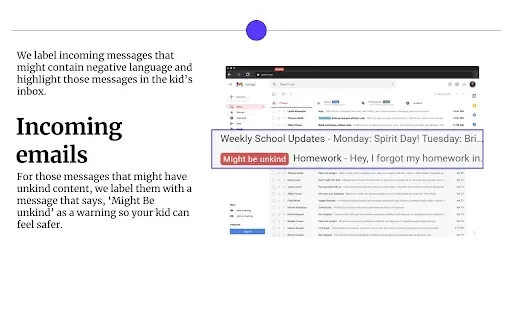
Safe Kids AI for Email is a protective tool for young Gmail users, safeguarding them from harmful messages and inappropriate content. It employs sophisticated machine learning to detect and highlight potential email risks, such as hate speech, bullying, and toxic language. This preventative method shields children from dangerous communications while nurturing a more positive digital space. Featuring an intuitive interface, it allows parents to effortlessly review and talk about flagged emails, promoting ongoing conversations about internet safety.
Who will use Safe Kids AI for Email?
- Parents
- Guardians
- Teachers and Educators
- Children between the ages of 8 and 16
How to use the Safe Kids AI for Email?
- Step 1: Install the Safe Kids AI for Email extension from the Chrome Web Store.
- Step 2: Connect it to your child's Gmail account.
- Step 3: Customize your monitoring preferences for different content types.
- Step 4: Examine highlighted messages and discuss them openly with your child.
Platform
- Web browser
- Google Chrome
Safe Kids AI for Email's Core Features & Benefits
The Core Features
- Real-time email monitoring
- AI-powered risk alerts
- Clear, user-friendly notifications
The Benefits
- Protects children from dangerous and harmful messages
- Fosters meaningful parent-child dialogue about online safety
- Encourages the development of healthier digital communication habits
Safe Kids AI for Email's Main Use Cases & Applications
- Proactive email safety monitoring for kids
- Enhancing communication between parents and children
- Facilitating educational discussions on responsible online behavior
FAQs of Safe Kids AI for Email
Is it free to use?
Yes, Safe Kids AI for Email is completely free to use.
What is Safe Kids AI for Email?
It is a browser extension designed to monitor Gmail accounts for potentially harmful content.
How does it work?
The tool uses advanced machine learning to analyze and flag emails containing potentially harmful language.
Can parents customize monitoring settings?
Absolutely. Parents have full control to adjust settings and specify which content types to monitor.
What age group is it suitable for?
It is primarily designed for children and teenagers aged 8 through 16.
Will it block messages?
No, it does not block emails. It highlights concerning messages for parental review.
How do I discuss flagged messages with my child?
Review the highlighted messages together with your child, using them as a starting point for open and honest conversation.
Is my child's data safe?
Yes. The extension strictly adheres to data privacy regulations to ensure all user information is protected.
Can it be used on mobile devices?
Currently, it is available exclusively as a Chrome browser extension.
Where can I find support?
For assistance and resources, please visit the official Safe Kids AI website.
Safe Kids AI for Email Company Information
Safe Kids AI for Email Screenshot

2026 Latest Best Top-rated AI Stem Separation Tools Curated for Remix Production, Sampling Prep, and Karaoke Masters. These powerful game-changing tools offer real-world tests to deliver precise audio isolation, boosting productivity significantly. XIX.AI provides a weekly updated free vs paid comparison guide to help you find the must-try solution that suits your needs. Explore now to unlock your AI edge.
 8 tools
 xix.ai

2026 Latest Best AI SQL Copilots Ranked Top-Rated! XIX.AI curates a powerful game-changing collection for weekly updated real-world tests. These must-try tools help you generate accurate revenue dashboards, analyze sales funnels, and track product metrics swiftly, boosting productivity massively. Explore now to Discover your perfect tool for data-driven decision making! 238 characters
9 tools
xix.ai

2026 Latest Best Top-Rated AI Melody Writing Tools for Song Drafts! XIX.AI has curated a highly powerful game-changing collection that goes through rigorous real-world tests to deliver the best writing experience. You can find detailed free vs paid comparisons, accurate rankings, and must-try options designed to help you create stunning song drafts effortlessly and boost your creative productivity significantly. Explore now to discover your perfect tool!
8 tools
xix.ai

2026 Latest Best Top-rated AI Conversation Trainer Tools for Interview Practice are here on XIX.AI! This curated collection features powerful, game-changing tools that go through rigorous real-world tests to deliver accurate feedback. You’ll find a free vs paid comparison and detailed rankings to help you choose the must-try option that boosts your confidence and skills. Explore now to Discover your perfect tool for interview success!
12 tools
xix.ai

2026 Latest Best Top-rated AI Style Transfer Tools for Creative Experiments! XIX.AI has curated a powerful, game-changing collection of must-try tools that deliver exceptional results through real-world tests and rigorous rankings. These top solutions help creatives boost productivity significantly by accelerating content creation and unlocking endless creative possibilities. Explore now to discover your perfect tool and start creating today!
9 tools
xix.ai

2026 Latest Best Top-Rated AI Dialogue Bubble Tools for Visual Storytelling are here on XIX.AI! This curated collection features powerful, game-changing tools that help creators boost productivity and overcome creative bottlenecks. Get a free vs paid comparison, see real-world tests, and check the latest rankings to find the must-try solutions perfect for crafting engaging visual narratives. Explore now to discover your ideal tool!
10 tools
xix.ai


This is exactly what I needed for my kid's Gmail! The AI catches weird stuff I'd miss, but I hope it doesn't block harmless jokes. 😅


