


 Home
HomeMeetMemos - Summarize Meetings, Audio & Video
MeetMemos AI Audio Video Transcription & Summarizer Extension



Helps TikTok sellers, brands, MCNs, and TAPs discover winning products and find creators.

HelpLook is an AI-powered all-in-one knowledge base tool that helps businesses quickly build knowledge bases, help centers, and...

Your AI Workspace

302.AI is an enterprise-grade AI resource platform with pay-as-you-go pricing, API access to a full range of AI models, and ready-to-use online applications.

剧火AI — AI Screenwriter + Director, a One-Person Short Drama Studio In one sentence, what is it?

What is Speech Translator?Speech Translator leverages Google's advanced speech recognition to deliver real-time translation for videos, audio, and live streams. This tool bridges language gaps, enabling seamless conversations and fostering clearer un

Ever wondered how to effortlessly turn your audio and video files into text? Enter Clipto, the powerhouse of AI transcription on the web. Imagine harnessing the same cutting-edge tech that fuels ChatGPT to convert your Zoom meetings, interviews, and

What is Revoldiv AI Chrome Extension? Revoldiv is a Chrome browser extension that instantly transcribes audio and video directly in your browser. It lets users follow along by reading live transcriptions and search for specific spoken words within po

Ever found yourself needing to turn spoken words into written text? Well, let me introduce you to tulz.AI—an AI-powered service that's all about making audio transcription a breeze. Whether it's a podcast, a business meeting, or any other spoken content,

Ever found yourself in need of a quick and accurate transcription of a video or audio file? That's where Video To Text AI comes into play. It's a slick AI-powered tool designed to effortlessly convert your media into text. Whether you're juggling YouTube
MeetMemos - Summarize Meetings, Audio & Video Product Information
What is MeetMemos?
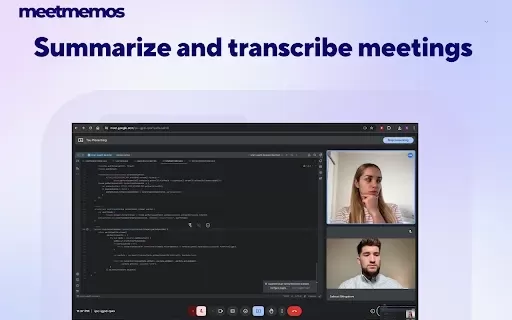
MeetMemos is a Chrome extension that transforms online meetings, lectures, and media consumption by delivering real-time transcriptions and AI-powered summaries via ChatGPT and Whisper technologies. It works seamlessly across platforms like YouTube, Google Meet, and Zoom—capturing conversations accurately and converting them into clear, concise summaries. Quick to install and effortless to use, MeetMemos integrates smoothly into your workflow, offering a practical way to save time and capture key insights.
Who uses MeetMemos?
- Students
- Professionals
- Lecturers
- Meeting attendees
- Content creators
How to use MeetMemos
- Step 1: Install the MeetMemos extension from the Chrome Web Store.
- Step 2: Allow the necessary permissions for accessing audio and video content.
- Step 3: Start a session on YouTube, Google Meet, Zoom, or another supported platform.
- Step 4: Click the MeetMemos extension icon to activate transcription and summarization.
- Step 5: View transcriptions and summaries directly in the extension interface.
Platform
- Web
- Chrome
MeetMemos Core Features & Benefits
Core Features
- Real-time transcription
- AI-powered summarization
- Integration with YouTube, Google Meet, and Zoom
- Interactive summary chat
- Multi-device sync
Benefits
- Save time with instant overviews
- Boost productivity
- Capture essential information
- Secure data handling
- Access from any device
Main Use Cases & Applications
- Transcribing and summarizing online lectures
- Recording and condensing meeting notes
- Creating concise summaries of videos
- Discussing summarized content interactively
- Accessing transcripts and summaries across devices
FAQs about MeetMemos
What platforms does MeetMemos support?
MeetMemos supports YouTube, Google Meet, Zoom, and other web-based platforms.
Is MeetMemos free to use?
MeetMemos offers a free basic service, with premium plans expected in the future.
How accurate is the transcription?
MeetMemos uses advanced AI to deliver highly accurate transcriptions.
Can I access my transcriptions across multiple devices?
Yes—MeetMemos syncs your transcriptions and summaries across all your devices.
How do I start using MeetMemos?
Install the extension from the Chrome Web Store, follow the setup steps, and start summarizing.
Does MeetMemos store my data?
MeetMemos follows strict privacy standards and does not store your data without consent.
Can I provide feedback on the service?
Yes—user feedback helps us improve. Share your thoughts through our feedback channels.
Is MeetMemos associated with OpenAI?
MeetMemos uses OpenAI technologies but is independently developed and not officially affiliated with OpenAI.
What are the system requirements for using MeetMemos?
You'll need the Chrome browser to install and run MeetMemos.
How often are updates released?
We release updates regularly to enhance accuracy and features in line with AI advancements.
MeetMemos Company Information
MeetMemos - Summarize Meetings, Audio & Video Screenshot

2026 Latest Best Top-Rated AI Melody Writing Tools for Song Drafts! XIX.AI has curated a highly powerful game-changing collection that goes through rigorous real-world tests to deliver the best writing experience. You can find detailed free vs paid comparisons, accurate rankings, and must-try options designed to help you create stunning song drafts effortlessly and boost your creative productivity significantly. Explore now to discover your perfect tool!
 8 tools
 xix.ai

2026 Latest Best Top-rated AI Conversation Trainer Tools for Interview Practice are here on XIX.AI! This curated collection features powerful, game-changing tools that go through rigorous real-world tests to deliver accurate feedback. You’ll find a free vs paid comparison and detailed rankings to help you choose the must-try option that boosts your confidence and skills. Explore now to Discover your perfect tool for interview success!
12 tools
xix.ai

2026 Latest Best Top-rated AI Style Transfer Tools for Creative Experiments! XIX.AI has curated a powerful, game-changing collection of must-try tools that deliver exceptional results through real-world tests and rigorous rankings. These top solutions help creatives boost productivity significantly by accelerating content creation and unlocking endless creative possibilities. Explore now to discover your perfect tool and start creating today!
9 tools
xix.ai

2026 Latest Best Top-Rated AI Dialogue Bubble Tools for Visual Storytelling are here on XIX.AI! This curated collection features powerful, game-changing tools that help creators boost productivity and overcome creative bottlenecks. Get a free vs paid comparison, see real-world tests, and check the latest rankings to find the must-try solutions perfect for crafting engaging visual narratives. Explore now to discover your ideal tool!
10 tools
xix.ai

2026 Latest Top-Rated Best AI Meeting Summary Tools for Clear Decision Tracking and Effortless Follow-Ups. This curated list showcases powerful, game-changing solutions that boost productivity dramatically by automating meeting notes, identifying key action items, and streamlining team coordination across all projects. Get a free vs paid comparison along with real-world tests and weekly updated rankings to help you find the perfect tool. Explore now to unlock your AI edge!
9 tools
xix.ai

2026 Latest Best Top-rated AI Data Cleaning Tools for quick fixing of missing values and duplicates. This curated list showcases powerful, game-changing solutions that boost productivity significantly. Each option has undergone rigorous real-world tests to ensure reliability. Get a free vs paid comparison and discover the must-try tool that fits your needs best. Explore now at XIX.AI to Unlock your AI edge.
11 tools
xix.ai


