


 Home
HomeMailGPT - ChatGPT and Claude for Gmail



Helps TikTok sellers, brands, MCNs, and TAPs discover winning products and find creators.

HelpLook is an AI-powered all-in-one knowledge base tool that helps businesses quickly build knowledge bases, help centers, and...

Your AI Workspace

302.AI is an enterprise-grade AI resource platform with pay-as-you-go pricing, API access to a full range of AI models, and ready-to-use online applications.

剧火AI — AI Screenwriter + Director, a One-Person Short Drama Studio In one sentence, what is it?

SalesRobot isn't just another tool in your sales arsenal—it's your new best friend in the world of automated outreach. This cloud-based gem lets you juggle multiple cold outreach campaigns on LinkedIn and through email, all while sipping your morning
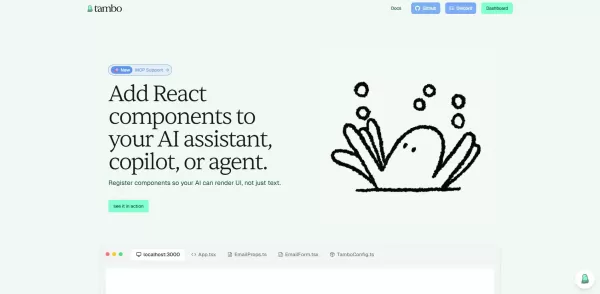
What is Tambo?Tambo is a comprehensive, end-to-end platform for building, deploying, and managing AI agents across your entire organization. Get started by choosing from a library of ready-to-use agent templates or designing a custom workflow in the

What is Dosu?Dosu is an intelligent AI assistant that uses machine learning to simplify and automate user workflows. It handles repetitive activities, organizes emails, schedules appointments, and delivers tailored support. By utilizing natural langu
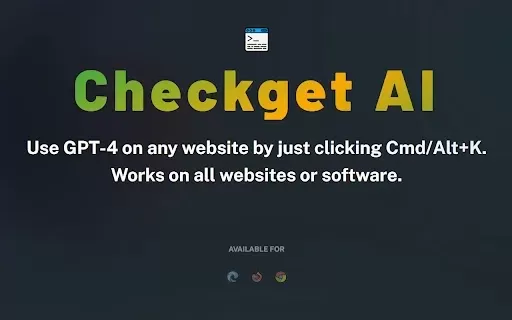
What is Checkget AI?Checkget is an advanced browser extension driven by GPT-4 technology. It streamlines daily activities like drafting emails, writing code, translating text, and responding to messages. Its smooth integration across all websites all
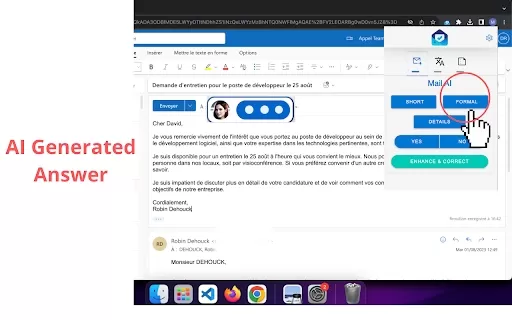
Ever wished for a trusty sidekick to handle your emails? Enter MailBot AI, a Chrome extension that's like your personal email assistant, powered by the magic of AI. This nifty tool helps automate your email tasks, making your life a whole lot easier.How t
MailGPT - ChatGPT and Claude for Gmail Product Information
What Is MailGPT? ChatGPT and Claude Integration for Gmail
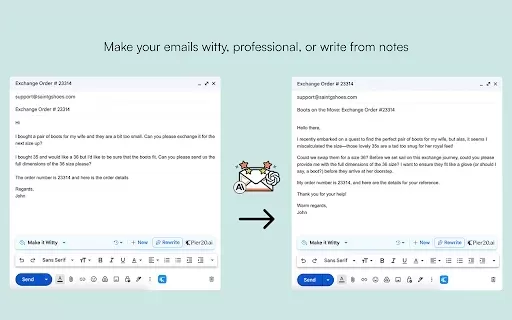
MailGPT, developed by Pier20.ai, integrates advanced AI models like ChatGPT and Claude directly into your Gmail inbox to enhance your email writing experience. This powerful tool helps you transform rough drafts into professional emails, convert meeting notes into actionable messages, add wit and personality to your communication, simplify complex emails, and create custom writing styles with personalized AI instructions. The extension is free to use and only requires a Pier20 account—no separate ChatGPT, OpenAI, Claude, or Anthropic accounts are needed.
Who Can Benefit from MailGPT?
- Professionals
- Students
- Email marketers
- Executives
- Business owners
How to Use MailGPT for Gmail
- Step 1: Install the MailGPT extension from the Chrome Web Store.
- Step 2: Create a free Pier20 account.
- Step 3: Open Gmail and compose a new email.
- Step 4: Use MailGPT features to draft, edit, and polish your emails.
- Step 5: Send professionally crafted emails with ease.
Supported Platform
- Chrome
Core Features and Benefits of MailGPT for Gmail
Key Features
- Transform drafts into polished emails
- Convert meeting notes into actionable emails
- Add personality to your messages
- Simplify complex content
- Create custom writing styles
Key Benefits
- Save time on email writing
- Improve email effectiveness
- Get faster responses
- Enhance email personalization
- Simplify communication
Main Use Cases and Applications of MailGPT
- Professional email drafting
- Meeting recap emails
- Personalized email communications
- Marketing email creation
- Client communication
Frequently Asked Questions About MailGPT
What Are ChatGPT and Claude?
ChatGPT and Claude are advanced AI language models trained to understand context and generate human-like text for a variety of purposes, including email writing.
What Is MailGPT?
MailGPT is a free Chrome extension by Pier20.ai that provides AI-powered writing assistance directly in your Gmail inbox, helping you write effective emails faster.
Is MailGPT Free?
Yes, the extension is completely free to use.
Do I Need an Account?
You will need a free Pier20.ai account to use the extension. Visit https://app.pier20.ai/ to get started.
Is This an Official OpenAI or Anthropic Product?
No, MailGPT was developed by the Pier20.ai team for public use and is not an official product of OpenAI or Anthropic.
How Do I Install MailGPT?
Install the MailGPT extension from the Chrome Web Store and create a Pier20 account to start using it.
What Features Does MailGPT Offer?
MailGPT offers features like transforming drafts, converting notes into emails, adding wit, simplifying complex content, and creating custom writing styles.
Can I Use MailGPT for Free Without Other AI Accounts?
Yes, you do not need separate accounts for ChatGPT, OpenAI, Claude, or Anthropic. A free Pier20 account is all you need.
Is My Data Safe with MailGPT?
Yes, the developer states that your data is not sold or used for unrelated purposes and complies with privacy policies.
How Can MailGPT Improve My Email Writing?
MailGPT saves you time, enhances effectiveness, adds personalization, simplifies complex content, and helps you craft professional emails.
Company Information for MailGPT
- Pier20.ai
- Pier20.ai
MailGPT - ChatGPT and Claude for Gmail Screenshot




2026 Latest Best AI Habit Tracking Tools for Personal Health Goals are here on XIX.AI! Our curated top-rated list includes powerful, game-changing solutions that help you stay consistent with your goals through real-world tests and strict rankings. We also offer a free vs paid comparison to help you choose the perfect fit. Explore now to Unlock your AI edge in achieving better health outcomes.
 10 tools
 xix.ai
2026 Latest Best Top-rated AI Anomaly Detection Tools for Dashboard Monitoring are here on XIX.AI! This curated list features powerful, game-changing solutions that deliver accurate real-world tests through weekly updated rankings. You’ll find a free vs paid comparison and insights into how these tools boost productivity by helping users spot issues fast, streamlining workflow efficiency. Discover your perfect tool to unlock your AI edge today. Explore now!
9 tools
xix.ai
2026 Latest Best AI Lip-Sync Generators for Dialogue-Driven Character Animation and Motion Scenes! XIX.AI has curated a top-rated list of powerful, game-changing tools that deliver flawless synchronized lip movements for animated characters. Each option undergoes rigorous real-world tests to ensure reliability, and our weekly updated rankings help you find the must-try solution that boosts your animation workflow efficiency. Explore now to discover your perfect tool!
9 tools
xix.ai

2026 Latest Best Top-rated AI Social Reply Assistants for Brand Community Management! XIX.AI has curated a powerful game-changing collection of must-try tools, all going through rigorous real-world tests to deliver consistent top-quality results. You can find detailed free vs paid comparison insights and up-to-date weekly updated rankings here. Explore now to unlock your AI edge in efficient community management!
12 tools
xix.ai

2026 Latest Top-Rated AI Daily Planner Apps make creating realistic deep work schedules effortless. This curated list features powerful, game-changing tools that go through real-world tests to ensure accuracy and effectiveness. You’ll find a free vs paid comparison along with detailed rankings based on usability and results. XIX.AI is part of this trusted collection. Explore now to discover your perfect tool and unlock your AI edge for staying focused and productive every day.
11 tools
xix.ai
2026 Latest Best Top-rated AI Chart Builder Tools for Fast Reporting are here on XIX.AI! This curated list features powerful game-changing tools that deliver accurate professional charts with just a few clicks, helping you boost writing efficiency and streamline content creation. Get a free vs paid comparison along with real-world tests and detailed rankings to find the must-try solution for your needs. Explore now to unlock your AI edge!
9 tools
xix.ai


