


 Home
HomeImgage - AI Social Site



Helps TikTok sellers, brands, MCNs, and TAPs discover winning products and find creators.

HelpLook is an AI-powered all-in-one knowledge base tool that helps businesses quickly build knowledge bases, help centers, and...

Your AI Workspace

302.AI is an enterprise-grade AI resource platform with pay-as-you-go pricing, API access to a full range of AI models, and ready-to-use online applications.

剧火AI — AI Screenwriter + Director, a One-Person Short Drama Studio In one sentence, what is it?

What is Banana AI - Free AI Photo Editor?Banana AI is a free, AI-driven photo editor that uses Google's Nano Banana technology (Gemini 2.5 Flash Image) to transform your pictures with simple text commands. Easily remove unwanted objects, swap backgro

What is Deepfake Maker Nano Banana AI? Nano Banana AI is an advanced artificial intelligence platform that generates stunning images from text descriptions and facilitates seamless image-to-image transformations. This cutting-edge AI model revolution

What is Line Art Maker?Line Art Maker is an intuitive application that effortlessly transforms your photos into stunning line drawings. Powered by sophisticated algorithms, it precisely identifies outlines and turns your images into detailed sketches

What is TranslateImages?AI Image Translator is an advanced tool that precisely translates text embedded in images, keeping the original layout and format intact. It supports over a dozen languages, such as English, Hindi, Arabic, Chinese, Japanese, K

What is Nano Banana | Nanana AI? Nanana AI is the leading AI image generator and AI image editor on the market. It taps into the full potential of Google's revolutionary Nano Banana model to offer unmatched image creation and editing power. As an ear
Imgage - AI Social Site Product Information
What is Imgage - AI Social Site?
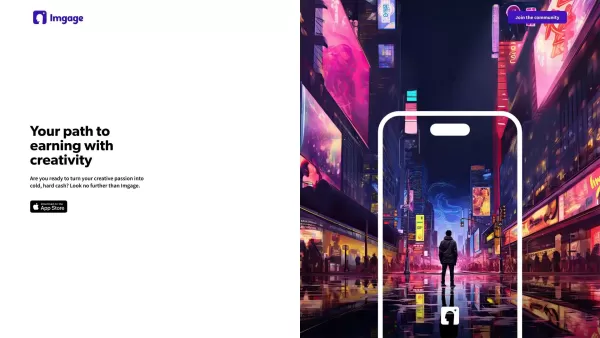
Imgage is a dynamic online marketplace that turns creative work into income. Artists can upload their images and custom prompts to sell them to a global audience. The platform makes transactions simple and provides real-time earnings tracking. It empowers creators by offering a streamlined way to monetize their art, ensuring their work reaches buyers quickly and effectively. With Imgage, artists can focus on creating while the platform manages sales.
Who uses Imgage - AI Social Site?
- Artists
- Photographers
- Digital Illustrators
- Graphic Designers
How to use Imgage - AI Social Site
- Step 1: Sign up and create your Imgage account.
- Step 2: Upload your images and custom prompts.
- Step 3: Set your prices for each item.
- Step 4: Publish your items to make them available for purchase.
- Step 5: Track your sales and earnings in real-time on your dashboard.
- Step 6: Withdraw your earnings using the available payout methods.
Platform
- Web
Imgage - AI Social Site's Core Features & Benefits
Core Features
- Upload and sell images
- Create custom prompts
- Real-time earnings tracking
- Seamless transaction process
Benefits
- Easily monetize your art
- Reach a global audience
- Efficient, streamlined sales process
- Focus on creativity while the platform handles sales
Imgage - AI Social Site's Main Use Cases & Applications
- Artists selling digital artwork
- Photographers monetizing their photos
- Graphic designers selling design templates
- Digital illustrators offering custom prompts
Imgage - AI Social Site's Pros & Cons
Pros
Uses advanced AI to generate artistic images from text prompts.
Offers various artistic styles to customize your creations.
Enables monetization by selling images and prompts.
Supports community growth and sharing features.
Available as a mobile app on the Apple App Store.
Cons
No information on availability for non-iOS platforms.
No open-source code or public GitHub repository.
Pricing details are not explicitly listed on the site.
Imgage - AI Social Site's Pricing
Has free plan | No |
|---|---|
Free trial details | |
Pricing model | |
Is credit card required | No |
Paid from | |
Has lifetime plan | No |
Billing frequency |
For the latest prices, please visit: https://imgage.app
FAQs for Imgage - AI Social Site
How do I sign up for Imgage?
Go to the Imgage website and click 'Sign Up' to create an account with your email.
What file types can I upload?
You can upload standard image formats like JPG, PNG, and BMP.
How do I set prices for my images?
After uploading, you can set your price in the item settings.
How do I track my earnings?
Track your earnings in real-time from your Imgage dashboard.
Can I withdraw my earnings anytime?
Yes, you can withdraw earnings anytime using the payout options in your account.
Is there a limit to how many images I can upload?
Currently, there is no upload limit for images.
What payment methods can I use to withdraw earnings?
Imgage supports multiple payout methods, including PayPal and direct bank transfers.
Can I edit or delete my uploaded items?
Yes, you can edit or delete your uploaded images and prompts anytime from your account.
How can I promote my items on Imgage?
Share your Imgage profile and items on social media or use the platform's promotional tools.
Is customer support available if I need help?
Yes, Imgage offers customer support via email and a help center on their website.
Imgage - AI Social Site Company Information
Website:
https://www.imgage.app/Company Name:
ImgageSupport Email:
Facebook:
NAX (Twitter):
NAYouTube:
NAInstagram:
NATikTok:
NALinkedIn:
NA
Imgage - AI Social Site Screenshot


2026 Latest Best Top-Rated AI Melody Writing Tools for Song Drafts! XIX.AI has curated a highly powerful game-changing collection that goes through rigorous real-world tests to deliver the best writing experience. You can find detailed free vs paid comparisons, accurate rankings, and must-try options designed to help you create stunning song drafts effortlessly and boost your creative productivity significantly. Explore now to discover your perfect tool!
 8 tools
 xix.ai

2026 Latest Best Top-rated AI Conversation Trainer Tools for Interview Practice are here on XIX.AI! This curated collection features powerful, game-changing tools that go through rigorous real-world tests to deliver accurate feedback. You’ll find a free vs paid comparison and detailed rankings to help you choose the must-try option that boosts your confidence and skills. Explore now to Discover your perfect tool for interview success!
12 tools
xix.ai

2026 Latest Best Top-rated AI Style Transfer Tools for Creative Experiments! XIX.AI has curated a powerful, game-changing collection of must-try tools that deliver exceptional results through real-world tests and rigorous rankings. These top solutions help creatives boost productivity significantly by accelerating content creation and unlocking endless creative possibilities. Explore now to discover your perfect tool and start creating today!
9 tools
xix.ai

2026 Latest Best Top-Rated AI Dialogue Bubble Tools for Visual Storytelling are here on XIX.AI! This curated collection features powerful, game-changing tools that help creators boost productivity and overcome creative bottlenecks. Get a free vs paid comparison, see real-world tests, and check the latest rankings to find the must-try solutions perfect for crafting engaging visual narratives. Explore now to discover your ideal tool!
10 tools
xix.ai

2026 Latest Top-Rated Best AI Meeting Summary Tools for Clear Decision Tracking and Effortless Follow-Ups. This curated list showcases powerful, game-changing solutions that boost productivity dramatically by automating meeting notes, identifying key action items, and streamlining team coordination across all projects. Get a free vs paid comparison along with real-world tests and weekly updated rankings to help you find the perfect tool. Explore now to unlock your AI edge!
9 tools
xix.ai

2026 Latest Best Top-rated AI Data Cleaning Tools for quick fixing of missing values and duplicates. This curated list showcases powerful, game-changing solutions that boost productivity significantly. Each option has undergone rigorous real-world tests to ensure reliability. Get a free vs paid comparison and discover the must-try tool that fits your needs best. Explore now at XIX.AI to Unlock your AI edge.
11 tools
xix.ai


