


 Home
HomeFLUX.2 Pro AI



Helps TikTok sellers, brands, MCNs, and TAPs discover winning products and find creators.

HelpLook is an AI-powered all-in-one knowledge base tool that helps businesses quickly build knowledge bases, help centers, and...

Your AI Workspace

302.AI is an enterprise-grade AI resource platform with pay-as-you-go pricing, API access to a full range of AI models, and ready-to-use online applications.

剧火AI — AI Screenwriter + Director, a One-Person Short Drama Studio In one sentence, what is it?

What is Banana AI - Free AI Photo Editor?Banana AI is a free, AI-driven photo editor that uses Google's Nano Banana technology (Gemini 2.5 Flash Image) to transform your pictures with simple text commands. Easily remove unwanted objects, swap backgro

What is Line Art Maker?Line Art Maker is an intuitive application that effortlessly transforms your photos into stunning line drawings. Powered by sophisticated algorithms, it precisely identifies outlines and turns your images into detailed sketches

What is Deepfake Maker Nano Banana AI? Nano Banana AI is an advanced artificial intelligence platform that generates stunning images from text descriptions and facilitates seamless image-to-image transformations. This cutting-edge AI model revolution

What is Nano Banana | Nanana AI? Nanana AI is the leading AI image generator and AI image editor on the market. It taps into the full potential of Google's revolutionary Nano Banana model to offer unmatched image creation and editing power. As an ear

What is TranslateImages?AI Image Translator is an advanced tool that precisely translates text embedded in images, keeping the original layout and format intact. It supports over a dozen languages, such as English, Hindi, Arabic, Chinese, Japanese, K
FLUX.2 Pro AI Product Information
What Is FLUX.2 Pro AI?
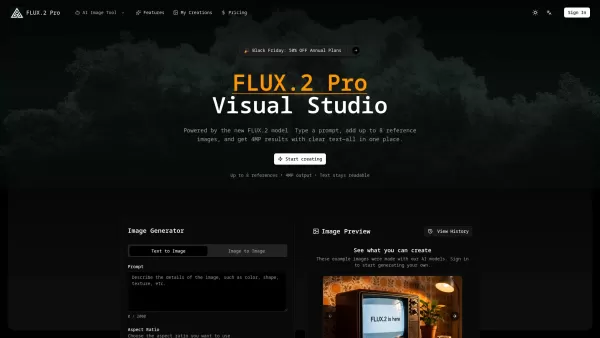
FLUX.2 Pro is a Visual AI Image Studio powered by the latest FLUX.2 model, designed to generate and edit high-quality images efficiently. It allows users to combine text prompts with up to eight reference images to produce 4MP images with clear, legible text. The platform offers a unified workflow for both text-to-image and image-to-image generation, simplifying the creative process by removing the need for complex design software. It is built to support fast campaigns, explainers, and production-grade mockups, ensuring brand consistency and professional-grade outputs.
How to Use FLUX.2 Pro AI?
To use FLUX.2 Pro, first create an account, sign in, and select a plan to access credits. Next, write a short prompt describing your desired image and optionally upload up to eight reference images to guide the style or layout. Then, choose between text-to-image or image-to-image modes, adjust guidance and size settings, and quickly render your results. Finally, download your 4MP PNG images from your saved history, which keeps a record of all renders and prompts for future use, upscaling, or export.
FLUX.2 Pro AI's Core Features
Generate and edit images within a single workflow (text-to-image and image-to-image).
Support for up to eight reference images to guide layout, materials, or style.
4MP output resolution with clear, readable text.
Ability to maintain subject consistency across a series of images.
Saved history for all generations, enabling reruns, variations, and re-downloads.
Prompt controls including guidance, creativity, and aspect sliders.
Downloadable 4MP PNGs without compression or watermarks.
Batch generation with brand consistency.
FLUX.2 Pro AI's Use Cases
Creating professional product shots, promotional materials, or creative concept art.
Making precise edits to existing images using text commands (e.g., changing outfits or backgrounds).
Generating multiple images with consistent style for e-commerce products or advertising campaigns.
Designing legible poster headlines, packaging mockups, and UI mockups.
Developing storyboards with consistent characters across different shots.
Testing marketing campaigns with high-fidelity visuals before committing to studio shoots.
FAQ from FLUX.2 Pro AI
What is FLUX.2 Pro and how does it work?
FLUX.2 Pro is a frontier visual intelligence studio for fast campaigns, explainers, and production-grade mockups. It works by allowing users to type a prompt and add up to eight reference images to generate and edit 4MP images with clear text, all within a single, integrated workflow.
How quickly can I see results?
FLUX.2 Pro is built for speed, generating high-definition, professional-grade images instantly and delivering editing results in seconds.
What is included on the backend?
The backend includes direct access to the latest FLUX.2 model with smart defaults, prompt controls (guidance, creativity, and aspect sliders), image-to-image editing capabilities, and a saved history for every generation.
Can I customize outputs to my brand?
Yes, FLUX.2 Pro supports brand consistency through features like uploading reference images to guide style, colors, and product shapes. It ensures precise brand elements and text rendering, making outputs suitable for marketing materials.
FLUX.2 Pro AI Support Email & Customer Service Contact & Refund Contact etc.
Here is the FLUX.2 Pro AI support email for customer service: [email protected] . For more contact options, visit the contact us page (mailto:[email protected])
FLUX.2 Pro AI Company
FLUX.2 Pro AI Company name: FLUX.2 Pro .
FLUX.2 Pro AI Company address: .
More about FLUX.2 Pro AI, please visit the about us page ().
FLUX.2 Pro AI Login
FLUX.2 Pro AI Login Link: https://flux2pro.ai/login
FLUX.2 Pro AI Sign Up
FLUX.2 Pro AI Sign Up Link: https://flux2pro.ai/register
FLUX.2 Pro AI Pricing
FLUX.2 Pro AI Pricing Link: https://flux2pro.ai/pricing
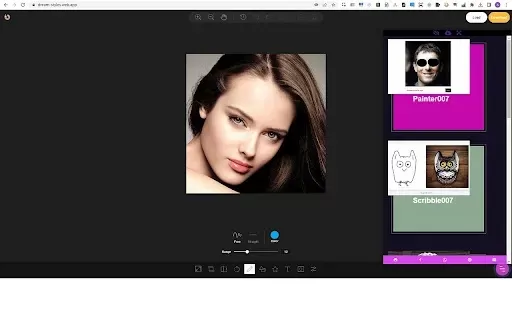
FLUX.2 Pro AI Screenshot
2026 Latest Top-rated AI Customer Chatbots featured on this curated list are the best solutions for answering customer FAQs instantly and qualifying leads around the clock. XIX.AI has conducted rigorous real-world tests to deliver a detailed free vs paid comparison along with up-to-date rankings, helping you find a powerful game-changing tool that boosts productivity significantly. Explore now to Discover your perfect AI chatbot solution!
 9 tools
 xix.ai
2026 Latest Best AI Storyboard Generators for Ad Creative Teams! XIX.AI has curated a top-rated list of powerful, game-changing tools that help teams create stunning visual content faster through real-world tests and rigorous weekly updated rankings. Enjoy a free vs paid comparison to find the perfect fit for your workflow. Explore now to unlock your AI edge in ad creation!
8 tools
xix.ai
2026 Latest Best Top-rated AI Knowledge Chatbot Tools for Internal Documentation are here on XIX.AI! This curated list features powerful game-changing solutions that significantly boost productivity by helping teams quickly generate high-quality content, streamline documentation creation, and overcome common writing challenges. We conduct rigorous real-world tests and provide a weekly updated free vs paid comparison along with detailed rankings to help you find the must-try option that fits your needs best. Explore now to Discover your perfect tool!
12 tools
xix.ai
2026 Latest Best Top-Rated AI Text-to-Speech Tools Curated for Creating Natural Voiceovers in Videos. XIX.AI delivers powerful, game-changing solutions that boost writing efficiency and help you break through creation bottlenecks. We conduct real-world tests, offer free vs paid comparison, and update our rankings weekly. Must-try options are highlighted based on rigorous evaluations. Explore now to Discover your perfect tool for enhancing video quality.
9 tools
xix.ai

2026 Latest Best Top-rated AI Fraud Detection Tools curated by XIX.AI offer powerful game-changing solutions to spot suspicious patterns swiftly and prevent costly losses. Get a free vs paid comparison, real-world tests, and detailed rankings to help you choose the must-try option that boosts your security efficiency. Explore now to Unlock your AI edge.
10 tools
xix.ai
2026 Latest Best Top-Rated AI Wellness Companions Ranked by Experts. This curated list features powerful game-changing tools that offer daily mindfulness support to help users reduce stress, boost focus, and improve overall well-being through real-world tests. Get a free vs paid comparison to find your perfect match. Explore now at XIX.AI to unlock your AI edge.
9 tools
xix.ai


