


 Home
HomeFlamingo for LinkedIn
LinkedIn Flamingo: Better LinkedIn Messaging & Organization



Helps TikTok sellers, brands, MCNs, and TAPs discover winning products and find creators.

HelpLook is an AI-powered all-in-one knowledge base tool that helps businesses quickly build knowledge bases, help centers, and...

Your AI Workspace

302.AI is an enterprise-grade AI resource platform with pay-as-you-go pricing, API access to a full range of AI models, and ready-to-use online applications.

剧火AI — AI Screenwriter + Director, a One-Person Short Drama Studio In one sentence, what is it?
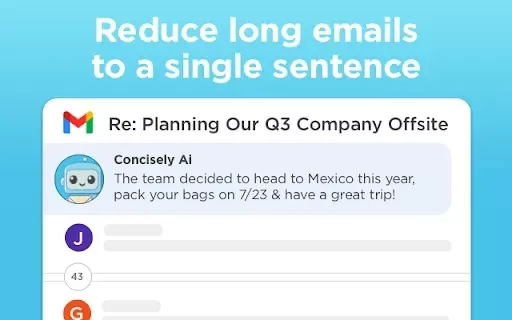
What is Concisely?Concisely is a cutting-edge Chrome extension that redefines email reading by using advanced AI to deliver one-sentence summaries of entire email threads. It allows busy professionals to capture the main idea instantly, eliminating t
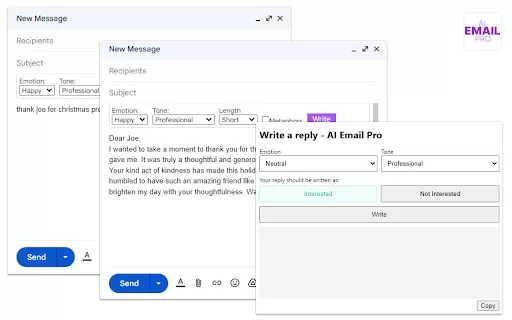
Discover the power of AI Email Pro, your go-to Chrome extension for crafting emails with ease! Powered by the cutting-edge GPT-3 technology, this tool is here to revolutionize your email writing experience.How to Use AI Email Pro Chrome ExtensionGetting started with AI Email Pro is a breeze. Simply

What is ChatCoach?ChatCoach.io is an AI-powered platform that simulates authentic conversations, helping users enhance their communication abilities. It delivers tailored feedback and uses emotional analytics to create lifelike interactions. Users ca

Ever found yourself staring at a blank email, unsure how to start or what tone to strike? Enter the ChatGPT Email Assistant, your new best friend in the world of digital correspondence. This nifty AI tool is here to transform the way you craft, polish, an
What is MessageMate?MessageMate is a user-friendly browser extension that helps you craft polished, professional messages on LinkedIn. It instantly refines your drafts to ensure clarity and a professional tone. Whether you're writing a new outreach m
Flamingo for LinkedIn Product Information
What is Flamingo for LinkedIn?
Flamingo for LinkedIn is a Chrome extension that enhances how you manage messages on LinkedIn. It helps you organize conversations with custom labels, view all unread messages in a single location, and efficiently filter communication. By reducing spam and distractions, it supports a focused networking environment. Designed with user-friendly functions, it is perfect for professionals aiming to boost their LinkedIn efficiency and keep their messaging interface clean.
Who uses Flamingo for LinkedIn?
- LinkedIn members
- Recruiters
- Sales representatives
- Job hunters
- Networking enthusiasts
How do you use Flamingo for LinkedIn?
- Step 1: Install the Flamingo for LinkedIn extension from the Chrome Web Store.
- Step 2: Open LinkedIn and log into your account.
- Step 3: Click the Flamingo icon in your browser toolbar to access its interface.
- Step 4: Create personalized labels to categorize your messages.
- Step 5: See all unread messages grouped by labels for quick reference.
- Step 6: Apply filters to handle spam and low-priority messages.
Platform
- Chrome browser
Flamingo for LinkedIn's Core Features & Benefits
Key Features
- Message categorization
- Custom labeling
- Unread message summary
- Spam control
- User-friendly design
Key Benefits
- Increased productivity
- Better message organization
- Simplified networking management
- Fewer interruptions
- More effective communication
Flamingo for LinkedIn's Main Use Cases & Applications
- Organizing professional networking messages
- Handling recruitment conversations
- Streamlining client communications
- Sifting through job opportunities
- Minimizing unwanted messages
Flamingo for LinkedIn FAQs
Does it help with spam management?
Yes, it includes features to reduce spam messages.
Is Flamingo free to use?
Yes, it is a free extension.
What is Flamingo for LinkedIn?
It's a Chrome extension that improves message organization on LinkedIn.
How do I install Flamingo?
Install it from the Chrome Web Store.
Can I categorize messages?
Yes, you can use custom labels to sort your messages.
Can I view unread messages easily?
Yes, it shows all your unread messages in one convenient location.
What platforms support Flamingo?
It works on the Chrome browser.
Who should use Flamingo?
It's useful for LinkedIn users, recruiters, sales professionals, and others.
Does it require any special permissions?
Yes, it needs access to your LinkedIn messages to function effectively.
How can I provide feedback?
Share your feedback via the Chrome Web Store.
Flamingo for LinkedIn Company Information
Website:
https://www.flamingo.comCompany Name:
FlamingoSupport Email:
Facebook:
NAX(Twitter):
NAYouTube:
NAInstagram:
NATiktok:
NALinkedIn:
https://linkedin.com/company/flamingo
Flamingo for LinkedIn Screenshot


2026 Latest Best Top-rated AI Study Discovery Tools are here on XIX.AI! This curated list includes powerful game-changing resources for quick access to journals, datasets, and industry trends. Get a free vs paid comparison along with real-world tests and updated rankings weekly. Must-try options help boost your research efficiency and unlock your AI edge. Explore now to discover your perfect tool!
 10 tools
 xix.ai

2026 Latest Best Top-Rated AI Email Campaign Tools for Lifecycle Marketing! XIX.AI has curated a powerful, game-changing collection of must-try solutions that boost writing efficiency, help create highly targeted content, and streamline entire marketing workflows. Enjoy weekly updated rankings, real-world tests, and a free vs paid comparison to find the perfect tool for your needs. Explore now to unlock your AI edge!
11 tools
xix.ai

2026 Latest Top-Rated Best AI Investment Research Tools are here on XIX.AI! This curated list includes powerfully accurate signals to assess portfolio risks and help you make smarter, data-driven decisions. We conduct real-world tests weekly to update rankings and offer a free vs paid comparison. Discover your perfect tool to boost investment analysis efficiency today. Explore now!
10 tools
xix.ai

2026 Latest Best Top-Rated AI Customer Chatbot Tools for Website Support are here on XIX.AI! Our curated list features powerful, game-changing solutions that boost response speeds, improve customer satisfaction, and save tons of manual work. Each option goes through rigorous real-world tests, complete with free vs paid comparison details. Explore now to find the perfect tool that boosts your online support efficiency!
10 tools
xix.ai

2026 Latest Best Instagram AI Comment Reply Tools for Shops, DMs, and Community Management! XIX.AI has curated a top-rated list of powerful game-changing solutions featuring weekly updated rankings, free vs paid comparison, and real-world tests. These must-try tools help boost productivity significantly by streamlining reply tasks, saving time, and enhancing customer engagement across all social media platforms. Explore now to discover your perfect tool for seamless community management!
10 tools
xix.ai

2026 Latest Best Top-Rated AI Photo Retouch Tools for Portrait Editing are here on XIX.AI! This curated list features powerful, game-changing solutions that help creators boost writing efficiency and unlock their full creative potential. We conduct real-world tests and provide detailed free vs paid comparison along with weekly updated rankings to ensure you find the must-try perfect tool for flawless portrait edits. Explore now to discover your ideal choice!
12 tools
xix.ai


This extension saved me from LinkedIn chaos! No more scrolling endlessly through the inbox. The custom labels make tracking leads so much easier. I just hope it doesn’t get flagged by LinkedIn policies... But for now, it's a game-changer! 🦩🔥
Just tried this extension and it's a game-changer for managing my LinkedIn inbox! Love the custom labels feature. Finally, no more lost messages in the chaos. 😅


