


 Home
HomeDreamstime Auto Submit
Dreamstime Auto Submit: Streamline Image Upload


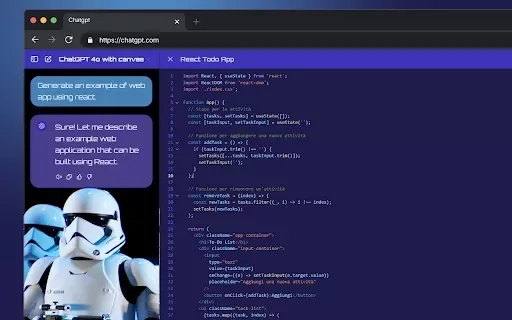
What is StylerGPT: ChatGPT Customization?StylerGPT is a Chrome extension that reimagines your ChatGPT interface as a fully customizable digital workspace. Choose from diverse color palettes, upload custom backgrounds, adjust fonts, and more to create
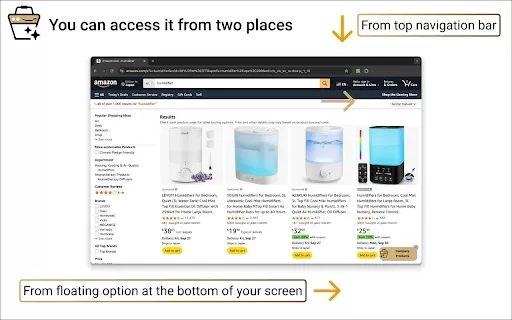
What is Product Comparison Tool?The Smart Amazon Product Comparer is a free Chrome extension that helps you make smarter buying choices on Amazon. It leverages OpenAI's ChatGPT to deliver AI-driven analysis, automatically evaluating product features,
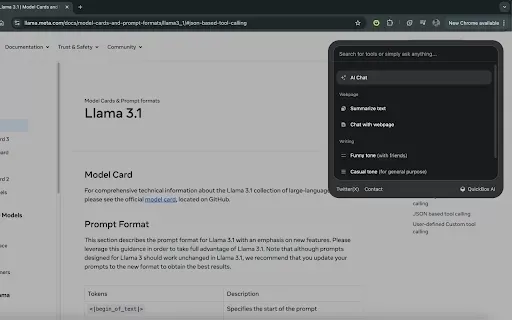
What is QuickBox AI?QuickBox AI offers a handy browser extension that integrates a suite of AI tools directly into your browser. Pressing cmd+k (or ctrl+k) brings up a compact overlay on your current tab, enabling instant access to AI utilities. You
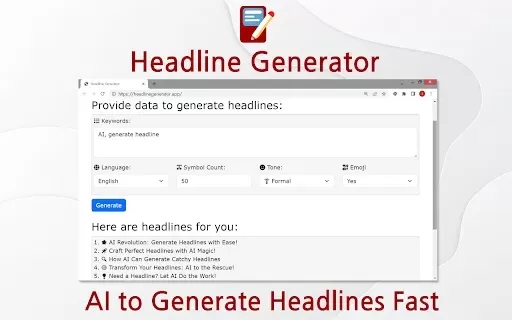
What is Headline Generator?The Headline Generator is a powerful Chrome extension that leverages artificial intelligence to create attention-grabbing and contextually appropriate headlines for diverse content purposes. Ideal for bloggers, marketers, a

What is Claudet: Claude.ai Voice Input?Claudet: Claude.ai Voice Input elevates your Claude.ai experience by enabling direct voice command input. It utilizes advanced technologies like Groq API, OpenAI, and WebGPU to deliver a smooth voice input featu
Dreamstime Auto Submit Product Information
What is Dreamstime Auto Submit?
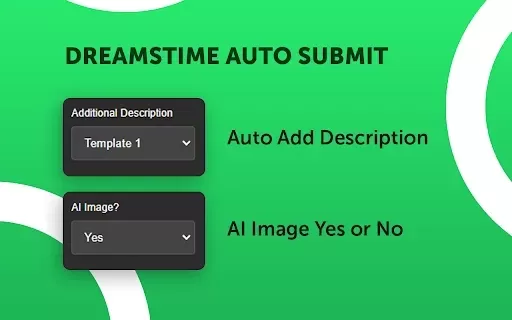
Dreamstime Auto Submit is a Chrome extension designed to simplify image submissions to Dreamstime through automation. This tool streamlines the process by allowing you to add image descriptions, indicate AI-generated content, set repeat counts, adjust delays, and attach model releases. With features like pause, sleep, and automatic skip or stop for duplicate IDs, it speeds up the entire workflow, enabling contributors to dedicate more time to content creation instead of repetitive administrative tasks.
Who is Dreamstime Auto Submit for?
- Dreamstime Contributors
- Photographers
- Image Creators
- Stock Image Vendors
How to Use Dreamstime Auto Submit
- Step 1: Download and install the Dreamstime Auto Submit extension from the Chrome Web Store.
- Step 2: Log into your Dreamstime contributor account.
- Step 3: Adjust the extension settings for descriptions, AI image status, repeat count, delay, and model release.
- Step 4: Upload your images directly via the extension’s interface.
- Step 5: Supervise the automated submission process as the extension handles the rest.
Platform
- Chrome
Dreamstime Auto Submit: Core Features & Benefits
Core Features
- Automated Image Submission
- Add Descriptions
- Specify AI Image Status
- Set Repeat Counts
- Customize Delays & Pauses
- Add Model Releases
- Skip or Stop on Duplicate ID Detection
Benefits
- Time-Saving
- Enhanced Efficiency
- Reduced Repetitive Work
- Accurate Submissions
- Streamlined Contributor Workflow
Dreamstime Auto Submit Use Cases & Applications
- Automating Image Uploads
- Managing Large Batches Efficiently
- Ensuring Consistent Metadata Entry
Dreamstime Auto Submit FAQs
What is Dreamstime Auto Submit?
A Chrome extension that automates the process of submitting images to Dreamstime.
How do I install Dreamstime Auto Submit?
Install it directly from the Chrome Web Store and add it to your browser.
Can I customize the submission delay?
Yes, the extension allows you to set custom delays in seconds or minutes.
Does it support adding model releases?
Yes, you can attach model releases through the extension.
Is it possible to automate descriptions?
Yes, you can input descriptions directly via the extension's interface.
Can I specify if an image is AI-generated?
Yes, you can mark the AI-generated status for each image.
What happens if the same ID is detected?
The extension can be configured to skip or stop the submission when a duplicate ID is found.
Is there a way to contact support?
You can reach out via the developer’s email listed in the Chrome Web Store.
Is there a cost associated with Dreamstime Auto Submit?
A license is required, but the tool is available for free.
Are there other tools like Dreamstime Auto Submit?
Yes, similar tools include AutoSubmit.ai and Easy Keywords for AdobeStock.
Dreamstime Auto Submit Company Information
Dreamstime Auto Submit Screenshot


Discover the 2026 best AI assistants for crafting epic xianxia & wuxia tales. XIX.AI's curated list features top-rated, game-changing tools to master cultivation progression and martial arts choreography. Compare free vs paid options with real-world tests. Unlock your creative potential and start writing today!
 10 tools
 xix.ai

Discover the 2026 best AI mobile app coding tools for Flutter & React Native. Our curated, top-rated list features powerful, game-changing solutions that generate cross-platform code from prompts. Compare free vs paid options with real-world tests. Unlock faster development and build better apps. Explore the rankings on XIX.AI now!
10 tools
xix.ai

Discover the 2026 best AI Chrome extension generators on XIX.AI. Our curated list features top-rated, must-try tools that let you create custom browser add-ons with zero coding. Compare free vs paid options, see real-world tests, and unlock your productivity. Explore the latest rankings and find your perfect tool today!
10 tools
xix.ai

Discover the 2026 best AI multilingual TTS tools for authentic native-accent speech in 50+ languages. Explore our top-rated, curated rankings with free vs paid comparisons and real-world tests. Find your perfect voice tool on XIX.AI and unlock global communication today.
10 tools
xix.ai

Discover the 2026 latest top-rated AI meeting automation tools for smarter, faster collaboration. Our curated list features powerful, game-changing solutions to automate notes, summaries, and action items. Compare free vs paid options with real-world tests and weekly updated rankings. Unlock peak team productivity. Explore the best picks now at XIX.AI.
10 tools
xix.ai

Discover the 2026 latest top-rated AI prompts for Infrastructure-as-Code. XIX.AI's curated selection helps you safely deploy Terraform & Docker configurations, automate cloud setups, and boost DevOps productivity. Compare free vs paid options with real-world tests. Explore now and unlock your AI edge.
10 tools
xix.ai


