


 Home
HomeCodeOpt: ChatGPT helper for Jupyter



What is Undressbaby AI?Undressbaby is a cutting-edge, AI-driven platform that lets users creatively alter their photos and videos. From swapping faces to trying on virtual outfits, it offers a simple yet powerful solution. Just upload your media, and
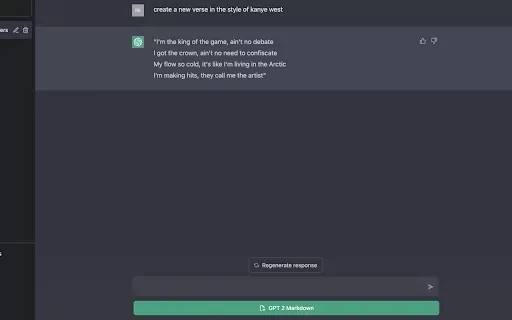
What is GPT2Markdown?GPT2Markdown is a Chrome extension that streamlines the process of exporting your ChatGPT conversations into Markdown format. With a single click, it allows you to download your chat history as a Markdown (.md) file directly to y

Ever been to an event and wished there was a cool way to share all those amazing moments in real time? Enter Fotify, the platform that turns your event into a live, collaborative photo album. It's like having a personal photographer for every guest, all c

What is xPage?xPage leverages AI to simplify the creation of professional eCommerce landing pages. It provides a wide selection of expert-designed templates that you can tailor to your brand. After choosing your template, the AI engine produces a dyn

What is Lyvia AI?Lyvia is a powerful platform featuring an uncensored AI image generator and versatile face swap tools for both photos and videos. Accessible on your mobile, tablet, or computer, it’s designed to evolve with you through regular update
CodeOpt: ChatGPT helper for Jupyter Product Information
What is CodeOpt: ChatGPT helper for Jupyter?
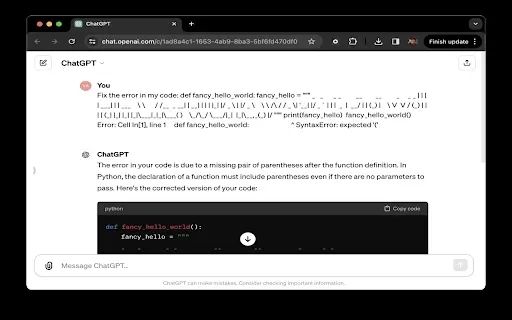
CodeOpt is a powerful Chrome extension for JupyterLab and Jupyter Notebook that embeds ChatGPT directly into your workflow. With a simple click on the toolbar button, you can instantly send code and outputs to ChatGPT for AI-powered help with debugging, refactoring, and optimization. It features customizable prompts for both code and error messages, and integrates automatically—the ChatGPT button appears in new JupyterLab cells. Built with privacy in mind, it only sends the specific code and outputs you select.
Who will use CodeOpt: ChatGPT helper for Jupyter?
- Jupyter Notebook and JupyterLab users
- Python developers
- Data scientists and analysts
How to use the CodeOpt: ChatGPT helper for Jupyter?
- Step 1: Install the CodeOpt extension from the Chrome Web Store.
- Step 2: Launch your JupyterLab or Jupyter Notebook environment.
- Step 3: Click the ChatGPT button in the Jupyter toolbar.
- Step 4: Send your code to ChatGPT and receive instant AI-powered suggestions.
- Step 5: Tailor the AI prompts to suit your specific coding tasks and needs.
Platform
- Web
- Chrome browser
CodeOpt: ChatGPT helper for Jupyter’s Core Features & Benefits
The Core Features
- Direct AI-Powered Assistance
- Customizable Prompts and Interaction
- Seamless Automatic Integration
- Privacy-Focused Design
- Sleek, User-Friendly Interface
The Benefits
- Significant boost to coding productivity
- Rapid error identification and resolution
- Improved code efficiency and readability
- Enhanced performance via algorithm optimization
- Interactive learning with real-time AI feedback
CodeOpt: ChatGPT helper for Jupyter’s Main Use Cases & Applications
- Debugging complex code
- Refactoring and improving code structure
- Optimizing algorithms for better performance
- Learning and applying coding best practices
FAQs of CodeOpt: ChatGPT helper for Jupyter
What is CodeOpt?
CodeOpt is a Chrome extension that integrates ChatGPT into JupyterLab and Jupyter Notebook to boost coding productivity with AI assistance.
How do I install CodeOpt?
Install CodeOpt directly from the Chrome Web Store.
What platforms does CodeOpt support?
CodeOpt is designed for the web and Chrome browser.
How does CodeOpt enhance productivity?
It offers AI-driven support for coding tasks, streamlining workflows, improving efficiency, and minimizing errors.
Can I customize the AI prompts?
Yes, you can fully customize AI prompts for both your code and any error messages.
Is my data private with CodeOpt?
Absolutely. CodeOpt is built to protect your privacy, sending only the code and outputs you explicitly choose.
Does CodeOpt integrate automatically into Jupyter?
Yes. The ChatGPT button automatically appears in new JupyterLab cells for a seamless experience.
What are the main use cases for CodeOpt?
Its primary uses are debugging, refactoring, optimizing algorithms, and learning coding best practices.
Who should use CodeOpt?
It's ideal for Jupyter users, Python developers, and data scientists.
What are some alternatives to CodeOpt?
Notable alternatives include JupyPilot, Visual Python for Colab, and Power Tools for ChatGPT.
CodeOpt: ChatGPT helper for Jupyter Company Information
- CodeOptimizer
- https://codeoptimizer.ai
CodeOpt: ChatGPT helper for Jupyter Screenshot


Discover the 2026 best AI data science mentors to master SQL, Pandas & ML workflows. Explore our top-rated, curated selection at XIX.AI for powerful, game-changing guidance. Compare free vs paid options with real-world insights. Unlock your data science mastery today.
 10 tools
 xix.ai

Discover the 2026 best AI flirting and conversation trainers on XIX.AI. Our curated, top-rated selection helps you build social charisma and confidence in real-time. Explore must-try, game-changing tools with free vs paid comparisons and weekly updated rankings. Unlock your social edge today.
10 tools
xix.ai

Discover the 2026 latest top-rated AI tools for automated unit testing. Our curated selection features powerful, game-changing solutions to generate Jest, PyTest & JUnit test cases instantly. Compare free vs paid options with real-world tests and weekly updated rankings on XIX.AI. Unlock your AI edge and boost development productivity today.
10 tools
xix.ai

Discover the 2026 best AI data visualization tools at XIX.AI. Our curated, top-rated selection helps you auto-generate powerful, interactive BI dashboards from raw files instantly. Compare free vs paid options with real-world tests and weekly updated rankings. Unlock your data's potential today.
10 tools
xix.ai

Discover the 2026 best AI branding kits for social media. XIX.AI's curated list features top-rated, game-changing tools to maintain perfectly consistent brand visuals across all channels. Compare free vs paid options with real-world tests. Unlock your brand's visual edge today.
10 tools
xix.ai

Discover the 2026 latest top-rated AI companion tools for immersive roleplay and connection. XIX.AI's curated guide features powerful, game-changing apps with weekly updated rankings, free vs. paid comparisons, and real-world tests. Find your perfect match and unlock meaningful digital companionship today.
10 tools
xix.ai


