


 Home
HomeBluedot: AI Meeting Recorder & Notetaker
Google Meet AI Tool: Record, Transcribe & Take Notes | Bluedot



Helps TikTok sellers, brands, MCNs, and TAPs discover winning products and find creators.

HelpLook is an AI-powered all-in-one knowledge base tool that helps businesses quickly build knowledge bases, help centers, and...

Your AI Workspace

302.AI is an enterprise-grade AI resource platform with pay-as-you-go pricing, API access to a full range of AI models, and ready-to-use online applications.

剧火AI — AI Screenwriter + Director, a One-Person Short Drama Studio In one sentence, what is it?

What is Speech Translator?Speech Translator leverages Google's advanced speech recognition to deliver real-time translation for videos, audio, and live streams. This tool bridges language gaps, enabling seamless conversations and fostering clearer un

Ever wondered how to effortlessly turn your audio and video files into text? Enter Clipto, the powerhouse of AI transcription on the web. Imagine harnessing the same cutting-edge tech that fuels ChatGPT to convert your Zoom meetings, interviews, and

What is Revoldiv AI Chrome Extension? Revoldiv is a Chrome browser extension that instantly transcribes audio and video directly in your browser. It lets users follow along by reading live transcriptions and search for specific spoken words within po

Ever found yourself needing to turn spoken words into written text? Well, let me introduce you to tulz.AI—an AI-powered service that's all about making audio transcription a breeze. Whether it's a podcast, a business meeting, or any other spoken content,

Ever found yourself in need of a quick and accurate transcription of a video or audio file? That's where Video To Text AI comes into play. It's a slick AI-powered tool designed to effortlessly convert your media into text. Whether you're juggling YouTube
Bluedot: AI Meeting Recorder & Notetaker Product Information
What is Bluedot: AI Meeting Recorder & Notetaker?
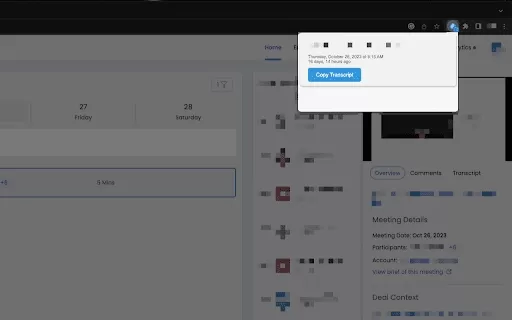
Bluedot enables users to easily record Google Meet sessions. This AI-driven tool transcribes conversations instantly, capturing every detail. When the session ends, it produces clear summaries and personalized notes, so you can engage in discussions without taking manual notes. Ideal for documenting important insights, action steps, and follow-up tasks, it streamlines post-meeting review and boosts productivity.
Who uses Bluedot: AI Meeting Recorder & Notetaker?
- Professionals
- Students
- Project Managers
- Team Leaders
- Executives
How do you use Bluedot: AI Meeting Recorder & Notetaker?
- Step 1: Install the Bluedot extension from the Chrome Web Store.
- Step 2: Join or start a Google Meeting.
- Step 3: Click the Bluedot icon to begin recording.
- Step 4: After the meeting, review transcriptions and summaries.
Platform
- Web
- Chrome
Bluedot: AI Meeting Recorder & Notetaker's Core Features & Benefits
Core Features
- Real-Time Recording
- Automatic Transcription
- Customizable Notes
- Meeting Summaries
Benefits
- Saves time on note-taking
- Comprehensive record keeping
- Easy access to past meeting data
- Boosts productivity
Bluedot: AI Meeting Recorder & Notetaker's Primary Use Cases & Applications
- Corporate meetings
- Academic discussions
- Team brainstorming
- Client consultations
Frequently Asked Questions About Bluedot: AI Meeting Recorder & Notetaker
How do I start using Bluedot?
Just install the extension from the Chrome Web Store and complete the setup process.
Does Bluedot work with platforms besides Google Meet?
At this time, Bluedot is built exclusively for Google Meet.
Is there a limit for recording length?
There is no set limit; you can record the full meeting.
Can I make changes to the generated notes?
Yes, you can edit the notes and summaries to fit your needs.
How secure is my data?
Bluedot prioritizes data security and follows strict privacy measures.
Does Bluedot support other browsers?
Currently, it is designed for Google Chrome.
Is there a mobile version of Bluedot?
As of now, Bluedot is offered as a Chrome extension.
Can I share transcriptions with others?
Yes, you can share transcriptions by email or through collaboration platforms.
What does Bluedot cost?
Visit the Chrome Web Store for up-to-date pricing and subscription information.
Are transcriptions saved automatically?
Yes, transcriptions are saved right after the meeting ends.
Bluedot: AI Meeting Recorder & Notetaker Company Information
Website:
https://bluedot.ioCompany Name:
BluedotSupport Email:
Facebook:
NAX (Twitter):
NAYouTube:
NAInstagram:
NATikTok:
NALinkedIn:
https://www.linkedin.com/company/bluedottechnologies
Bluedot: AI Meeting Recorder & Notetaker Screenshot


2026 Latest Best AI SQL Copilots Ranked Top-Rated! XIX.AI curates a powerful game-changing collection for weekly updated real-world tests. These must-try tools help you generate accurate revenue dashboards, analyze sales funnels, and track product metrics swiftly, boosting productivity massively. Explore now to Discover your perfect tool for data-driven decision making! 238 characters
 9 tools
 xix.ai

2026 Latest Best Top-Rated AI Melody Writing Tools for Song Drafts! XIX.AI has curated a highly powerful game-changing collection that goes through rigorous real-world tests to deliver the best writing experience. You can find detailed free vs paid comparisons, accurate rankings, and must-try options designed to help you create stunning song drafts effortlessly and boost your creative productivity significantly. Explore now to discover your perfect tool!
8 tools
xix.ai

2026 Latest Best Top-rated AI Conversation Trainer Tools for Interview Practice are here on XIX.AI! This curated collection features powerful, game-changing tools that go through rigorous real-world tests to deliver accurate feedback. You’ll find a free vs paid comparison and detailed rankings to help you choose the must-try option that boosts your confidence and skills. Explore now to Discover your perfect tool for interview success!
12 tools
xix.ai

2026 Latest Best Top-rated AI Style Transfer Tools for Creative Experiments! XIX.AI has curated a powerful, game-changing collection of must-try tools that deliver exceptional results through real-world tests and rigorous rankings. These top solutions help creatives boost productivity significantly by accelerating content creation and unlocking endless creative possibilities. Explore now to discover your perfect tool and start creating today!
9 tools
xix.ai

2026 Latest Best Top-Rated AI Dialogue Bubble Tools for Visual Storytelling are here on XIX.AI! This curated collection features powerful, game-changing tools that help creators boost productivity and overcome creative bottlenecks. Get a free vs paid comparison, see real-world tests, and check the latest rankings to find the must-try solutions perfect for crafting engaging visual narratives. Explore now to discover your ideal tool!
10 tools
xix.ai

2026 Latest Top-Rated Best AI Meeting Summary Tools for Clear Decision Tracking and Effortless Follow-Ups. This curated list showcases powerful, game-changing solutions that boost productivity dramatically by automating meeting notes, identifying key action items, and streamlining team coordination across all projects. Get a free vs paid comparison along with real-world tests and weekly updated rankings to help you find the perfect tool. Explore now to unlock your AI edge!
9 tools
xix.ai


