


 Home
HomeAutopest - Email follow-ups powered by A.I.



Helps TikTok sellers, brands, MCNs, and TAPs discover winning products and find creators.

HelpLook is an AI-powered all-in-one knowledge base tool that helps businesses quickly build knowledge bases, help centers, and...

Your AI Workspace

302.AI is an enterprise-grade AI resource platform with pay-as-you-go pricing, API access to a full range of AI models, and ready-to-use online applications.

剧火AI — AI Screenwriter + Director, a One-Person Short Drama Studio In one sentence, what is it?
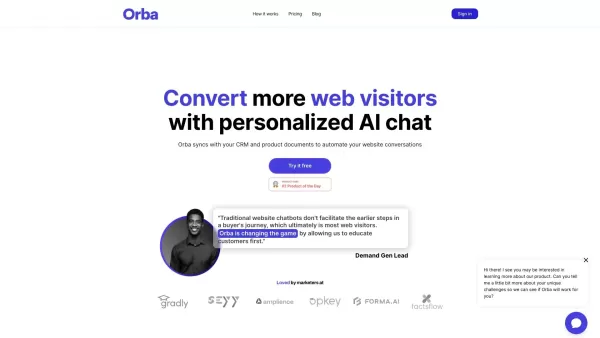
What is Orba?Orba is an AI-powered platform that personalizes interactions with your website visitors to enhance engagement and drive more conversions. It provides automated SDR outbound services, featuring an AI-driven website chatbot and personaliz
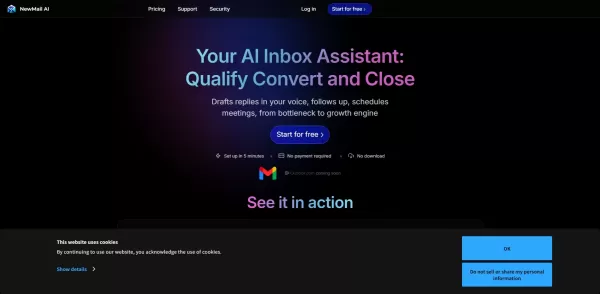
What is NewMail AI?NewMail AI provides a comprehensive suite of features that simplify email management. Powered by advanced AI algorithms, it automatically sorts incoming emails, highlights urgent messages, and proposes intelligent responses to boos
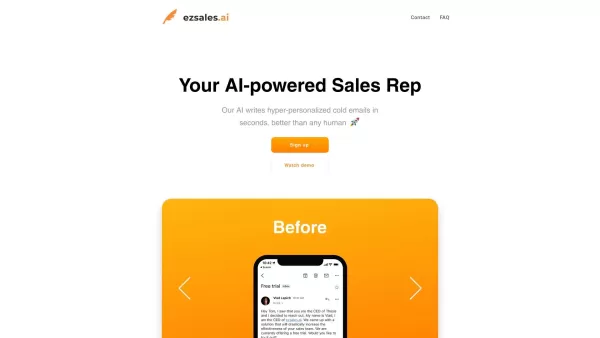
What is Ezsales AI?EzSales.ai is an advanced AI-powered platform that optimizes LinkedIn lead generation. It delivers highly accurate and current contact information, including verified email addresses and phone numbers, to help users build connectio
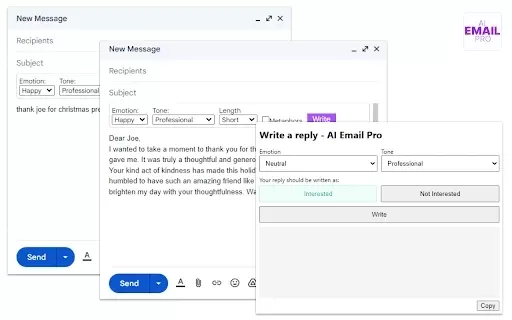
What is AI Email Pro?AI Email Pro is an intelligent email assistant that leverages artificial intelligence to help users draft emails swiftly and effectively. Its user-friendly interface allows you to create professional email drafts by simply enteri

What is TradeWind AI? TradeWind AI is the world's leading expert in sales lead development. It harnesses real-time data analysis from billions of global companies to precisely identify and engage potential customers. Available around the clock, it em
Autopest - Email follow-ups powered by A.I. Product Information
What Is Autopest? AI-Powered Email Follow-Ups for Gmail
Autopest enhances the email communication experience for Gmail users. This AI-powered tool automatically sends follow-up emails to recipients who haven't responded to your previous messages. Whether you're in sales, customer service, or managing a personal project, Autopest keeps your email correspondence organized and proactive. Its intelligent scheduling lets you customize follow-up timings, ensuring your messages are sent at the most effective moments, thereby increasing the likelihood of receiving a response.
Who Uses Autopest? AI-Powered Email Follow-Ups for Gmail
- Sales professionals
- Customer support teams
- Freelancers
- Entrepreneurs
- Anyone using Gmail
How to Use Autopest for AI-Powered Email Follow-Ups
- Step 1: Install the Autopest extension from the Chrome Web Store
- Step 2: Connect Autopest to your Gmail account
- Step 3: Configure your follow-up settings
- Step 4: Compose your email and send it
- Step 5: Sit back while Autopest manages your follow-up emails
Platforms
- Web
- Chrome
Autopest - AI-Powered Email Follow-Ups: Core Features & Benefits
Core Features
- Automated Follow-Up Emails
- AI-Driven Scheduling
- Customizable Follow-Up Settings
- Integration with Gmail
Benefits
- Increased Email Response Rates
- Time-Saving Automation
- Enhanced Productivity
- Better Email Management
Autopest - AI-Powered Email Follow-Ups: Main Use Cases & Applications
- Sales Follow-Ups
- Client Communication
- Customer Support Inquiries
- Event Reminders
- Important Project Updates
FAQs About Autopest: AI-Powered Email Follow-Ups
What Is Autopest?
Autopest is an AI-powered Chrome extension for Gmail users that automates follow-up emails.
How Does Autopest Work?
It automatically sends follow-up emails based on your configuration and timing settings.
Is Autopest Free?
Check the Chrome Web Store for pricing details; it may offer both free and premium versions.
Can I Customize the Follow-Up Messages?
Yes, you can tailor your follow-up messages according to your preferences.
Does Autopest Integrate with Other Email Clients?
Currently, it integrates primarily with Gmail.
Is My Data Safe with Autopest?
Yes, Autopest is designed with data privacy in mind, ensuring your information is secure.
Can I Turn Off Automated Follow-Ups?
Yes, you can easily disable the automation features in the settings.
How Do I Install Autopest?
You can install it directly from the Chrome Web Store by clicking the install button.
Is There Customer Support Available?
Yes, Autopest offers customer support for users facing issues.
Can I Schedule Follow-Ups at Specific Times?
Yes, Autopest allows you to set specific times for sending follow-up emails.
Autopest - AI-Powered Email Follow-Ups: Company Information
Website:
https://5-letter-words.comCompany Name:
NASupport Email:
NAFacebook:
NAX (Twitter):
NAYouTube:
NAInstagram:
NATikTok:
NALinkedIn:
NA
Autopest - Email follow-ups powered by A.I. Screenshot


2026 Latest Best Top-rated AI Multilingual Voice Tools for Global Content are here on XIX.AI! This curated list features powerful, game-changing options that deliver flawless speech in dozens of languages, perfect for creating high-quality content fast and boosting writing efficiency across global markets. Get a free vs paid comparison along with real-world tests and our updated weekly rankings to help you find the must-try tool that suits your needs. Explore now to unlock your AI edge!
 10 tools
 xix.ai

2026 Latest Best Top-rated AI Persona Builders help you turn valuable CRM data into actionable customer profiles quickly. This curated list showcases powerful, game-changing tools that go through real-world tests to deliver accurate insights. Get a free vs paid comparison and discover which option suits your needs best. XIX.AI is also included in this must-try selection. Explore now to Unlock your AI edge!
9 tools
xix.ai

2026 Latest Best Top-rated AI SQL Analysis Tools for Business Intelligence Teams! XIX.AI has curated a powerful, game-changing collection that goes through rigorous real-world tests. You’ll find a free vs paid comparison, detailed rankings, and in-depth insights to help you boost productivity significantly. Must-try options are available to unlock your AI edge. Explore now!
11 tools
xix.ai

2026 Latest Best Top-rated AI Batch Background Removal Tools for Catalog Images are curated by XIX.AI for quick, powerful removal of backgrounds from multiple images at once. These tools offer real-world tests and free vs paid comparison to help you find the most efficient solution that boosts your productivity significantly. Must-try options are regularly updated weekly. Explore now to Discover your perfect tool and Unlock your AI edge.
14 tools
xix.ai

2026 Latest Best Top-Rated AI Academic Writing Helpers for Students & Researchers! XIX.AI has curated a powerful, game-changing collection of tools that undergo real-world tests to boost writing efficiency significantly. You’ll find detailed free vs paid comparison, weekly updated rankings, and insights on how these tools can help refine abstracts, structure papers, and overcome common academic writing challenges. Must-try for anyone aiming to unlock their AI edge in academic work. Explore now!
8 tools
xix.ai

2026 Latest Best Top-rated AI Comic Generators ranked by actual user performance. This curated collection features powerful game-changing tools that help creators turn unique story ideas into polished illustrated panels fast, boosting productivity significantly. XIX.AI offers a detailed free vs paid comparison along with real-world tests to guide your choice. Explore now and Discover your perfect tool to unlock your AI edge in comic creation.
15 tools
xix.ai


