


 Home
HomeBuild an AI-Powered Emoji Quote Generator Using Next.js and Gemini API
Build an AI-Powered Emoji Quote Generator with Next.js
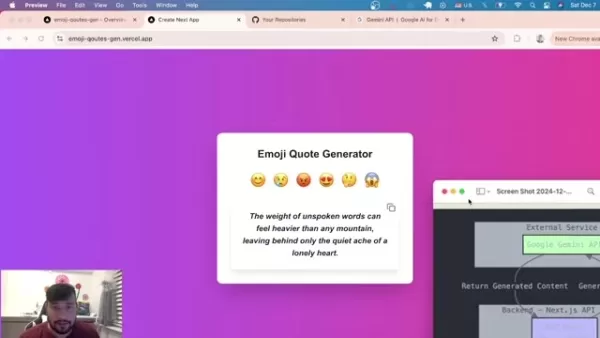
This hands-on tutorial walks through creating an engaging social media tool that combines web development with artificial intelligence. We'll build a dynamic application that generates inspirational quotes based on emoji inputs using Next.js and Google's Gemini API.
Key Learning Objectives
Develop a complete Next.js application with modern architecture
Integrate AI capabilities through Gemini API
Implement responsive styling with Tailwind CSS
Deploy your project professionally using Vercel
Master API data fetching and state management
Understand server-side rendering benefits
Creating Your Emoji Quote Generator
The Power of Visual Communication
Emojis have transformed digital conversations, becoming essential tools for expression across platforms. Our generator solves a common frustration - finding the perfect words to match emotions - through AI-assisted creativity.

Users select an emoji representing their mood, and our system instantly delivers customized quotes for social sharing. Streamline content creation while experimenting with cutting-edge technologies.
Technical Architecture Breakdown

Our solution leverages:
- Next.js: Production-ready React framework for optimal performance
- Gemini API: Google's advanced AI for contextual content generation
- Tailwind CSS: Utility-first styling for rapid UI development
- Vercel: Seamless deployment platform for Next.js applications
This stack combines reliability with innovation, offering scalability from hobby projects to professional solutions.
Application Structure
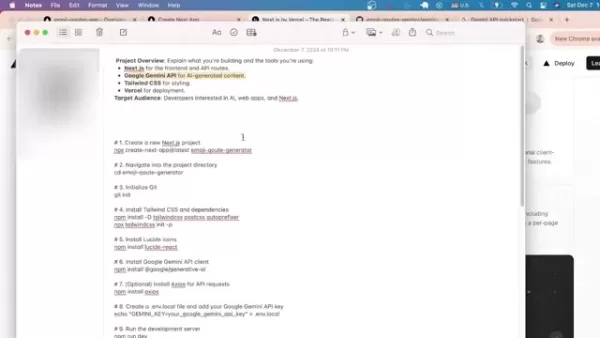
The three-layer architecture ensures maintainability:
- Frontend: Interactive UI built with Next.js components
- Middleware: Next.js API routes handling business logic
- AI Service: Gemini API processing emoji inputs into quotes
Getting Started
Development Environment Setup
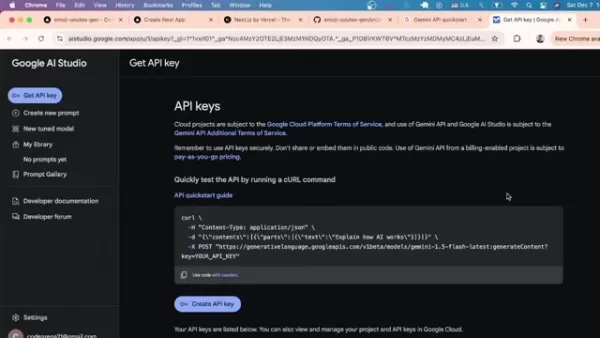
Prerequisites:
- Node.js v18+ installed
- Code editor (VS Code recommended)
- Google account for API access
- Terminal/Command Prompt access
Project Initialization
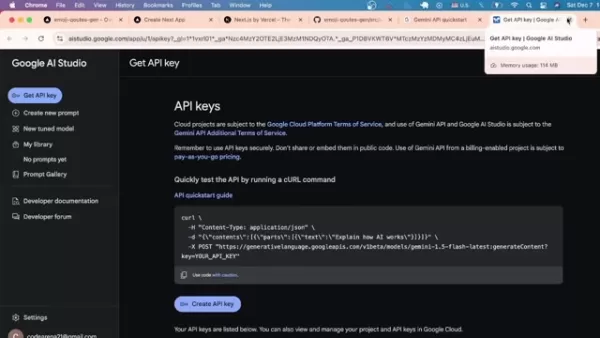
Create your Next.js foundation:
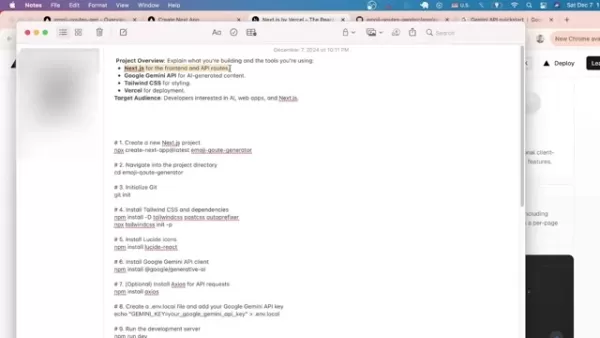
- Run:
npx create-next-app@latest emoji-quote-generator - Select configuration:
- TypeScript: No
- ESLint: Yes
- Tailwind CSS: Yes
- App Router: Yes
Essential Dependencies
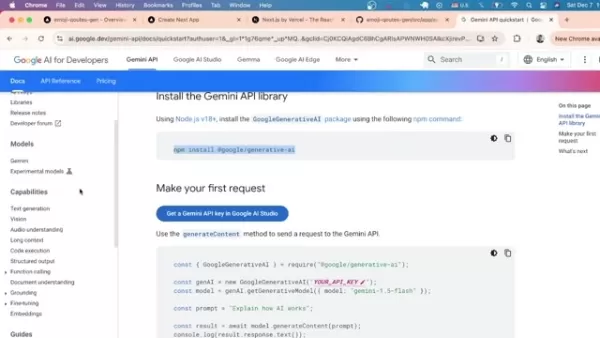
Install required packages:
- Google's AI SDK:
npm install @google/generative-ai - Tailwind CSS:
npm install -D tailwindcss postcss autoprefixer - Icon library:
npm install lucide-react
Deployment Guide
Publishing to Vercel
Launch your application:
- Install Vercel CLI:
npm install -g vercel - Deploy:
vercel --prod - Confirm deployment prompts
Technical Considerations
Advantages
Modern web development techniques meeting AI capabilities
Scalable foundation for feature expansion
Professional deployment workflow
Performance optimized architecture
Limitations
External API dependency
Output quality reliant on prompt engineering
Custom styling requirements
Core Functionality
AI Integration
Gemini API processes emoji selections into shareable quotes through carefully crafted prompts tailored for inspirational content generation.
Development Components
- Frontend: User interface elements
- API Routes: Server-side logic
- Integration Layer: AI connection
Frequently Asked Questions
Project Purpose
Designed for developers exploring AI integration in web applications, demonstrating practical implementation of emerging technologies.
Requirements
Node.js v18+ environment and valid Gemini API key.
Application Structure
Composed of frontend interface, backend API routes, and external AI service integration.
Technical Insights
Why Next.js with Gemini?
The combination offers:
- Enhanced SEO through server-side rendering
- Improved initial load performance
- Simplified API integration
- Optimized development experience
Prompt Customization
The default template generates meaningful quotes, but developers can modify prompts in the API route handler.
Related article
 Stripe to Acquire OpenRouter as AI Model Routing Gains Momentum
Stripe has agreed to acquire OpenRouter, an AI model-routing platform that gives developers access to hundreds of models through a single interface. The deal adds model selection and routing to Stripe’s existing work around AI usage and token-based b
Former OpenAI Researcher Barrett Zoph Returns to Google to Support Gemini Development
Barret Zoph, who previously abruptly left and joined OpenAI due to a disagreement with Thinking Machines Lab CEO Miriam Mularati, has once again changed employers. Alphabet's Google announced that Zoph will return as Vice President of Research, bring
How Recursive Intelligence Raised $335M at $4B Valuation in 4 Months
The co-founders of startup Ricursive Intelligence seemed destined to be co-founders.Anna Goldie, CEO, and Azalia Mirhoseini, CTO, are so well-known in the AI community that they were among those AI engineers who “got those weird emails from Zuckerber
Related Special Topic Recommendations
Design & Art
Stripe to Acquire OpenRouter as AI Model Routing Gains Momentum
Stripe has agreed to acquire OpenRouter, an AI model-routing platform that gives developers access to hundreds of models through a single interface. The deal adds model selection and routing to Stripe’s existing work around AI usage and token-based b
Former OpenAI Researcher Barrett Zoph Returns to Google to Support Gemini Development
Barret Zoph, who previously abruptly left and joined OpenAI due to a disagreement with Thinking Machines Lab CEO Miriam Mularati, has once again changed employers. Alphabet's Google announced that Zoph will return as Vice President of Research, bring
How Recursive Intelligence Raised $335M at $4B Valuation in 4 Months
The co-founders of startup Ricursive Intelligence seemed destined to be co-founders.Anna Goldie, CEO, and Azalia Mirhoseini, CTO, are so well-known in the AI community that they were among those AI engineers who “got those weird emails from Zuckerber
Related Special Topic Recommendations
Design & Art
 Top AI Illustration Tools: Create Editorial Scenes and Cover Art Faster
2026 Latest Top-rated AI Illustration Tools: Our curated list features the best powerfully designed tools for creating stunning editorial scenes and eye-catching cover art quickly. Each option has gone through rigorous real-world tests, offering a free vs paid comparison to help you find the perfect match for your workflow. Try these must-try solutions today to unlock your AI edge and boost your creative productivity. Explore now at XIX.AI.
 10 tools
 xix.ai
Education and Learning
Top AI Tutors for Exam Prep: Practice Math, Science, and English
xix.ai
Education and Learning
Top AI Tutors for Exam Prep: Practice Math, Science, and English
2026 Latest Top-Rated Best AI Tutors for Exam Prep are here on XIX.AI! Our curated list features powerful game-changing tools that offer free vs paid comparison, real-world tests, and weekly updated rankings. They help boost your writing efficiency, simplify complex topic learning, and unlock your academic potential. Explore now to Discover your perfect exam prep tool and Start creating today to Unlock your AI edge!
10 tools
xix.ai
Finance
AI Budget Planning Tools for Personal Money Management
2026 Latest Best Top-Rated AI Budget Planning Tools for Personal Money Management are here on XIX.AI! This curated collection features powerful, game-changing solutions that help you conduct real-world tests, understand spending habits, and create personalized plans to boost productivity. Enjoy a free vs paid comparison along with detailed rankings. Must-try tools designed to simplify money management and unlock your AI edge. Explore now!
11 tools
xix.ai
Health & Wellness
AI Sleep Tracking Assistants: Improve Recovery with Better Bedtime Habits
2026 Latest Best Top-Rated AI Sleep Tracking Assistants curated for ultimate recovery. This fully updated weekly guide features powerful tools that deliver real-world tests, free vs paid comparison, and detailed rankings to help you find the must-try solution that boosts sleep quality and supports better bedtime habits. Explore now at XIX.AI to Unlock your AI edge.
10 tools
xix.ai
Data Analysis
AI SQL Copilots for Product and Revenue Analytics
2026 Latest Best Top-Rated AI SQL Copilots for Product and Revenue Analytics! XIX.AI has curated a powerful, game-changing collection of must-try tools that undergo real-world tests through weekly updated rankings. These tools help users boost productivity significantly by accelerating data analysis, streamlining complex queries, and generating accurate insights to drive smarter business decisions. Explore now to Discover your perfect tool for unlocking your AI edge!
14 tools
xix.ai
Education and Learning
Best AI Homework Helpers That Teach: Learn Concepts, Not Just Answers
2026 Latest Best Top-Rated AI Homework Helpers That Teach Core Concepts Not Just Answers Powerful Tools for Students Must-Try Curated List Weekly Updated Free vs Paid Comparison Real-World Tests Accurate Rankings to Help You Unlock Your Full Learning Potential Explore now to Discover your perfect tool for smarter studying.
10 tools
xix.ai

 Comments (0)
0/500
Comments (0)
0/500
Build an AI-Powered Emoji Quote Generator with Next.js
This hands-on tutorial walks through creating an engaging social media tool that combines web development with artificial intelligence. We'll build a dynamic application that generates inspirational quotes based on emoji inputs using Next.js and Google's Gemini API.
Key Learning Objectives
Develop a complete Next.js application with modern architecture
Integrate AI capabilities through Gemini API
Implement responsive styling with Tailwind CSS
Deploy your project professionally using Vercel
Master API data fetching and state management
Understand server-side rendering benefits
Creating Your Emoji Quote Generator
The Power of Visual Communication
Emojis have transformed digital conversations, becoming essential tools for expression across platforms. Our generator solves a common frustration - finding the perfect words to match emotions - through AI-assisted creativity.
Users select an emoji representing their mood, and our system instantly delivers customized quotes for social sharing. Streamline content creation while experimenting with cutting-edge technologies.
Technical Architecture Breakdown
Our solution leverages:
- Next.js: Production-ready React framework for optimal performance
- Gemini API: Google's advanced AI for contextual content generation
- Tailwind CSS: Utility-first styling for rapid UI development
- Vercel: Seamless deployment platform for Next.js applications
This stack combines reliability with innovation, offering scalability from hobby projects to professional solutions.
Application Structure
The three-layer architecture ensures maintainability:
- Frontend: Interactive UI built with Next.js components
- Middleware: Next.js API routes handling business logic
- AI Service: Gemini API processing emoji inputs into quotes
Getting Started
Development Environment Setup
Prerequisites:
- Node.js v18+ installed
- Code editor (VS Code recommended)
- Google account for API access
- Terminal/Command Prompt access
Project Initialization
Create your Next.js foundation:
- Run:
npx create-next-app@latest emoji-quote-generator - Select configuration:
- TypeScript: No
- ESLint: Yes
- Tailwind CSS: Yes
- App Router: Yes
Essential Dependencies
Install required packages:
- Google's AI SDK:
npm install @google/generative-ai - Tailwind CSS:
npm install -D tailwindcss postcss autoprefixer - Icon library:
npm install lucide-react
Deployment Guide
Publishing to Vercel
Launch your application:
- Install Vercel CLI:
npm install -g vercel - Deploy:
vercel --prod - Confirm deployment prompts
Technical Considerations
Advantages
Modern web development techniques meeting AI capabilities
Scalable foundation for feature expansion
Professional deployment workflow
Performance optimized architecture
Limitations
External API dependency
Output quality reliant on prompt engineering
Custom styling requirements
Core Functionality
AI Integration
Gemini API processes emoji selections into shareable quotes through carefully crafted prompts tailored for inspirational content generation.
Development Components
- Frontend: User interface elements
- API Routes: Server-side logic
- Integration Layer: AI connection
Frequently Asked Questions
Project Purpose
Designed for developers exploring AI integration in web applications, demonstrating practical implementation of emerging technologies.
Requirements
Node.js v18+ environment and valid Gemini API key.
Application Structure
Composed of frontend interface, backend API routes, and external AI service integration.
Technical Insights
Why Next.js with Gemini?
The combination offers:
- Enhanced SEO through server-side rendering
- Improved initial load performance
- Simplified API integration
- Optimized development experience
Prompt Customization
The default template generates meaningful quotes, but developers can modify prompts in the API route handler.








 Stripe to Acquire OpenRouter as AI Model Routing Gains Momentum
Stripe has agreed to acquire OpenRouter, an AI model-routing platform that gives developers access to hundreds of models through a single interface. The deal adds model selection and routing to Stripe’s existing work around AI usage and token-based b
Stripe to Acquire OpenRouter as AI Model Routing Gains Momentum
Stripe has agreed to acquire OpenRouter, an AI model-routing platform that gives developers access to hundreds of models through a single interface. The deal adds model selection and routing to Stripe’s existing work around AI usage and token-based b
 Former OpenAI Researcher Barrett Zoph Returns to Google to Support Gemini Development
Barret Zoph, who previously abruptly left and joined OpenAI due to a disagreement with Thinking Machines Lab CEO Miriam Mularati, has once again changed employers. Alphabet's Google announced that Zoph will return as Vice President of Research, bring
Former OpenAI Researcher Barrett Zoph Returns to Google to Support Gemini Development
Barret Zoph, who previously abruptly left and joined OpenAI due to a disagreement with Thinking Machines Lab CEO Miriam Mularati, has once again changed employers. Alphabet's Google announced that Zoph will return as Vice President of Research, bring
 How Recursive Intelligence Raised $335M at $4B Valuation in 4 Months
The co-founders of startup Ricursive Intelligence seemed destined to be co-founders.Anna Goldie, CEO, and Azalia Mirhoseini, CTO, are so well-known in the AI community that they were among those AI engineers who “got those weird emails from Zuckerber
How Recursive Intelligence Raised $335M at $4B Valuation in 4 Months
The co-founders of startup Ricursive Intelligence seemed destined to be co-founders.Anna Goldie, CEO, and Azalia Mirhoseini, CTO, are so well-known in the AI community that they were among those AI engineers who “got those weird emails from Zuckerber

2026 Latest Top-rated AI Illustration Tools: Our curated list features the best powerfully designed tools for creating stunning editorial scenes and eye-catching cover art quickly. Each option has gone through rigorous real-world tests, offering a free vs paid comparison to help you find the perfect match for your workflow. Try these must-try solutions today to unlock your AI edge and boost your creative productivity. Explore now at XIX.AI.
10 tools
xix.ai

2026 Latest Top-Rated Best AI Tutors for Exam Prep are here on XIX.AI! Our curated list features powerful game-changing tools that offer free vs paid comparison, real-world tests, and weekly updated rankings. They help boost your writing efficiency, simplify complex topic learning, and unlock your academic potential. Explore now to Discover your perfect exam prep tool and Start creating today to Unlock your AI edge!
10 tools
xix.ai

2026 Latest Best Top-Rated AI Budget Planning Tools for Personal Money Management are here on XIX.AI! This curated collection features powerful, game-changing solutions that help you conduct real-world tests, understand spending habits, and create personalized plans to boost productivity. Enjoy a free vs paid comparison along with detailed rankings. Must-try tools designed to simplify money management and unlock your AI edge. Explore now!
11 tools
xix.ai

2026 Latest Best Top-Rated AI Sleep Tracking Assistants curated for ultimate recovery. This fully updated weekly guide features powerful tools that deliver real-world tests, free vs paid comparison, and detailed rankings to help you find the must-try solution that boosts sleep quality and supports better bedtime habits. Explore now at XIX.AI to Unlock your AI edge.
10 tools
xix.ai

2026 Latest Best Top-Rated AI SQL Copilots for Product and Revenue Analytics! XIX.AI has curated a powerful, game-changing collection of must-try tools that undergo real-world tests through weekly updated rankings. These tools help users boost productivity significantly by accelerating data analysis, streamlining complex queries, and generating accurate insights to drive smarter business decisions. Explore now to Discover your perfect tool for unlocking your AI edge!
14 tools
xix.ai

2026 Latest Best Top-Rated AI Homework Helpers That Teach Core Concepts Not Just Answers Powerful Tools for Students Must-Try Curated List Weekly Updated Free vs Paid Comparison Real-World Tests Accurate Rankings to Help You Unlock Your Full Learning Potential Explore now to Discover your perfect tool for smarter studying.
10 tools
xix.ai












