


 Home
HomeAI Tool FormulaBot Enhances Excel and Google Sheets Productivity
Struggling with complex Excel or Google Sheets formulas? In a data-driven era, efficient data handling is essential. FormulaBot, an AI-powered solution, simplifies formula creation and explanation for Excel and Google Sheets users. Whether you're a data expert or a beginner, FormulaBot streamlines tasks, saves time, and boosts productivity. This article explores FormulaBot's features, pricing, and usage, helping you optimize data analysis with ease.
Key Highlights
FormulaBot uses AI to create Excel and Google Sheets formulas.
It provides both formula generation and detailed explanations.
Offers limited monthly free credits for basic use.
Flexible pricing plans suit various user needs.
Includes step-by-step guidance for applying formulas.
Handles tasks from simple calculations to advanced analytics.
Emphasizes precise cell references for accurate results.
FormulaBot streamlines complex tasks, enhancing data analysis efficiency.
Exploring FormulaBot
What is FormulaBot?
FormulaBot is an AI-driven platform that simplifies Excel and Google Sheets by generating formulas based on user input. Users describe their desired outcome, and FormulaBot creates the correct formula.

This tool is ideal for those less familiar with formula syntax or seeking to speed up their workflow.
Acting as a virtual data assistant, FormulaBot interprets instructions and delivers functional formulas. It reduces errors, saves time, and lets users focus on data insights rather than formula syntax.
While not entirely free, FormulaBot offers five monthly credits at no cost, with paid plans available for extended use. No technical expertise is needed—users input a prompt, and FormulaBot generates the appropriate Excel or Google Sheets formula, improving workflow and spreadsheet skills.
To start, search for FormulaBot in your browser, then input specific instructions. For example, request the sum of a column based on a condition, like a specific word or date, and specify whether you need a formula generated or explained.
Using the Interface
FormulaBot's interface is user-friendly and intuitive upon login.
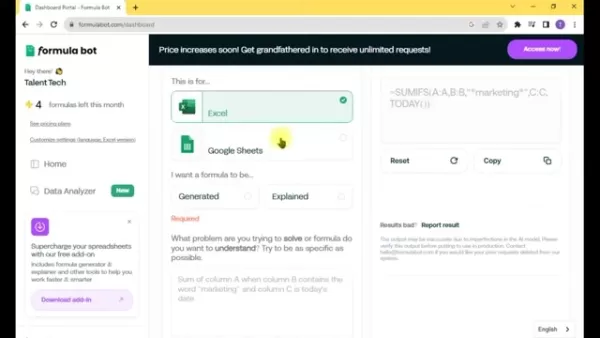
Key features include:
- Data Analyzer: Upload and analyze data directly, gaining insights with AI.
- Formula Generators: Core tool for creating Excel and Google Sheets formulas based on your needs.
- Add-ons: Extra features to enhance spreadsheet functionality.
- Pricing: Details on subscription plans and credit options.
These options make it easy to leverage FormulaBot for specific tasks.
FormulaBot's Advanced Features
Creating Precise Formulas
FormulaBot excels at generating accurate formulas when given clear instructions. Best practices include:
- Specify Exact Cells: Use precise references (e.g., A1, rows 1-2, column B) for best results.
- Be Clear: Vague instructions may lead to less accurate formulas.
- Include Row/Column Numbers: This ensures formula specificity.
- Use Detailed Prompts: Multiple sentences improve AI accuracy.
Following these tips ensures FormulaBot delivers relevant, effective formulas.
Interpreting Formula Outputs
Refer to the table below for examples of common Excel and Google Sheets formulas:
| Operation | Formula | Description|| :-------- | :-------------------------------------------------------------------------- | :----------------------------------------------------------------------------------------- || Sum | ,[object Object],| Adds all numbers in cells A1 to A10. || Average | ,[object Object],| Computes the average of numbers in cells B1 to B10. || Count | ,[object Object],| Counts cells with numbers in the range C1 to C10. || Max | ,[object Object],| Finds the highest number in cells D1 to D10.|| Min | ,[object Object],| Identifies the lowest number in cells E1 to E10. || IF| ,[object Object],| Returns "Pass" if F1 is greater than 70, otherwise "Fail". || VLOOKUP | ,[object Object], | Looks up G1 in the first column of A1:B10 and returns the value from the second column.|| CONCATENATE | ,[object Object], | Combines text in H1 and I1 with a space between. || SUMIF | ,[object Object], | Sums values in J1:J10 that are greater than 0. || COUNTIF | ,[object Object], | Counts cells in K1:K10 containing "apple".|
These examples clarify how FormulaBot’s outputs work, helping users apply formulas and optimize workflows.
Using FormulaBot Effectively
Steps to Generate Formulas
Creating formulas with FormulaBot is simple. Follow these steps:
- Visit FormulaBot:

Open your browser and go to the FormulaBot website.
- Access the Dashboard: Log in and enter your prompt in the provided field.
- Choose Your Platform: Specify if the formula is for Excel or Google Sheets.
- Generate Formula: Click 'Generate' to view the result.
- Review Output: Understand the formula and its function.
- Refine as Needed: Adjust the prompt for different results if necessary.
Tips for Effective Prompts
Crafting clear prompts improves FormulaBot’s accuracy. Key tips:
- Use Specific Language: Provide detailed, clear instructions.
- Add Context: Explicitly describe the task for better results.
- Test and Refine: Adjust prompts based on outputs to enhance precision.
FormulaBot Pricing Overview
Pricing Breakdown
FormulaBot offers five free credits monthly, but frequent users may need a paid plan. Pricing is tailored for everyone, from casual users to professional analysts.
Choose a plan that aligns with your needs for optimal value. Each plan offers varying levels of access and support.
Pros and Cons of FormulaBot
Advantages
Simplifies intricate formula creation
Saves time and reduces effort
Improves accuracy, minimizing errors
Boosts productivity for data tasks
Combines formula generation and explanation
Powered by advanced AI
Disadvantages
Not fully free; paid plans required for heavy use
Accuracy relies on clear, specific prompts
Limited free credits monthly
May not suit users who prefer manual formula writing
FAQ
Is FormulaBot free to use?
FormulaBot provides five free credits monthly. Additional use requires a subscription. Free credits offer a trial to test features, but advanced functionality needs a paid plan.
Can FormulaBot explain existing formulas?
Yes, FormulaBot can break down existing formulas, explaining their logic and functionality. This is useful for understanding complex formulas or analyzing others’ spreadsheets. Input the formula to get a clear explanation, aiding learning and adaptation.
What types of formulas can FormulaBot generate?
FormulaBot supports a wide range of Excel and Google Sheets formulas, from standard deviation calculations to ensuring uniform data entries.
What are FormulaBot’s core features?
FormulaBot’s website focuses on AI-driven formula generation and explanation tools, enabling users to work smarter and deepen their spreadsheet expertise.
Related Topics
Alternatives to FormulaBot
FormulaBot is effective but paid, which may not suit everyone. Alternatives include Bardeen AI, Airis AI, Excelly AI, and Sheet AI. Research their features and pricing to find the best fit.
Boosting Productivity in Excel and Google Sheets
Excel and Google Sheets are powerful but can be challenging without technical know-how. Tips to improve efficiency include:
- Master Shortcuts: Use keyboard shortcuts for tasks like copying or formatting.
- Leverage Pivot Tables: Summarize large datasets for quick insights.
- Create Macros: Automate repetitive tasks with recorded actions.
- Apply Conditional Formatting: Highlight key data or trends.
- Use AI Tools: Tools like FormulaBot simplify unfamiliar processes.
These strategies can significantly enhance your efficiency in Excel and Google Sheets.
Related article
 Stripe to Acquire OpenRouter as AI Model Routing Gains Momentum
Stripe has agreed to acquire OpenRouter, an AI model-routing platform that gives developers access to hundreds of models through a single interface. The deal adds model selection and routing to Stripe’s existing work around AI usage and token-based b
Former OpenAI Researcher Barrett Zoph Returns to Google to Support Gemini Development
Barret Zoph, who previously abruptly left and joined OpenAI due to a disagreement with Thinking Machines Lab CEO Miriam Mularati, has once again changed employers. Alphabet's Google announced that Zoph will return as Vice President of Research, bring
How Recursive Intelligence Raised $335M at $4B Valuation in 4 Months
The co-founders of startup Ricursive Intelligence seemed destined to be co-founders.Anna Goldie, CEO, and Azalia Mirhoseini, CTO, are so well-known in the AI community that they were among those AI engineers who “got those weird emails from Zuckerber
Related Special Topic Recommendations
Design & Art
Stripe to Acquire OpenRouter as AI Model Routing Gains Momentum
Stripe has agreed to acquire OpenRouter, an AI model-routing platform that gives developers access to hundreds of models through a single interface. The deal adds model selection and routing to Stripe’s existing work around AI usage and token-based b
Former OpenAI Researcher Barrett Zoph Returns to Google to Support Gemini Development
Barret Zoph, who previously abruptly left and joined OpenAI due to a disagreement with Thinking Machines Lab CEO Miriam Mularati, has once again changed employers. Alphabet's Google announced that Zoph will return as Vice President of Research, bring
How Recursive Intelligence Raised $335M at $4B Valuation in 4 Months
The co-founders of startup Ricursive Intelligence seemed destined to be co-founders.Anna Goldie, CEO, and Azalia Mirhoseini, CTO, are so well-known in the AI community that they were among those AI engineers who “got those weird emails from Zuckerber
Related Special Topic Recommendations
Design & Art
 Top AI Illustration Tools: Create Editorial Scenes and Cover Art Faster
2026 Latest Top-rated AI Illustration Tools: Our curated list features the best powerfully designed tools for creating stunning editorial scenes and eye-catching cover art quickly. Each option has gone through rigorous real-world tests, offering a free vs paid comparison to help you find the perfect match for your workflow. Try these must-try solutions today to unlock your AI edge and boost your creative productivity. Explore now at XIX.AI.
 10 tools
 xix.ai
Education and Learning
Top AI Tutors for Exam Prep: Practice Math, Science, and English
xix.ai
Education and Learning
Top AI Tutors for Exam Prep: Practice Math, Science, and English
2026 Latest Top-Rated Best AI Tutors for Exam Prep are here on XIX.AI! Our curated list features powerful game-changing tools that offer free vs paid comparison, real-world tests, and weekly updated rankings. They help boost your writing efficiency, simplify complex topic learning, and unlock your academic potential. Explore now to Discover your perfect exam prep tool and Start creating today to Unlock your AI edge!
10 tools
xix.ai
Finance
AI Budget Planning Tools for Personal Money Management
2026 Latest Best Top-Rated AI Budget Planning Tools for Personal Money Management are here on XIX.AI! This curated collection features powerful, game-changing solutions that help you conduct real-world tests, understand spending habits, and create personalized plans to boost productivity. Enjoy a free vs paid comparison along with detailed rankings. Must-try tools designed to simplify money management and unlock your AI edge. Explore now!
11 tools
xix.ai
Health & Wellness
AI Sleep Tracking Assistants: Improve Recovery with Better Bedtime Habits
2026 Latest Best Top-Rated AI Sleep Tracking Assistants curated for ultimate recovery. This fully updated weekly guide features powerful tools that deliver real-world tests, free vs paid comparison, and detailed rankings to help you find the must-try solution that boosts sleep quality and supports better bedtime habits. Explore now at XIX.AI to Unlock your AI edge.
10 tools
xix.ai
Data Analysis
AI SQL Copilots for Product and Revenue Analytics
2026 Latest Best Top-Rated AI SQL Copilots for Product and Revenue Analytics! XIX.AI has curated a powerful, game-changing collection of must-try tools that undergo real-world tests through weekly updated rankings. These tools help users boost productivity significantly by accelerating data analysis, streamlining complex queries, and generating accurate insights to drive smarter business decisions. Explore now to Discover your perfect tool for unlocking your AI edge!
14 tools
xix.ai
Education and Learning
Best AI Homework Helpers That Teach: Learn Concepts, Not Just Answers
2026 Latest Best Top-Rated AI Homework Helpers That Teach Core Concepts Not Just Answers Powerful Tools for Students Must-Try Curated List Weekly Updated Free vs Paid Comparison Real-World Tests Accurate Rankings to Help You Unlock Your Full Learning Potential Explore now to Discover your perfect tool for smarter studying.
10 tools
xix.ai

 Comments (4)
0/500
Comments (4)
0/500
![KevinDavis]()
Finally, a tool that speaks my language! 😅 I've spent hours trying to figure out nested IFs. Does FormulaBot actually work with Google Sheets' array formulas? Might save me from pulling my hair out.
![JuanMartínez]()
FormulaBot sounds like a game-changer for spreadsheet nerds like me! 😎 I’m curious if it can handle my messy datasets as smoothly as it claims. Worth a try!
![HarryAllen]()
FormulaBot sounds like a game-changer for Excel nerds like me! 😎 It’s crazy how AI can just spit out formulas from plain text. Saves so much time, but I wonder if it’ll make me lazy at learning Excel tricks.
![EdwardRamirez]()
FormulaBot sounds like a game-changer for Excel! I’ve been wrestling with VLOOKUP for ages, and this could save me hours. Anyone tried it yet? 😄
Struggling with complex Excel or Google Sheets formulas? In a data-driven era, efficient data handling is essential. FormulaBot, an AI-powered solution, simplifies formula creation and explanation for Excel and Google Sheets users. Whether you're a data expert or a beginner, FormulaBot streamlines tasks, saves time, and boosts productivity. This article explores FormulaBot's features, pricing, and usage, helping you optimize data analysis with ease.
Key Highlights
FormulaBot uses AI to create Excel and Google Sheets formulas.
It provides both formula generation and detailed explanations.
Offers limited monthly free credits for basic use.
Flexible pricing plans suit various user needs.
Includes step-by-step guidance for applying formulas.
Handles tasks from simple calculations to advanced analytics.
Emphasizes precise cell references for accurate results.
FormulaBot streamlines complex tasks, enhancing data analysis efficiency.
Exploring FormulaBot
What is FormulaBot?
FormulaBot is an AI-driven platform that simplifies Excel and Google Sheets by generating formulas based on user input. Users describe their desired outcome, and FormulaBot creates the correct formula.
This tool is ideal for those less familiar with formula syntax or seeking to speed up their workflow.
Acting as a virtual data assistant, FormulaBot interprets instructions and delivers functional formulas. It reduces errors, saves time, and lets users focus on data insights rather than formula syntax.
While not entirely free, FormulaBot offers five monthly credits at no cost, with paid plans available for extended use. No technical expertise is needed—users input a prompt, and FormulaBot generates the appropriate Excel or Google Sheets formula, improving workflow and spreadsheet skills.
To start, search for FormulaBot in your browser, then input specific instructions. For example, request the sum of a column based on a condition, like a specific word or date, and specify whether you need a formula generated or explained.
Using the Interface
FormulaBot's interface is user-friendly and intuitive upon login.
Key features include:
- Data Analyzer: Upload and analyze data directly, gaining insights with AI.
- Formula Generators: Core tool for creating Excel and Google Sheets formulas based on your needs.
- Add-ons: Extra features to enhance spreadsheet functionality.
- Pricing: Details on subscription plans and credit options.
These options make it easy to leverage FormulaBot for specific tasks.
FormulaBot's Advanced Features
Creating Precise Formulas
FormulaBot excels at generating accurate formulas when given clear instructions. Best practices include:
- Specify Exact Cells: Use precise references (e.g., A1, rows 1-2, column B) for best results.
- Be Clear: Vague instructions may lead to less accurate formulas.
- Include Row/Column Numbers: This ensures formula specificity.
- Use Detailed Prompts: Multiple sentences improve AI accuracy.
Following these tips ensures FormulaBot delivers relevant, effective formulas.
Interpreting Formula Outputs
Refer to the table below for examples of common Excel and Google Sheets formulas:
| Operation | Formula | Description|| :-------- | :-------------------------------------------------------------------------- | :----------------------------------------------------------------------------------------- || Sum | ,[object Object],| Adds all numbers in cells A1 to A10. || Average | ,[object Object],| Computes the average of numbers in cells B1 to B10. || Count | ,[object Object],| Counts cells with numbers in the range C1 to C10. || Max | ,[object Object],| Finds the highest number in cells D1 to D10.|| Min | ,[object Object],| Identifies the lowest number in cells E1 to E10. || IF| ,[object Object],| Returns "Pass" if F1 is greater than 70, otherwise "Fail". || VLOOKUP | ,[object Object], | Looks up G1 in the first column of A1:B10 and returns the value from the second column.|| CONCATENATE | ,[object Object], | Combines text in H1 and I1 with a space between. || SUMIF | ,[object Object], | Sums values in J1:J10 that are greater than 0. || COUNTIF | ,[object Object], | Counts cells in K1:K10 containing "apple".|
These examples clarify how FormulaBot’s outputs work, helping users apply formulas and optimize workflows.
Using FormulaBot Effectively
Steps to Generate Formulas
Creating formulas with FormulaBot is simple. Follow these steps:
- Visit FormulaBot:
Open your browser and go to the FormulaBot website.
- Access the Dashboard: Log in and enter your prompt in the provided field.
- Choose Your Platform: Specify if the formula is for Excel or Google Sheets.
- Generate Formula: Click 'Generate' to view the result.
- Review Output: Understand the formula and its function.
- Refine as Needed: Adjust the prompt for different results if necessary.
Tips for Effective Prompts
Crafting clear prompts improves FormulaBot’s accuracy. Key tips:
- Use Specific Language: Provide detailed, clear instructions.
- Add Context: Explicitly describe the task for better results.
- Test and Refine: Adjust prompts based on outputs to enhance precision.
FormulaBot Pricing Overview
Pricing Breakdown
FormulaBot offers five free credits monthly, but frequent users may need a paid plan. Pricing is tailored for everyone, from casual users to professional analysts.
Choose a plan that aligns with your needs for optimal value. Each plan offers varying levels of access and support.
Pros and Cons of FormulaBot
Advantages
Simplifies intricate formula creation
Saves time and reduces effort
Improves accuracy, minimizing errors
Boosts productivity for data tasks
Combines formula generation and explanation
Powered by advanced AI
Disadvantages
Not fully free; paid plans required for heavy use
Accuracy relies on clear, specific prompts
Limited free credits monthly
May not suit users who prefer manual formula writing
FAQ
Is FormulaBot free to use?
FormulaBot provides five free credits monthly. Additional use requires a subscription. Free credits offer a trial to test features, but advanced functionality needs a paid plan.
Can FormulaBot explain existing formulas?
Yes, FormulaBot can break down existing formulas, explaining their logic and functionality. This is useful for understanding complex formulas or analyzing others’ spreadsheets. Input the formula to get a clear explanation, aiding learning and adaptation.
What types of formulas can FormulaBot generate?
FormulaBot supports a wide range of Excel and Google Sheets formulas, from standard deviation calculations to ensuring uniform data entries.
What are FormulaBot’s core features?
FormulaBot’s website focuses on AI-driven formula generation and explanation tools, enabling users to work smarter and deepen their spreadsheet expertise.
Related Topics
Alternatives to FormulaBot
FormulaBot is effective but paid, which may not suit everyone. Alternatives include Bardeen AI, Airis AI, Excelly AI, and Sheet AI. Research their features and pricing to find the best fit.
Boosting Productivity in Excel and Google Sheets
Excel and Google Sheets are powerful but can be challenging without technical know-how. Tips to improve efficiency include:
- Master Shortcuts: Use keyboard shortcuts for tasks like copying or formatting.
- Leverage Pivot Tables: Summarize large datasets for quick insights.
- Create Macros: Automate repetitive tasks with recorded actions.
- Apply Conditional Formatting: Highlight key data or trends.
- Use AI Tools: Tools like FormulaBot simplify unfamiliar processes.
These strategies can significantly enhance your efficiency in Excel and Google Sheets.








 Stripe to Acquire OpenRouter as AI Model Routing Gains Momentum
Stripe has agreed to acquire OpenRouter, an AI model-routing platform that gives developers access to hundreds of models through a single interface. The deal adds model selection and routing to Stripe’s existing work around AI usage and token-based b
Stripe to Acquire OpenRouter as AI Model Routing Gains Momentum
Stripe has agreed to acquire OpenRouter, an AI model-routing platform that gives developers access to hundreds of models through a single interface. The deal adds model selection and routing to Stripe’s existing work around AI usage and token-based b
 Former OpenAI Researcher Barrett Zoph Returns to Google to Support Gemini Development
Barret Zoph, who previously abruptly left and joined OpenAI due to a disagreement with Thinking Machines Lab CEO Miriam Mularati, has once again changed employers. Alphabet's Google announced that Zoph will return as Vice President of Research, bring
Former OpenAI Researcher Barrett Zoph Returns to Google to Support Gemini Development
Barret Zoph, who previously abruptly left and joined OpenAI due to a disagreement with Thinking Machines Lab CEO Miriam Mularati, has once again changed employers. Alphabet's Google announced that Zoph will return as Vice President of Research, bring
 How Recursive Intelligence Raised $335M at $4B Valuation in 4 Months
The co-founders of startup Ricursive Intelligence seemed destined to be co-founders.Anna Goldie, CEO, and Azalia Mirhoseini, CTO, are so well-known in the AI community that they were among those AI engineers who “got those weird emails from Zuckerber
How Recursive Intelligence Raised $335M at $4B Valuation in 4 Months
The co-founders of startup Ricursive Intelligence seemed destined to be co-founders.Anna Goldie, CEO, and Azalia Mirhoseini, CTO, are so well-known in the AI community that they were among those AI engineers who “got those weird emails from Zuckerber

2026 Latest Top-rated AI Illustration Tools: Our curated list features the best powerfully designed tools for creating stunning editorial scenes and eye-catching cover art quickly. Each option has gone through rigorous real-world tests, offering a free vs paid comparison to help you find the perfect match for your workflow. Try these must-try solutions today to unlock your AI edge and boost your creative productivity. Explore now at XIX.AI.
10 tools
xix.ai

2026 Latest Top-Rated Best AI Tutors for Exam Prep are here on XIX.AI! Our curated list features powerful game-changing tools that offer free vs paid comparison, real-world tests, and weekly updated rankings. They help boost your writing efficiency, simplify complex topic learning, and unlock your academic potential. Explore now to Discover your perfect exam prep tool and Start creating today to Unlock your AI edge!
10 tools
xix.ai

2026 Latest Best Top-Rated AI Budget Planning Tools for Personal Money Management are here on XIX.AI! This curated collection features powerful, game-changing solutions that help you conduct real-world tests, understand spending habits, and create personalized plans to boost productivity. Enjoy a free vs paid comparison along with detailed rankings. Must-try tools designed to simplify money management and unlock your AI edge. Explore now!
11 tools
xix.ai

2026 Latest Best Top-Rated AI Sleep Tracking Assistants curated for ultimate recovery. This fully updated weekly guide features powerful tools that deliver real-world tests, free vs paid comparison, and detailed rankings to help you find the must-try solution that boosts sleep quality and supports better bedtime habits. Explore now at XIX.AI to Unlock your AI edge.
10 tools
xix.ai

2026 Latest Best Top-Rated AI SQL Copilots for Product and Revenue Analytics! XIX.AI has curated a powerful, game-changing collection of must-try tools that undergo real-world tests through weekly updated rankings. These tools help users boost productivity significantly by accelerating data analysis, streamlining complex queries, and generating accurate insights to drive smarter business decisions. Explore now to Discover your perfect tool for unlocking your AI edge!
14 tools
xix.ai

2026 Latest Best Top-Rated AI Homework Helpers That Teach Core Concepts Not Just Answers Powerful Tools for Students Must-Try Curated List Weekly Updated Free vs Paid Comparison Real-World Tests Accurate Rankings to Help You Unlock Your Full Learning Potential Explore now to Discover your perfect tool for smarter studying.
10 tools
xix.ai

Finally, a tool that speaks my language! 😅 I've spent hours trying to figure out nested IFs. Does FormulaBot actually work with Google Sheets' array formulas? Might save me from pulling my hair out.
FormulaBot sounds like a game-changer for spreadsheet nerds like me! 😎 I’m curious if it can handle my messy datasets as smoothly as it claims. Worth a try!
FormulaBot sounds like a game-changer for Excel nerds like me! 😎 It’s crazy how AI can just spit out formulas from plain text. Saves so much time, but I wonder if it’ll make me lazy at learning Excel tricks.
FormulaBot sounds like a game-changer for Excel! I’ve been wrestling with VLOOKUP for ages, and this could save me hours. Anyone tried it yet? 😄












