


 Home
HomeWondershare Filmora BR



Helps TikTok sellers, brands, MCNs, and TAPs discover winning products and find creators.

HelpLook is an AI-powered all-in-one knowledge base tool that helps businesses quickly build knowledge bases, help centers, and...

Your AI Workspace

302.AI is an enterprise-grade AI resource platform with pay-as-you-go pricing, API access to a full range of AI models, and ready-to-use online applications.

剧火AI — AI Screenwriter + Director, a One-Person Short Drama Studio In one sentence, what is it?

Introducing AniEraser: The Ultimate AI Clothes RemoverIf you've ever wanted to edit photos like a pro without the hassle of complicated tools or software installations, AniEraser is here to change the game. This cutting-edge online tool uses advanced AI t

What is Undressbaby AI?Undressbaby is a cutting-edge, AI-driven platform that lets users creatively alter their photos and videos. From swapping faces to trying on virtual outfits, it offers a simple yet powerful solution. Just upload your media, and
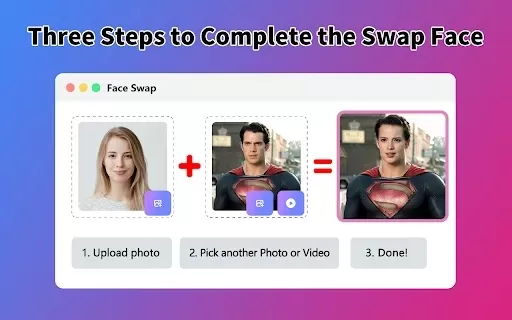
What is Face Swap - AI Face Swapper?Face Swap AI Face Swapper is a cutting-edge online tool that enables effortless face swapping in photos and videos. Powered by sophisticated artificial intelligence, it allows you to seamlessly replace faces, swap

Ever wanted to give your videos a quirky twist or a professional touch? Look no further than KreadoAI Video Face Swap! This nifty tool is a game-changer for anyone looking to seamlessly replace faces in videos. What's even better? It's absolutely free and

What is VideoWatermarkRemover AI? VideoWatermarkRemover is a free, AI-powered online tool that quickly and easily removes watermarks from videos. It supports popular formats like MP4, MOV, and AVI, and can detect and erase both static and moving wate
Wondershare Filmora BR Product Information
What Is Wondershare Filmora BR?
Filmora is a highly versatile video editing program that makes it simple for users to create, edit, and enhance their videos. It comes equipped with a wide array of useful features such as pre-made templates, various transitions, background music options, text overlays, and multiple filters. Designed to suit both beginners and experienced users, the software offers advanced tools like AI-powered editing, motion tracking, and color correction. Whether you’re working on a short clip for social media or a more complex project for professional use, Filmora provides all the essential functionalities you need.
Who Uses Wondershare Filmora BR?
- Content creators
- YouTubers
- Marketing professionals
- Educators
- Social media influencers
- Video editing enthusiasts
How to Use Wondershare Filmora BR?
- Step 1: Download and install the Filmora software.
- Step 2: Launch the program and import your video files.
- Step 3: Drag and drop the clips you want to use onto the timeline.
- Step 4: Edit your video by trimming, splitting, or making other adjustments using the built-in tools.
- Step 5: Add transitions, visual effects, and text overlays to enhance your footage.
- Step 6: Include background music and sound effects to improve the audio quality.
- Step 7: Preview your video and make any final tweaks needed.
- Step 8: Export your completed video in the format you prefer.
Available Platforms
- mac
- windows
Core Features & Benefits of Wondershare Filmora BR
The Core Features
- A user-friendly drag and drop interface
- Tools for trimming and splitting video clips
- Over 1000 pre-designed templates
- AI video editing capabilities
- Motion tracking functions
- Color correction options
- Audio editing tools
The Benefits
- Intuitive and easy to operate
- Delivers videos with professional quality
- Saves time thanks to AI-powered features
- Flexible enough for a variety of projects
- Regular updates with new features added
Main Use Cases & Applications
- Creating YouTube videos
- Producing marketing videos
- Developing educational content
- Creating social media posts
- Documenting events via videography
- Working on personal video projects
Pros and Cons of Wondershare Filmora BR
The Pros
It leverages advanced AI technologies to automate and streamline the video editing process.
It allows for multi-platform exports and direct uploading to social media sites such as YouTube.
Its user-friendly drag and drop interface is suitable for both beginners and experienced editors.
It includes a range of useful tools like automatic captioning, an AI video enhancer, and smart background music generation features.
It supports multi-camera editing, planar tracking, and GPU acceleration to ensure smooth performance.
The Cons
Since it is not open source, customization options and community-driven development are limited.
Certain AI-generated elements can only be used for non-commercial purposes due to licensing restrictions.
Some of its features rely on cloud-based AI, which means an internet connection is required.
Pricing details are not fully disclosed on the main website; you need to visit the official store page to find out.
Pricing of Wondershare Filmora BR
Is there a free plan? | No |
|---|---|
What are the details of the free trial? | |
What is the pricing model? | Paid |
Is a credit card required? | No |
What is the starting price? | 39.99 USD |
Is there a lifetime plan available? | YES |
How often is billing processed? | Annually |
Details of the Pricing Plans
Annual Plan
39.99 USD
- Access to all available features
- Free regular software updates
- Standard customer support
Perpetual Plan
79.99 USD
- Lifetime license to use the program
- Free regular software updates
- Standard customer support
Discounts:
You may be eligible for seasonal discounts.
To view the most current pricing options, visit: https://filmora.wondershare.com.br/shop/buy/buy-video-editor.html
FAQs About Wondershare Filmora BR
How Do I Add Text to My Video?
Select the “Text” tab, choose a text template, drag it onto the timeline, and then customize its appearance as needed.
Can I Use Filmora Free of Charge?
Filmora provides a free trial version, but exports from this trial come with watermarks. Removing those watermarks requires purchasing a paid license.
Does Filmora Support 4K Video Editing?
Yes, Filmora is capable of editing 4K videos.
How Do I Export My Video?
Click on “Export”, set your desired settings, and choose the format in which you want to save your video.
Can I Use Filmora on Both Windows and Mac?
Yes, Filmora is compatible with both Windows and Mac operating systems.
What Are the Minimum System Requirements for Filmora?
The basic system requirements include a multi-core processor, 4GB of RAM, and at least 10GB of free disk space.
How Can I Remove Background Noise from My Videos?
Use the audio editing tools built into Filmora to reduce or eliminate background noise.
Is There Customer Support Available for Filmora?
Yes, Wondershare offers comprehensive customer support through FAQs, detailed guides, and direct contact options.
Can I Collaborate with Other Users in Filmora?
Filmora does not currently provide functionality for real-time collaboration among users.
Does Filmora Offer Monthly Subscription Plans?
Yes, Filmora offers both monthly and annual subscription options.
Company Information About Wondershare Filmora BR
Website:
https://www.wondershare.comCompany Name:
Wondershare Technology Group Co., Ltd.Support Email:
Facebook:
https://www.facebook.com/wondershareX(Twitter):
https://twitter.com/wondershareYouTube:
https://www.youtube.com/user/WondershareInstagram:
https://www.instagram.com/wondershareTiktok:
NALinkedIn:
NA
Wondershare Filmora BR Screenshot
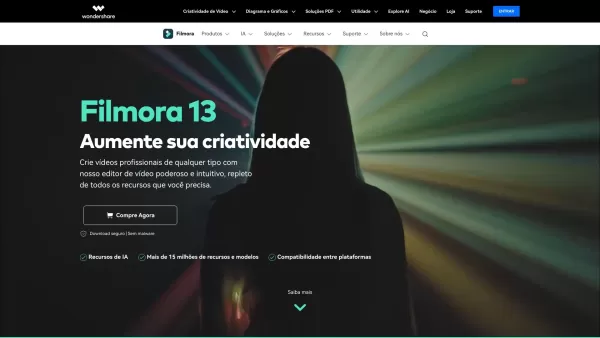

2026 Latest Top-rated AI Illustration Tools: Our curated list features the best powerfully designed tools for creating stunning editorial scenes and eye-catching cover art quickly. Each option has gone through rigorous real-world tests, offering a free vs paid comparison to help you find the perfect match for your workflow. Try these must-try solutions today to unlock your AI edge and boost your creative productivity. Explore now at XIX.AI.
 10 tools
 xix.ai

2026 Latest Top-Rated Best AI Tutors for Exam Prep are here on XIX.AI! Our curated list features powerful game-changing tools that offer free vs paid comparison, real-world tests, and weekly updated rankings. They help boost your writing efficiency, simplify complex topic learning, and unlock your academic potential. Explore now to Discover your perfect exam prep tool and Start creating today to Unlock your AI edge!
10 tools
xix.ai

2026 Latest Best Top-Rated AI Budget Planning Tools for Personal Money Management are here on XIX.AI! This curated collection features powerful, game-changing solutions that help you conduct real-world tests, understand spending habits, and create personalized plans to boost productivity. Enjoy a free vs paid comparison along with detailed rankings. Must-try tools designed to simplify money management and unlock your AI edge. Explore now!
11 tools
xix.ai

2026 Latest Best Top-Rated AI Sleep Tracking Assistants curated for ultimate recovery. This fully updated weekly guide features powerful tools that deliver real-world tests, free vs paid comparison, and detailed rankings to help you find the must-try solution that boosts sleep quality and supports better bedtime habits. Explore now at XIX.AI to Unlock your AI edge.
10 tools
xix.ai

2026 Latest Best Top-Rated AI SQL Copilots for Product and Revenue Analytics! XIX.AI has curated a powerful, game-changing collection of must-try tools that undergo real-world tests through weekly updated rankings. These tools help users boost productivity significantly by accelerating data analysis, streamlining complex queries, and generating accurate insights to drive smarter business decisions. Explore now to Discover your perfect tool for unlocking your AI edge!
14 tools
xix.ai

2026 Latest Best Top-Rated AI Homework Helpers That Teach Core Concepts Not Just Answers Powerful Tools for Students Must-Try Curated List Weekly Updated Free vs Paid Comparison Real-World Tests Accurate Rankings to Help You Unlock Your Full Learning Potential Explore now to Discover your perfect tool for smarter studying.
10 tools
xix.ai


Filmora BR 确实挺适合新手,模板多而且操作简单,剪短视频完全够用。就是导出有时候有点慢,希望后续版本能优化下性能吧,整体体验还是不错的!🎥✨


