


 Home
HomeUpWrite AI: Proofreads all Texts in Browser



Helps TikTok sellers, brands, MCNs, and TAPs discover winning products and find creators.

HelpLook is an AI-powered all-in-one knowledge base tool that helps businesses quickly build knowledge bases, help centers, and...

Your AI Workspace

302.AI is an enterprise-grade AI resource platform with pay-as-you-go pricing, API access to a full range of AI models, and ready-to-use online applications.

剧火AI — AI Screenwriter + Director, a One-Person Short Drama Studio In one sentence, what is it?

What is Originality?Originality.AI is an advanced AI-powered platform built to identify AI-generated text and detect plagiarism. It serves writers, publishers, and educators by verifying the authenticity and originality of content. The tool utilizes

What is PaperRed? PaperRed is a game-changer in the world of academic tools. It’s a free online plagiarism checker powered by AI technology, designed to help students, writers, and researchers ensure their work is original and polished. Think of it as you
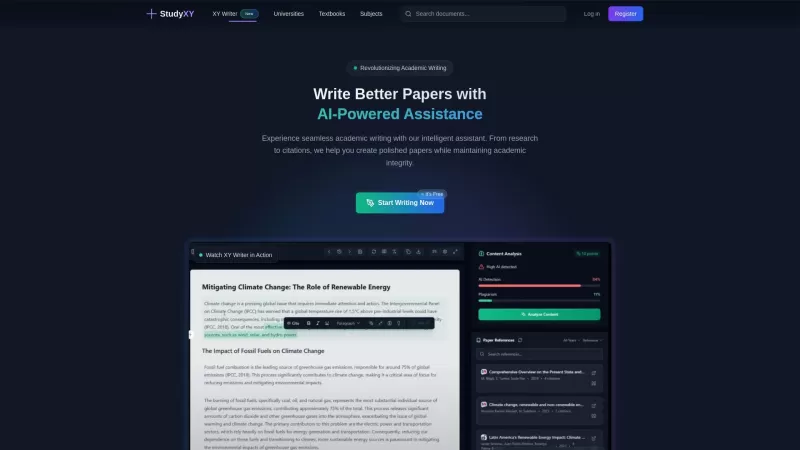
What is XYWriter?XYWriter is your go-to AI-powered academic writing assistant. It's designed to make life easier for students and researchers by helping with everything from managing citations to checking for plagiarism. Plus, it's all about keeping things honest and academically sound.How to Use XY

What is Giststack? Giststack is an AI-driven platform that assists users, especially solopreneurs and marketers, in tackling the hurdles of social media content creation. It gathers content from your preferred websites and newsletters, spots trending
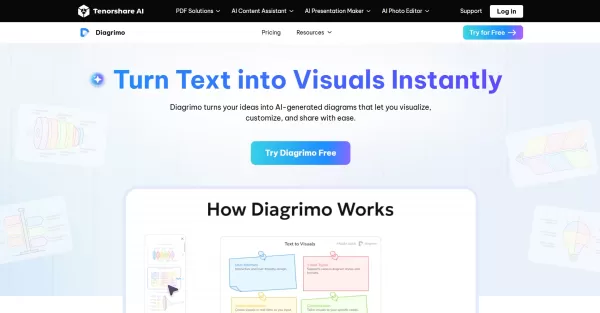
What is Diagrimo?Diagrimo is an AI-powered text-to-visual tool that helps users transform text or concepts into structured diagrams like flowcharts, SWOT analyses, pyramids, and infographics. It supports users in organizing ideas, planning projects,
UpWrite AI: Proofreads all Texts in Browser Product Information
What Is UpWrite AI? A Browser-Based Proofreading Tool
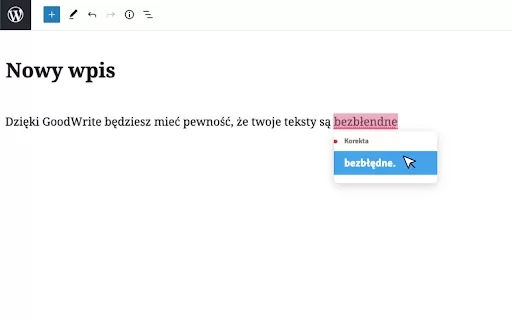
UpWrite AI is a digital writing assistant that provides comprehensive proofreading and editing capabilities directly within your browser. Using advanced AI technology, it analyzes your text to identify errors and improve clarity. Whether you're drafting emails, articles, or academic papers, this tool helps you produce polished content. By offering real-time feedback, UpWrite AI ensures your writing is free of common mistakes and accurately conveys your thoughts. It is ideal for both casual writers and professionals looking to enhance the quality of their text.
Who Will Use UpWrite AI? A Browser Proofreading Tool
- Students
- Professionals
- Content creators
- Business writers
- Bloggers
How to Use UpWrite AI: A Browser Proofreading Tool
- Step 1: Install the UpWrite AI Chrome extension from the Chrome Web Store.
- Step 2: Enable the extension in your browser settings.
- Step 3: Start typing in any text field, such as emails or documents.
- Step 4: Review the suggestions and corrections highlighted by UpWrite AI.
- Step 5: Apply the suggested changes to improve your writing.
Platform
- Web
- Chrome
UpWrite AI: Proofreads All Texts in Browser's Core Features & Benefits
The Core Features
- Real-time proofreading
- Grammar and spelling correction
- Punctuation checking
- Style suggestions
The Benefits
- Enhances writing clarity and coherence
- Saves time on manual proofreading
- Boosts confidence in written communication
- Supports a variety of writing styles
UpWrite AI: Proofreads All Texts in Browser's Main Use Cases & Applications
- Academic essays
- Professional emails
- Blog posts
- Social media content
FAQs of UpWrite AI: Proofreads All Texts in Browser
What is UpWrite AI?
UpWrite AI is a software tool that helps with proofreading and improving writing quality.
How does UpWrite AI work?
It uses AI and natural language processing to identify grammar, spelling, and punctuation errors.
Is UpWrite AI free?
Yes, UpWrite AI can be installed at no cost from the Chrome Web Store.
Can UpWrite AI be used offline?
No, UpWrite AI requires an internet connection because it operates as a browser extension.
Who can benefit from UpWrite AI?
Students, professionals, content creators, and anyone who writes frequently can benefit from this tool.
Does UpWrite AI support multiple languages?
Currently, UpWrite AI primarily supports English.
How do I install UpWrite AI?
You can install it directly from the Chrome Web Store by searching for UpWrite AI.
Can I integrate UpWrite AI with other tools?
UpWrite AI mainly functions as a standalone browser extension.
What platforms are supported?
Currently, UpWrite AI is available for the web and is optimized for Google Chrome.
Is my writing kept private?
Yes, UpWrite AI prioritizes user privacy and does not store your writing data.
UpWrite AI: Proofreads All Texts in Browser Company Information
Website:
https://upwriteai.comCompany Name:
UpWrite AISupport Email:
Facebook:
NAX(Twitter):
NAYouTube:
NAInstagram:
NATiktok:
NALinkedIn:
NA
UpWrite AI: Proofreads all Texts in Browser Screenshot


2026 Latest Best CapCut AI Video Editors for Reels Shorts Ads and Social Commerce Launches! This curated list features top-rated powerful game-changing tools that deliver impressive results through real-world tests. You’ll find a free vs paid comparison along with detailed rankings to help you choose the perfect fit. XIX.AI offers expert insights to help you unlock your AI edge in content creation. Explore now to discover your ideal tool and boost your productivity today!
 14 tools
 xix.ai

2026 Latest Best Top-rated AI Study Discovery Tools are here on XIX.AI! This curated list includes powerful game-changing resources for quick access to journals, datasets, and industry trends. Get a free vs paid comparison along with real-world tests and updated rankings weekly. Must-try options help boost your research efficiency and unlock your AI edge. Explore now to discover your perfect tool!
10 tools
xix.ai

2026 Latest Best Top-Rated AI Email Campaign Tools for Lifecycle Marketing! XIX.AI has curated a powerful, game-changing collection of must-try solutions that boost writing efficiency, help create highly targeted content, and streamline entire marketing workflows. Enjoy weekly updated rankings, real-world tests, and a free vs paid comparison to find the perfect tool for your needs. Explore now to unlock your AI edge!
11 tools
xix.ai

2026 Latest Top-Rated Best AI Investment Research Tools are here on XIX.AI! This curated list includes powerfully accurate signals to assess portfolio risks and help you make smarter, data-driven decisions. We conduct real-world tests weekly to update rankings and offer a free vs paid comparison. Discover your perfect tool to boost investment analysis efficiency today. Explore now!
10 tools
xix.ai

2026 Latest Best Top-Rated AI Customer Chatbot Tools for Website Support are here on XIX.AI! Our curated list features powerful, game-changing solutions that boost response speeds, improve customer satisfaction, and save tons of manual work. Each option goes through rigorous real-world tests, complete with free vs paid comparison details. Explore now to find the perfect tool that boosts your online support efficiency!
10 tools
xix.ai

2026 Latest Best Instagram AI Comment Reply Tools for Shops, DMs, and Community Management! XIX.AI has curated a top-rated list of powerful game-changing solutions featuring weekly updated rankings, free vs paid comparison, and real-world tests. These must-try tools help boost productivity significantly by streamlining reply tasks, saving time, and enhancing customer engagement across all social media platforms. Explore now to discover your perfect tool for seamless community management!
10 tools
xix.ai


