


 Home
HomeUdio Music Generator



Helps TikTok sellers, brands, MCNs, and TAPs discover winning products and find creators.

HelpLook is an AI-powered all-in-one knowledge base tool that helps businesses quickly build knowledge bases, help centers, and...

Your AI Workspace

302.AI is an enterprise-grade AI resource platform with pay-as-you-go pricing, API access to a full range of AI models, and ready-to-use online applications.

剧火AI — AI Screenwriter + Director, a One-Person Short Drama Studio In one sentence, what is it?
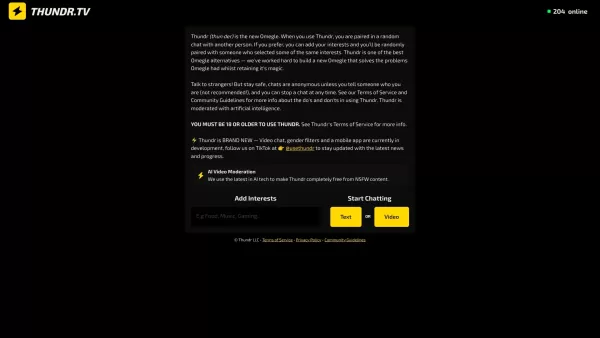
What is Thundr?Thundr is an advanced AI platform for lifelike voice conversations. It uses sophisticated artificial intelligence to simulate realistic human interaction, offering a unique and engaging communication tool. Ideal for applications from c

What is YOU-TLDR 2.0?YOU-TLDR is an intuitive platform that simplifies extracting key insights from YouTube videos. Simply paste the video URL, and the tool generates a brief 'TLDR' summary, allowing you to save time and boost productivity—ideal for
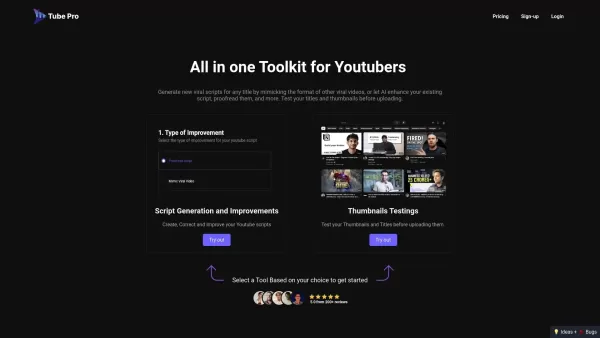
What is TubePro?TubePro is an AI-powered toolkit designed for YouTube creators to streamline their content creation. It helps generate new scripts by analyzing popular video formats, refines existing scripts through proofreading and enhancements, and

What is TryHijab?TryHijab is an innovative AI-powered platform that lets you visualize yourself wearing a hijab. Simply upload a selfie, and the AI will overlay various hijab styles to create realistic photos. It's a quick, convenient way to explore

What is Thumbmachine?Thumbmachine is an innovative AI-powered online platform designed to simplify the creation of high-quality thumbnails. It empowers users to effortlessly generate professional designs for videos, social media content, and marketin
Udio Music Generator Product Information
What is Udio Music Generator?
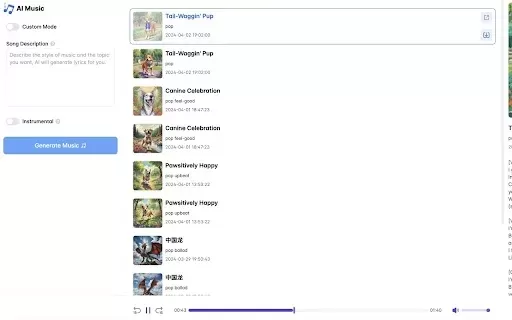
Udio AI Music Generator uses sophisticated artificial intelligence to create original music based on your instructions. Simply describe the music you have in mind, and the AI will produce a high-quality MP3 track. This tool unlocks creative possibilities for musicians, content creators, and anyone wanting to make personalized music without deep musical expertise. Its intuitive interface makes Udio ideal for education, content creation, or pure enjoyment.
Who will use Udio Music Generator?
- Musicians
- Content Creators
- Podcasters
- Educators
- Hobbyists
How to use the Udio Music Generator?
- Step 1: Install the Udio AI Music Generator extension.
- Step 2: Open the extension and type your music idea into the text prompt.
- Step 3: Click the 'Create' button to generate your track.
- Step 4: Listen to the generated music and make adjustments if needed.
- Step 5: Download your finished MP3 track for personal use.
Platform
- Web
Udio Music Generator's Core Features & Benefits
The Core Features
- Text-to-Music Generation
- High-Quality MP3 Output
- User-Friendly Interface
- Customization Options
The Benefits
- Instantly create unique tracks
- Cost-effective music production
- Fosters creativity
- Accessible to non-musicians
Udio Music Generator's Main Use Cases & Applications
- Creating background music for videos
- Generating custom tracks for podcasts
- Developing music for games
- Quickly composing jingles and sound effects
Udio Music Generator's Pros & Cons
The Pros
Enables decentralized resource sharing
Focus on privacy and security
Scalable infrastructure
The Cons
Lacks clear AI-specific features
Limited information on user experience
Unclear pricing details
FAQs of Udio Music Generator
Can I use Udio's generated music commercially?
Yes, Udio permits commercial use of the music it generates.
Is there a limit to how long the music can be?
Currently, Udio can generate tracks up to 15 minutes in length.
What kind of input does Udio need?
You only need to provide a text description of the music you want.
Do I need any musical skills to use Udio?
No, Udio is designed for users without any musical background.
What formats can I download the music in?
Music is available for download in MP3 format.
Can I modify the generated music?
Yes, you can adjust the generated music before downloading it.
When was Udio launched?
Udio was publicly launched in April 2024.
How does the AI create music?
It analyzes existing musical patterns and creates new compositions based on your prompts.
Is Udio suitable for professionals?
Yes, Udio is built for both amateur creators and professional musicians.
Why choose Udio over other platforms?
Udio offers a unique combination of high-quality output and user-friendly design.
Udio Music Generator Company Information
Udio Music Generator Screenshot




2026 Latest Best AI Invoice OCR Platforms for QuickBooks, Xero, and Multi-Entity Reconciliation! XIX.AI curates a top-rated list of powerful tools that deliver accurate real-world tests and weekly updated rankings. These must-try solutions streamline invoice processing, boost productivity, and save time across complex business setups. Get a free vs paid comparison to find your perfect fit. Explore now to unlock your AI edge!
 8 tools
 xix.ai
2026 Latest Best AI RFP Response Software for Enterprise Proposal Workflows! XIX.AI curates a top-rated list of powerful tools that pass rigorous real-world tests, offering must-try features to boost productivity and streamline your proposal processes. Get a free vs paid comparison, see detailed rankings, and discover how these game-changing solutions can help you create high-quality responses faster. Explore now to unlock your AI edge!
9 tools
xix.ai

2026 Latest Best Top-rated AI Subtitle and Dubbing Tools Curated for Localizing Video for Global Audiences Powerfully boost content reach across language barriers with game-changing accuracy Real-world tests prove these must-try solutions offer free vs paid comparison and reliable rankings to maximize productivity Explore now to Discover your perfect tool for global content delivery
10 tools
xix.ai

2026 Latest Best AI Invoice Processing Tools for AP Automation, Approval Routing, and ERP Sync Workflows! XIX.AI curates top-rated, powerful solutions that pass rigorous real-world tests to boost productivity dramatically. Get a free vs paid comparison, see detailed rankings, and discover must-try options to streamline your finance operations. Explore now to unlock your AI edge!
9 tools
xix.ai

2026 Latest Best Top-rated AI Technical Documentation Tools for Developer Teams! XIX.AI has curated a powerful, game-changing collection of must-try tools that go through rigorous real-world tests and weekly updated rankings. These top-rated solutions help teams boost productivity dramatically by streamlining content creation, fixing documentation errors, and accelerating coding workflows across all projects. Explore now to Discover your perfect tool for unlocking your AI edge!
13 tools
xix.ai

2026 Latest Best Top-rated AI Bug Triage Assistants Ranked! This curated collection showcases powerful game-changing tools that help teams quickly sort bugs by severity and user impact, saving valuable time. XIX.AI offers a free vs paid comparison along with real-world tests to help you find the must-try solution that boosts productivity significantly. Explore now to Discover your perfect tool for streamlining development workflows!
10 tools
xix.ai


