


 Home
HomeTutorUp
AI Homework Helper OCR Instant Answers



Helps TikTok sellers, brands, MCNs, and TAPs discover winning products and find creators.

HelpLook is an AI-powered all-in-one knowledge base tool that helps businesses quickly build knowledge bases, help centers, and...

Your AI Workspace

302.AI is an enterprise-grade AI resource platform with pay-as-you-go pricing, API access to a full range of AI models, and ready-to-use online applications.

剧火AI — AI Screenwriter + Director, a One-Person Short Drama Studio In one sentence, what is it?

Ever wished for a trusty sidekick to help you navigate the digital world with ease? Enter Sider, your personal AI companion designed to seamlessly blend into your daily routine. Starting off as a handy Chrome/Edge extension, Sider transforms your browsing
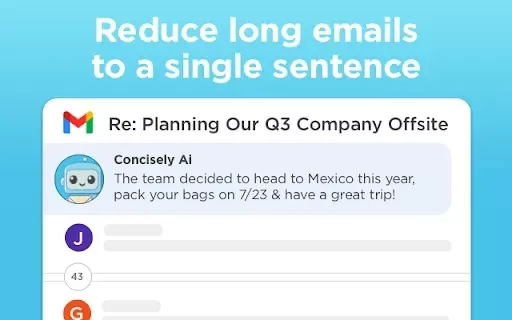
What is Concisely?Concisely is a cutting-edge Chrome extension that redefines email reading by using advanced AI to deliver one-sentence summaries of entire email threads. It allows busy professionals to capture the main idea instantly, eliminating t
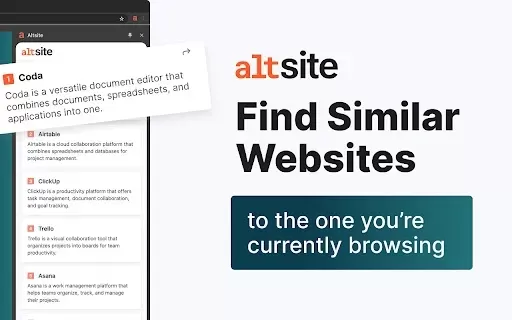
What is Altsite?Altsite is a browser extension that helps users find websites similar to the one they're currently visiting. Using advanced AI technology, it analyzes website content and instantly generates a list of related sites. This tool is ideal

What is SciSpace?SciSpace is your go-to AI-powered buddy for diving into the world of scientific research papers. It's like having a super-smart assistant that helps you not just read but really understand and analyze those dense academic texts. With SciSpace, you can highlight bits of text, ask que

What is Comment Generator?Comment Generator is an innovative AI tool that crafts authentic and compelling comments for Instagram and Threads. This Chrome extension uses sophisticated algorithms to automate comment writing, saving you time while prese
TutorUp Product Information
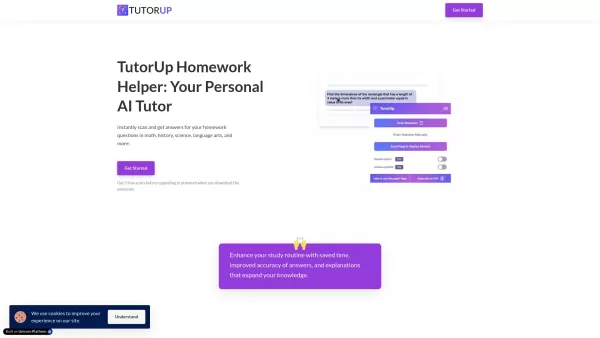
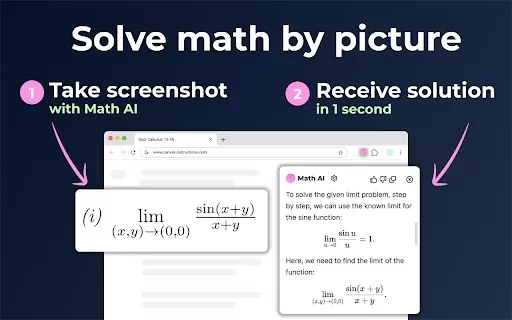
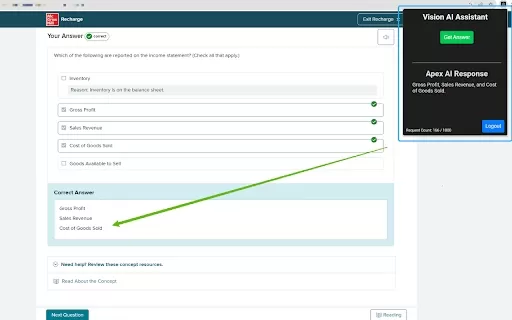
Ever found yourself staring blankly at a tricky homework problem, wishing you had a magic wand to wave it away? Well, TutorUp might just be that magic wand for you! It's an AI-powered homework helper that uses OCR technology to quickly solve your homework and exam questions across a variety of subjects. It's like having a personal tutor who's always ready to help, no matter the time of day.
How to Use TutorUp?
Getting started with TutorUp is as easy as pie. First, you'll want to install the Chrome extension—think of it as your gateway to instant homework help. Once you've got that set up, all you need to do is scan your homework questions, and voila! TutorUp will provide you with answers in a snap. It's like magic, but better because it's real!
TutorUp's Core Features
What makes TutorUp stand out? Let me count the ways:
- Instant OCR Scanning of Questions: No more typing out your questions. Just snap a pic and let TutorUp do the rest.
- Detailed Explanations of Answers: It's not just about getting the right answer; TutorUp helps you understand why it's right.
- Support for High-Level Math and Niche Subjects: Whether you're tackling calculus or something more obscure, TutorUp has got your back.
- Stealth Mode for Inconspicuous Operation: Need to use TutorUp without drawing attention? Stealth mode is your secret weapon.
- Ability to Scan Entire Pages of Questions in Premium Version: For those heavy homework nights, the premium version lets you scan whole pages at once. Talk about efficiency!
TutorUp's Use Cases
So, who can benefit from TutorUp? Let me give you a couple of scenarios:
- Students Scanning Complex Math Problems for Quick Solutions: Got a math problem that's making your head spin? TutorUp can break it down in seconds.
- Historians Looking for Detailed Descriptions from Questions Found Online: If you're researching history and need detailed answers, TutorUp can help you dig deeper without spending hours in the library.
FAQ from TutorUp
- How many free scans do I get?
- With TutorUp, you start with a handful of free scans to get you going. After that, you might want to consider upgrading to premium for unlimited access.
- What is stealth mode?
- Stealth mode is perfect for those times when you need to use TutorUp without making a big fuss. It keeps your activities under wraps, so you can get help without anyone noticing.
- How does the TutorUp AI work?
- TutorUp's AI uses OCR technology to read your questions and then employs sophisticated algorithms to provide accurate answers and explanations. It's like having a super-smart friend who's always ready to help.
- What does the premium version offer?
- The premium version of TutorUp gives you unlimited scans, the ability to scan entire pages at once, and priority support. It's a game-changer for those serious about their studies.
- How can I install TutorUp?
- Installing TutorUp is a breeze. Just head over to the Chrome Web Store, search for the TutorUp extension, and click "Add to Chrome". In no time, you'll be ready to tackle any homework challenge that comes your way.
TutorUp Screenshot

2026 Latest Top-rated AI Illustration Tools: Our curated list features the best powerfully designed tools for creating stunning editorial scenes and eye-catching cover art quickly. Each option has gone through rigorous real-world tests, offering a free vs paid comparison to help you find the perfect match for your workflow. Try these must-try solutions today to unlock your AI edge and boost your creative productivity. Explore now at XIX.AI.
 10 tools
 xix.ai

2026 Latest Top-Rated Best AI Tutors for Exam Prep are here on XIX.AI! Our curated list features powerful game-changing tools that offer free vs paid comparison, real-world tests, and weekly updated rankings. They help boost your writing efficiency, simplify complex topic learning, and unlock your academic potential. Explore now to Discover your perfect exam prep tool and Start creating today to Unlock your AI edge!
10 tools
xix.ai

2026 Latest Best Top-Rated AI Budget Planning Tools for Personal Money Management are here on XIX.AI! This curated collection features powerful, game-changing solutions that help you conduct real-world tests, understand spending habits, and create personalized plans to boost productivity. Enjoy a free vs paid comparison along with detailed rankings. Must-try tools designed to simplify money management and unlock your AI edge. Explore now!
11 tools
xix.ai

2026 Latest Best Top-Rated AI Sleep Tracking Assistants curated for ultimate recovery. This fully updated weekly guide features powerful tools that deliver real-world tests, free vs paid comparison, and detailed rankings to help you find the must-try solution that boosts sleep quality and supports better bedtime habits. Explore now at XIX.AI to Unlock your AI edge.
10 tools
xix.ai

2026 Latest Best Top-Rated AI SQL Copilots for Product and Revenue Analytics! XIX.AI has curated a powerful, game-changing collection of must-try tools that undergo real-world tests through weekly updated rankings. These tools help users boost productivity significantly by accelerating data analysis, streamlining complex queries, and generating accurate insights to drive smarter business decisions. Explore now to Discover your perfect tool for unlocking your AI edge!
14 tools
xix.ai

2026 Latest Best Top-Rated AI Homework Helpers That Teach Core Concepts Not Just Answers Powerful Tools for Students Must-Try Curated List Weekly Updated Free vs Paid Comparison Real-World Tests Accurate Rankings to Help You Unlock Your Full Learning Potential Explore now to Discover your perfect tool for smarter studying.
10 tools
xix.ai


TutorUp은 숙제 도움에 정말 좋습니다! 손끝에 개인 튜터가 있는 것 같아요. OCR 기술은 정확하지만, 가끔 손글씨에 어려움을 겪습니다. 그래도 학생들에게 필수 앱입니다! 📚✨
TutorUp es increíble para obtener ayuda rápida con la tarea. ¡Es como tener un tutor personal al alcance de tus dedos! La tecnología OCR es precisa, pero a veces tiene problemas con la escritura a mano. Aún así, es imprescindible para los estudiantes. 📚✨
TutorUp is amazing for quick homework help! It's like having a personal tutor at your fingertips. The OCR tech is spot on, but sometimes it struggles with handwriting. Still, a must-have for students! 📚✨
TutorUpは宿題の即時サポートに素晴らしいです!指先に個人チューターがいるようなものです。OCR技術は正確ですが、時々手書きに苦労します。それでも、学生にとって必須のアプリです!📚✨
TutorUp é incrível para ajuda rápida com lição de casa! É como ter um tutor pessoal ao alcance dos dedos. A tecnologia OCR é precisa, mas às vezes luta com a caligrafia. Ainda assim, é essencial para estudantes! 📚✨


