


 Home
Home


Helps TikTok sellers, brands, MCNs, and TAPs discover winning products and find creators.

HelpLook is an AI-powered all-in-one knowledge base tool that helps businesses quickly build knowledge bases, help centers, and...

Your AI Workspace

302.AI is an enterprise-grade AI resource platform with pay-as-you-go pricing, API access to a full range of AI models, and ready-to-use online applications.

剧火AI — AI Screenwriter + Director, a One-Person Short Drama Studio In one sentence, what is it?
Trancy for Chrome Product Information
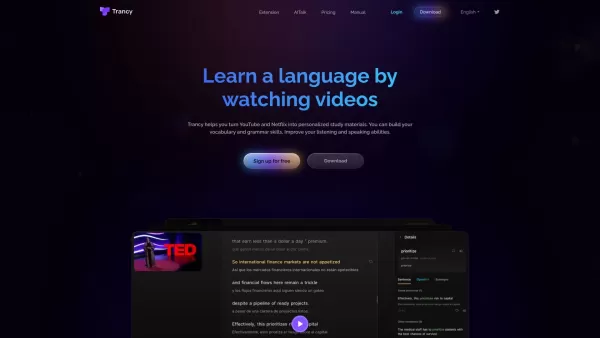
Ever stumbled upon a cool tool that makes learning a new language feel like a breeze? That's Trancy for Chrome for you—a nifty browser extension that turns your binge-watching sessions on YouTube and Netflix into a fun language learning experience. Imagine this: you're watching your favorite show, and instead of just zoning out, you're picking up a new language, thanks to Trancy's clever use of ChatGPT and OpenAI tech. It's not just about watching; it's about understanding the nuances of words and diving deep into sentence structures, making every episode a stepping stone to fluency.
How to Get Started with Trancy for Chrome?
Getting started is as easy as pie. Here's what you need to do:
- Hop over to the Chrome Web Store and grab the Trancy for Chrome extension. It's just a click away!
- Once it's all set up, fire up YouTube or Netflix and pick out a video that tickles your fancy.
- Now, click on the Trancy icon in your browser's toolbar to activate it. It's like flipping a switch to your learning mode!
- Decide if you want to go with theater mode or reading mode for those bilingual subtitles. It's your call!
- Start watching with those subtitles and soak in the language. Practice your listening and speaking based on what you're understanding.
- Don't shy away from using Trancy's AI features—look up words, analyze grammar, and translate sentences to really get the hang of it.
- Feeling adventurous? Use the immersive translation feature to translate bits of webpages you're curious about.
- Tailor your learning journey by creating decks, saving videos you love, and reviewing sentences that pop up in real life.
- And hey, don't forget to play around with speed playback, highlight words, adjust fonts, use text-to-speech, or even dip into external dictionaries for a richer learning experience.
What Makes Trancy for Chrome Stand Out?
Bilingual Subtitles and AI-Powered Magic
Trancy isn't just about subtitles; it's about making those subtitles work for you. Whether it's YouTube or Netflix, you get to watch with bilingual subtitles, diving into the language at your own pace.
From Webpage Translation to Grammar Analysis
Ever wanted to understand a webpage in another language? Trancy's got you covered with its AI-powered translation feature. And if grammar's your jam, the AI grammar analysis for complex sentences is like having a tutor by your side.
Personalized Learning, Your Way
What's cool about Trancy is how it lets you personalize your learning. Create decks, organize your favorite videos, save sentences you want to remember, and tweak your learning experience to fit your style.
More Than Just Watching
With Trancy, you're not just watching; you're learning to speak and listen in a way that feels natural. From adjusting playback speed to highlighting words, it's all about making your learning journey as smooth as possible.
Why Use Trancy for Chrome?
Whether you're looking to pick up a new language while catching up on your favorite series, or you want to sharpen your speaking and listening skills in a real-world context, Trancy for Chrome is your go-to. It's perfect for translating webpage content, analyzing grammar, practicing with videos, or even just reading foreign articles and understanding them better. And if you've got specific words or paragraphs you're curious about, Trancy's there to help you out.
Now, if you've got questions like whether Trancy works with languages other than English, or if it's compatible with other browsers, you're in luck. Trancy's designed to be versatile, with customizable fonts and sizes, handy keyboard shortcuts, and features to boost your pronunciation and listening skills. And if you're ever stuck, just hop into the Trancy for Chrome Discord community or shoot an email to their support team. They're all about making your learning journey as enjoyable and effective as possible!
Trancy for Chrome Screenshot


2026 Latest Top-rated AI Illustration Tools: Our curated list features the best powerfully designed tools for creating stunning editorial scenes and eye-catching cover art quickly. Each option has gone through rigorous real-world tests, offering a free vs paid comparison to help you find the perfect match for your workflow. Try these must-try solutions today to unlock your AI edge and boost your creative productivity. Explore now at XIX.AI.
 10 tools
 xix.ai

2026 Latest Top-Rated Best AI Tutors for Exam Prep are here on XIX.AI! Our curated list features powerful game-changing tools that offer free vs paid comparison, real-world tests, and weekly updated rankings. They help boost your writing efficiency, simplify complex topic learning, and unlock your academic potential. Explore now to Discover your perfect exam prep tool and Start creating today to Unlock your AI edge!
10 tools
xix.ai

2026 Latest Best Top-Rated AI Budget Planning Tools for Personal Money Management are here on XIX.AI! This curated collection features powerful, game-changing solutions that help you conduct real-world tests, understand spending habits, and create personalized plans to boost productivity. Enjoy a free vs paid comparison along with detailed rankings. Must-try tools designed to simplify money management and unlock your AI edge. Explore now!
11 tools
xix.ai

2026 Latest Best Top-Rated AI Sleep Tracking Assistants curated for ultimate recovery. This fully updated weekly guide features powerful tools that deliver real-world tests, free vs paid comparison, and detailed rankings to help you find the must-try solution that boosts sleep quality and supports better bedtime habits. Explore now at XIX.AI to Unlock your AI edge.
10 tools
xix.ai

2026 Latest Best Top-Rated AI SQL Copilots for Product and Revenue Analytics! XIX.AI has curated a powerful, game-changing collection of must-try tools that undergo real-world tests through weekly updated rankings. These tools help users boost productivity significantly by accelerating data analysis, streamlining complex queries, and generating accurate insights to drive smarter business decisions. Explore now to Discover your perfect tool for unlocking your AI edge!
14 tools
xix.ai

2026 Latest Best Top-Rated AI Homework Helpers That Teach Core Concepts Not Just Answers Powerful Tools for Students Must-Try Curated List Weekly Updated Free vs Paid Comparison Real-World Tests Accurate Rankings to Help You Unlock Your Full Learning Potential Explore now to Discover your perfect tool for smarter studying.
10 tools
xix.ai


This extension is a game-changer! I've been using it to watch Netflix with dual subtitles and it's seriously improved my listening skills. The vocabulary pop-up is super handy. Only wish it supported more streaming sites. 😄


