


 Home
Hometl;dv
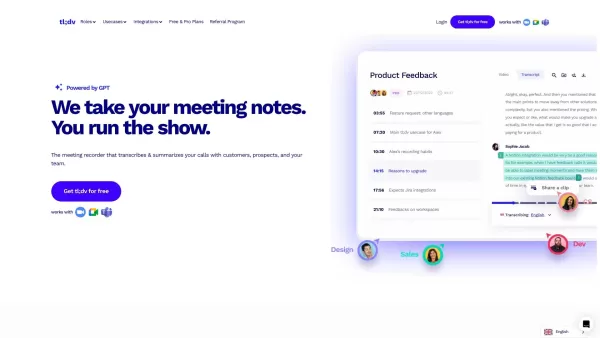
AI-Powered Meeting Recorder for Zoom & Google Meet



Helps TikTok sellers, brands, MCNs, and TAPs discover winning products and find creators.

HelpLook is an AI-powered all-in-one knowledge base tool that helps businesses quickly build knowledge bases, help centers, and...

Your AI Workspace

302.AI is an enterprise-grade AI resource platform with pay-as-you-go pricing, API access to a full range of AI models, and ready-to-use online applications.

剧火AI — AI Screenwriter + Director, a One-Person Short Drama Studio In one sentence, what is it?

Ever stumbled upon Cherry Studio AI and wondered what it's all about? Well, let me break it down for you. Cherry Studio AI isn't just another run-of-the-mill AI tool; it's a powerhouse desktop client that lets you dive into advanced AI interactions across

Discover Plume AI: Your Ultimate Academic Writing AssistantAre you tired of struggling with your academic writing? Well, say hello to Plume AI, the innovative AI assistant that's here to revolutionize the way you write! Designed with students in mind, Plume AI harnesses the power of cutting-edge art

Ever wondered how to turn your jumbled thoughts and complex queries into something you can actually grasp? Enter The Visualizer, your new best friend in the world of learning and creativity. This nifty tool takes your written queries, URLs, and even PDFs,

Ever wished for a trusty sidekick to help you navigate the digital world with ease? Enter Sider, your personal AI companion designed to seamlessly blend into your daily routine. Starting off as a handy Chrome/Edge extension, Sider transforms your browsing

Ever wondered what Ninja AI is all about? Well, let me tell you, it's like having a Swiss Army knife for your digital needs! Ninja AI isn't just another AI tool; it's a powerhouse that brings together over 24 top-notch Large Language Models (LLMs) to help
tl;dv Product Information
- What languages does tl;dv support for meeting transcription?
- Can I create clips from my meeting recordings?
- Can I search for keywords in my meeting transcripts?
- Does tl;dv integrate with other collaboration platforms and CRMs?
How to Use tl;dv
Getting started with tl;dv is as easy as pie. First things first, head over to the app store or Chrome Web Store and grab the tl;dv extension tailored specifically for Zoom or Google Meet. Once it’s installed, you’re golden. Start your meetings, press record, and let tl;dv handle the rest. The best part? All your recordings, transcriptions, and highlights live in one neat library. No more sifting through messy notes or forgotten details—everything’s right there, waiting for you.
Core Features of tl;dv
- Video Recording: Capture every moment of your meetings, crystal clear and ready to go.
- Transcription: Let tl;dv do the heavy lifting by turning your audio into searchable, readable text. It’s like having a personal secretary who never sleeps.
- Highlights: Need to know what really mattered in that marathon call? tl;dv picks out the key points so you don’t have to skim through hours of footage.
- Sharing: Share your insights with teammates, clients, or stakeholders effortlessly. It’s all about keeping everyone in the loop.
Use Cases for tl;dv
tl;dv isn’t just another tool—it’s a game-changer. Here’s where it shines:
- Boosting Reports: Create AI-powered notes, clips, and cross-meeting insights to supercharge your reporting game.
- Screening Candidates: Streamline the hiring process by recording interviews and leveraging AI notes to make smarter decisions.
- Promoting Team Cohesion: Keep everyone aligned with automated summaries and recordings that make collaboration seamless.
- Sales Insights: Dive deep into your sales calls with AI-driven analysis to uncover trends and opportunities.
- Support Analysis: Gain actionable insights from customer interactions to enhance service quality.
- Scaling Onboarding: Build an engaging knowledge base that helps new hires hit the ground running.
- Knowledge Sharing: Foster continuous learning across departments with automated highlights and resources.
Frequently Asked Questions
- What languages does tl;dv support for meeting transcription?
- tl;dv supports multiple languages, ensuring inclusivity and flexibility for global teams. Check their latest updates for the full list.
- Can I create clips from my meeting recordings?
- Absolutely! tl;dv lets you easily extract important segments from your recordings, perfect for sharing highlights or creating quick summaries.
- Can I search for keywords in my meeting transcripts?
- Yes! Searchability is one of tl;dv’s standout features. Find specific moments by typing in relevant terms—you’ll wonder how you ever managed without it.
- Does tl;dv integrate with other collaboration platforms and CRMs?
- Yes! tl;dv integrates seamlessly with popular tools like Slack, Salesforce, and more. Syncing data has never been easier.
Links
- tl;dv Login
- tl;dv Sign Up
- tl;dv Pricing
- tl;dv YouTube
- tl;dv TikTok
- tl;dv LinkedIn
- tl;dv Twitter
- tl;dv Instagram
tl;dv Screenshot

2026 Latest Best Top-rated AI Roleplay Chat Apps for Language Practice, Interview Prep, and Daily Fluency! XIX.AI curates a powerful game-changing collection that offers free vs paid comparison, real-world tests, and updated rankings weekly. These must-try tools help you boost writing skills, overcome fluency challenges, and improve communication efficiency across all daily scenarios. Explore now to discover your perfect tool for language growth!
 10 tools
 xix.ai

2026 Latest Best Top-rated AI Stem Separation Tools Curated for Remix Production, Sampling Prep, and Karaoke Masters. These powerful game-changing tools offer real-world tests to deliver precise audio isolation, boosting productivity significantly. XIX.AI provides a weekly updated free vs paid comparison guide to help you find the must-try solution that suits your needs. Explore now to unlock your AI edge.
8 tools
xix.ai

2026 Latest Best AI SQL Copilots Ranked Top-Rated! XIX.AI curates a powerful game-changing collection for weekly updated real-world tests. These must-try tools help you generate accurate revenue dashboards, analyze sales funnels, and track product metrics swiftly, boosting productivity massively. Explore now to Discover your perfect tool for data-driven decision making! 238 characters
9 tools
xix.ai

2026 Latest Best Top-Rated AI Melody Writing Tools for Song Drafts! XIX.AI has curated a highly powerful game-changing collection that goes through rigorous real-world tests to deliver the best writing experience. You can find detailed free vs paid comparisons, accurate rankings, and must-try options designed to help you create stunning song drafts effortlessly and boost your creative productivity significantly. Explore now to discover your perfect tool!
8 tools
xix.ai

2026 Latest Best Top-rated AI Conversation Trainer Tools for Interview Practice are here on XIX.AI! This curated collection features powerful, game-changing tools that go through rigorous real-world tests to deliver accurate feedback. You’ll find a free vs paid comparison and detailed rankings to help you choose the must-try option that boosts your confidence and skills. Explore now to Discover your perfect tool for interview success!
12 tools
xix.ai

2026 Latest Best Top-rated AI Style Transfer Tools for Creative Experiments! XIX.AI has curated a powerful, game-changing collection of must-try tools that deliver exceptional results through real-world tests and rigorous rankings. These top solutions help creatives boost productivity significantly by accelerating content creation and unlocking endless creative possibilities. Explore now to discover your perfect tool and start creating today!
9 tools
xix.ai


