


 Home
HomeTappy - Your AI LinkedIn Comments Assistant
AI LinkedIn Comments: Tap to Generate



Helps TikTok sellers, brands, MCNs, and TAPs discover winning products and find creators.

HelpLook is an AI-powered all-in-one knowledge base tool that helps businesses quickly build knowledge bases, help centers, and...

Your AI Workspace

302.AI is an enterprise-grade AI resource platform with pay-as-you-go pricing, API access to a full range of AI models, and ready-to-use online applications.

剧火AI — AI Screenwriter + Director, a One-Person Short Drama Studio In one sentence, what is it?

What is Originality?Originality.AI is an advanced AI-powered platform built to identify AI-generated text and detect plagiarism. It serves writers, publishers, and educators by verifying the authenticity and originality of content. The tool utilizes

What is Altsite?Altsite is a browser extension that helps users find websites similar to the one they're currently visiting. Using advanced AI technology, it analyzes website content and instantly generates a list of related sites. This tool is ideal

What is Hive AI Detector?Hive AI Detector uses advanced machine learning to analyze various types of media and determine whether they were generated or altered by artificial intelligence. This tool is ideal for journalists, educators, marketers, and

What is Lilybank AI? Lilybank AI is a game-changer in the world of content creation. It's like having a team of AI wizards at your fingertips, ready to churn out high-quality content faster than you can say "publish." From crafting compelling blog posts t

What is Rosebud?Rosebud.ai is a cutting-edge platform that uses generative AI to streamline the game development workflow. It offers a suite of tools to produce game assets—including characters, environments, and textures—and to animate avatars using
Tappy - Your AI LinkedIn Comments Assistant Product Information
What is Tappy - Your AI LinkedIn Comments Assistant?
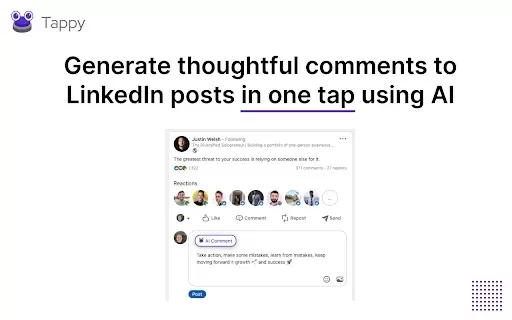
Tappy is an intuitive Chrome extension that uses artificial intelligence to help you craft thoughtful, context-aware comments on LinkedIn. With a simple tap, Tappy reads the post content and generates natural, personalized replies in multiple writing styles—saving you time while elevating your engagement on the professional platform. Ideal for professionals aiming to enhance their social media presence, Tappy streamlines commenting so your interactions stay relevant and meaningful.
Who uses Tappy - Your AI LinkedIn Comments Assistant?
- Professionals looking to boost engagement on LinkedIn
- Business owners aiming to actively interact with their community
- Marketers focused on building an effective social media footprint
- Job seekers wanting to expand their network with compelling comments
How to use Tappy - Your AI LinkedIn Comments Assistant
- Step 1: Install Tappy from the Chrome Web Store
- Step 2: Log in to your LinkedIn account
- Step 3: Go to any LinkedIn post where you'd like to comment
- Step 4: Click the Tappy icon to generate a tailored comment
- Step 5: Review the suggested response and make edits if desired
- Step 6: Post the comment directly to LinkedIn
Platform
- Chrome
Tappy - Your AI LinkedIn Comments Assistant's Core Features & Benefits
The Core Features
- AI-generated LinkedIn comments
- One-click comment generation
- Multiple tone and style options
The Benefits
- Reduces time spent writing comments
- Boosts social engagement and visibility
- Simple and fast—activated in one tap
Tappy - Your AI LinkedIn Comments Assistant's Main Use Cases & Applications
- Professionals improving LinkedIn engagement
- Connecting with prospective clients
- Increasing reach on LinkedIn posts
- Aiding job search efforts with strategic comments
FAQs of Tappy - Your AI LinkedIn Comments Assistant
What is Tappy?
Tappy is an AI-powered extension that instantly creates engaging comments for LinkedIn posts.
How do I install Tappy?
Install Tappy directly from the Chrome Web Store.
Is Tappy easy to use?
Yes—just one click creates a comment in seconds.
Does Tappy support all types of LinkedIn posts?
Yes, Tappy works across a broad range of LinkedIn posts.
What styles of comments does Tappy offer?
Tappy provides a variety of tones and styles for different situations.
Can Tappy help with job searching?
Yes, it improves networking and visibility to support your job search.
Is there a fee for using Tappy?
Tappy is free to use and does not require any subscription.
What platforms support Tappy?
Tappy is available as a Chrome extension.
Who can benefit from using Tappy?
Professionals, marketers, and job seekers gain the most from using Tappy.
Can I edit the comments generated by Tappy?
Yes—you can always review, tweak, or rewrite the comment before posting.
Tappy - Your AI LinkedIn Comments Assistant Company Information
Tappy - Your AI LinkedIn Comments Assistant Screenshot



2026 Latest Best Top-rated AI Stem Separation Tools Curated for Remix Production, Sampling Prep, and Karaoke Masters. These powerful game-changing tools offer real-world tests to deliver precise audio isolation, boosting productivity significantly. XIX.AI provides a weekly updated free vs paid comparison guide to help you find the must-try solution that suits your needs. Explore now to unlock your AI edge.
 8 tools
 xix.ai

2026 Latest Best AI SQL Copilots Ranked Top-Rated! XIX.AI curates a powerful game-changing collection for weekly updated real-world tests. These must-try tools help you generate accurate revenue dashboards, analyze sales funnels, and track product metrics swiftly, boosting productivity massively. Explore now to Discover your perfect tool for data-driven decision making! 238 characters
9 tools
xix.ai

2026 Latest Best Top-Rated AI Melody Writing Tools for Song Drafts! XIX.AI has curated a highly powerful game-changing collection that goes through rigorous real-world tests to deliver the best writing experience. You can find detailed free vs paid comparisons, accurate rankings, and must-try options designed to help you create stunning song drafts effortlessly and boost your creative productivity significantly. Explore now to discover your perfect tool!
8 tools
xix.ai

2026 Latest Best Top-rated AI Conversation Trainer Tools for Interview Practice are here on XIX.AI! This curated collection features powerful, game-changing tools that go through rigorous real-world tests to deliver accurate feedback. You’ll find a free vs paid comparison and detailed rankings to help you choose the must-try option that boosts your confidence and skills. Explore now to Discover your perfect tool for interview success!
12 tools
xix.ai

2026 Latest Best Top-rated AI Style Transfer Tools for Creative Experiments! XIX.AI has curated a powerful, game-changing collection of must-try tools that deliver exceptional results through real-world tests and rigorous rankings. These top solutions help creatives boost productivity significantly by accelerating content creation and unlocking endless creative possibilities. Explore now to discover your perfect tool and start creating today!
9 tools
xix.ai

2026 Latest Best Top-Rated AI Dialogue Bubble Tools for Visual Storytelling are here on XIX.AI! This curated collection features powerful, game-changing tools that help creators boost productivity and overcome creative bottlenecks. Get a free vs paid comparison, see real-world tests, and check the latest rankings to find the must-try solutions perfect for crafting engaging visual narratives. Explore now to discover your ideal tool!
10 tools
xix.ai


