


 Home
HomeSummary with Bing Chat for YouTube



Helps TikTok sellers, brands, MCNs, and TAPs discover winning products and find creators.

HelpLook is an AI-powered all-in-one knowledge base tool that helps businesses quickly build knowledge bases, help centers, and...

Your AI Workspace

302.AI is an enterprise-grade AI resource platform with pay-as-you-go pricing, API access to a full range of AI models, and ready-to-use online applications.

剧火AI — AI Screenwriter + Director, a One-Person Short Drama Studio In one sentence, what is it?

What is Speech Translator?Speech Translator leverages Google's advanced speech recognition to deliver real-time translation for videos, audio, and live streams. This tool bridges language gaps, enabling seamless conversations and fostering clearer un

Ever wondered how to effortlessly turn your audio and video files into text? Enter Clipto, the powerhouse of AI transcription on the web. Imagine harnessing the same cutting-edge tech that fuels ChatGPT to convert your Zoom meetings, interviews, and

What is Revoldiv AI Chrome Extension? Revoldiv is a Chrome browser extension that instantly transcribes audio and video directly in your browser. It lets users follow along by reading live transcriptions and search for specific spoken words within po

Ever found yourself needing to turn spoken words into written text? Well, let me introduce you to tulz.AI—an AI-powered service that's all about making audio transcription a breeze. Whether it's a podcast, a business meeting, or any other spoken content,

Ever found yourself in need of a quick and accurate transcription of a video or audio file? That's where Video To Text AI comes into play. It's a slick AI-powered tool designed to effortlessly convert your media into text. Whether you're juggling YouTube
Summary with Bing Chat for YouTube Product Information
What does Summary with Bing Chat for YouTube do?
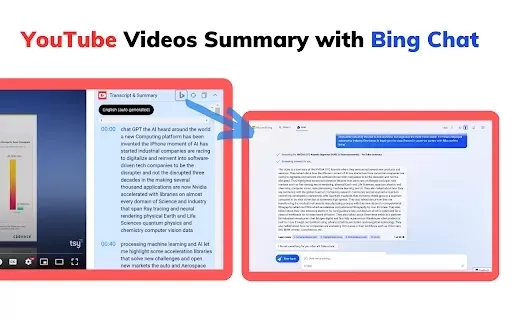
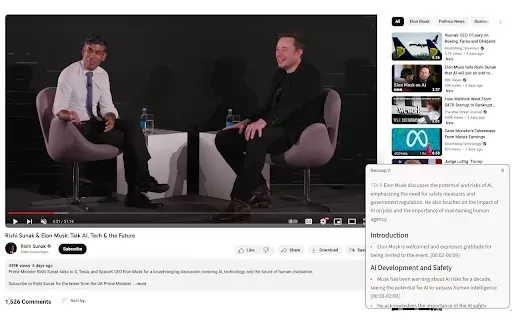
The 'Summary with Bing Chat' extension enables you to summarize YouTube videos in seconds. It leverages Bing's AI to create concise transcripts and highlight a video's key points. This tool is perfect for anyone wanting to quickly understand video content—for studying, research, or personal curiosity. The extension features a simple, user-friendly interface, allowing you to generate a summary with a single click, making it accessible even for non-technical users.
Who is the Summary with Bing Chat for YouTube extension for?
- Students
- Researchers
- Content Creators
- Busy Professionals
- Everyday YouTube Viewers
How do you use Summary with Bing Chat for YouTube?
- Step 1: Install the extension from the Chrome Web Store.
- Step 2: Go to the YouTube video you want summarized.
- Step 3: Click the extension icon in your browser toolbar.
- Step 4: Wait a few seconds for the AI to process the video.
- Step 5: Review the concise summary provided by Bing Chat.
Platform
- Web
- Chrome
Summary with Bing Chat for YouTube's Core Features & Benefits
Core Features
- Instant video summaries
- AI-powered transcript generation
- Simple, intuitive interface
- One-click operation
Key Benefits
- Saves valuable time
- Provides easy access to key information
- Boosts productivity
- Enhances learning and comprehension
Summary with Bing Chat for YouTube's Main Use Cases & Applications
- Studying from educational videos
- Quickly extracting key points from lengthy lectures or talks
- Researching topics for projects or content creation
FAQs of Summary with Bing Chat for YouTube
Can this extension summarize any YouTube video?
Yes, it works with any public YouTube video.
Is there a cost to use this extension?
No, it is completely free.
Does it work with private or unlisted videos?
No, it only functions with publicly accessible videos.
How accurate are the generated summaries?
Summaries are AI-generated and aim for accuracy, but the level of detail can vary.
Is this extension available on browsers other than Chrome?
Currently, it is designed specifically for the Chrome browser.
Is there a limit to the number of summaries I can create?
No, you can generate unlimited summaries.
Do I need to sign up for an account?
No account or registration is required to use it.
Can I save the summaries for later?
Yes, you can easily copy and paste the summary text to save it.
Is customer support available?
You can reach out to the developer via their provided contact email for support.
What languages does the extension support?
The extension primarily supports English, but may handle other languages depending on the video's content and audio.
Summary with Bing Chat for YouTube Company Information
Website:
https://www.bing.com/images/createCompany Name:
MicrosoftSupport Email:
NAFacebook:
NAX(Twitter):
NAYouTube:
NAInstagram:
NATiktok:
NALinkedIn:
NA
Summary with Bing Chat for YouTube Screenshot

2026 Latest Best Top-Rated AI Melody Writing Tools for Song Drafts! XIX.AI has curated a highly powerful game-changing collection that goes through rigorous real-world tests to deliver the best writing experience. You can find detailed free vs paid comparisons, accurate rankings, and must-try options designed to help you create stunning song drafts effortlessly and boost your creative productivity significantly. Explore now to discover your perfect tool!
 8 tools
 xix.ai

2026 Latest Best Top-rated AI Conversation Trainer Tools for Interview Practice are here on XIX.AI! This curated collection features powerful, game-changing tools that go through rigorous real-world tests to deliver accurate feedback. You’ll find a free vs paid comparison and detailed rankings to help you choose the must-try option that boosts your confidence and skills. Explore now to Discover your perfect tool for interview success!
12 tools
xix.ai

2026 Latest Best Top-rated AI Style Transfer Tools for Creative Experiments! XIX.AI has curated a powerful, game-changing collection of must-try tools that deliver exceptional results through real-world tests and rigorous rankings. These top solutions help creatives boost productivity significantly by accelerating content creation and unlocking endless creative possibilities. Explore now to discover your perfect tool and start creating today!
9 tools
xix.ai

2026 Latest Best Top-Rated AI Dialogue Bubble Tools for Visual Storytelling are here on XIX.AI! This curated collection features powerful, game-changing tools that help creators boost productivity and overcome creative bottlenecks. Get a free vs paid comparison, see real-world tests, and check the latest rankings to find the must-try solutions perfect for crafting engaging visual narratives. Explore now to discover your ideal tool!
10 tools
xix.ai

2026 Latest Top-Rated Best AI Meeting Summary Tools for Clear Decision Tracking and Effortless Follow-Ups. This curated list showcases powerful, game-changing solutions that boost productivity dramatically by automating meeting notes, identifying key action items, and streamlining team coordination across all projects. Get a free vs paid comparison along with real-world tests and weekly updated rankings to help you find the perfect tool. Explore now to unlock your AI edge!
9 tools
xix.ai

2026 Latest Best Top-rated AI Data Cleaning Tools for quick fixing of missing values and duplicates. This curated list showcases powerful, game-changing solutions that boost productivity significantly. Each option has undergone rigorous real-world tests to ensure reliability. Get a free vs paid comparison and discover the must-try tool that fits your needs best. Explore now at XIX.AI to Unlock your AI edge.
11 tools
xix.ai


