


 Home
HomeSomme: Wine Matched to You



Helps TikTok sellers, brands, MCNs, and TAPs discover winning products and find creators.

HelpLook is an AI-powered all-in-one knowledge base tool that helps businesses quickly build knowledge bases, help centers, and...

Your AI Workspace

302.AI is an enterprise-grade AI resource platform with pay-as-you-go pricing, API access to a full range of AI models, and ready-to-use online applications.

剧火AI — AI Screenwriter + Director, a One-Person Short Drama Studio In one sentence, what is it?
What is PimEyes?PimEyes is an innovative AI-powered online face search engine that helps you track where your images appear across the web. Whether you're managing your online privacy, protecting your digital identity, or simply curious, you can uplo

What is Optical Character Recognition (OCR)?Our OCR extension uses cutting-edge optical character recognition technology to convert images into editable text. Use screen selection or image uploads for immediate text conversion - ideal for students, p
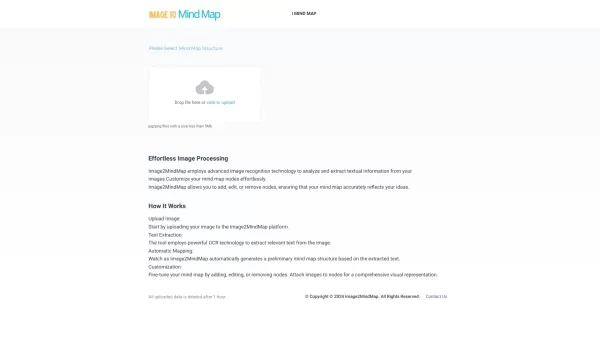
What is Convert image to mindmap?Image2MindMap is an advanced online tool that turns pictures into interactive mind maps, helping you organize concepts, brainstorm ideas, and structure plans visually. It streamlines the brainstorming and planning pro
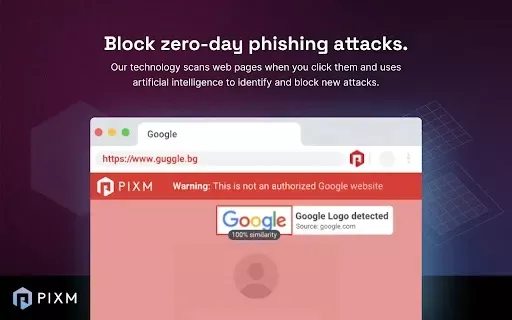
What is PIXM Phishing Protection?PIXM Phishing Protection is a browser extension that leverages artificial intelligence to offer real-time defense against phishing attacks. It inspects the visual elements of websites to immediately detect hazardous o
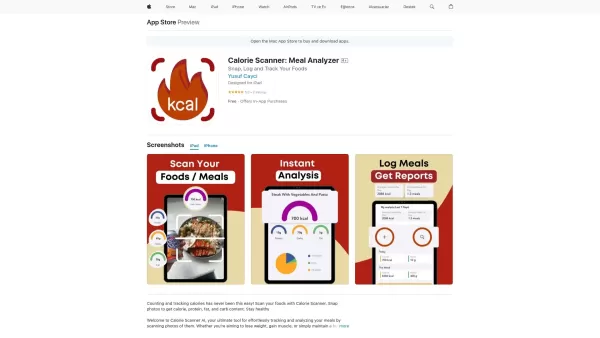
What is Calorie Scanner: Meal Analyzer?Discover Calorie Scanner AI, your all-in-one solution for effortless meal tracking and analysis. Just snap a picture of your food, and our sophisticated AI will estimate its calories, protein, fat, and carbs. Re
Somme: Wine Matched to You Product Information
What is Somme: Wine Matched to You?
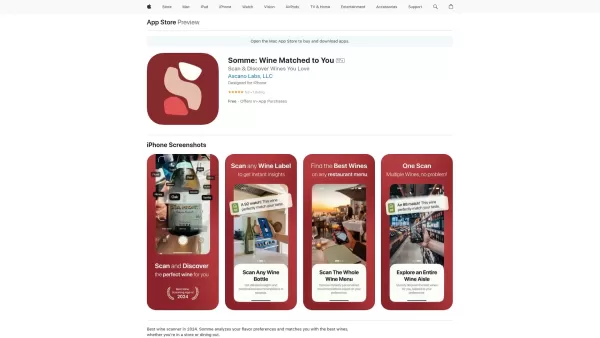
Somme is your smart wine companion app, blending AI with expert sommelier insights to provide personalized wine suggestions. Simply scan labels or restaurant menus for instant details on a wine's origin, grape varieties, flavor profile, and tasting notes. Customized to your individual taste, Somme empowers you to choose wines with confidence. It features in-depth wine profiles, flavor analysis, and tools to save and monitor your top picks. Whether you're just starting your wine journey or are a seasoned enthusiast, Somme transforms wine discovery into an engaging and educational experience.
Who will use Somme: Wine Matched to You?
- Wine enthusiasts and collectors
- Casual wine drinkers
- Beginners learning about wine
- Professional sommeliers and wine experts
How to use the Somme: Wine Matched to You?
- Step 1: Download and install Somme from the App Store.
- Step 2: Create your account using email or Google Sign-In.
- Step 3: Set up your flavor profile by indicating your taste preferences.
- Step 4: Use the camera to scan wine labels or printed menus.
- Step 5: View comprehensive wine profiles and get personalized recommendations.
- Step 6: Save wines you love to your favorites for later.
- Step 7: Explore new suggestions curated for your palate.
- Step 8: Share your finds with friends on social media.
Platform
- iOS
Somme: Wine Matched to You's Core Features & Benefits
The Core Features
- Scan wine labels and menus
- Personalized wine recommendations
- Detailed wine profiles
- Flavor profile analysis
- Save and track favorite wines
- Explore wine regions and varietals
- Social media sharing
- Push notifications
The Benefits
- Make confident, informed wine selections
- Discover new wines suited to your taste
- Expand your understanding of wine
- Easily track and revisit your preferred wines
- Share your wine experiences with others
Somme: Wine Matched to You's Main Use Cases & Applications
- Wine shopping at stores
- Choosing wine at restaurants
- Attending wine tasting events
FAQs of Somme: Wine Matched to You
What is Somme App?
Somme App is your personal wine advisor, using advanced image recognition and AI to help you discover and remember wines you enjoy.
Is the app free to use?
Yes, the app is free to download and use. Some premium features may be available via in-app purchases.
How do I scan a wine bottle?
Tap the Camera icon on the home screen, aim your phone's camera at the bottle label, and take a clear photo.
How does the app identify wines?
It uses image recognition technology and a comprehensive wine database to identify labels and deliver relevant information.
What if the app can’t recognize the wine I scanned?
Please try taking a better-lit, clearer photo, or you can manually enter the wine details.
Can I scan a wine menu at a restaurant?
Absolutely. The app can scan printed wine menus and recommend the top three options matching your flavor profile.
What is a Flavor Profile?
Your Flavor Profile helps the app learn your wine preferences so it can provide tailored suggestions.
How can I save a wine to my favorites?
After scanning, navigate to the wine's details page and tap the Save button to add it to your Favorites list.
Can I view my past scans?
Yes, all your previous scans are stored and accessible in the Activity section.
How can I delete a scan or favorite wine?
Delete scans from the Activity section or remove items from your Favorites list using the delete option.
Somme: Wine Matched to You Company Information
- Ascano Labs, LLC
- https://sommeapp.com
Somme: Wine Matched to You Screenshot

2026 Latest Best Top-Rated AI Melody Writing Tools for Song Drafts! XIX.AI has curated a highly powerful game-changing collection that goes through rigorous real-world tests to deliver the best writing experience. You can find detailed free vs paid comparisons, accurate rankings, and must-try options designed to help you create stunning song drafts effortlessly and boost your creative productivity significantly. Explore now to discover your perfect tool!
 8 tools
 xix.ai

2026 Latest Best Top-rated AI Conversation Trainer Tools for Interview Practice are here on XIX.AI! This curated collection features powerful, game-changing tools that go through rigorous real-world tests to deliver accurate feedback. You’ll find a free vs paid comparison and detailed rankings to help you choose the must-try option that boosts your confidence and skills. Explore now to Discover your perfect tool for interview success!
12 tools
xix.ai

2026 Latest Best Top-rated AI Style Transfer Tools for Creative Experiments! XIX.AI has curated a powerful, game-changing collection of must-try tools that deliver exceptional results through real-world tests and rigorous rankings. These top solutions help creatives boost productivity significantly by accelerating content creation and unlocking endless creative possibilities. Explore now to discover your perfect tool and start creating today!
9 tools
xix.ai

2026 Latest Best Top-Rated AI Dialogue Bubble Tools for Visual Storytelling are here on XIX.AI! This curated collection features powerful, game-changing tools that help creators boost productivity and overcome creative bottlenecks. Get a free vs paid comparison, see real-world tests, and check the latest rankings to find the must-try solutions perfect for crafting engaging visual narratives. Explore now to discover your ideal tool!
10 tools
xix.ai

2026 Latest Top-Rated Best AI Meeting Summary Tools for Clear Decision Tracking and Effortless Follow-Ups. This curated list showcases powerful, game-changing solutions that boost productivity dramatically by automating meeting notes, identifying key action items, and streamlining team coordination across all projects. Get a free vs paid comparison along with real-world tests and weekly updated rankings to help you find the perfect tool. Explore now to unlock your AI edge!
9 tools
xix.ai

2026 Latest Best Top-rated AI Data Cleaning Tools for quick fixing of missing values and duplicates. This curated list showcases powerful, game-changing solutions that boost productivity significantly. Each option has undergone rigorous real-world tests to ensure reliability. Get a free vs paid comparison and discover the must-try tool that fits your needs best. Explore now at XIX.AI to Unlock your AI edge.
11 tools
xix.ai


