


 Home
HomePackfiles Warp
GitHub Migration Tool: Streamlined Planning & Execution



Helps TikTok sellers, brands, MCNs, and TAPs discover winning products and find creators.

HelpLook is an AI-powered all-in-one knowledge base tool that helps businesses quickly build knowledge bases, help centers, and...

Your AI Workspace

302.AI is an enterprise-grade AI resource platform with pay-as-you-go pricing, API access to a full range of AI models, and ready-to-use online applications.

剧火AI — AI Screenwriter + Director, a One-Person Short Drama Studio In one sentence, what is it?
Ever heard of Sweep? It's this nifty AI code assistant that's making waves in the developer community. Essentially, it transforms those pesky bugs and feature requests into actual code changes. And the best part? It hooks right into GitHub, making the who
Packfiles Warp Product Information
Packfiles Warp: Fast, Secure Migration to GitHub
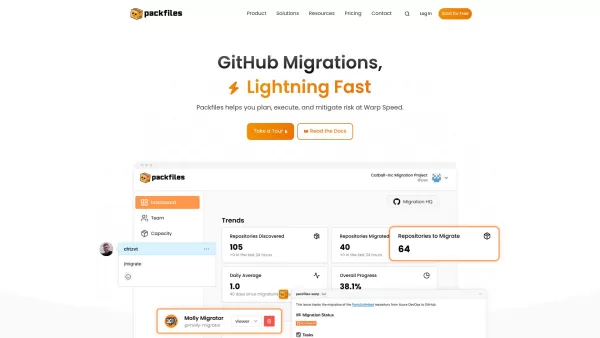
Ever wondered how to make your repository migration process smoother and more efficient? Enter Packfiles Warp—a game-changer in the world of software development. This migration tool doesn’t just move your data; it transforms it into actionable insights through interactive GitHub Issues. Whether you’re switching from Azure DevOps or Bitbucket, Packfiles Warp simplifies every step of the journey.
With its intuitive design and robust features, Packfiles Warp ensures that your team stays productive while handling complex migration tasks. No more headaches over lost configurations or missed deadlines. Let’s dive into what makes this tool indispensable.
How Does Packfiles Warp Work?
Using Packfiles Warp is simpler than you think. Start by connecting your source repositories—whether they’re on Azure DevOps, Bitbucket, or another platform. Once connected, the tool goes to work, scanning your data and transforming it into organized GitHub Issues. Each issue represents a task, milestone, or discussion point that helps you visualize the entire migration process.
From there, follow the intuitive steps to execute your migration effortlessly. No technical jargon required—you’re in good hands. Packfiles Warp takes care of the heavy lifting so you can focus on what matters most: building great software.
The Core Features of Packfiles Warp
Lightning-Fast Migration to GitHub
No more waiting around for days. Packfiles Warp accelerates your migration process, ensuring minimal downtime and maximum productivity.
Integration with GitHub Issues
Your data isn’t just transferred—it’s repurposed. Issues created during migration become living documents for tracking progress and collaboration.
Real-Time Support with GitHub Copilot
Need help along the way? Packfiles Warp integrates seamlessly with GitHub Copilot, offering real-time assistance tailored to your needs.
Security and Privacy Measures
Data safety is non-negotiable. Packfiles Warp employs advanced encryption protocols to protect your sensitive information throughout the migration process.
User-Friendly Interface for Seamless Planning
A clean, modern UI ensures that even the most intricate migrations feel manageable. Drag-and-drop functionality and customizable views keep everything clear and organized.
Packfiles Warp: Versatile Use Cases
Migrating Repositories from Azure DevOps to GitHub
Switching platforms doesn’t have to mean starting over. Packfiles Warp preserves your history, branches, and commit messages while mapping everything to GitHub’s ecosystem.
Transitioning Teams from Bitbucket Server to GitHub
Effortlessly onboard your team to GitHub with Packfiles Warp. From pull requests to issues, every detail follows you to the new platform.
Planning and Executing Migration Projects Efficiently
Whether you’re moving one repository or an entire suite, Packfiles Warp provides the tools to plan meticulously and execute flawlessly.
Frequently Asked Questions
- Is there a free trial for Packfiles Warp?
- Absolutely! Try Packfiles Warp risk-free with our free trial. Get started today and see the difference.
- What platforms can I migrate from using Packfiles Warp?
- Currently, Packfiles Warp supports migrations from Azure DevOps, Bitbucket, and other popular platforms. Check the full list on our website.
- How does Packfiles Warp ensure migration security?
- We prioritize your data’s safety. Advanced encryption and secure APIs ensure your information remains protected at all times.
- Can Packfiles Warp help with planning migrations?
- Definitely! By creating interactive issues, Packfiles Warp turns migration planning into a collaborative, step-by-step process.
Support and Contact Information
For any questions, feedback, or assistance, reach out via email at [email protected]. Need a refund? Contact our customer service team directly. For more details, visit our Contact Us page.
About Packfiles Warp
Packfiles Warp is brought to you by Packfiles Inc., a leader in migration solutions. Learn more about us and our mission on the About Us page.
Login to Packfiles Warp
Already a user? Log in to your account at Packfiles Warp.
Pricing Information
Ready to upgrade your migration experience? Explore our plans and pricing on the Pricing Page.
Connect with Packfiles Warp on GitHub
Find us on GitHub at Packfiles. Follow us for updates, tips, and community discussions.
Ready to supercharge your migration? Give Packfiles Warp a try today!
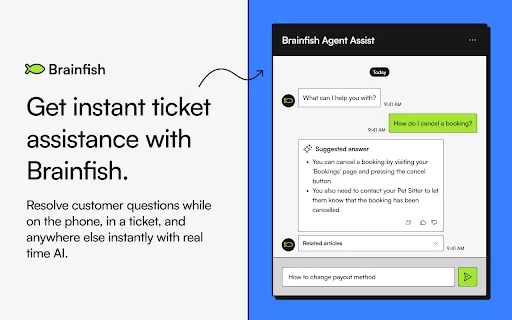
Packfiles Warp Screenshot
Discover the 2026 best AI database migration tools at XIX.AI. Our top-rated, curated selection helps you seamlessly convert legacy SQL scripts into modern NoSQL schema code. Compare free vs paid options with real-world tests and weekly updated rankings. Unlock your AI edge for faster, error-free migrations today.
 10 tools
 xix.ai
Discover the 2026 latest top-rated AI code converters. Our curated selection at XIX.AI features powerful, game-changing tools for modernizing legacy systems. Compare free vs paid options with real-world tests and weekly updated rankings. Unlock seamless migration from COBOL or Fortran to cloud-native Java. Explore now and transform your development workflow.
10 tools
xix.ai


Finally a tool that makes repo migration painless! Packfiles Warp is super fast and secure. I moved my entire project in minutes without any hiccups. Highly recommend for anyone tired of manual transfers. 🚀


