


 Home
HomeOpenAI expenses checker
OpenAI Expense Tracker: Manage Costs in Browser



Helps TikTok sellers, brands, MCNs, and TAPs discover winning products and find creators.

HelpLook is an AI-powered all-in-one knowledge base tool that helps businesses quickly build knowledge bases, help centers, and...

Your AI Workspace

302.AI is an enterprise-grade AI resource platform with pay-as-you-go pricing, API access to a full range of AI models, and ready-to-use online applications.

剧火AI — AI Screenwriter + Director, a One-Person Short Drama Studio In one sentence, what is it?
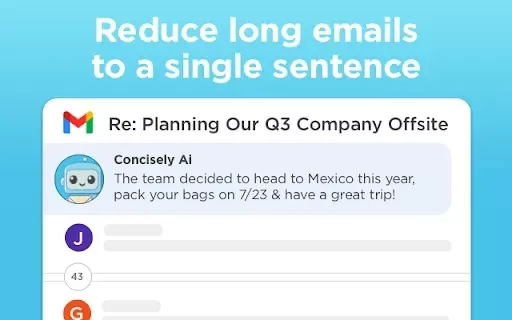
What is Concisely?Concisely is a cutting-edge Chrome extension that redefines email reading by using advanced AI to deliver one-sentence summaries of entire email threads. It allows busy professionals to capture the main idea instantly, eliminating t
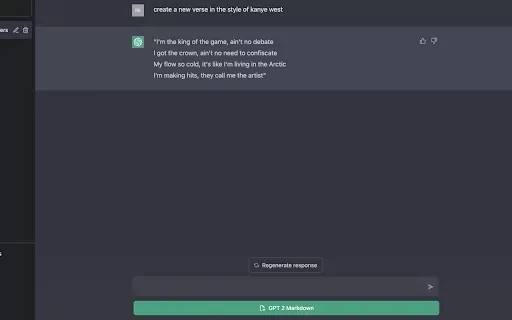
What is GPT2Markdown?GPT2Markdown is a Chrome extension that streamlines the process of exporting your ChatGPT conversations into Markdown format. With a single click, it allows you to download your chat history as a Markdown (.md) file directly to y
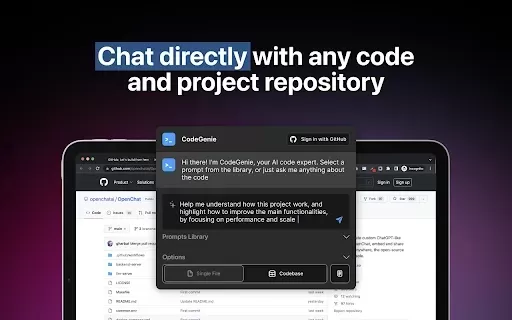
What is CodeGenie for Github?CodeGenie for GitHub is an intelligent assistant that uses ChatGPT to analyze and demystify code repositories on GitHub. It helps developers by interpreting code segments, offering clear explanations, and suggesting impro
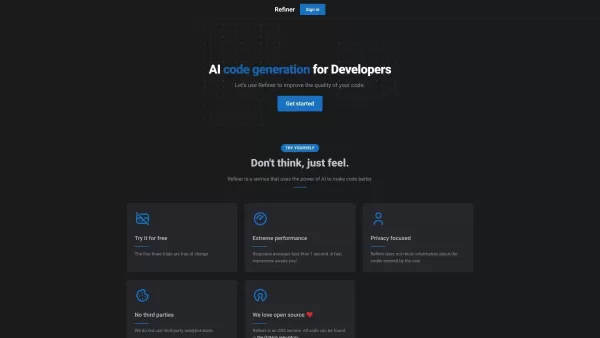
What is Refiner?Refiner is a sophisticated survey platform designed to capture actionable user feedback and insights. It provides businesses with a complete set of tools to build, share, and analyze surveys that meet their specific requirements. With
What is Tambo?Tambo is a comprehensive, end-to-end platform for building, deploying, and managing AI agents across your entire organization. Get started by choosing from a library of ready-to-use agent templates or designing a custom workflow in the
OpenAI expenses checker Product Information
What is the OpenAI Expenses Checker?
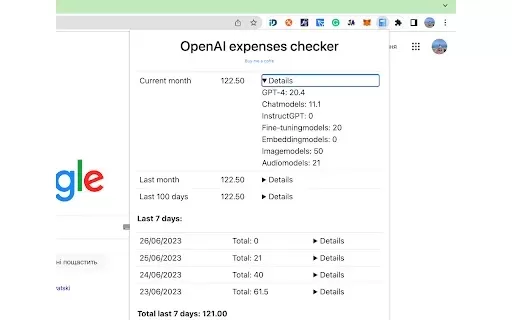
The OpenAI Expenses Checker is a Chrome extension built for quick and effortless tracking of your OpenAI spending from your browser. It eliminates the need to visit a separate website, offering an integrated interface that lets you monitor your costs efficiently directly within Chrome. This streamlined process helps you manage expenses without interrupting your workflow, making it both efficient and user-friendly.
Who is the OpenAI Expenses Checker for?
- OpenAI users
- Developers integrating OpenAI APIs
- Account managers
- Financial analysts overseeing OpenAI expenditures
- Tech enthusiasts managing AI service budgets
How to Use the OpenAI Expenses Checker
- Step 1: Install the OpenAI Expenses Checker from the Chrome Web Store.
- Step 2: Pin the extension to your Chrome toolbar for one-click access.
- Step 3: Click the extension icon on your toolbar.
- Step 4: Log in using your OpenAI account credentials.
- Step 5: View and track your expenses directly within the extension’s interface.
Platform
- Chrome
OpenAI Expenses Checker: Core Features & Benefits
Core Features
- Real-time expense tracking
- Seamless browser integration
- Instant access to spending data
- Streamlined and intuitive interface
Key Benefits
- Saves valuable time
- Simplifies expense monitoring
- No need to switch to an external website
- Boosts overall productivity
Main Use Cases & Applications
- Monitoring monthly OpenAI spending
- Budgeting for AI service consumption
- Tracking costs for financial reports
- Quickly accessing expense data for project oversight
FAQs for the OpenAI Expenses Checker
What is the OpenAI Expenses Checker?
The OpenAI Expenses Checker is a Chrome extension that allows you to track your OpenAI costs directly from your browser.
How do I install the OpenAI Expenses Checker?
Search for 'OpenAI Expenses Checker' in the Chrome Web Store and click 'Add to Chrome' to install it.
Do I need to log in to use the OpenAI Expenses Checker?
Yes, you must log in with your OpenAI credentials to view your expense information.
Can I use this extension on browsers other than Chrome?
No, the extension is built specifically for the Chrome browser.
Is the OpenAI Expenses Checker free to use?
Yes, the extension is completely free to use.
What kind of expense data can I track with this extension?
You can track OpenAI-related costs, such as API usage fees, through the extension.
How often is the expense data updated in the extension?
Data is generally updated in real-time or at regular intervals, based on your OpenAI account.
Can I export my expense data from the OpenAI Expenses Checker?
Currently, the extension does not offer an export feature.
Is my expense data secure in the OpenAI Expenses Checker?
Yes, the extension employs secure authentication to protect your data.
Where can I get support for the OpenAI Expenses Checker?
For support, reach out to the developer via the Chrome Web Store page or their provided contact email.
OpenAI Expenses Checker Company Information
Website:
NACompany Name:
OpenAI Expenses CheckerSupport Email:
NAFacebook:
NAX (Twitter):
NAYouTube:
NAInstagram:
NATikTok:
NALinkedIn:
NA
OpenAI expenses checker Screenshot


2026 Latest Best Top-Rated AI Coding Tools for Python and JavaScript are here on XIX.AI’s curated list. These powerful game-changing tools have undergone rigorous real-world tests to deliver exceptional results for writing efficient code, fixing bugs, and boosting productivity. Get a free vs paid comparison and see which options suit your needs. Explore now to Discover your perfect coding tool and Unlock your AI edge.
 10 tools
 xix.ai

2026 Latest Best Top-Rated AI Citation Mapping Tools for Research Discovery! XIX.AI has curated a powerful, game-changing collection of must-try tools that go through rigorous real-world tests to deliver accurate results. You’ll find detailed free vs paid comparisons, weekly updated rankings, and insights to help you boost your research efficiency and uncover valuable data faster. Explore now to discover your perfect tool for academic work! 238 characters
11 tools
xix.ai

2026 Latest Best Top-rated AI Meta Tag Tools for Faster On Page SEO! XIX.AI has curated a powerful, game-changing collection of highly reliable tools that undergo rigorous real-world tests. You’ll find a free vs paid comparison along with detailed rankings to help you choose the perfect option for boosting your content’s search visibility and improving writing efficiency. Explore now to Unlock your AI edge!
9 tools
xix.ai

2026 Latest Best AI Habit Tracking Tools for Personal Health Goals are here on XIX.AI! Our curated top-rated list includes powerful, game-changing solutions that help you stay consistent with your goals through real-world tests and strict rankings. We also offer a free vs paid comparison to help you choose the perfect fit. Explore now to Unlock your AI edge in achieving better health outcomes.
10 tools
xix.ai

2026 Latest Best Top-rated AI Anomaly Detection Tools for Dashboard Monitoring are here on XIX.AI! This curated list features powerful, game-changing solutions that deliver accurate real-world tests through weekly updated rankings. You’ll find a free vs paid comparison and insights into how these tools boost productivity by helping users spot issues fast, streamlining workflow efficiency. Discover your perfect tool to unlock your AI edge today. Explore now!
9 tools
xix.ai

2026 Latest Best AI Lip-Sync Generators for Dialogue-Driven Character Animation and Motion Scenes! XIX.AI has curated a top-rated list of powerful, game-changing tools that deliver flawless synchronized lip movements for animated characters. Each option undergoes rigorous real-world tests to ensure reliability, and our weekly updated rankings help you find the must-try solution that boosts your animation workflow efficiency. Explore now to discover your perfect tool!
9 tools
xix.ai


