


 Home
HomeMuka



Helps TikTok sellers, brands, MCNs, and TAPs discover winning products and find creators.

HelpLook is an AI-powered all-in-one knowledge base tool that helps businesses quickly build knowledge bases, help centers, and...

Your AI Workspace

302.AI is an enterprise-grade AI resource platform with pay-as-you-go pricing, API access to a full range of AI models, and ready-to-use online applications.

剧火AI — AI Screenwriter + Director, a One-Person Short Drama Studio In one sentence, what is it?

Ever stumbled upon Cherry Studio AI and wondered what it's all about? Well, let me break it down for you. Cherry Studio AI isn't just another run-of-the-mill AI tool; it's a powerhouse desktop client that lets you dive into advanced AI interactions across

Discover Plume AI: Your Ultimate Academic Writing AssistantAre you tired of struggling with your academic writing? Well, say hello to Plume AI, the innovative AI assistant that's here to revolutionize the way you write! Designed with students in mind, Plume AI harnesses the power of cutting-edge art

Ever wondered how to turn your jumbled thoughts and complex queries into something you can actually grasp? Enter The Visualizer, your new best friend in the world of learning and creativity. This nifty tool takes your written queries, URLs, and even PDFs,

Ever wished for a trusty sidekick to help you navigate the digital world with ease? Enter Sider, your personal AI companion designed to seamlessly blend into your daily routine. Starting off as a handy Chrome/Edge extension, Sider transforms your browsing

Ever wondered what Ninja AI is all about? Well, let me tell you, it's like having a Swiss Army knife for your digital needs! Ninja AI isn't just another AI tool; it's a powerhouse that brings together over 24 top-notch Large Language Models (LLMs) to help
Muka Product Information
What is Muka?
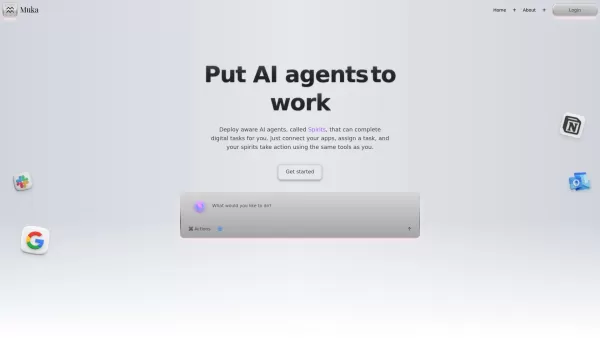
Muka is a platform that streamlines the use of software tools by connecting applications like Gmail, Notion, and Slack. Users can interact with these apps through a chat interface or by granting AI agents, called "Spirits," access to them. These Spirits handle digital tasks, automate workflows, and manage information across connected tools, acting as digital assistants to free up user time.
How to use Muka?
Users connect their existing software tools to Muka. They then create "Spirits" by defining their capabilities—such as sending emails or conducting research. Tasks are assigned to these Spirits and can be executed immediately, on a schedule, or triggered by specific events. Muka also enables organizing work into "Spaces" and sharing resources like prompts, sources (PDFs), and AI-generated "Artifacts" within "Libraries."
Muka's Core Features
AI Agents (Spirits) for Task Automation
Integration with Various Software Tools (e.g., Gmail, Notion, Slack, Google Drive, HubSpot)
Hands-Off Task Assignment and Scheduling
Collaborative "Spaces" for Organizing Work and Teams
"Libraries" for Sharing Prompts, Sources, and AI-Created Artifacts
Notion-Like Editor for Collaborative Artifact Creation
Muka's Use Cases
Research Assistant: Gathers competitor insights and market data.
Content Writer: Drafts marketing copy and blog posts.
Spreadsheet Guru: Automates spreadsheet analytics and formulas.
Email Concierge: Drafts onboarding and lifecycle emails.
Meeting Summarizer: Turns call transcripts into concise summaries.
Automating Emails, Reports, Research, and Analysis.
FAQ from Muka
What Are Spirits?
How Do Spirits Use My Tools?
What Are Spaces?
What Are Libraries?
Muka Support Email, Customer Service Contact, and Refund Contact
For more contact options, visit the contact us page (https://cal.com/cracked/15min)
Muka Company
Company name: Muka, Inc. .
Company address: 2025.
For more about Muka, please visit the about us page (https://www.muka.ai/about).
Muka Login
Login link: https://www.muka.ai/login
Muka Twitter
Twitter link: https://x.com/mukadotai
Muka Screenshot

2026 Latest Best AI RFP Response Software for Enterprise Proposal Workflows! XIX.AI curates a top-rated list of powerful tools that pass rigorous real-world tests, offering must-try features to boost productivity and streamline your proposal processes. Get a free vs paid comparison, see detailed rankings, and discover how these game-changing solutions can help you create high-quality responses faster. Explore now to unlock your AI edge!
 9 tools
 xix.ai

2026 Latest Best Top-rated AI Subtitle and Dubbing Tools Curated for Localizing Video for Global Audiences Powerfully boost content reach across language barriers with game-changing accuracy Real-world tests prove these must-try solutions offer free vs paid comparison and reliable rankings to maximize productivity Explore now to Discover your perfect tool for global content delivery
10 tools
xix.ai

2026 Latest Best AI Invoice Processing Tools for AP Automation, Approval Routing, and ERP Sync Workflows! XIX.AI curates top-rated, powerful solutions that pass rigorous real-world tests to boost productivity dramatically. Get a free vs paid comparison, see detailed rankings, and discover must-try options to streamline your finance operations. Explore now to unlock your AI edge!
9 tools
xix.ai
2026 Latest Best Top-rated AI Technical Documentation Tools for Developer Teams! XIX.AI has curated a powerful, game-changing collection of must-try tools that go through rigorous real-world tests and weekly updated rankings. These top-rated solutions help teams boost productivity dramatically by streamlining content creation, fixing documentation errors, and accelerating coding workflows across all projects. Explore now to Discover your perfect tool for unlocking your AI edge!
13 tools
xix.ai

2026 Latest Best Top-rated AI Bug Triage Assistants Ranked! This curated collection showcases powerful game-changing tools that help teams quickly sort bugs by severity and user impact, saving valuable time. XIX.AI offers a free vs paid comparison along with real-world tests to help you find the must-try solution that boosts productivity significantly. Explore now to Discover your perfect tool for streamlining development workflows!
10 tools
xix.ai

2026 Latest Best Top-Rated AI Coding Tools for Python and JavaScript are here on XIX.AI’s curated list. These powerful game-changing tools have undergone rigorous real-world tests to deliver exceptional results for writing efficient code, fixing bugs, and boosting productivity. Get a free vs paid comparison and see which options suit your needs. Explore now to Discover your perfect coding tool and Unlock your AI edge.
10 tools
xix.ai


