


 Home
HomeFlomo Quick Save 2.1
Flomo Quick Save: AI Summaries & Tags



Helps TikTok sellers, brands, MCNs, and TAPs discover winning products and find creators.

HelpLook is an AI-powered all-in-one knowledge base tool that helps businesses quickly build knowledge bases, help centers, and...

Your AI Workspace

302.AI is an enterprise-grade AI resource platform with pay-as-you-go pricing, API access to a full range of AI models, and ready-to-use online applications.

剧火AI — AI Screenwriter + Director, a One-Person Short Drama Studio In one sentence, what is it?
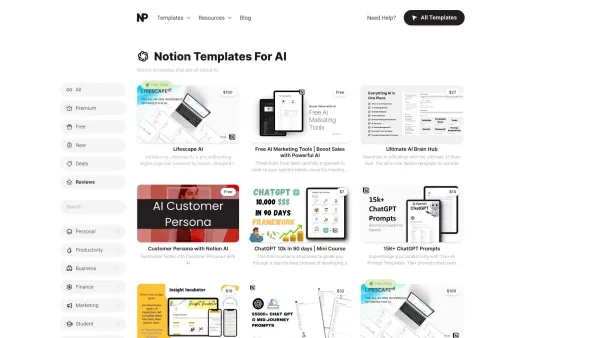
What Are Notion Templates for AI? Notion Templates for AI Integration to Supercharge Productivity Looking to harness the power of AI within your workflow? Notion Templates for AI Integration offers tailored solutions designed to streamline your day-to-day

BrandGhost is a game-changer for content creators, offering a slick social media automation platform that makes managing your online presence across various networks a breeze. It's like having a personal assistant dedicated to keeping your social media ga

What is Simbla?Simbla is a cloud-based no-code platform that allows users of any skill level to build professional websites and applications. Its intuitive drag-and-drop interface and responsive templates enable the creation of visually appealing, fu
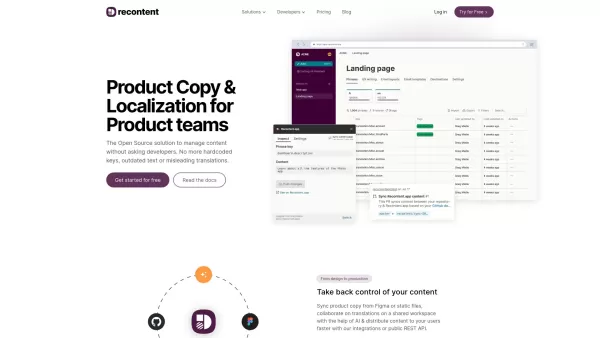
What is Recontent.app?Recontent.app is an open-source solution that empowers product teams to efficiently manage and localize their product copy. By connecting with tools like Figma and GitHub, it enables teams to synchronize text, collaborate on tra
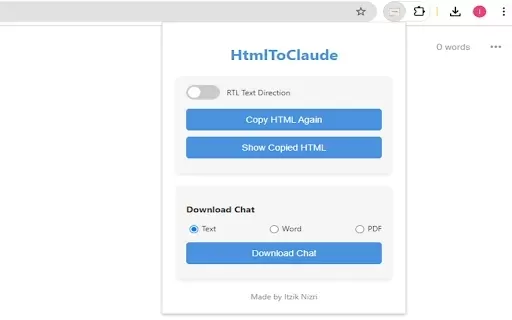
What is HtmlToClaude?HtmlToClaude is a Chrome extension that simplifies your work with Claude AI. It enables you to effortlessly capture HTML content from any webpage and paste it directly into your conversations with Claude. The tool also lets you d
Flomo Quick Save 2.1 Product Information
What is Flomo Quick Save 2.1?
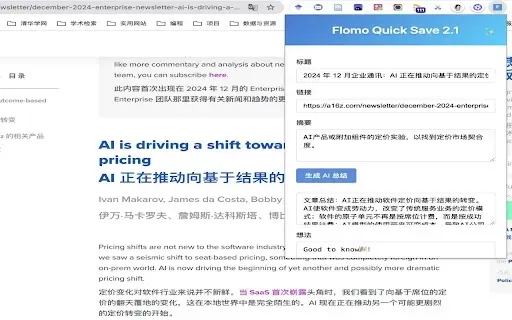
Flomo Quick Save is a browser extension that empowers users to instantly capture and save web content directly to their Flomo notes. It offers AI-powered summaries, smart tag suggestions, and seamless integration with the Flomo platform. Features like automatic draft saving, a modern interface with pleasant sound effects, and customizable AI API settings transform the process of gathering and organizing information into a more efficient, intelligent workflow.
Who will use Flomo Quick Save 2.1?
- Researchers
- Students
- Content Creators
- Journalists
- Productivity Enthusiasts
How to use the Flomo Quick Save 2.1?
- Step 1: Install the extension.
- Step 2: Click ‘Configure Flomo API’ and enter your personal Flomo API key.
- Step 3: For AI features, navigate to ‘AI Settings’ to set up your OpenAI API Key and endpoint URL.
- Step 4: On any webpage, click the extension icon to auto-fetch the page title and URL.
- Step 5: You can manually edit the title, add a summary, and include your personal notes.
- Step 6: Click ‘Generate AI Summary’ to get an AI-crafted synopsis of the article.
- Step 7: Type tags into the input field and press Enter to add them.
- Step 8: Click ‘Save to Flomo’ to finish and store your note.
- Step 9: All your work is auto-saved as a draft and will be restored the next time you open the extension.
Platform
- Web
- Chrome
Flomo Quick Save 2.1's Core Features & Benefits
The Core Features
- One-click web content saving
- AI-generated article summaries
- Intelligent tag recommendations
- Add personal notes and ideas
- Sleek, modern interface
- Pleasant confirmation sounds
- Automatic draft saving
- Custom AI API configuration
The Benefits
- Efficiently capture important information
- Enrich your notes with AI-generated insights
- Effortlessly organize notes with smart tagging
- Save time and boost personal productivity
- Enjoy a clean, intuitive user experience
Flomo Quick Save 2.1's Main Use Cases & Applications
- Archiving research papers and articles
- Saving insightful blog posts
- Compiling study materials
- Documenting useful online resources
- Storing personal thoughts and ideas
FAQs of Flomo Quick Save 2.1
How do I install Flomo Quick Save?
You can install it directly from the Chrome Web Store by clicking the ‘Add to Chrome’ button.
Is Flomo Quick Save free?
Yes, the extension is completely free to use.
Does Flomo Quick Save support other browsers?
Currently, the extension is designed for and supports Google Chrome.
How do I configure the API settings?
After installation, click on ‘Configure Flomo API’ in the extension and enter your personal Flomo API key.
Can I customize AI settings?
Yes, you can set up your own OpenAI API Key and endpoint URL in the ‘AI Settings’ section.
What kind of content can I save with Flomo Quick Save?
You can save virtually any web content, such as articles, blog posts, and web pages for your notes.
Does it auto-save drafts?
Yes, all inputs are automatically saved as a draft and will be there when you reopen the extension.
Can I add personal notes and ideas?
Absolutely. You can manually edit the title, input your summary, and append your own thoughts.
What are the main features of Flomo Quick Save?
Core features include one-click saving, AI-generated summaries, intelligent tag suggestions, and custom AI API support.
How can I provide feedback?
You can submit feedback by opening an issue on GitHub or emailing the developer at [email protected].
Flomo Quick Save 2.1 Company Information
Flomo Quick Save 2.1 Screenshot


2026 Latest Best AI Short-Form Video Hook Generators for Reels Shorts and Product Launch Campaigns! XIX.AI curates top-rated powerful game-changing tools that deliver must-try results through real-world tests. This weekly updated page offers free vs paid comparison rankings to help you find the perfect solution for boosting content creativity and productivity. Explore now to Unlock your AI edge!
 11 tools
 xix.ai

2026 Latest Best Top-Rated AI Article Outline Tools for Long Form Writing! This curated collection features powerful, game-changing tools that deliver accurate, structured outlines with real-world tests to boost writing efficiency significantly. XIX.AI is part of this elite selection. Get a free vs paid comparison to help you choose the perfect tool. Explore now and Unlock your AI edge!
9 tools
xix.ai

2026 Latest Best Top-rated AI Roleplay Chat Apps for Language Practice, Interview Prep, and Daily Fluency! XIX.AI curates a powerful game-changing collection that offers free vs paid comparison, real-world tests, and updated rankings weekly. These must-try tools help you boost writing skills, overcome fluency challenges, and improve communication efficiency across all daily scenarios. Explore now to discover your perfect tool for language growth!
10 tools
xix.ai

2026 Latest Best Top-rated AI Stem Separation Tools Curated for Remix Production, Sampling Prep, and Karaoke Masters. These powerful game-changing tools offer real-world tests to deliver precise audio isolation, boosting productivity significantly. XIX.AI provides a weekly updated free vs paid comparison guide to help you find the must-try solution that suits your needs. Explore now to unlock your AI edge.
8 tools
xix.ai

2026 Latest Best AI SQL Copilots Ranked Top-Rated! XIX.AI curates a powerful game-changing collection for weekly updated real-world tests. These must-try tools help you generate accurate revenue dashboards, analyze sales funnels, and track product metrics swiftly, boosting productivity massively. Explore now to Discover your perfect tool for data-driven decision making! 238 characters
9 tools
xix.ai

2026 Latest Best Top-Rated AI Melody Writing Tools for Song Drafts! XIX.AI has curated a highly powerful game-changing collection that goes through rigorous real-world tests to deliver the best writing experience. You can find detailed free vs paid comparisons, accurate rankings, and must-try options designed to help you create stunning song drafts effortlessly and boost your creative productivity significantly. Explore now to discover your perfect tool!
8 tools
xix.ai


