


 Home
HomeFlex Chef



Helps TikTok sellers, brands, MCNs, and TAPs discover winning products and find creators.

HelpLook is an AI-powered all-in-one knowledge base tool that helps businesses quickly build knowledge bases, help centers, and...

Your AI Workspace

302.AI is an enterprise-grade AI resource platform with pay-as-you-go pricing, API access to a full range of AI models, and ready-to-use online applications.

剧火AI — AI Screenwriter + Director, a One-Person Short Drama Studio In one sentence, what is it?
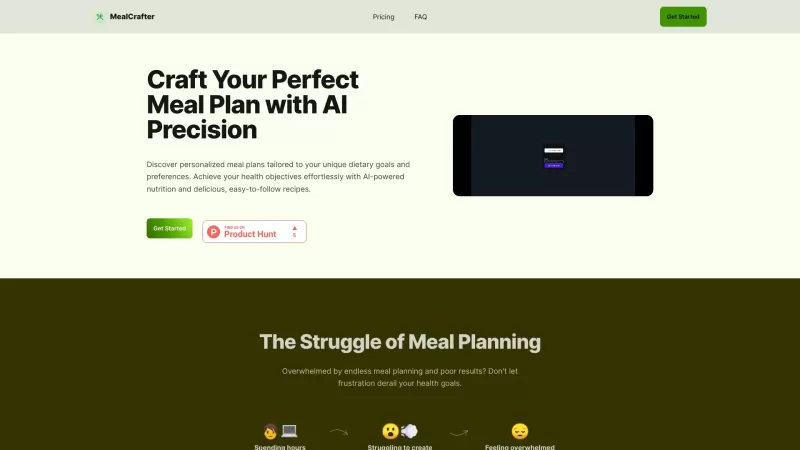
Ever wondered how to make meal planning a breeze while sticking to your dietary goals? Enter MealCrafter, your AI-powered buddy that crafts personalized meal plans just for you. It's like having a personal chef and nutritionist rolled into one handy app.
Flex Chef Product Information
What Is Flex Chef?
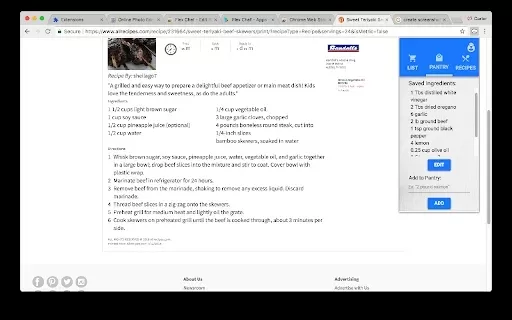
Flex Chef is a user-friendly Chrome extension designed to help users manage their cooking needs more efficiently. It allows users to keep track of ingredients they’ve saved, streamlining grocery shopping by helping them identify recipes that use the items already in their pantry. With its intuitive interface, users can easily select ingredients directly from any webpage and get instant comparisons with desired recipes. Suitable for both beginners and experienced home cooks, Flex Chef improves meal planning processes, making them faster and more enjoyable.
Who Is Flex Chef For?
- Home cooks
- People who plan meals regularly
- Grocery shoppers
- Food enthusiasts
- Individuals focused on healthy eating
How to Use Flex Chef?
- Step 1: Download Flex Chef from the Chrome Web Store.
- Step 2: Add the extension to your browser toolbar for quick access.
- Step 3: Click the extension icon to begin adding ingredients.
- Step 4: Use your cursor to select ingredients on any webpage you’re viewing.
- Step 5: Compare the selected ingredients with available recipes.
- Step 6: Use the insights gained to plan your grocery purchases.
Platform
- web
- chrome
Core Features & Benefits of Flex Chef
The Core Features
- Tracking saved ingredients
- Recipe comparison tool
- Quick access to grocery lists
- User-friendly interface
The Benefits
- Simplifies the meal planning process
- Aids in reducing food waste
- Increases cooking efficiency
- Supports healthier dietary choices
Primary Use Cases for Flex Chef
- Grocery shopping
- Meal preparation
- Adopting a healthier eating style
- Creating new recipes
FAQs About Flex Chef
What Is Flex Chef?
Flex Chef is a Chrome extension designed for tracking ingredients and recipes.
How Do I Install Flex Chef?
You can install it directly from the Chrome Web Store.
Is Flex Chef Free?
Yes, Flex Chef is available as a free extension.
How Do I Add Ingredients?
You can use your cursor to select ingredients from any webpage.
Can I Save Recipes?
Yes, you can compare the ingredients you’ve saved with your favorite recipes.
Does It Sync With Other Devices?
Flex Chef is linked to your Chrome browser, so it syncs across devices when using the same account.
Is There a Limit on Saved Ingredients?
No, there’s no limit on the number of ingredients you can save.
What Are the System Requirements?
Flex Chef requires a Chrome browser to function properly.
How Can I Get Support For Flex Chef?
You can contact support through the email address provided on their website.
Can I Use Flex Chef On Mobile?
Flex Chef is primarily designed for use on desktops within the Chrome browser.
Company Information About Flex Chef
Website:
https://5-letter-words.comCompany Name:
Not availableSupport Email:
Not availableFacebook:
Not availableX(Twitter):
Not availableYouTube:
Not availableInstagram:
Not availableTiktok:
Not availableLinkedIn:
Not available
Flex Chef Screenshot

2026 Latest Best AI Sleep Insight Tools for Better Recovery Habits are here on XIX.AI! This curated list features top-rated, powerful solutions that offer real-world tests and weekly updated rankings. You’ll find a free vs paid comparison to help you choose the must-try option that boosts productivity and helps you build consistent recovery habits. Explore now to unlock your AI edge!
 7 tools
 xix.ai

2026 Latest Best Top-rated AI Research Assistants for Streamlining Literature Reviews and Citation Tracking. XIX.AI curates a powerful game-changing selection, backed by rigorous real-world tests and weekly updated rankings. You’ll find must-try options that boost productivity significantly, helping you overcome research bottlenecks faster. Explore now to discover your perfect tool and unlock your AI edge in academic work.
10 tools
xix.ai

2026 Latest Best Top-Rated AI meal planning apps for building smarter nutrition routines. This curated list includes powerful tools that offer real-world tests and weekly updated rankings. You can find a free vs paid comparison to help you choose the must-try solution that boosts productivity and helps you create balanced meals effortlessly. Explore now at XIX.AI to unlock your AI edge.
12 tools
xix.ai

2026 Latest Top-rated AI SEO Auditors for Small Teams are here on XIX.AI! Our curated list features powerful tools that help you fix hidden issues fast, boost your rankings, and save time. Get a free vs paid comparison along with real-world tests to choose the best option for your needs. Explore now to Discover your perfect tool and Unlock your AI edge.
11 tools
xix.ai

2026 Latest Best Top-Rated AI Podcast Voice Cloning Tools for Long-Form Narration are here on XIX.AI! This curated list features powerful, game-changing solutions that deliver professional-quality audio with zero effort. We conduct real-world tests and provide a free vs paid comparison along with weekly updated rankings to help you find the must-try tool that boosts your productivity significantly. Explore now to unlock your AI edge!
10 tools
xix.ai

2026 Latest Best Top-rated AI Internal Linking Tools for Content Hubs: This curated list features powerful game-changing solutions that drastically cut manual work. XIX.AI has conducted real-world tests and provided a detailed free vs paid comparison alongside weekly updated rankings to help you find the must-try tool that boosts productivity and supercharges your content strategy. Explore now to unlock your AI edge!
10 tools
xix.ai


