


 Home
HomeFamily Photo Finder
Family Photo Finder: Find Faces in Photos



Helps TikTok sellers, brands, MCNs, and TAPs discover winning products and find creators.

HelpLook is an AI-powered all-in-one knowledge base tool that helps businesses quickly build knowledge bases, help centers, and...

Your AI Workspace

302.AI is an enterprise-grade AI resource platform with pay-as-you-go pricing, API access to a full range of AI models, and ready-to-use online applications.

剧火AI — AI Screenwriter + Director, a One-Person Short Drama Studio In one sentence, what is it?

Ever wished for a trusty sidekick to help you navigate the digital world with ease? Enter Sider, your personal AI companion designed to seamlessly blend into your daily routine. Starting off as a handy Chrome/Edge extension, Sider transforms your browsing
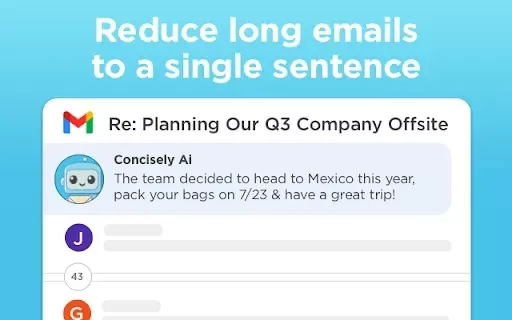
What is Concisely?Concisely is a cutting-edge Chrome extension that redefines email reading by using advanced AI to deliver one-sentence summaries of entire email threads. It allows busy professionals to capture the main idea instantly, eliminating t

What is Altsite?Altsite is a browser extension that helps users find websites similar to the one they're currently visiting. Using advanced AI technology, it analyzes website content and instantly generates a list of related sites. This tool is ideal
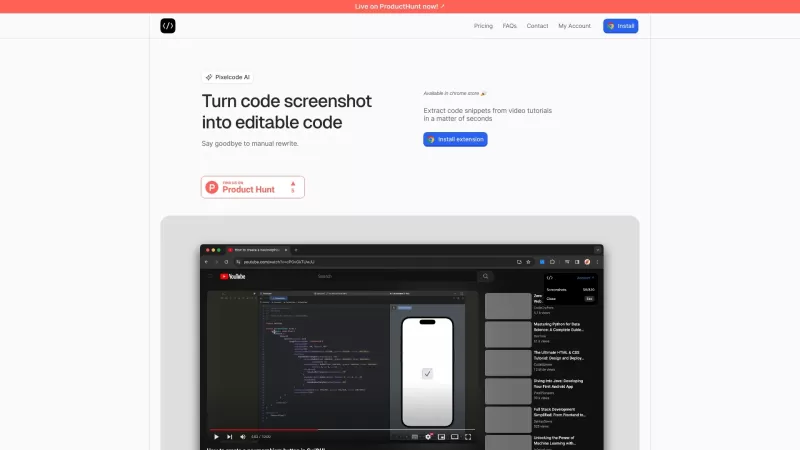
Pixelcode is a revolutionary tool that transforms screenshots of code into editable text, saving you from the tedious task of typing out code manually. Imagine snapping a picture of a code snippet and instantly having it ready to edit in your preferred co

What is Comment Generator?Comment Generator is an innovative AI tool that crafts authentic and compelling comments for Instagram and Threads. This Chrome extension uses sophisticated algorithms to automate comment writing, saving you time while prese
Family Photo Finder Product Information
What is Family Photo Finder?
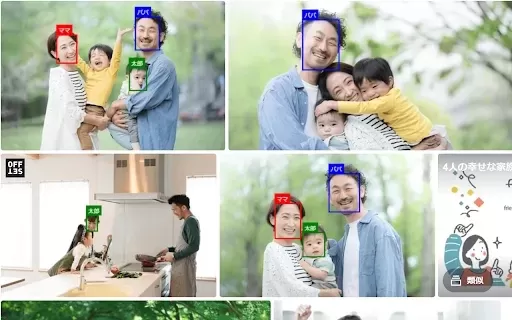
Family Photo Finder is a convenient Chrome extension designed to help you effortlessly locate and mark familiar faces in online photos. By using pre-saved photos of your family or friends, this tool instantly finds and outlines matching faces on any website you visit. This makes scanning through digital albums or group shots much faster, so you can always pick out your favorite people in an instant. It's an intuitive and indispensable aid for anyone who regularly views pictures on the web.
Who can benefit from using Family Photo Finder?
- Family members
- Photographers
- Social media users
- Event organizers
How to use the Family Photo Finder?
- Step 1: Install Family Photo Finder from the Chrome Web Store.
- Step 2: Add photos of the individuals you wish to find.
- Step 3: Visit any webpage containing photos.
- Step 4: The tool will automatically scan and highlight recognized faces.
Platform
- Chrome
Family Photo Finder's Core Features & Benefits
Core Features
- Automated face recognition
- Visual highlighting of faces
- Simple installation and usage
- Custom face gallery
Why You'll Love It
- Makes locating relatives in photos effortless
- Speeds up browsing through online albums
- Guarantees you always spot important people in web images
Family Photo Finder's Main Use Cases & Applications
- Picking out relatives in large group photos
- Exploring social media photo albums
- Arranging personal photo libraries
- Recognizing event attendees in pictures
FAQs of Family Photo Finder
How do I install Family Photo Finder?
Simply visit the Chrome Web Store and click ‘Add to Chrome’ to install Family Photo Finder.
Is Family Photo Finder free?
Yes, Family Photo Finder is completely free to use.
How do I register faces with Family Photo Finder?
Upload clear images of the people you want the extension to identify.
Does Family Photo Finder work on all websites?
Yes, it functions on any website that displays images.
Is my data safe with Family Photo Finder?
Yes, the developer states that no personal data is collected or used.
Can I update the facial images?
You can edit or replace stored face photos at any time.
Does Family Photo Finder support multiple users?
Yes, you can save facial data for several different people.
How accurate is the face detection?
The extension employs sophisticated technology for reliable and precise face matching.
Can I use Family Photo Finder for professional photography?
Absolutely, it works well for both personal and professional photo management.
Do I need an internet connection to use Family Photo Finder?
Yes, an active internet connection is necessary to browse and process online photos.
Family Photo Finder Company Information
- 240developper
Family Photo Finder Screenshot





2026 Latest Best Top-rated AI Style Transfer Tools for Creative Experiments! XIX.AI has curated a powerful, game-changing collection of must-try tools that deliver exceptional results through real-world tests and rigorous rankings. These top solutions help creatives boost productivity significantly by accelerating content creation and unlocking endless creative possibilities. Explore now to discover your perfect tool and start creating today!
 9 tools
 xix.ai

2026 Latest Best Top-Rated AI Dialogue Bubble Tools for Visual Storytelling are here on XIX.AI! This curated collection features powerful, game-changing tools that help creators boost productivity and overcome creative bottlenecks. Get a free vs paid comparison, see real-world tests, and check the latest rankings to find the must-try solutions perfect for crafting engaging visual narratives. Explore now to discover your ideal tool!
10 tools
xix.ai

2026 Latest Top-Rated Best AI Meeting Summary Tools for Clear Decision Tracking and Effortless Follow-Ups. This curated list showcases powerful, game-changing solutions that boost productivity dramatically by automating meeting notes, identifying key action items, and streamlining team coordination across all projects. Get a free vs paid comparison along with real-world tests and weekly updated rankings to help you find the perfect tool. Explore now to unlock your AI edge!
9 tools
xix.ai

2026 Latest Best Top-rated AI Data Cleaning Tools for quick fixing of missing values and duplicates. This curated list showcases powerful, game-changing solutions that boost productivity significantly. Each option has undergone rigorous real-world tests to ensure reliability. Get a free vs paid comparison and discover the must-try tool that fits your needs best. Explore now at XIX.AI to Unlock your AI edge.
11 tools
xix.ai

2026 Latest Best Top-Rated AI Creative Ideation Tools for Artists are curated by XIX.AI to help creators break through visual blocks and boost creativity instantly. These powerful game-changing tools offer real-world tests, detailed free vs paid comparison, and weekly updated rankings. Discover your perfect tool to accelerate content creation and unlock your AI edge today. Explore now!
14 tools
xix.ai

2026 Latest Best AI Beat Makers for TikTok Background Tracks, Reels Audio, and Creator Promo Music! XIX.AI has curated a top-rated list of powerful game-changing tools that go through real-world tests to deliver flawless music for every content need. You’ll find detailed free vs paid comparison data, weekly updated rankings, and must-try options to help you boost creativity and productivity. Explore now to discover your perfect tool!
11 tools
xix.ai


