


 Home
HomeEmoji Say - AI-Powered Ultimate Emoji Companion
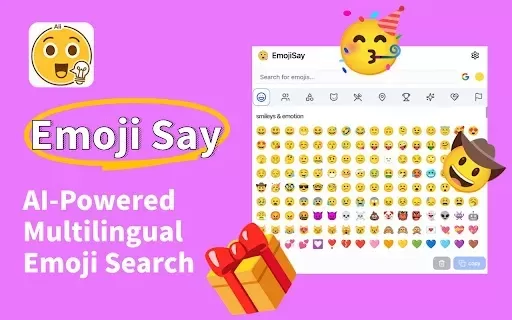
EmojiSay: AI Emoji Search for Any Browser



Helps TikTok sellers, brands, MCNs, and TAPs discover winning products and find creators.

HelpLook is an AI-powered all-in-one knowledge base tool that helps businesses quickly build knowledge bases, help centers, and...

Your AI Workspace

302.AI is an enterprise-grade AI resource platform with pay-as-you-go pricing, API access to a full range of AI models, and ready-to-use online applications.

剧火AI — AI Screenwriter + Director, a One-Person Short Drama Studio In one sentence, what is it?
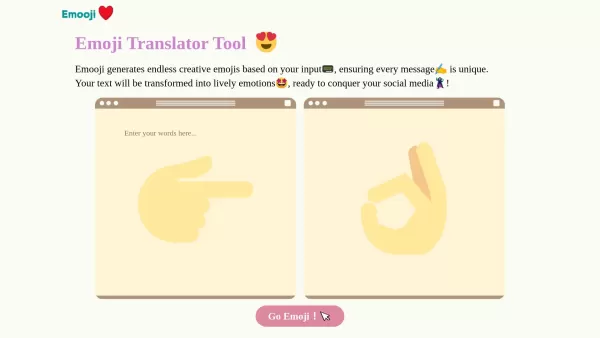
What is Emooji?Emooji lets you type in text and instantly receive a diverse collection of vibrant emojis suited to your message. It’s perfect for anyone wanting to give their words a visual flair—bringing feelings to life in a fun, engaging way. The

Ever wondered how to make your social media videos pop with those cool captions and emojis? Well, let me introduce you to AutoCaption—an AI-powered tool that's like a magic wand for your Instagram, TikTok, and YouTube videos. It's all about making your content more engaging with automatic transcript

What is SmartEdit? SmartEdit is your go-to tool for streamlining video creation with cutting-edge AI technology. Designed to captivate audiences and keep them glued to your content, SmartEdit automatically generates trendy captions, adds sleek animations,
Emoji Say - AI-Powered Ultimate Emoji Companion Product Information
What is Emoji Say – Your AI-Powered Ultimate Emoji Companion?
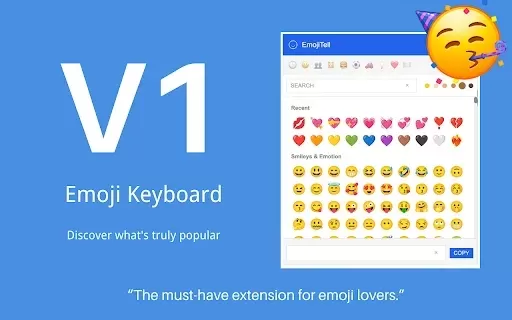
Emoji Say is an intelligent browser extension that elevates your digital conversations. It uses AI-powered search to let you find the right emoji quickly—just describe it in your own words. No need to remember complex codes. Enjoy a wide variety of emoji styles including Google, Twitter, Apple, and Facebook, plus a rich and frequently updated emoji collection featuring animated options. Personalize your panel, tweak sizes and actions, and copy or select multiple emojis at once for faster, more expressive messaging.
Who uses Emoji Say – Your AI-Powered Ultimate Emoji Companion?
- Digital communication lovers
- Active social media users
- Professionals in business settings
- Creative content developers
- Individuals learning new languages
How to use Emoji Say – Your AI-Powered Ultimate Emoji Companion
- Step 1: Install Emoji Say from the Chrome Web Store.
- Step 2: Click the Emoji Say icon in your browser toolbar.
- Step 3: Enter a phrase or keyword in any language.
- Step 4: Explore the smart, AI-generated suggestions.
- Step 5: Click your chosen emoji to copy it instantly.
- Step 6: Paste it wherever you chat or post online.
Platform
- web
- chrome
Emoji Say – AI-Powered Ultimate Emoji Companion's Core Features & Benefits
The Core Features
- AI-driven search
- Animated emojis
- Vast emoji collection
- Multiple style options
- Skin tone variations
- Customizable interface
- Instant copying
- Bulk emoji selection
- Flexible display settings
The Benefits
- Saves time
- Boosts expressiveness
- Always up to date
- Improves online conversations
- Easy-to-use design
Emoji Say – AI-Powered Ultimate Emoji Companion's Main Use Cases & Applications
- Social media updates
- Professional business chats
- Educational resources
- Personal messaging
- Blogs and creative content
FAQs of Emoji Say – AI-Powered Ultimate Emoji Companion
What is Emoji Say?
Emoji Say is a smart, multilingual emoji search tool for your browser.
How do I add Emoji Say to my browser?
Visit the Chrome Web Store to install Emoji Say.
Can I use language descriptions with Emoji Say?
Yes, you can describe any emoji in your preferred language.
Does Emoji Say offer animated emojis?
Yes, Emoji Say includes many animated emojis.
Are there different emoji styles available?
Yes—choose from Google, Twitter, Apple, and Facebook styles.
Can I customize the Emoji Say panel?
Absolutely—adjust the layout, sizes, and actions to your liking.
Is the emoji library updated regularly?
Yes, the emoji library receives frequent updates.
How can I copy and use emojis?
Click any emoji to copy it, then paste it in your app or website.
Does Emoji Say support skin tone diversity?
Yes, it offers a broad selection of skin tones.
Is Emoji Say user-friendly?
Yes, its intuitive layout makes it simple for everyone.
Emoji Say – AI-Powered Ultimate Emoji Companion Company Information
Emoji Say - AI-Powered Ultimate Emoji Companion Screenshot


2026 Latest Best Top-rated AI Stem Separation Tools Curated for Remix Production, Sampling Prep, and Karaoke Masters. These powerful game-changing tools offer real-world tests to deliver precise audio isolation, boosting productivity significantly. XIX.AI provides a weekly updated free vs paid comparison guide to help you find the must-try solution that suits your needs. Explore now to unlock your AI edge.
 8 tools
 xix.ai

2026 Latest Best AI SQL Copilots Ranked Top-Rated! XIX.AI curates a powerful game-changing collection for weekly updated real-world tests. These must-try tools help you generate accurate revenue dashboards, analyze sales funnels, and track product metrics swiftly, boosting productivity massively. Explore now to Discover your perfect tool for data-driven decision making! 238 characters
9 tools
xix.ai

2026 Latest Best Top-Rated AI Melody Writing Tools for Song Drafts! XIX.AI has curated a highly powerful game-changing collection that goes through rigorous real-world tests to deliver the best writing experience. You can find detailed free vs paid comparisons, accurate rankings, and must-try options designed to help you create stunning song drafts effortlessly and boost your creative productivity significantly. Explore now to discover your perfect tool!
8 tools
xix.ai

2026 Latest Best Top-rated AI Conversation Trainer Tools for Interview Practice are here on XIX.AI! This curated collection features powerful, game-changing tools that go through rigorous real-world tests to deliver accurate feedback. You’ll find a free vs paid comparison and detailed rankings to help you choose the must-try option that boosts your confidence and skills. Explore now to Discover your perfect tool for interview success!
12 tools
xix.ai

2026 Latest Best Top-rated AI Style Transfer Tools for Creative Experiments! XIX.AI has curated a powerful, game-changing collection of must-try tools that deliver exceptional results through real-world tests and rigorous rankings. These top solutions help creatives boost productivity significantly by accelerating content creation and unlocking endless creative possibilities. Explore now to discover your perfect tool and start creating today!
9 tools
xix.ai

2026 Latest Best Top-Rated AI Dialogue Bubble Tools for Visual Storytelling are here on XIX.AI! This curated collection features powerful, game-changing tools that help creators boost productivity and overcome creative bottlenecks. Get a free vs paid comparison, see real-world tests, and check the latest rankings to find the must-try solutions perfect for crafting engaging visual narratives. Explore now to discover your ideal tool!
10 tools
xix.ai


