


 Home
Homeedraw ai



Helps TikTok sellers, brands, MCNs, and TAPs discover winning products and find creators.

HelpLook is an AI-powered all-in-one knowledge base tool that helps businesses quickly build knowledge bases, help centers, and...

Your AI Workspace

302.AI is an enterprise-grade AI resource platform with pay-as-you-go pricing, API access to a full range of AI models, and ready-to-use online applications.

剧火AI — AI Screenwriter + Director, a One-Person Short Drama Studio In one sentence, what is it?

What is PDF Translator & Editor?PDF Translator & Editor is an all-in-one solution for translating and editing PDFs. It allows you to convert native PDFs, scanned files, and other formats like Word, Excel, PowerPoint, and images across 136 languages.

What is PDFY?PDFY.AI is an AI-powered application that allows users to interact with PDF files, websites, audio, and video content. It uses artificial intelligence to answer your questions, generate summaries, and pinpoint specific details within you
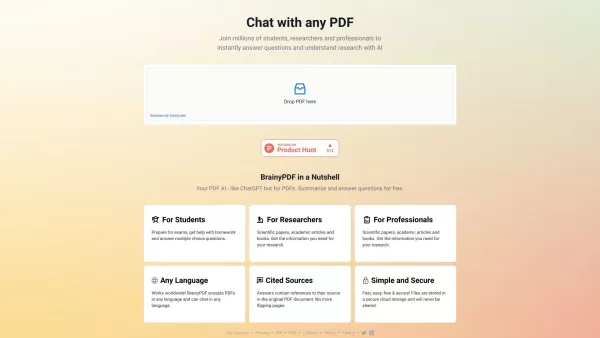
What is BrainyPDF?BrainyPDF is an AI-powered platform that enables users to ask questions and get detailed answers directly from any PDF. It includes intelligent features like context-aware text adjustments, AI-driven editing, and multi-language supp

What is IP Author?IP Author is a specialized AI software platform designed for patent drafting. It employs sophisticated artificial intelligence to streamline the entire patent creation journey, from generating claims to conducting prior art searches

What is Edutor AI?EdutorAI is an AI-driven educational platform that delivers personalized learning experiences for students. It leverages sophisticated algorithms to adapt content according to individual learning styles and needs, enhancing the effi
edraw ai Product Information
What is Edraw AI?
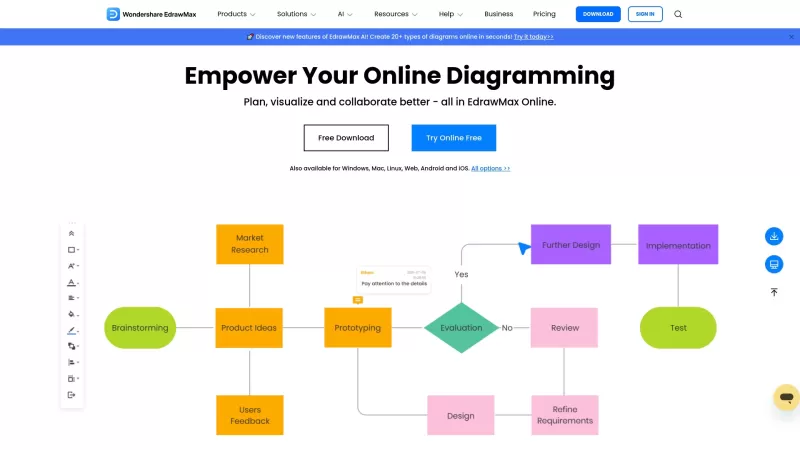
EdrawMax is a comprehensive diagramming solution that enables users to create more than 280 diagram types, such as flowcharts, mind maps, floor plans, org charts, and network diagrams. It combines an intuitive interface with a vast template library and support for multiple file formats. Built for users of all skill levels, EdrawMax facilitates easy customization, cloud-based access, and seamless collaboration. It is an essential tool for business users, educators, and anyone who needs to present information clearly and visually.
Who uses Edraw AI?
- Business Professionals
- Educators and Teachers
- Students
- Designers
- Project Managers
How to use Edraw AI
- Step 1: Launch EdrawMax and sign in to your account.
- Step 2: Select a template from the library or begin with a blank canvas.
- Step 3: Insert and customize shapes, connectors, and text elements.
- Step 4: Apply formatting tools to polish and enhance your diagram.
- Step 5: Save, export, or share your finished diagram.
Platform
- Web
- Mac
- Windows
Edraw AI's Core Features & Benefits
Core Features
- Extensive template library
- Supports 280+ diagram types
- User-friendly interface
- Cloud storage and real-time collaboration
- Customizable shapes and elements
Key Benefits
- Streamlines the diagram creation process
- Versatile for use across numerous fields
- Easy to customize and update
- Accessible across multiple platforms
- Enhances team collaboration
Main Use Cases & Applications
- Creating flowcharts
- Designing mind maps
- Drafting floor plans
- Developing organizational charts
- Mapping network diagrams
Edraw AI's Pros & Cons
Pros
Integrates AI to assist with brainstorming, planning, summarizing, and design tasks.
Enables real-time collaboration and teamwork from any location.
Offers an extensive library of 26,000 symbols and 700 professional templates.
Features a user-friendly interface that is easy for beginners to navigate.
Provides specialized tools for various professions including project management, research, engineering, marketing, consulting, education, and IT.
Ensures data security with compliance to AWS and GDPR standards.
Cons
Not optimized for mobile devices, limiting use on smartphones and tablets.
No indication of being open-source or having community-driven development.
No direct presence on major app stores or extension platforms like Google Play, Apple App Store, or Chrome Web Store.
Edraw AI Pricing
Has free plan | YES |
|---|---|
Free trial details | 7-Day Free Trial |
Pricing model | Freemium |
Is credit card required | No |
Paid from | 2.99 USD |
Has lifetime plan | No |
Billing frequency | Monthly |
Pricing Plan Details
Free Plan
0 USD
- 500 AI Tokens
- Easy drag-and-drop editor
- 100MB cloud storage
Pro Plan
6.58 USD
- 10,000 AI Tokens
- 1GB cloud storage
- Unlimited shapes, themes & pages
- Unlock all templates & symbols
- Export/Print without watermark
Unlimited Plan
8.25 USD
- Unlimited AI Tokens
- 10GB cloud storage
- Access to all features
- Advanced Team Management
- Unlimited Teams
- Unlimited Team Members
- Priority Support
Discount:
Annual subscription offers up to 62% OFF
For the latest pricing, visit: https://www.edraw.ai/pricing.html
Edraw AI FAQs
What is EdrawMax?
EdrawMax is a versatile diagramming tool that supports the creation of a wide variety of diagrams.
Is EdrawMax available on multiple platforms?
Yes, EdrawMax is accessible via web, Windows, and Mac.
Can I collaborate with my team using EdrawMax?
Yes, EdrawMax includes cloud storage and collaboration tools for team projects.
Does EdrawMax offer a free trial?
Yes, EdrawMax provides a free trial for new users to explore its features.
How many types of diagrams can I create with EdrawMax?
EdrawMax supports the creation of over 280 different diagram types.
Is EdrawMax suitable for educational purposes?
Yes, EdrawMax is popular among educators and students for projects and presentations.
Can I import and export files in EdrawMax?
Yes, EdrawMax supports importing and exporting files in various formats.
Does EdrawMax offer template diagrams?
Yes, it includes an extensive library of templates for different diagram categories.
Is EdrawMax easy to use for beginners?
Yes, its user-friendly interface makes it easy for beginners to start diagramming.
Can I save my diagrams online for access from different devices?
Yes, with cloud storage, you can save and access your diagrams from any device.
Edraw AI Company Information
- EdrawSoft
- https://www.edraw.ai
- https://www.facebook.com/edrawsoft
- https://twitter.com/Edrawsoft
- https://www.youtube.com/channel/UCCtmmOBF1yOJEWw-2dW5-PQ
- https://www.instagram.com/edrawsoft
edraw ai Screenshot



2026 Latest Top-rated AI Illustration Tools: Our curated list features the best powerfully designed tools for creating stunning editorial scenes and eye-catching cover art quickly. Each option has gone through rigorous real-world tests, offering a free vs paid comparison to help you find the perfect match for your workflow. Try these must-try solutions today to unlock your AI edge and boost your creative productivity. Explore now at XIX.AI.
 10 tools
 xix.ai

2026 Latest Top-Rated Best AI Tutors for Exam Prep are here on XIX.AI! Our curated list features powerful game-changing tools that offer free vs paid comparison, real-world tests, and weekly updated rankings. They help boost your writing efficiency, simplify complex topic learning, and unlock your academic potential. Explore now to Discover your perfect exam prep tool and Start creating today to Unlock your AI edge!
10 tools
xix.ai

2026 Latest Best Top-Rated AI Budget Planning Tools for Personal Money Management are here on XIX.AI! This curated collection features powerful, game-changing solutions that help you conduct real-world tests, understand spending habits, and create personalized plans to boost productivity. Enjoy a free vs paid comparison along with detailed rankings. Must-try tools designed to simplify money management and unlock your AI edge. Explore now!
11 tools
xix.ai

2026 Latest Best Top-Rated AI Sleep Tracking Assistants curated for ultimate recovery. This fully updated weekly guide features powerful tools that deliver real-world tests, free vs paid comparison, and detailed rankings to help you find the must-try solution that boosts sleep quality and supports better bedtime habits. Explore now at XIX.AI to Unlock your AI edge.
10 tools
xix.ai

2026 Latest Best Top-Rated AI SQL Copilots for Product and Revenue Analytics! XIX.AI has curated a powerful, game-changing collection of must-try tools that undergo real-world tests through weekly updated rankings. These tools help users boost productivity significantly by accelerating data analysis, streamlining complex queries, and generating accurate insights to drive smarter business decisions. Explore now to Discover your perfect tool for unlocking your AI edge!
14 tools
xix.ai

2026 Latest Best Top-Rated AI Homework Helpers That Teach Core Concepts Not Just Answers Powerful Tools for Students Must-Try Curated List Weekly Updated Free vs Paid Comparison Real-World Tests Accurate Rankings to Help You Unlock Your Full Learning Potential Explore now to Discover your perfect tool for smarter studying.
10 tools
xix.ai


