


 Home
Homedecisions.com



Helps TikTok sellers, brands, MCNs, and TAPs discover winning products and find creators.

HelpLook is an AI-powered all-in-one knowledge base tool that helps businesses quickly build knowledge bases, help centers, and...

Your AI Workspace

302.AI is an enterprise-grade AI resource platform with pay-as-you-go pricing, API access to a full range of AI models, and ready-to-use online applications.

剧火AI — AI Screenwriter + Director, a One-Person Short Drama Studio In one sentence, what is it?

What is AI Excel Bot?AI Excel Bot uses advanced AI algorithms to help you build complex Excel and Google Sheets formulas in seconds. By leveraging natural language processing, it makes writing, editing, and understanding formulas much easier. Whether

What is GPT2Markdown?GPT2Markdown is a Chrome extension that streamlines the process of exporting your ChatGPT conversations into Markdown format. With a single click, it allows you to download your chat history as a Markdown (.md) file directly to y

What is Sakura AI?Sakura AI harnesses cutting-edge artificial intelligence to provide a conversational interface that helps with a wide range of tasks, from managing schedules to answering questions. It uses advanced voice recognition and understandi

AI Chatbot Hub is your go-to no-code platform for crafting and deploying AI chatbots that streamline customer interactions and boost internal operations. No need to be a coding whiz—just dive in and start creating chatbots that can capture leads, schedule

Ever wished for a trusty sidekick to boost your productivity while you surf the web? Well, say hello to the MaxAI AI Chrome extension! This little gem is your go-to for real-time suggestions and a whole suite of AI tools that can transform your online exp
decisions.com Product Information
What Is Decisions.com?
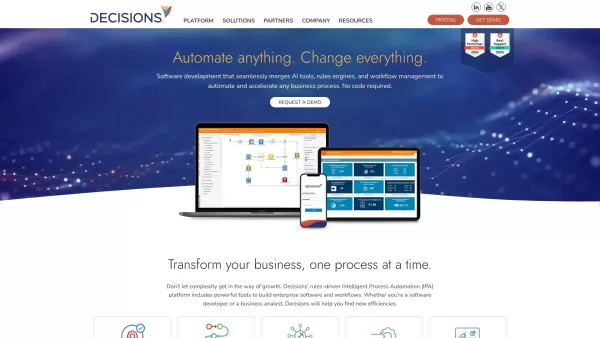
Decisions is a comprehensive no-code platform that enables users to build, automate, and optimize business processes. It integrates workflow automation, business rules, and data handling into a single, user-friendly solution. Designed for various industries, Decisions supports rapid application development, process improvement, and seamless integration across multiple platforms. Its intuitive drag-and-drop interface removes the need for coding, helping organizations boost productivity, maintain compliance, and drive innovation effortlessly.
Who Uses Decisions.com?
- Business Process Managers
- IT Departments
- Financial Institutions
- Healthcare Providers
- Manufacturers
- Government Agencies
How to Use Decisions.com
- Step 1: Sign up and log in to the Decisions platform.
- Step 2: Use the drag-and-drop interface to design workflows and rules.
- Step 3: Integrate existing applications and data into your workflows.
- Step 4: Test and validate automated processes.
- Step 5: Deploy and monitor performance metrics.
Platform
- Web
- Chrome
Decisions.com's Core Features and Benefits
Core Features
- No-Code Workflow Design
- Business Rules Engine
- Data Handling and Analytics
- Integration Capabilities
- Real-Time Monitoring
Benefits
- Rapid Application Development
- Improved Efficiency
- Enhanced Compliance
- Scalability
- Increased Productivity
Decisions.com's Main Use Cases and Applications
- Customer Onboarding
- Claims Processing
- Regulatory Compliance
- Supply Chain Management
- Loan Origination
FAQs About Decisions.com
What Is Decisions?
Decisions is an intelligent process automation platform designed to streamline and automate business processes and applications.
Is Coding Knowledge Required to Use Decisions?
No, Decisions is a no-code platform that allows users to automate and optimize processes without any coding knowledge.
What Industries Can Benefit from Decisions?
Decisions is beneficial for various industries including finance, healthcare, manufacturing, and government.
How Do I Get Started with Decisions?
You can get started by signing up on the Decisions platform, using the drag-and-drop interface to design workflows, and integrating your existing applications and data.
What Platforms Does Decisions Support?
Decisions supports web platforms and can be used on Chrome, Edge, Firefox, and Safari browsers.
Can I Integrate Decisions with Other Applications?
Yes, Decisions offers robust integration capabilities to connect with various applications and data sources.
Is There a Free Trial Available for Decisions?
Information about a free trial can be obtained from the Decisions website or by contacting their sales team.
What Kind of Customer Support Does Decisions Offer?
Decisions provides extensive customer support including installation help and technical assistance.
What Are the Main Benefits of Using Decisions?
Key benefits include rapid application development, improved efficiency, enhanced compliance, scalability, and increased productivity.
Where Can I Find More Information About Decisions' Features?
You can find detailed information about Decisions' features on their official website and documentation pages.
Decisions.com Company Information
- Decisions
- https://decisions.com
- https://www.facebook.com/decisionsplatform/
- https://www.youtube.com/c/Decisions
- https://www.linkedin.com/company/decisions
decisions.com Screenshot

2026 Latest Top-rated AI Illustration Tools: Our curated list features the best powerfully designed tools for creating stunning editorial scenes and eye-catching cover art quickly. Each option has gone through rigorous real-world tests, offering a free vs paid comparison to help you find the perfect match for your workflow. Try these must-try solutions today to unlock your AI edge and boost your creative productivity. Explore now at XIX.AI.
 10 tools
 xix.ai

2026 Latest Top-Rated Best AI Tutors for Exam Prep are here on XIX.AI! Our curated list features powerful game-changing tools that offer free vs paid comparison, real-world tests, and weekly updated rankings. They help boost your writing efficiency, simplify complex topic learning, and unlock your academic potential. Explore now to Discover your perfect exam prep tool and Start creating today to Unlock your AI edge!
10 tools
xix.ai

2026 Latest Best Top-Rated AI Budget Planning Tools for Personal Money Management are here on XIX.AI! This curated collection features powerful, game-changing solutions that help you conduct real-world tests, understand spending habits, and create personalized plans to boost productivity. Enjoy a free vs paid comparison along with detailed rankings. Must-try tools designed to simplify money management and unlock your AI edge. Explore now!
11 tools
xix.ai

2026 Latest Best Top-Rated AI Sleep Tracking Assistants curated for ultimate recovery. This fully updated weekly guide features powerful tools that deliver real-world tests, free vs paid comparison, and detailed rankings to help you find the must-try solution that boosts sleep quality and supports better bedtime habits. Explore now at XIX.AI to Unlock your AI edge.
10 tools
xix.ai

2026 Latest Best Top-Rated AI SQL Copilots for Product and Revenue Analytics! XIX.AI has curated a powerful, game-changing collection of must-try tools that undergo real-world tests through weekly updated rankings. These tools help users boost productivity significantly by accelerating data analysis, streamlining complex queries, and generating accurate insights to drive smarter business decisions. Explore now to Discover your perfect tool for unlocking your AI edge!
14 tools
xix.ai

2026 Latest Best Top-Rated AI Homework Helpers That Teach Core Concepts Not Just Answers Powerful Tools for Students Must-Try Curated List Weekly Updated Free vs Paid Comparison Real-World Tests Accurate Rankings to Help You Unlock Your Full Learning Potential Explore now to Discover your perfect tool for smarter studying.
10 tools
xix.ai


