


 Home
HomeClipZap AI



Helps TikTok sellers, brands, MCNs, and TAPs discover winning products and find creators.

HelpLook is an AI-powered all-in-one knowledge base tool that helps businesses quickly build knowledge bases, help centers, and...

Your AI Workspace

302.AI is an enterprise-grade AI resource platform with pay-as-you-go pricing, API access to a full range of AI models, and ready-to-use online applications.

剧火AI — AI Screenwriter + Director, a One-Person Short Drama Studio In one sentence, what is it?

Ever wondered what lies beneath the fabric? Well, Undress AI promises to give you a peek with its deepnude technology. It's like having a digital artist at your fingertips, ready to create those "what if" scenarios without any of the hassle. This tool isn

What is Celebrity AI?CelebrityAI revolutionizes digital content creation with its cutting-edge artificial intelligence platform that generates lifelike celebrity videos and voice messages. Using sophisticated technologies including deep neural networ

If you're diving into the world of AI and need a tool to streamline your interactions with models like ChatGPT, Claude, and Gemini, let me introduce you to TaoPrompt. This isn't just another AI tool; it's a professional prompt generator that's designed to
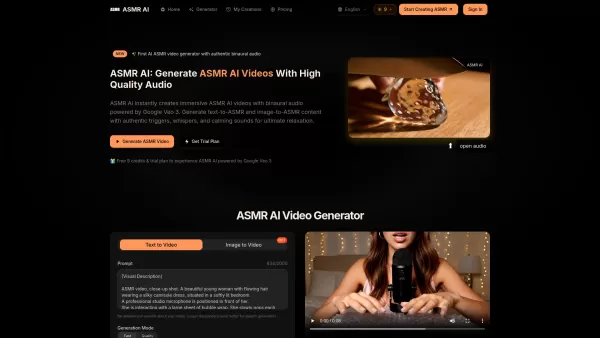
What is ASMR AI?ASMR AI represents the cutting edge of digital relaxation technology - an AI-driven platform specializing in hyper-realistic ASMR video generation. Harnessing the power of Google's Veo 3 technology, it crafts immersive binaural audio

Ever wondered what EwolveAI is all about? Well, let me break it down for you. EwolveAI isn't just another AI tool; it's your all-in-one AI solution that's here to revolutionize the way you handle content. Whether you're a writer, a marketer, or just someo
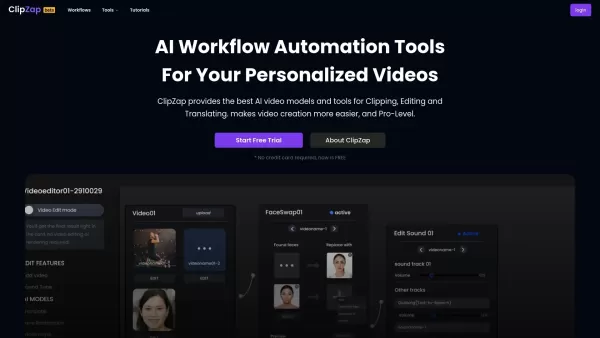
ClipZap AI Product Information
What is ClipZap AI?
ClipZap is an AI-powered platform that makes video clipping, editing, and translation simple. It harnesses cutting-edge video and image models to help users create personalized, professional-quality videos quickly. Key features include AI face-swapping, multi-language video translation, and rapid clip generation. Built for both individual creators and businesses, ClipZap offers highly adaptable workflows for marketing, social media, and professional video projects.
Who uses ClipZap AI?
- Content Creators
- Marketing Professionals
- Social Media Managers
- Businesses
- Video Editors
- Hobbyists
How to use ClipZap AI?
- Step 1: Sign up and log in to your ClipZap account.
- Step 2: Upload your video footage or choose from the gallery.
- Step 3: Select an AI tool like face-swapping or translation.
- Step 4: Customize your video using the available models and features.
- Step 5: Generate and preview your video.
- Step 6: Download the final video or share it directly on social media.
Platform
- Web
ClipZap AI's Core Features & Benefits
Core Features
- AI Video Clipping
- AI Video Editing
- AI Translation
- AI Face-Swapping
- Customizable Workflows
Key Benefits
- Effortless Video Creation
- Professional Quality
- High Customization
- Fast Processing
- Supports Multiple Languages
ClipZap AI's Main Use Cases & Applications
- Marketing Campaigns
- Social Media Content
- Corporate Videos
- Personalized Memes and Spoofs
- Event Invitations
- YouTube Clips
ClipZap AI's Pros & Cons
Pros
An all-in-one platform integrating over 20 AI models for video, image, and audio creation.
An easy-to-use workflow editor that requires no specialized skills.
Enables fast, high-quality AI-generated videos and images with extensive customization.
Offers workflow automation suitable for both individuals and businesses.
Trusted by more than 250,000 users globally with strong customer feedback.
Allows commercial use of generated content in line with its guidelines.
Includes numerous workflow templates and integration options.
Cons
No open-source code or public GitHub repository is available.
Access to advanced features and faster generation requires a paid subscription.
Limited information on app store or browser extension availability.
Some highly customized workflows may have a learning curve.
ClipZap AI's Pricing
Has free plan | YES |
|---|---|
Free trial details | The free plan includes 100 Credits per month with limited features. |
Pricing model | Freemium |
Is credit card required | No |
Paid from | 24 USD |
Has lifetime plan | YES |
Billing frequency | Monthly |
Details of Pricing Plan
Free
0 USD
- 100 Free Credits
- Approximately 2 videos, 10 images, and unlimited text generations
- Unlimited tasks & video durations
- Access to instant tools like FaceSwapper, Translator, AI Video Generator, and AI Image Generator
- Includes ClipZap Watermark
Starter
24 USD
- 1800 Credits per month
- Approximately 40 videos, 180 images, and unlimited text generations
- Suitable tasks & video durations
- No Watermark
- Access to 15+ powerful models including Video Model: VEO2; Kling 2.0; Wan; Image Model: GPT4-Image; Imagen4; Edit: Image Edit & Virtual TryOn
Professional
39 USD
- 5800 Credits per month
- Approximately 120 videos, 580 images, and unlimited text generations
- Unlimited tasks & longer video durations
- No Watermark
- More advanced models such as Google VEO3, Kling 2.1, MiniMax HaiLuo 02
Ultra
89 USD
- 12000 Credits per month
- Approximately 240 videos, 1060 images, and unlimited text generations
- Unlimited tasks & longer video durations
- Generation speeds up to 10x faster than the Professional plan
- No Watermark
- Access to the most advanced models including Google VEO3, Kling 2.1, MiniMax HaiLuo 02
Discount:
7-day Money Back Guarantee. No specific discount codes are mentioned.
For the latest prices, please visit: https://app.clipzap.ai/workbench/pricing
FAQs about ClipZap AI
Is ClipZap free to use?
Yes, ClipZap offers a free version with watermarks. Paid plans are available for additional features and watermark removal.
What AI models does ClipZap support?
ClipZap supports over 20 leading AI visual models for tasks like face-swapping, translation, and more.
Can ClipZap be used for commercial purposes?
Yes, content generated with ClipZap can be used for commercial video production.
How can I remove watermarks from my videos?
To remove watermarks, you need to subscribe to one of ClipZap's paid plans.
What video formats does ClipZap support?
ClipZap supports a wide range of common video formats for both upload and download.
Is ClipZap available on mobile devices?
Currently, ClipZap is accessible via web browsers on desktop and mobile.
How fast is the video generation process?
ClipZap provides rapid video generation, significantly faster than many traditional editing tools.
Do you offer API access for ClipZap?
Yes, API access is available for members to integrate ClipZap's models into their own workflows.
Can I create personalized video workflows with ClipZap?
Yes, ClipZap allows you to build and customize workflows tailored to your specific video production needs.
Does ClipZap provide support for video enhancement?
Yes, ClipZap includes AI-powered tools for enhancing video quality.
ClipZap AI Company Information
- JUNOVERSE TECHNOLOGY PTE. LTD.
- https://www.clipzap.ai
ClipZap AI Screenshot
2026 Latest Top-Rated Best AI Paper Reading Tools for Researchers! This curated list offers powerful game-changing solutions to quickly extract key methods, results, and limitations from complex academic papers. XIX.AI provides weekly updated free vs paid comparison data along with real-world tests across diverse research fields. Discover your perfect tool to boost productivity and unlock your AI edge today. Explore now!
 8 tools
 xix.ai
2026 Latest Best Top-rated AI Vocal Demo Tools for Track Prototypes are here on XIX.AI! This curated list features powerful, game-changing tools that go through real-world tests to ensure top performance. You’ll find a free vs paid comparison, detailed rankings, and must-try options perfect for boosting creative efficiency and helping you unlock your AI edge. Explore now to discover your perfect tool!
10 tools
xix.ai

2026 Latest Best Top-rated AI API Mocking Tools for Frontend-Backend Collaboration are here on XIX.AI! This curated list features powerful, game-changing solutions that help teams streamline workflows, boost productivity, and create high-quality apps faster through real-world tests and strict rankings. Get a free vs paid comparison to find the must-try option that suits your needs. Explore now to unlock your AI edge!
12 tools
xix.ai
2026 Latest Best Top-rated Midjourney Style Reference Tools for Character Concepts, Posters, and Ad Visuals! XIX.AI has curated a powerful game-changing collection that undergoes weekly updated real-world tests. You can find detailed free vs paid comparison insights and reliable rankings to help you pick the must-try option that boosts your creativity and speeds up workflow significantly. Explore now to Discover your perfect tool for all your visual design needs.
11 tools
xix.ai
2026 Latest Best Top-rated AI Vocal Generation Tools for Creating Demo Vocals and Harmony Layers are here on XIX.AI. This curated collection features powerful, game-changing solutions that have passed rigorous real-world tests. We provide a weekly updated free vs paid comparison along with detailed rankings to help you find the perfect tool for boosting your creativity and productivity. Explore now to Unlock your AI edge.
12 tools
xix.ai
2026 Latest Best Top-rated AI Focus Assistants Curated to Slash Context Switching and Keep You Productive All Day. These powerful tools undergo rigorous real-world tests, featuring a free vs paid comparison along with weekly updated rankings. Discover your perfect tool to boost writing efficiency, unlock creative ideas, and stay focused without distraction. Explore now at XIX.AI to Unlock your AI edge.
9 tools
xix.ai


