


 Home
HomeChatGPT Images Exporter



Helps TikTok sellers, brands, MCNs, and TAPs discover winning products and find creators.

HelpLook is an AI-powered all-in-one knowledge base tool that helps businesses quickly build knowledge bases, help centers, and...

Your AI Workspace

302.AI is an enterprise-grade AI resource platform with pay-as-you-go pricing, API access to a full range of AI models, and ready-to-use online applications.

剧火AI — AI Screenwriter + Director, a One-Person Short Drama Studio In one sentence, what is it?

What is Undressbaby AI?Undressbaby is a cutting-edge, AI-driven platform that lets users creatively alter their photos and videos. From swapping faces to trying on virtual outfits, it offers a simple yet powerful solution. Just upload your media, and

What is GPT2Markdown?GPT2Markdown is a Chrome extension that streamlines the process of exporting your ChatGPT conversations into Markdown format. With a single click, it allows you to download your chat history as a Markdown (.md) file directly to y

What is Lyvia AI?Lyvia is a powerful platform featuring an uncensored AI image generator and versatile face swap tools for both photos and videos. Accessible on your mobile, tablet, or computer, it’s designed to evolve with you through regular update
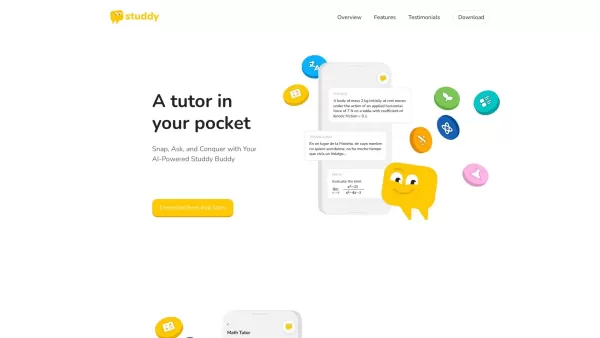
What is Studdy?Studdy AI is an intelligent tutoring app that helps students complete homework, grasp difficult subjects, and improve their grades. Leveraging advanced AI, it offers immediate support for math, science, reading, and other areas. The ap

What is xPage?xPage leverages AI to simplify the creation of professional eCommerce landing pages. It provides a wide selection of expert-designed templates that you can tailor to your brand. After choosing your template, the AI engine produces a dyn
ChatGPT Images Exporter Product Information
What Is the ChatGPT Images Exporter?
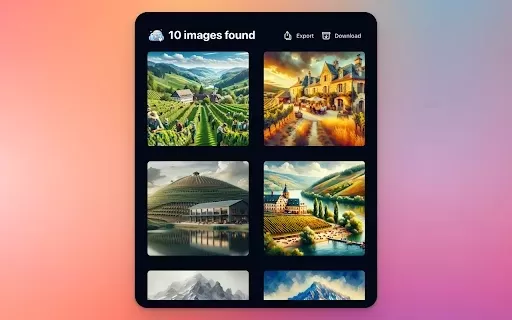
The ChatGPT Images Exporter is a Chrome extension built to simplify downloading and exporting DALL·E 3 images generated within ChatGPT. Users can save these images directly to their local devices or popular cloud services like Notion, Airtable, Google Drive, and Dropbox. This functionality makes it easy to consolidate and manage visuals for projects, presentations, or personal collections. The extension streamlines the process, ensuring users avoid unnecessary complications when accessing their AI-generated images.
Who Uses the ChatGPT Images Exporter?
- Designers
- Content Creators
- Marketers
- Educators
- Students
How to Use the ChatGPT Images Exporter
- Step 1: Install the ChatGPT Images Exporter extension from the Chrome Web Store.
- Step 2: Open ChatGPT and generate a DALL·E 3 image.
- Step 3: Click the exporter icon to start the export process.
- Step 4: Choose your desired storage location (local or cloud service).
- Step 5: Confirm and save the image.
Platform
- Chrome
ChatGPT Images Exporter's Core Features & Benefits
Core Features
- Direct Export of DALL·E 3 Images
- Supports Multiple Storage Options
- User-Friendly Interface
Key Benefits
- Efficient Image Management
- Time-Saving Workflow
- High-Quality Images in Various Formats
Main Use Cases & Applications for ChatGPT Images Exporter
- Downloading Images for Presentations
- Storing AI-Generated Content for Client Projects
- Creating a Portfolio of AI Art
FAQs of ChatGPT Images Exporter
Can I Export Images in Different Formats?
Yes, you can export images in standard formats such as PNG and JPEG.
Is This Extension Free?
Yes, the ChatGPT Images Exporter is available for free on the Chrome Web Store.
Do I Need an Account to Use This Extension?
No, you can use it without creating an account.
Can I Export Images Directly to Google Drive?
Yes, the extension supports exporting directly to Google Drive.
Will It Work on Other Browsers?
Currently, it is designed specifically for Google Chrome.
What If I Encounter a Bug?
You can report issues through the extension's support options.
Can I Use This for Commercial Projects?
Yes, the images can be used for commercial purposes as per the usage rights.
How Do I Uninstall the Extension?
You can uninstall it from the Chrome extensions page in your browser.
Can I Access My Images Later?
Yes, all exported images can be accessed from the chosen storage service.
Is There a Limit on the Number of Images I Can Export?
No, there is no specified limit on the number of images.
ChatGPT Images Exporter Company Information
Website:
https://www.inspicify.comCompany Name:
InspicifySupport Email:
Facebook:
NAX(Twitter):
NAYouTube:
NAInstagram:
NATiktok:
NALinkedIn:
NA
ChatGPT Images Exporter Screenshot

2026 Latest Best Top-rated AI Multilingual Voice Tools for Global Content are here on XIX.AI! This curated list features powerful, game-changing options that deliver flawless speech in dozens of languages, perfect for creating high-quality content fast and boosting writing efficiency across global markets. Get a free vs paid comparison along with real-world tests and our updated weekly rankings to help you find the must-try tool that suits your needs. Explore now to unlock your AI edge!
 10 tools
 xix.ai

2026 Latest Best Top-rated AI Persona Builders help you turn valuable CRM data into actionable customer profiles quickly. This curated list showcases powerful, game-changing tools that go through real-world tests to deliver accurate insights. Get a free vs paid comparison and discover which option suits your needs best. XIX.AI is also included in this must-try selection. Explore now to Unlock your AI edge!
9 tools
xix.ai

2026 Latest Best Top-rated AI SQL Analysis Tools for Business Intelligence Teams! XIX.AI has curated a powerful, game-changing collection that goes through rigorous real-world tests. You’ll find a free vs paid comparison, detailed rankings, and in-depth insights to help you boost productivity significantly. Must-try options are available to unlock your AI edge. Explore now!
11 tools
xix.ai
2026 Latest Best Top-rated AI Batch Background Removal Tools for Catalog Images are curated by XIX.AI for quick, powerful removal of backgrounds from multiple images at once. These tools offer real-world tests and free vs paid comparison to help you find the most efficient solution that boosts your productivity significantly. Must-try options are regularly updated weekly. Explore now to Discover your perfect tool and Unlock your AI edge.
14 tools
xix.ai
2026 Latest Best Top-Rated AI Academic Writing Helpers for Students & Researchers! XIX.AI has curated a powerful, game-changing collection of tools that undergo real-world tests to boost writing efficiency significantly. You’ll find detailed free vs paid comparison, weekly updated rankings, and insights on how these tools can help refine abstracts, structure papers, and overcome common academic writing challenges. Must-try for anyone aiming to unlock their AI edge in academic work. Explore now!
8 tools
xix.ai

2026 Latest Best Top-rated AI Comic Generators ranked by actual user performance. This curated collection features powerful game-changing tools that help creators turn unique story ideas into polished illustrated panels fast, boosting productivity significantly. XIX.AI offers a detailed free vs paid comparison along with real-world tests to guide your choice. Explore now and Discover your perfect tool to unlock your AI edge in comic creation.
15 tools
xix.ai


