


 Home
HomeBookly
Bookly: AI Bookmark Summaries | Chrome Extension



Helps TikTok sellers, brands, MCNs, and TAPs discover winning products and find creators.

HelpLook is an AI-powered all-in-one knowledge base tool that helps businesses quickly build knowledge bases, help centers, and...

Your AI Workspace

302.AI is an enterprise-grade AI resource platform with pay-as-you-go pricing, API access to a full range of AI models, and ready-to-use online applications.

剧火AI — AI Screenwriter + Director, a One-Person Short Drama Studio In one sentence, what is it?

Ever wished for a trusty sidekick to help you navigate the digital world with ease? Enter Sider, your personal AI companion designed to seamlessly blend into your daily routine. Starting off as a handy Chrome/Edge extension, Sider transforms your browsing
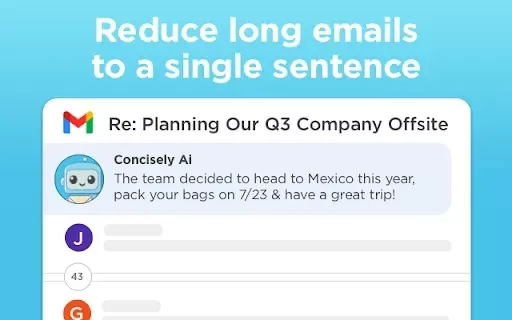
What is Concisely?Concisely is a cutting-edge Chrome extension that redefines email reading by using advanced AI to deliver one-sentence summaries of entire email threads. It allows busy professionals to capture the main idea instantly, eliminating t
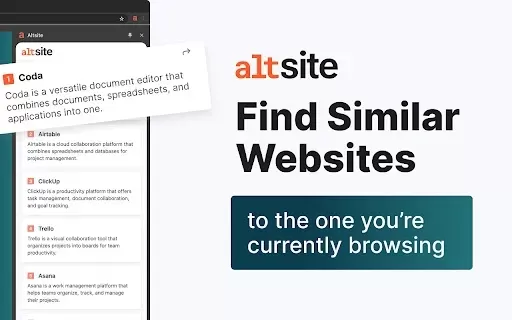
What is Altsite?Altsite is a browser extension that helps users find websites similar to the one they're currently visiting. Using advanced AI technology, it analyzes website content and instantly generates a list of related sites. This tool is ideal

What is SciSpace?SciSpace is your go-to AI-powered buddy for diving into the world of scientific research papers. It's like having a super-smart assistant that helps you not just read but really understand and analyze those dense academic texts. With SciSpace, you can highlight bits of text, ask que
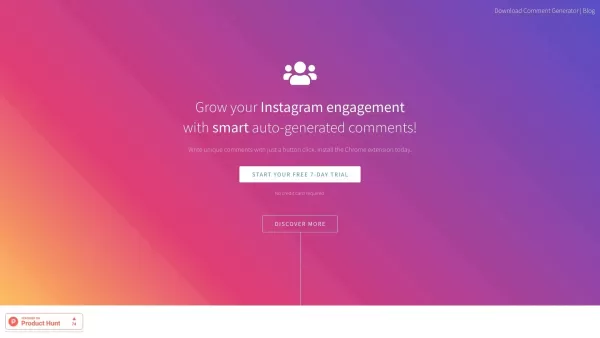
What is Comment Generator?Comment Generator is an innovative AI tool that crafts authentic and compelling comments for Instagram and Threads. This Chrome extension uses sophisticated algorithms to automate comment writing, saving you time while prese
Bookly Product Information
What is Bookly?
Bookly is a handy Chrome extension that helps you manage your bookmarks more effectively using AI-powered summaries. Whenever you bookmark a webpage, Bookly automatically creates a summary for it, no matter which folder you place it in. This makes organizing and retrieving your bookmarks a breeze. Simply click the Bookly icon in your toolbar, type your search into the query box, and instantly locate any saved pages you need. Ideal for anyone looking to simplify their bookmarking process and enhance their web browsing workflow.
Who will use Bookly?
- Students
- Researchers
- Office professionals
- Regular internet users
How to use Bookly?
- Step 1: Install the Bookly extension from the Chrome Web Store.
- Step 2: Click the Bookly icon located in your browser's toolbar.
- Step 3: Save webpages as bookmarks as you normally would.
- Step 4: Bookly will automatically create summaries for each saved bookmark.
- Step 5: Enter keywords in the search bar to quickly find relevant bookmarks.
Platform
- Chrome
Bookly's Core Features & Benefits
The Core Features
- AI-generated bookmark summaries
- Effortless bookmark organization
- Fast search capabilities
The Benefits
- Reduces time spent organizing bookmarks
- Speeds up retrieval of saved web content
- Simplifies and enhances your browsing experience
Bookly's Main Use Cases & Applications
- Organizing academic research
- Managing work-related resources
- Tracking useful articles and blogs
- Saving interesting web content for future use
FAQs of Bookly
How do I install Bookly?
To install Bookly, visit the Chrome Web Store and click the 'Add to Chrome' button.
How does Bookly generate summaries?
Bookly utilizes artificial intelligence to automatically produce summaries for every bookmark you save.
Can I use Bookly with bookmarks in any folder?
Yes, Bookly works with bookmarks in any folder and generates summaries for all of them.
Is there a limit to the number of bookmarks Bookly can manage?
Bookly does not impose a specific limit on the number of bookmarks you can save and manage.
How do I search for my bookmarks using Bookly?
Click the Bookly icon, type your search term into the query box, and Bookly will display relevant results.
Is Bookly free to use?
Yes, Bookly is a free extension available on the Chrome Web Store.
Does Bookly collect or use my data?
The developer states that Bookly does not collect or utilize user data.
What languages is Bookly available in?
Bookly is currently available in Simplified Chinese.
How do I report an issue with Bookly?
To report a problem, please email the developer at [email protected].
Is there customer support for Bookly?
For support inquiries, contact the developer via email at [email protected].
Bookly Company Information
- Bookly Pro
- https://bookly.pro/
Bookly Screenshot



2026 Latest Top-rated AI Illustration Tools: Our curated list features the best powerfully designed tools for creating stunning editorial scenes and eye-catching cover art quickly. Each option has gone through rigorous real-world tests, offering a free vs paid comparison to help you find the perfect match for your workflow. Try these must-try solutions today to unlock your AI edge and boost your creative productivity. Explore now at XIX.AI.
 10 tools
 xix.ai

2026 Latest Top-Rated Best AI Tutors for Exam Prep are here on XIX.AI! Our curated list features powerful game-changing tools that offer free vs paid comparison, real-world tests, and weekly updated rankings. They help boost your writing efficiency, simplify complex topic learning, and unlock your academic potential. Explore now to Discover your perfect exam prep tool and Start creating today to Unlock your AI edge!
10 tools
xix.ai

2026 Latest Best Top-Rated AI Budget Planning Tools for Personal Money Management are here on XIX.AI! This curated collection features powerful, game-changing solutions that help you conduct real-world tests, understand spending habits, and create personalized plans to boost productivity. Enjoy a free vs paid comparison along with detailed rankings. Must-try tools designed to simplify money management and unlock your AI edge. Explore now!
11 tools
xix.ai

2026 Latest Best Top-Rated AI Sleep Tracking Assistants curated for ultimate recovery. This fully updated weekly guide features powerful tools that deliver real-world tests, free vs paid comparison, and detailed rankings to help you find the must-try solution that boosts sleep quality and supports better bedtime habits. Explore now at XIX.AI to Unlock your AI edge.
10 tools
xix.ai

2026 Latest Best Top-Rated AI SQL Copilots for Product and Revenue Analytics! XIX.AI has curated a powerful, game-changing collection of must-try tools that undergo real-world tests through weekly updated rankings. These tools help users boost productivity significantly by accelerating data analysis, streamlining complex queries, and generating accurate insights to drive smarter business decisions. Explore now to Discover your perfect tool for unlocking your AI edge!
14 tools
xix.ai

2026 Latest Best Top-Rated AI Homework Helpers That Teach Core Concepts Not Just Answers Powerful Tools for Students Must-Try Curated List Weekly Updated Free vs Paid Comparison Real-World Tests Accurate Rankings to Help You Unlock Your Full Learning Potential Explore now to Discover your perfect tool for smarter studying.
10 tools
xix.ai


Bookly is a total game-changer for my bookmark chaos! The auto-summaries save me so much time when I'm digging through old links. Just wish it worked on mobile too. 🙌📑


