


 Heim
HeimCalifornia Markup
AI-gesteuerter HTML-Code-Generator - California Markup


California Markup Produktinformationen
What Exactly is California Markup?
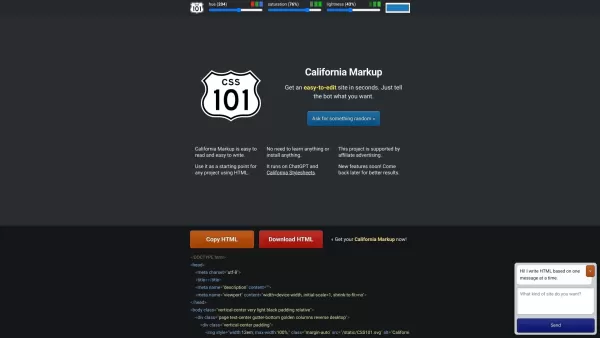
Ever wished you could just describe what you want on a webpage and—poof!—get clean, ready-to-use HTML code? That's California Markup in a nutshell. It's an AI-powered tool that takes your ideas and spits out perfectly formatted HTML, saving you from the headache of writing every single tag manually. Think of it as your personal coding assistant that speaks fluent HTML.
Getting Started with California Markup
Using this tool couldn't be simpler. Just tell it what you need—whether that's a contact form, image gallery, or entire page layout—and watch as it generates clean, readable code in seconds. No installations, no steep learning curves. Just copy the code, paste it into your project, and tweak as needed. It's like having a cheat code for web development.
Why You'll Love These Features
- AI-Powered Magic: Gets smarter with every use, delivering more accurate code over time
- Beginner-Friendly: Outputs code that's clean and easy to understand, even if you're new to HTML
- Zero Setup: Works right in your browser—no downloads or installations needed
- Powered by Cutting-Edge Tech: Leverages ChatGPT and California Stylesheets under the hood
Who Should Be Using This?
Whether you're a seasoned developer looking to speed up your workflow or a complete newbie dipping your toes into web development, California Markup has your back. It's perfect for:
- Kicking off new web projects with professional-grade starter code
- Learning HTML by studying well-structured examples
- Rapid prototyping when you need to visualize ideas fast
Frequently Asked Questions
- Is there a limit to how much code I can generate?
- Currently no hard limits—generate to your heart's content!
- How accurate is the generated code?
- The AI gets better with each use, but we always recommend reviewing the output.
- Can I use this for commercial projects?
- Absolutely! The code is yours to use however you need.
- What browsers are supported?
- It works great on all modern browsers—Chrome, Firefox, Safari, and Edge.
California Markup Screenshot



Entdecken Sie die neuesten, hochbewerteten KI-Tools von 2026 für den automatisierten Unit-Testing-Prozess. Unsere sorgfältig ausgewählten Lösungen bieten leistungsstarke und bahnbrechende Funktionen, um sofort Jest-, PyTest- und JUnit-Testfälle zu generieren. Vergleichen Sie kostenlose und kostenpflichtige Optionen anhand von tatsächlichen Tests sowie wöchentlich aktualisierten Rankings auf XIX.AI. Entfalten Sie Ihr KI-Potenzial und steigern Sie noch heute die Produktivität Ihrer Entwicklungstätigkeit.
 10 Tools
 xix.ai

Entdecken Sie bei XIX.AI die besten KI-Tools zur Datenvisualisierung für 2026. Unsere sorgfältig zusammengestellte Auswahl der besten Tools hilft Ihnen dabei, leistungsstarke, interaktive BI-Dashboards sofort aus Rohdaten automatisch zu erstellen. Vergleichen Sie kostenlose und kostenpflichtige Optionen anhand von Praxistests und wöchentlich aktualisierten Rankings. Schöpfen Sie noch heute das Potenzial Ihrer Daten aus.
10 Tools
xix.ai

Entdecken Sie die besten KI-Branding-Kits für Social Media im Jahr 2026. Die von XIX.AI zusammengestellte Liste enthält erstklassige, bahnbrechende Tools, mit denen Sie ein einheitliches Markenbild auf allen Kanälen gewährleisten können. Vergleichen Sie kostenlose und kostenpflichtige Optionen anhand von Praxistests. Verschaffen Sie Ihrer Marke noch heute einen visuellen Vorsprung.
10 Tools
xix.ai

Entdecken Sie die besten KI-Begleit-Tools des Jahres 2026 für ein fesselndes Rollenspiel und echte Verbundenheit. Der von XIX.AI zusammengestellte Leitfaden präsentiert leistungsstarke, bahnbrechende Apps mit wöchentlich aktualisierten Rankings, Vergleichen zwischen kostenlosen und kostenpflichtigen Angeboten sowie Tests aus der Praxis. Finden Sie noch heute Ihren perfekten Partner und erleben Sie eine bereichernde digitale Begleitung.
10 Tools
xix.ai

Entdecken Sie die besten KI-Assistenten des Jahres 2026 für das Verfassen epischer Xianxia- und Wuxia-Geschichten. Die von XIX.AI zusammengestellte Liste enthält erstklassige, bahnbrechende Tools, mit denen Sie den Fortschritt der Kultivierung und die Choreografie von Kampfkünsten meistern können. Vergleichen Sie kostenlose und kostenpflichtige Optionen anhand von Praxistests. Entfalten Sie Ihr kreatives Potenzial und beginnen Sie noch heute mit dem Schreiben!
10 Tools
xix.ai

Entdecken Sie die besten AI-Programmierwerkzeuge für mobile Anwendungen im Jahr 2026 – geeignet für Flutter und React Native. Unsere sorgfältig ausgewählte, hochbewertete Liste bietet leistungsstarke Lösungen, die es ermöglichen, plattformübergreifenden Code auf Basis von Vorgaben zu generieren. Vergleichen Sie kostenlose und kostenpflichtige Optionen anhand realer Tests – beschleunigen Sie Ihre Entwicklung und erstellen Sie bessere Anwendungen. Erfahren Sie mehr über die Rangliste auf XIX.AI!
10 Tools
xix.ai


